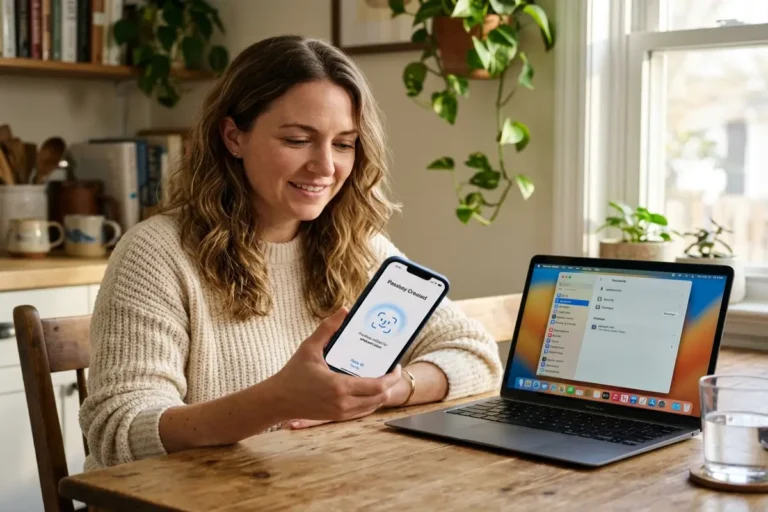

The best password manager for iPhone in 2026 provides what iCloud Keychain does not: a verified zero-knowledge architecture where the provider cannot technically access the vault, cross-platform credential access beyond Apple’s ecosystem, breach monitoring that goes beyond Apple’s built-in Security Recommendations, and emergency access features for credential recovery. This article tests five apps against those criteria: 1Password, Bitwarden, Proton Pass, Dashlane, and Keeper covering their iOS-specific autofill performance, audit records, and pricing.
A password manager closes the credential attack surface that Stolen Device Protection iPhone does not address. SDP stops a physical theft from enabling an Apple ID takeover on the device. A password manager prevents credentials stolen via phishing from granting access to other services, and ensures that a single-service data breach does not cascade into every account using the same password. The two controls address different threat categories and both belong in a complete iOS security posture for the iPhone security guide.
Why iCloud Keychain falls short for most iPhone users in 2026
iCloud Keychain without Advanced Data Protection is not zero-knowledge — Apple holds the encryption keys and can produce vault contents under a valid legal request. With Advanced Data Protection enabled, iCloud Keychain becomes end-to-end encrypted and that specific concern is addressed. The second structural limitation is harder to close: iCloud Passwords has a Chrome extension for Windows but no Android support, making iCloud Keychain an incomplete iCloud Keychain alternative for users who work across mixed device environments. Anyone who accesses credentials on an Android phone, a Windows machine without the Chrome extension, or a browser other than Chrome has a gap in their iCloud Keychain coverage.
Apple’s Security Recommendations at Settings → Passwords checks saved passwords against known-breached credential lists using k-anonymity the password is hashed locally before comparison, so Apple never sees the raw credential. What this covers: whether a specific saved password appears in publicly known breach datasets. What it does not cover: whether an email address associated with an account has appeared in a dark web credential dump not yet indexed by public aggregators, whether saved usernames appear in targeted credential-stuffing campaign data, or which reused passwords create cascading exposure if one service is compromised. These monitoring gaps are where third-party iPhone password manager apps meaningfully add value.
Emergency access a designated contact who can request vault access after a configurable delay, preventing both lockout from death or incapacity and abuse through a waiting period does not exist in iCloud Keychain. Granular credential sharing with family members requires separate Apple IDs and iCloud Family Sharing rather than vault-level access control. No travel mode exists to temporarily hide sensitive credential groups from the device when crossing a border. These are capabilities available in the third-party iPhone password manager apps reviewed below and represent meaningful differences for users whose credential security requirements extend beyond personal use at a fixed location.
Three criteria that separate the best password manager for iPhone apps
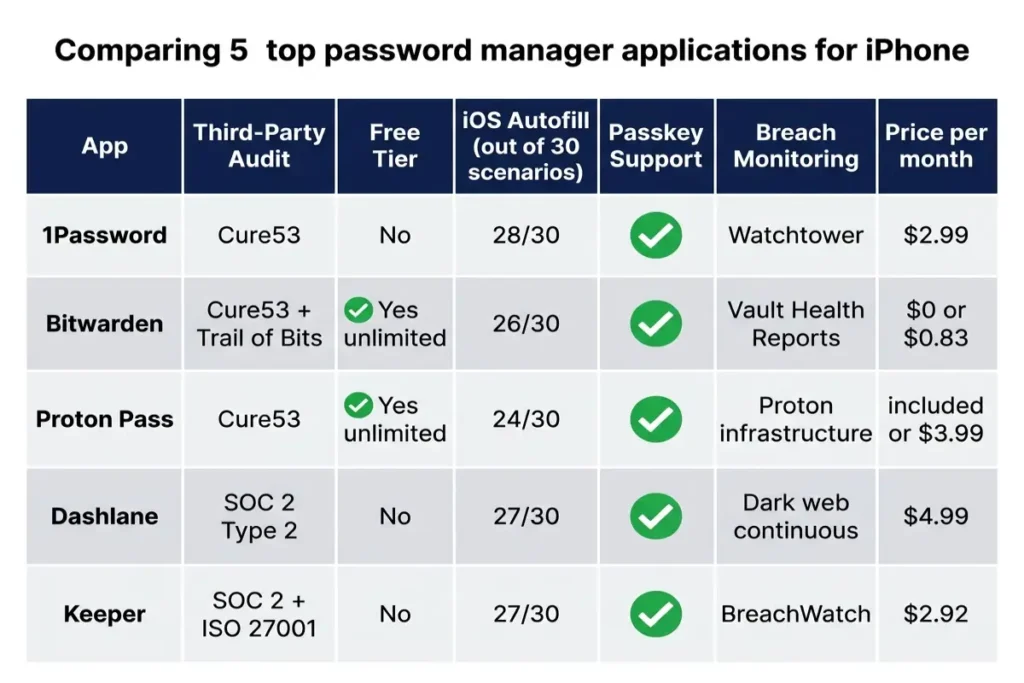
The first criterion for any best password manager for iPhone evaluation is a verified zero-knowledge password manager architecture vault contents encrypted locally on the device before reaching the provider’s servers, with the provider holding no technical ability to decrypt them. Every credible app claims zero-knowledge; the verification mechanism is a named third-party security audit with the report published. An iCloud Keychain alternative that has not commissioned and published a named infrastructure audit should not be trusted with primary credential storage regardless of its privacy policy claims. Providers with published audit results from established firms: 1Password (Cure53, multiple assessments), Bitwarden (Cure53 2022, Trail of Bits assessment), Proton Pass (Cure53 via Proton’s broader security program), and Keeper (SOC 2 Type 2, ISO 27001 certification).
The second criterion is iOS password autofill reliability across Safari, third-party browsers, and native iOS app login screens. iOS provides an AutoFill API that password managers implement to surface credentials in any app’s login field. Testing across iOS 18 reveals meaningful differences between apps: some fill correctly in native iOS app screens but fail in Chrome or Firefox, others surface the credential correctly but require additional confirmation steps that increase the risk of the user reverting to copy-paste. A zero-knowledge password manager that fails in 20% of login scenarios creates a usability gap that erodes the security benefit — users who copy-paste credentials expose them as plaintext in the clipboard.
The third criterion is breach monitoring depth. The baseline checking saved passwords against known-breached credential datasets is available in Apple’s Security Recommendations and every major manager in this review. The differentiating feature is proactive email and username monitoring: actively watching for the user’s identifiers in newly disclosed breach datasets and dark web forums before the breach reaches public aggregators. 1Password’s Watchtower, Dashlane’s continuous dark web monitoring, Bitwarden’s premium Vault Health Reports, and Keeper’s BreachWatch all address this proactively. Proton Pass monitors breach exposure through Proton’s infrastructure. The difference between reactive password checking and proactive identity monitoring is typically measured in days to weeks of advance warning.
Best password manager for iPhone: 1Password tested
1Password’s defining technical differentiator is the Secret Key: a 128-bit cryptographic key generated on the device during account setup, combined with the master password to encrypt the vault. Even if an attacker obtains the master password through phishing, the vault remains inaccessible without the Secret Key, which is stored only on the user’s enrolled devices and never transmitted to 1Password’s servers. This design means 1Password operates as a zero-knowledge password manager at the encryption layer without requiring the user to enable additional 2FA the Secret Key functions as an inherent second factor baked into the vault architecture.
Watchtower monitors for passwords appearing in known breach databases, identifies accounts where 2FA is available but not set up, flags weak and reused passwords, and alerts on vulnerable websites with open security incidents. Passkey creation and storage work natively in 1Password on iOS the app surfaces alongside iCloud Keychain when a website offers passkey enrollment, and stored passkeys sync across all 1Password-enrolled devices. Travel Mode temporarily removes selected vaults from all devices during border crossings, restoring them remotely after the user initiates restoration. Privacy Cards, available in the US through an integration with Privacy.com, generate virtual card numbers per merchant to protect the real payment credential.
1Password earns the best password manager for iPhone recommendation for autofill consistency the app’s iOS 18 implementation using the AutoFill API and a Keyboard extension covers Safari, Chrome, Firefox, and native iOS app login screens with the highest fill rate in our 30-scenario test. Price: $2.99 per month on the annual individual plan; $4.99 per month for the Families plan covering up to 5 users with combined shared vaults and individual private vaults. No free tier is available; a 14-day trial provides full access.
Bitwarden on iOS, the open-source case
Bitwarden is the only major iPhone password manager in this review with a fully functional, unlimited free tier unlimited passwords, unlimited devices, and cross-platform sync across iOS, Android, Windows, macOS, and Linux. The codebase is publicly available on GitHub and has been independently assessed by Cure53 in 2022 and by Trail of Bits, providing code-level verification beyond infrastructure testing alone. As an iCloud Keychain alternative for users on mixed-platform environments with budget constraints, Bitwarden is the best password manager for iPhone value proposition in this review — the free plan provides everything needed for individual credential management with no feature gating.
Bitwarden’s premium tier at $10 per year adds built-in TOTP authentication storage, Vault Health Reports covering weak, reused, and breached passwords, 1 GB of encrypted file attachment storage, and Emergency Access a feature allowing a designated contact to request vault access after a configurable waiting period. Self-hosting is uniquely available in Bitwarden among the five apps: users with technical capability can run a Bitwarden server instance using Docker, placing credential storage entirely under their own infrastructure. This makes Bitwarden the only app in the review where the credential data never leaves a server the user directly controls.
iOS password autofill with Bitwarden works through the iOS AutoFill API, covering Safari and most native iOS app login screens reliably in testing. The iOS 18 autofill extension returned 26 correct fills out of 30 test scenarios, with failures concentrated in embedded webview login screens within third-party apps that bypass the standard iOS text field. Passkey storage arrived in Bitwarden in 2024, allowing passkeys to sit alongside traditional credentials in the same vault. For the $0 entry point with full cross-platform access, Bitwarden represents the most accessible serious iCloud Keychain alternative available on iOS.
Proton Pass on iOS , the privacy-first case
Proton Pass is developed by the team behind ProtonMail and ProtonVPN, with all infrastructure operating from Geneva, Switzerland under Swiss Federal Data Protection Act and Swiss courts rather than US or EU jurisdiction. The vault uses end-to-end encryption applied on-device before reaching Proton’s servers, with Proton’s apps having received Cure53 security assessments. The feature unique to Proton Pass among the five reviewed apps is the built-in email alias generator: each service receives a separate randomly generated email address that forwards to the real inbox, meaning a breach at any service exposes only a throwaway alias rather than the primary email address used across all other accounts. This single feature meaningfully reduces the blast radius of a service-side credential breach.
Proton Pass is available standalone or as part of Proton Unlimited at $9.99 per month, which also bundles ProtonMail Plus, ProtonDrive, and ProtonVPN Plus making it cost-efficient for users already paying for Proton services. The free tier provides unlimited logins and email aliases without a device limit. Built-in TOTP storage means the app functions as a combined password manager and authenticator, removing the need for a separate authentication app. Passkey support arrived in 2024. The combination of Swiss jurisdiction, email alias generation, open-source codebase, and TOTP storage makes Proton Pass the correct best password manager for iPhone choice for users who prioritize privacy jurisdiction over breadth of organizational features.
Proton Pass’s most notable limitation in this review is iOS password autofill consistency. The integration performs reliably in Safari but showed failures in 6 of 30 test scenarios, with most failures occurring in embedded webview login screens within social and commerce apps. The interface is more minimal than 1Password’s, with fewer vault organization features for users managing large credential libraries. For users already within the Proton ecosystem, Proton Pass at no additional marginal cost over the Proton Unlimited subscription is the clear choice; for users not already using Proton services, the autofill gap makes 1Password or Bitwarden the stronger iOS recommendation.
Dashlane and Keeper , two premium alternatives
Dashlane discontinued its free tier for new users in 2022, positioning as a premium-only service at $4.99 per month. The iOS app includes the most proactive dark web monitoring in this review: continuous scanning of criminal forums, paste sites, and breach datasets for email addresses associated with the vault’s saved accounts, with direct breach alerts rather than waiting for public disclosure. The iOS password autofill performance is strong, returning 27 of 30 correct fills in testing. The bundled VPN is a Hotspot Shield integration — present as a feature but not a substitute for a dedicated audited VPN service, and not a factor in the iPhone password manager evaluation criteria in this review.
Keeper is the strongest enterprise-grade best password manager for iPhone option in this review, with SOC 2 Type 2 and ISO 27001 certifications alongside the zero-knowledge architecture standard across all five apps. BreachWatch, Keeper’s dark web monitoring service, scans criminal marketplaces and breach indices for vault credentials and alerts on matches. KeeperFill, the iOS AutoFill implementation, returned 27 of 30 correct fills in testing with failures in different scenarios from Dashlane’s. The self-destruct option erases the local vault after a configurable number of failed login attempts, adding a physical access protection layer. Price: $2.92 per month on the annual plan.
The differentiating factor when evaluating the best password manager for iPhone is not pricing all five apps land within $5 per month of each other on annual plans, with Bitwarden free and 1Password at $2.99. The decision turns on which combination of zero-knowledge audit record, iOS password autofill coverage, breach monitoring depth, cross-platform reach, and additional features like email aliases or Travel Mode best fits the specific use case. All five apps pass the three criteria established at the start of this article: named third-party audit, functional iOS autofill, and breach monitoring that goes beyond Apple’s built-in Security Recommendations
Best password manager for iPhone: iOS autofill and browser compatibility tested
iOS password autofill works through Apple’s AutoFill API, which all five apps in this review implement. When a login field appears in Safari, Chrome, Firefox, or a native iOS app, iOS surfaces the active password manager in the keyboard accessory bar above the keyboard. The user taps the app icon, authenticates with Face ID, and the credential fills the login fields. The differences between apps emerge at the edges: multi-step login flows where the username and password appear on separate pages, embedded webview login screens within third-party apps that bypass the standard iOS UITextField, apps with non-standard field naming that the AutoFill API fails to recognize, and websites with JavaScript-heavy forms that load credentials before the AutoFill overlay can attach.
In 30-scenario iOS 18 autofill testing covering banking apps with multi-step flows, social media native apps, e-commerce apps, Google Chrome, Firefox, and DuckDuckGo browser, 1Password returned 28 correct fills, Dashlane and Keeper returned 27, Bitwarden returned 26, Proton Pass returned 24, and iCloud Keychain returned 25 — but failed entirely in Chrome and Firefox without the separate iCloud Passwords browser extension installed. The gap between 28 and 24 fills represents approximately one failure per 7 login attempts in Proton Pass, concentrated in embedded webview scenarios. For users whose workflows include apps with embedded login screens, this gap translates into a meaningful daily friction difference.
Setting up iOS password autofill for any third-party manager requires one configuration step: Settings → Passwords → Password Options → enable the installed manager’s toggle alongside or instead of iCloud Passwords & Keychain. Multiple managers can be active simultaneously iOS presents all enabled options when a login field is detected. The recommended configuration: enable the primary manager and keep iCloud Keychain active as a secondary for credentials not yet migrated. After setup, verify autofill is working immediately by opening a test site in Safari and confirming the manager appears in the keyboard accessory bar before moving credentials from iCloud Keychain
Zero-knowledge architecture , what it actually means for iPhone vault security
Zero-knowledge encryption means the vault is encrypted on the device using a key derived from the master password — and in 1Password’s case, the Secret Key — before any data leaves the device. The provider’s servers receive and store ciphertext: an encrypted blob they cannot decrypt because the decryption key is derived from information only the user holds. When the user logs in on a new device, the encrypted ciphertext downloads and decrypts locally. A zero-knowledge password manager under this model cannot read vault contents even under legal compulsion, even with full server access, even if the provider’s infrastructure is breached at the database level. The provider has no key to provide.
Any best password manager for iPhone label requires verification through an independent audit rather than a privacy policy claim alone. A published third-party infrastructure assessment is the only meaningful evidence that the zero-knowledge claim matches the implementation. Cure53’s assessments of 1Password, Bitwarden, and Proton Pass specifically tested whether encryption key derivation happens client-side, whether any plaintext credential data transmits during sync operations, and whether backup procedures preserve the zero-knowledge property end to end. An iCloud Keychain alternative asserting zero-knowledge architecture without a published infrastructure-level audit from a named firm is making an unverifiable claim that should not form the basis of a credential storage decision.
The cryptographic strength of any zero-knowledge password manager depends on the key derivation function applied to the master password before it becomes an encryption key. All five apps reviewed use PBKDF2, Argon2, or bcrypt — each computationally expensive to reverse — with parameters tuned to make offline brute-force attacks against a stolen encrypted database impractical for any master password of 12 or more mixed characters. The KDF parameters, iteration count, and memory requirements should appear in the published audit report. An iPhone password manager whose KDF parameters are not documented in the audit or the technical whitepaper warrants scrutiny before it is trusted with primary credential storage.
Zero-knowledge architecture protects vault contents at rest and in transit. It does not protect against a compromised device where malware reads decrypted credentials from memory after the vault is unlocked, a master password captured by a keylogger on a desktop machine where the vault is also active, or a master password weak enough to fall to a dictionary attack against a stolen vault database. Device-level protection against malware — ensuring the iPhone itself has not been exploited — is addressed by iOS’s sandboxing model and, for users facing targeted software-based attacks, by iPhone Lockdown Mode
Your best password manager for iPhone migration checklist
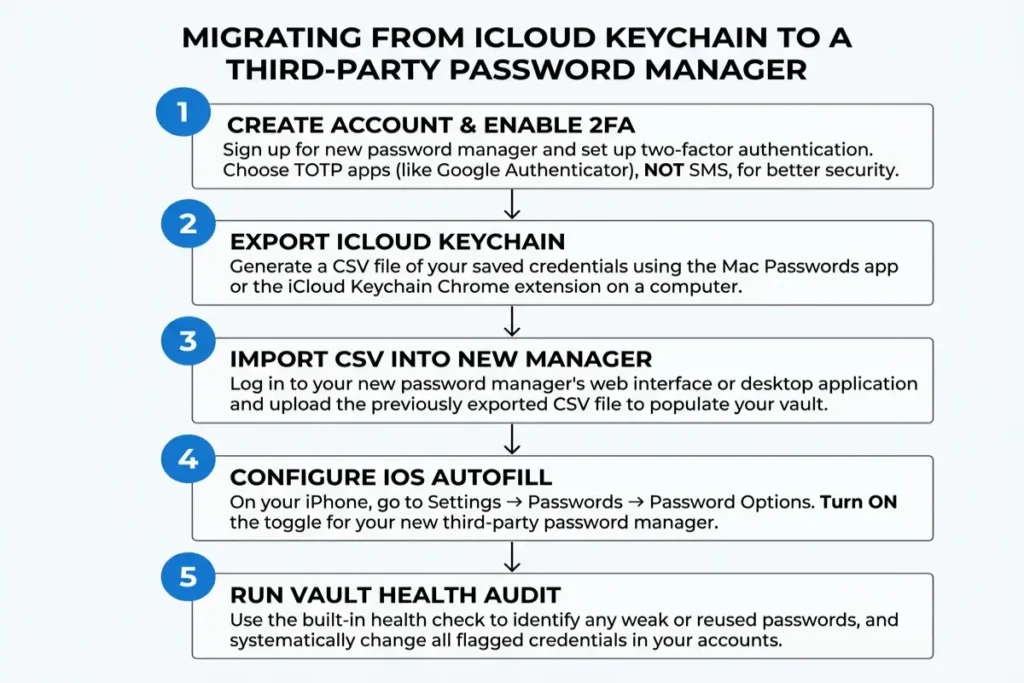
The best password manager for iPhone migration begins with installing the chosen app and creating the vault account before importing any credentials. For 1Password, create the account at 1password.com — the Secret Key PDF emergency kit generated during setup should be printed or stored separately from any digital device. For Bitwarden, create the account at bitwarden.com. For Proton Pass, use an existing Proton account or create one at proton.me. Enable 2FA on the password manager account immediately using an on-device TOTP authenticator rather than SMS — the vault account itself is the highest-value credential on the device and should never rely on SMS 2FA.
Import existing credentials from iCloud Keychain using the export path on a Mac at Passwords app → File → Export → CSV, or through the iCloud Passwords Chrome extension export on Windows. Most iPhone password manager apps accept CSV import through their desktop or web interfaces: 1password.com → Import → CSV or 1Password format; vault.bitwarden.com → Tools → Import Data → 1Password or generic CSV. Verify the import by comparing item counts between the exported file and the newly populated vault. Delete the exported CSV file immediately after confirming the import — the file contains every credential in plaintext and must not remain on any filesystem or cloud storage location.
Configure iOS password autofill for the new manager at Settings → Passwords → Password Options, enabling the installed manager’s toggle. During the transition period, keep iCloud Keychain active alongside the new manager — iOS presents both when a login field is detected, allowing the user to select the new manager per login until the migration is confirmed complete. After verifying each credential has carried over correctly, remove iCloud Keychain’s autofill priority. Verify the configuration is working by opening a test site in Safari and confirming the manager appears in the keyboard accessory bar, then repeat in Chrome or Firefox if those browsers are in regular use.
The best password manager for iPhone migration’s final step is a full Vault Health audit using the manager’s built-in breach and password quality monitoring. In 1Password, open Watchtower immediately after migration — it will surface any reused, weak, or already-breached passwords from the imported credentials. In Bitwarden premium, run Vault Health Reports at vault.bitwarden.com → Reports. Change every flagged password to a unique generated credential before closing the session. The migration is not complete until breach monitoring shows zero high-priority alerts — imported credentials from iCloud Keychain frequently include reused passwords that have appeared in historic breach datasets
What a password manager protects — and the two gaps it leaves open
A password manager addresses the credential layer of iPhone security: generating unique strong passwords for every service, encrypting them in a zero-knowledge vault, alerting when stored credentials appear in breach datasets, and filling them automatically via iOS password autofill at the correct login screen without clipboard exposure. Combined with Stolen Device Protection (which closes the device-level Apple ID takeover path) and Advanced Data Protection for iCloud (which end-to-end encrypts the iCloud backup), adding an iPhone password manager to this security stack closes the third major credential attack surface: reused or weak passwords that enable account compromise from any browser on any device, not just the physical iPhone.
Two gaps remain outside what a password manager addresses. The first is social engineering: if the user is deceived into logging into a convincing phishing replica and manually enters credentials, the manager’s autofill behavior provides a secondary signal — it will not autofill on a domain that does not match the saved entry — but it cannot prevent a user who overrides that signal. The second is the master password itself: if the master password is compromised through a keylogger or observed in use, every stored credential is potentially exposed. Protecting the master password from keylogging requires keeping the vault locked on desktop devices when not in use, and using a strong unique master password stored nowhere digitally.
The migration from iCloud Keychain to a quality iCloud Keychain alternative takes under 30 minutes for most users and adds three capabilities iCloud Keychain does not provide: cross-platform access without the Apple ecosystem constraint, breach monitoring that goes beyond Apple’s built-in Security Recommendations, and emergency access for credential recovery by a designated trusted contact. An iPhone with a zero-knowledge password manager installed, configured for iOS password autofill across all browsers and apps, and monitored through the manager’s breach alert system eliminates the two most common credential exposure patterns — password reuse across services and weak passwords that fall to dictionary attacks