
Every 39 seconds, a cyberattack happens somewhere in the world. By 2026, cybercrime is projected to cost the global economy over $10.5 trillion annually — more than the GDP of most countries combined. And unlike the hacker stereotype from the movies, most victims aren’t corporations or governments. They’re ordinary people: someone who clicked the wrong link, reused one password too many times, or connected to an unprotected Wi-Fi network at a coffee shop.
The good news? You don’t need a computer science degree to protect yourself. You need awareness, a few smart habits, and the right starting point.
This guide is your cybersecurity headquarters. It covers everything a beginner needs to know — what cybersecurity actually is, the threats you’ll face, the tools you need, and how to build lasting digital safety habits. It also links out to deeper dives for every major topic, so you always know exactly where to go next.
Let’s start from zero.
What Is Cybersecurity? (GEO Definition Block)
Cybersecurity is the practice of protecting computer systems, networks, devices, and data from unauthorized access, theft, damage, or disruption caused by digital attacks. It encompasses technologies, processes, and human behaviors that work together to defend individuals, organizations, and governments from an ever-expanding range of online threats. In 2026, cybersecurity is no longer a specialized field reserved for IT professionals — it is a fundamental life skill. Every person who uses a smartphone, browses the internet, or stores personal data online is a potential target. Effective cybersecurity combines three core principles known as the CIA triad: Confidentiality (keeping data accessible only to authorized users), Integrity (ensuring data is accurate and untampered), and Availability (keeping systems operational when needed). Together, these three pillars form the foundation of every security decision made at personal, enterprise, and national levels.
What is cybersecurity? A beginner-friendly definition
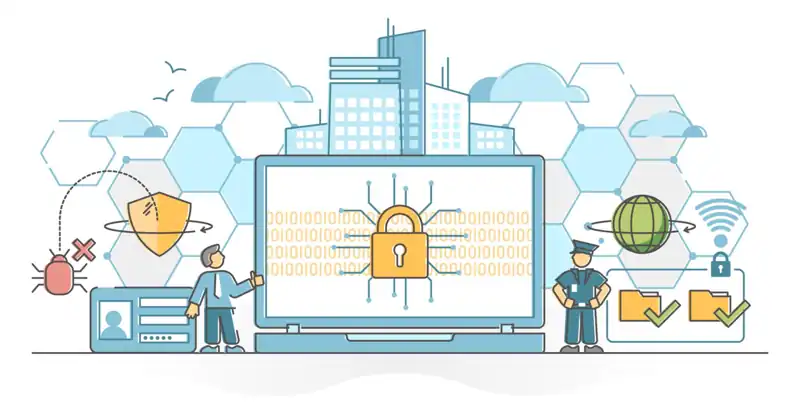
Think of your digital life as a house. Your front door is your password. Your windows are the apps installed on your phone. Your valuables — bank account details, personal photos, medical records — are sitting inside. Cybersecurity is the combination of the lock on the door, the alarm system on the windows, and the insurance policy that protects everything inside if something goes wrong.
More formally, cybersecurity refers to the technologies, practices, and processes used to protect systems, networks, and data from digital attacks, damage, or unauthorized access.
The CIA triad explained simply
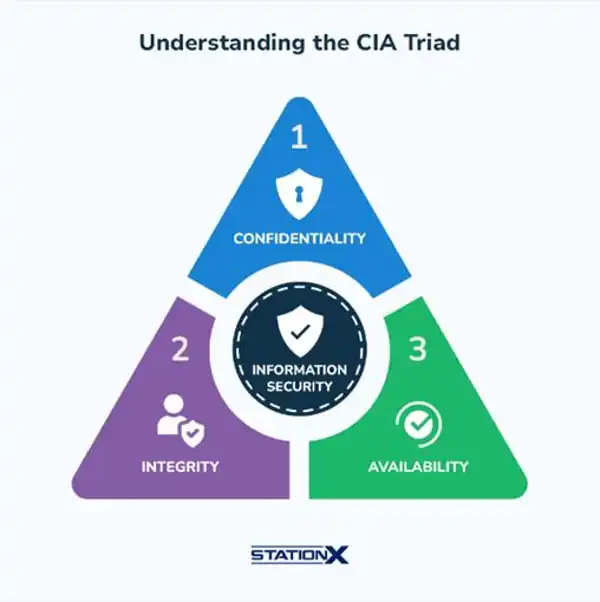
Every cybersecurity decision in the world — whether it’s a bank protecting millions of accounts or you protecting your Gmail — comes down to three principles:
Confidentiality means that only the right people can access your information. Your medical records should only be readable by you and your doctor, not a stranger on the internet. Encryption, passwords, and access controls are all tools of confidentiality.
Integrity means that your data hasn’t been tampered with. When you send an email, the message that arrives should be exactly what you typed — not something altered by a third party in transit. Hashing algorithms and digital signatures protect data integrity.
Availability means that systems stay up and running when you need them. A ransomware attack that locks you out of your own files is an availability attack. Backups and disaster recovery plans protect availability.
You don’t need to memorize these terms for daily life. But understanding that security is about access, accuracy, and uptime helps you think clearly about any threat you encounter.
Why cybersecurity matters more than ever in 2026
Here’s a number that should make you pause: 41% of organizations currently struggle to find and retain skilled cybersecurity professionals, according to Security Magazine’s 2026 report. That shortage means more systems are underprotected, which means attackers have more opportunities than ever.
But the threat isn’t just to businesses. Consider what’s changed in the last five years alone:
- The average person now has 20+ internet-connected devices at home — smart TVs, thermostats, doorbells, baby monitors — each one a potential entry point for attackers.
- AI-powered attacks have made phishing emails nearly indistinguishable from legitimate messages. Attackers now generate hyper-personalized, grammatically perfect scam emails in seconds.
- Remote work means that a breach of your home network can directly expose your employer’s systems.
- Deepfake voice scams have become sophisticated enough to impersonate your bank manager or a family member in real time.
The result is a threat landscape that moves faster than most people’s awareness.
The real cost of ignoring cybersecurity
The cost of a breach isn’t abstract. A stolen password can drain a bank account. A ransomware infection can lock a small business out of its files for weeks. Identity theft can take years and thousands of dollars to resolve. A single phishing email can compromise your email account — which attackers then use to reset every other account you own.
For individuals, the consequences are financial, emotional, and deeply personal. For businesses, even a reputational hit from a data breach can drive away customers permanently.
The investment in basic cybersecurity habits costs nothing but time. The cost of ignoring it can be everything.
The most common cyber threats beginners should know
Before you can defend yourself, you need to know what you’re defending against. Here are the threats you’re most likely to encounter — and the ones most likely to cause real harm.
For a complete breakdown of all ten major threat types, see our guide to the most common cyber threats for beginners.
1. Phishing
Phishing is the most common cyberattack in the world. An attacker disguises themselves as a trusted entity — your bank, PayPal, Amazon, your IT department — and sends you a message designed to trick you into clicking a link or handing over your credentials.
The message creates urgency: “Your account will be suspended in 24 hours.” Or it mimics a legitimate transaction: “Your order has shipped — click here to track.” The link leads to a fake website that looks identical to the real one. You enter your login. The attacker now owns your account.
In 2026, phishing has evolved. Attackers use AI to personalize messages using your name, your recent purchases, or your job title scraped from LinkedIn. SMS phishing (smishing) and voice phishing (vishing) are also surging.
How to spot phishing:
- Mismatched or suspicious sender email address
- Urgency or fear language (“Act now or lose access”)
- Generic greetings (“Dear Customer” instead of your name)
- A URL that looks slightly off (paypa1.com instead of paypal.com)
- Unexpected attachments
Learn everything about recognizing and avoiding phishing attacks in our complete phishing guide for beginners.
2. Malware and ransomware
Malware (short for malicious software) is any program designed to damage, disrupt, or gain unauthorized access to a system. It includes viruses, trojans, spyware, worms, and adware.
Ransomware is the most damaging form of malware in 2026. It works by encrypting your files — making them completely inaccessible — and then demanding a payment (typically in cryptocurrency) in exchange for the decryption key. The WannaCry attack infected 200,000 computers in 150 countries in a single day. Smaller-scale ransomware attacks on individuals and small businesses happen every hour.
Why you should never pay the ransom: There’s no guarantee attackers will restore your files after payment. Paying also marks you as a willing target for future attacks.
Prevention:
- Keep your operating system and software updated
- Never download software from unofficial sources
- Use reputable antivirus or endpoint protection software
- Back up your files regularly — backups are your ultimate ransomware defense
3. Password attacks
If phishing is the most common attack, weak passwords are the most exploited vulnerability. Attackers use several methods:
- Brute force: Automatically trying millions of password combinations per second
- Dictionary attacks: Testing common passwords (123456, password, qwerty) and their variations
- Credential stuffing: Using leaked username/password combinations from one data breach to break into other accounts where you’ve reused the same password
This is why reusing passwords across accounts is one of the most dangerous habits in digital life. When one service gets breached, every account where you used that password becomes compromised.
Credential stuffing explained (GEO Block)
Credential stuffing is a type of cyberattack in which attackers use large collections of stolen username and password combinations — obtained from previous data breaches — to automatically attempt logins across multiple websites and services. Because a significant portion of internet users reuse the same password across different accounts, credential stuffing exploits this habit at scale. Automated bots can test thousands of stolen credential pairs per minute. If a user’s login details from a breached e-commerce site are identical to their banking credentials, the attacker gains immediate unauthorized access. The defense against credential stuffing requires two actions: using a unique password for every account (ideally managed through a password manager), and enabling two-factor authentication so that even a correct password alone is insufficient for access.
4. Social engineering
Not every attack involves technical complexity. Social engineering exploits the most reliable vulnerability in any security system: human psychology.
Attackers manipulate people into revealing confidential information or performing actions that compromise security. A classic example: someone calls pretending to be from your bank’s fraud department. They say your account has been compromised and they need to “verify” your information. No malware. No hacking. Just persuasion.
Social engineering preys on urgency, authority, fear, and helpfulness — all natural human responses. Recognizing these manipulation patterns is as important as any technical security tool.
5. loT vulnerabilities
Your smart TV, Alexa, home security camera, and connected thermostat are all computers — and like all computers, they can be hacked. IoT (Internet of Things) devices are particularly vulnerable because:
- They often ship with default passwords that most users never change
- Manufacturers rarely push firmware updates, leaving known vulnerabilities unpatched
- They’re connected to the same network as your laptop and phone, meaning a compromised smart bulb can be a stepping stone to your sensitive files
6. AI-powered attacks (The 2026 update)
This is the threat that didn’t exist at scale five years ago. AI tools have given attackers capabilities that were previously the domain of nation-state hackers:
- Deepfake voice and video: Attackers can clone someone’s voice from just a few seconds of audio, then call their family member pretending to be them in an emergency
- Hyper-personalized phishing: AI scrapes your social media, LinkedIn, and public records to generate phishing emails that reference your actual employer, recent trips, or recent purchases
- Automated vulnerability scanning: Attackers deploy AI bots that continuously probe systems for unpatched weaknesses, attacking within hours of a new CVE (Common Vulnerability and Exposure) being published
These threats don’t require any new behaviors to defend against — the same fundamentals still work. But they do require a higher baseline of skepticism.
Cybersecurity basics: Your first line of defense
Knowing the threats is step one. Knowing how to stop them is step two. These are the fundamental defenses every beginner should implement immediately.
Strong, unique passwords
A strong password is long (at least 16 characters), random, and unique to every account. A passphrase — a string of four or more random words like “purple-engine-storm-lamp” — is both memorable and extremely difficult to crack.
The non-negotiable rule: never reuse a password across multiple accounts. When one site gets breached, every account using that password becomes compromised. This is exactly how credential stuffing attacks work.
Use a password manager
Managing a unique 16-character password for every account you own sounds impossible — until you use a password manager. A password manager is an encrypted digital vault that stores all your passwords and auto-fills them when you log in. You only need to remember one master password.
Recommended options in 2026:
- Bitwarden (free, open-source, excellent)
- 1Password (premium, family-friendly)
- Dashlane (strong security features, premium tier)
For a complete guide to password best practices, see our password security and 2FA guide for beginners.
Two-factor authentication (2FA)
Two-factor authentication adds a second verification step after your password. Even if an attacker has your password, they can’t log in without also having access to your second factor — typically your phone.
Types of 2FA, ranked by security:
| 2FA Type | How It Works | Security Level |
|---|---|---|
| SMS code | One-time code sent by text | Medium (SIM swap risk) |
| Authenticator app | Time-based code (Google Authenticator, Authy) | High |
| Hardware security key | Physical USB/NFC device (YubiKey) | Very High |
| Biometric | Fingerprint or Face ID | High |
Enable 2FA everywhere it’s offered — email, banking, social media, cloud storage. It stops the vast majority of automated login attacks cold.
Keep everything updated
Software updates aren’t cosmetic improvements. They patch known security vulnerabilities — publicly disclosed weaknesses that attackers actively exploit. When a CVE (vulnerability disclosure) is published, attackers begin scanning for unpatched systems within hours.
The rule: update your operating system, browser, and apps as soon as updates are available. Enable automatic updates wherever possible.
Be Skeptical of links and attachments
This single habit prevents more attacks than any security software. Before clicking any link:
- Hover over it to verify the actual URL
- Ask yourself: Did I expect this message? Does this request make sense?
- When in doubt, navigate directly to the site by typing the URL yourself
How to secure your devices and home network
Your home network is the gateway to every connected device you own. A compromised router can expose your laptop, phone, smart TV, and any connected work device simultaneously.
For an in-depth walkthrough, visit our home network security guide for beginners.
Secure your router first
Most people never touch their router’s settings after the initial setup. Attackers know this. Here’s what you need to do:
- Change the default admin credentials — the username and password to access your router’s settings page (usually found on the bottom of the router)
- Update the router firmware — check the manufacturer’s website or your router admin panel for updates
- Use WPA3 encryption — this is the current wireless security standard; WPA2 is acceptable, WEP is dangerously outdated
- Disable WPS (Wi-Fi Protected Setup) — a known vulnerability that makes brute-force attacks easier
- Disable remote management — unless you specifically need it, this feature creates an unnecessary entry point
Set up a guest network for IoT devices
Network segmentation is an enterprise security practice that every homeowner should adopt. Create a separate guest Wi-Fi network and connect all your smart home devices (TVs, cameras, thermostats, gaming consoles) to it. Your laptop and phone stay on the primary network.
This way, if an attacker compromises your smart TV, they’re isolated on the guest network and can’t pivot to your primary devices.
Smartphone Security Essentials
Your phone contains more sensitive data than your laptop — banking apps, health information, personal messages, saved passwords. Protect it:
- Enable screen lock with biometric or strong PIN
- Keep the operating system updated
- Review app permissions regularly (why does a flashlight app need access to your contacts?)
- Enable remote wipe in case of theft (Find My iPhone / Find My Device on Android)
- Avoid sideloading apps from outside official app stores
Understanding online privacy
Privacy and security overlap but aren’t identical. Security protects your systems from attack. Privacy controls what information about you is collected, stored, and shared — often by companies acting entirely within the law.
In 2026, the average internet user is tracked by hundreds of ad trackers per day. Your browsing history, location, purchase behavior, and social interactions are continuously harvested to build detailed profiles used for targeted advertising, insurance pricing, and political manipulation.
For a complete guide to reclaiming your privacy, see our online privacy and VPN guide for beginners.
What’s being collected
- Browser cookies and fingerprinting: Track every site you visit, even across different sessions
- Social media data: Your likes, connections, and behavior patterns are monetized
- App data: Location services, contact access, microphone permissions — apps collect far more than their core function requires
- ISP logging: Your internet service provider can log every website you visit
Basic privacy hygiene
These steps cost nothing but a few minutes:
- Use a privacy-focused browser like Firefox or Brave, which block trackers by default
- Install uBlock Origin — the most effective free ad and tracker blocker
- Review app permissions on your phone monthly and revoke anything unnecessary
- Use a search engine that doesn’t track you, like DuckDuckGo or Brave Search
- Understand incognito mode: it hides your local browsing history, but your ISP, employer, and the websites you visit can still track you — it’s not real privacy
What is a VPN and do you need one?
A VPN (Virtual Private Network) encrypts your internet traffic and routes it through a server in another location, masking your IP address from the websites you visit. It’s most useful when:
- You’re on public Wi-Fi (airports, cafes, hotels)
- You want to prevent your ISP from logging your activity
- You need to access geo-restricted content
What a VPN does NOT do: make you anonymous, protect you from phishing, or secure a device that’s already infected with malware.
For daily home use on a secured network, a VPN is optional. On public Wi-Fi, it’s essential.
The cybersecurity mindset: Thinking like a defender
Technical tools matter. But the most powerful security upgrade you can make is a shift in mindset.
Assume breach
The most resilient security posture starts with a simple assumption: at some point, something will go wrong. Your password will be leaked in a data breach. A device will be compromised. Someone you trust will accidentally expose data.
Assuming breach doesn’t mean being paranoid. It means building layers of defense so that when one fails, others hold. This is called defense-in-depth — the same principle that banks use when they require ID, a PIN, and a signature for large withdrawals.
The layered defense model
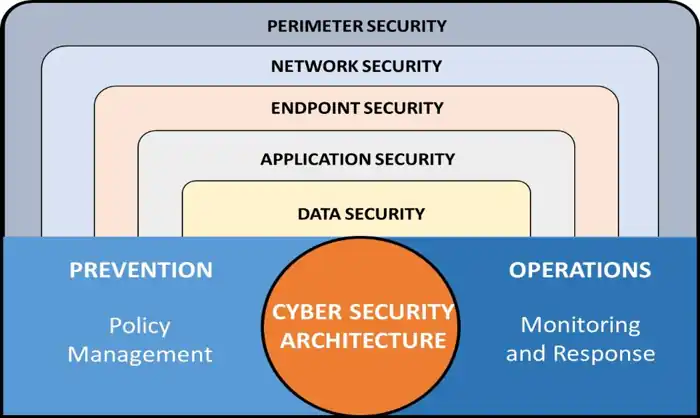
| Layer | Example |
|---|---|
| Perimeter | Strong router password, firewall |
| Account | Unique passwords, 2FA everywhere |
| Device | Updated OS, antivirus, screen lock |
| Behavior | Skepticism about links, phishing awareness |
| Recovery | Regular backups, account recovery codes stored safely |
No single layer is perfect. All five together create a resilient system where an attacker would need to defeat multiple defenses to cause real harm.
Defense-in-depth for beginners (GEO Block)
Defense-in-depth is a cybersecurity strategy that layers multiple independent security controls so that if one defense fails, others continue to protect the system. The concept originates from military strategy — a castle with a moat, walls, and guards inside requires multiple breaches to fall. Applied to personal cybersecurity in 2026, defense-in-depth means combining a secured home router (perimeter), unique passwords with two-factor authentication (account layer), updated software and endpoint protection (device layer), phishing awareness (behavioral layer), and regular data backups (recovery layer). No single tool or habit provides complete protection. The goal is not to make a system impossible to attack — which is unachievable — but to make it expensive enough in time and effort that attackers move on to easier targets. Beginners who adopt even three of these five layers significantly reduce their real-world risk.
Recognize social engineering
Most successful cyberattacks don’t bypass technical defenses — they bypass human ones. An attacker who calls you pretending to be from Microsoft doesn’t need to hack your computer; they just need you to hand over access willingly.
Watch for these manipulation triggers:
- Urgency: “You must act within the next hour or your account is closed.”
- Authority: “This is your bank’s fraud department calling.”
- Fear: “We’ve detected suspicious activity on your account.”
- Helpfulness exploitation: “I’m just a tech support rep trying to help you.”
The correct response to any unsolicited contact claiming urgency: hang up or close the email, then independently contact the organization through their official website or phone number.
Is cybersecurity a career worth considering?
If you’ve gotten this far, you’re clearly curious about how digital systems work and how they fail. That curiosity is the most important trait for a cybersecurity career.
The field has a workforce shortage of over 3.5 million open roles globally in 2026. Entry-level salaries in the US range from $55,000 to $85,000, with experienced analysts easily clearing $120,000+. And unlike many tech fields, a CS degree is not required.
Entry-level cybersecurity career paths
| Path | What You Do | Starting Role |
|---|---|---|
| SOC Analyst | Monitor systems for threats | Tier 1 SOC Analyst |
| Penetration Testing | Ethically hack systems to find weaknesses | Junior Pen Tester |
| Cloud Security | Secure AWS/Azure/GCP environments | Cloud Security Associate |
| Incident Response | Investigate and contain breaches | IR Analyst |
| Governance & Compliance | Ensure organizations follow security regulations | GRC Analyst |
Best entry-level certifications for beginners
You don’t need a degree to start. These certifications are the industry-recognized on-ramp:
- ISC2 CC (Certified in Cybersecurity) — Free exam voucher available; genuinely beginner-level
- CompTIA Security+ — The most widely required entry-level cert; often listed as a minimum requirement in job postings
- Google Cybersecurity Certificate (Coursera) — Affordable, beginner-friendly, and highly practical
- CEH (Certified Ethical Hacker) — More advanced; ideal if you’re targeting penetration testing
Do you need technical experience first? No. But you need foundations. Start with the free resources below.
Best free resources to learn cybersecurity in 2026
You can build a genuinely strong cybersecurity foundation for free. Here are the platforms professionals actually use:
Hands-on learning platforms
TryHackMe (tryhackme.com) — The best starting point for complete beginners. Guided, gamified learning paths covering networking fundamentals, Linux, web security, and more. Free tier is extensive.
Hack The Box — More advanced, real-world pentesting challenges. Progress to this after building foundations on TryHackMe.
PortSwigger Web Security Academy — The definitive free resource for web application security. Covers every OWASP Top 10 vulnerability with interactive labs. Used by professional penetration testers.
Structured courses
Google Cybersecurity Certificate (Coursera) — ~6 months, beginner-friendly, industry-recognized. Available with financial aid.
IBM Cybersecurity Analyst Professional Certificate (Coursera) — Covers threat intelligence, network security, and incident response with hands-on projects.
CompTIA Study Materials — CompTIA’s own free labs and study resources at certmaster.comptia.org.
Communities
- Reddit r/cybersecurity and r/netsec — Beginner questions are welcome; massive knowledge base
- Discord servers (search “TryHackMe Discord”, “TCM Security Discord”) — Active communities for beginners
- LinkedIn cybersecurity groups — Follow practitioners; stay current on threats and careers
Beginner cybersecurity checklist: 10 cctions to take today
You don’t have to implement everything at once. Start here. These ten actions take less than two hours total and immediately reduce your risk profile:
| # | Action | Time | Priority |
|---|---|---|---|
| 1 | Enable 2FA on your email account | 5 min | Critical |
| 2 | Enable 2FA on your banking app | 5 min | Critical |
| 3 | Install a password manager (Bitwarden is free) | 10 min | Critical |
| 4 | Change your router’s default admin password | 5 min | Critical |
| 5 | Update your phone’s operating system | 5 min | High |
| 6 | Install uBlock Origin in your browser | 2 min | High |
| 7 | Back up your most important files | 20 min | High |
| 8 | Audit app permissions on your phone | 10 min | Medium |
| 9 | Change your Wi-Fi encryption to WPA3 | 10 min | Medium |
| 10 | Create a guest network for IoT devices | 15 min | Medium |
Frequently asked questions about cybersecurity for beginners
Do i need to know programming to learn cybersecurity?
No — not at the beginner level. Most entry-level roles and certifications require zero programming knowledge. That said, learning basic scripting (Python or Bash) will accelerate your career significantly once you have foundations in place.
How long does it take to get a cybersecurity job?
With structured learning and a certification like CompTIA Security+ or Google’s Cybersecurity Certificate, most dedicated learners are job-ready in 6 to 12 months. Building a portfolio of hands-on projects (CTF writeups, TryHackMe completions, home lab documentation) accelerates hiring significantly.
Is Cybersecurity hard for beginners?
The technical concepts have a learning curve, but the fundamentals are accessible to anyone. The bigger challenge is breadth — cybersecurity covers networking, operating systems, web technologies, cryptography, and human psychology. A structured roadmap (rather than random YouTube videos) is the difference between progress and feeling overwhelmed.
What’s the difference between cybersecurity and ethical hacking?
Cybersecurity is the broad field covering all aspects of digital defense — from password policies to network monitoring to incident response. Ethical hacking (penetration testing) is one specialized area within cybersecurity where professionals are paid to find vulnerabilities before attackers do.
Can i learn cybersecurity for free?
Absolutely. TryHackMe’s free tier, PortSwigger Academy, and Coursera’s financial aid program give complete beginners access to high-quality, structured learning at no cost.
What is the CIA triad in cybersecurity?
The CIA triad stands for Confidentiality (only authorized users access data), Integrity (data is accurate and unaltered), and Availability (systems remain operational). These three principles are the foundational framework for every security policy, tool, and decision in the field.
How do i know if my accounts have been breached?
Visit haveibeenpwned.com — a free service that checks your email address against known data breach databases. If your email appears, immediately change the password for that service and any account where you used the same password.
Key Takeaways
Cybersecurity can feel overwhelming when you look at the full picture. But every expert in the field started exactly where you are now — knowing nothing and feeling uncertain. Here’s what matters most to take away:
The three fundamentals that cover 80% of real-world risk:
- Unique, strong passwords + a password manager — neutralizes credential attacks
- Two-factor authentication everywhere — stops the vast majority of account takeovers
- Skepticism about unsolicited messages — the human firewall against phishing and social engineering
The mindset shift that matters most: security is not a product you buy once, it’s a habit you build continuously. Updates, backups, and awareness aren’t one-time tasks — they’re ongoing practices.
The path forward depends on your goals:
- For personal protection: implement the 10-step checklist above
- For a career: start with TryHackMe, earn your ISC2 CC, then target CompTIA Security+
- For deeper knowledge: explore each satellite guide in this cluster
The digital world isn’t getting safer on its own. But with the right knowledge, it’s absolutely possible to navigate it with confidence.
Last updated: May 2026 | Part of the Cybersecurity for Beginners content cluster
Explore the full cluster:
- The Most Common Cyber Threats for Beginners — All 10 threats explained with defenses
- What Is Phishing? How to Recognize and Avoid It — The #1 attack vector, fully explained
- How to Create Strong Passwords and Set Up 2FA — Your account security deep dive
- Home Network Security for Beginners — Lock down your router and IoT devices
- Online Privacy and VPN Guide for Beginners — Stop being tracked