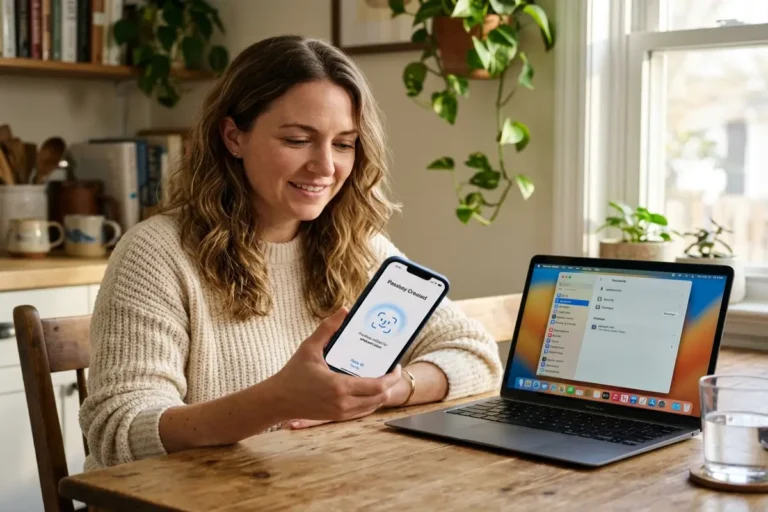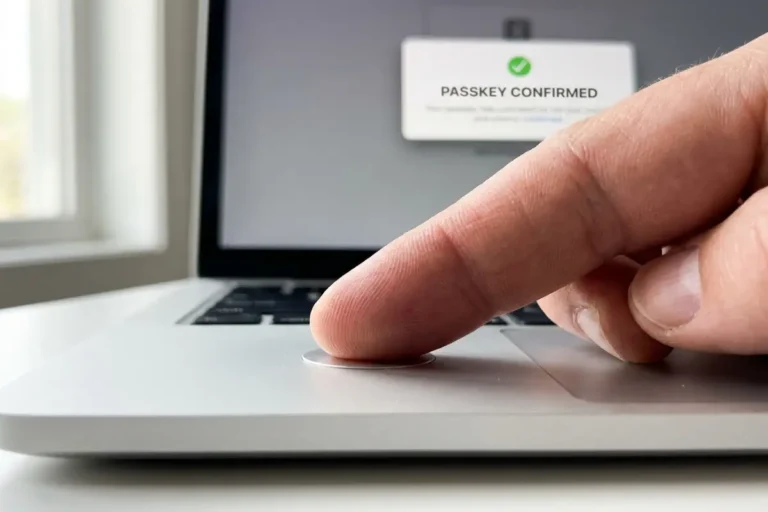

Passkeys vs passwords is no longer an abstract debate. It is the choice presented on sign-in screens at Google, Amazon, Microsoft, PayPal, and thousands of smaller sites every time a login form loads. Passkeys have reached global scale, with 5 billion now in active use according to the FIDO Alliance’s October 2025 Passkey Index, built from deployment data shared by nine member organizations including Amazon, Google, Microsoft, and Target. That volume settles a question that felt genuinely open three years ago: whether passkeys vs passwords would ever move past early adopters into mainstream use. The companies handling the largest share of global logins have already made the call. FIDO Alliance
This guide breaks down what the passkeys vs passwords comparison actually shows in verified 2025 data, and where it still calls for caution. Three-quarters of consumers worldwide now recognize passkeys by name, and the share of the top 100 websites offering passkey sign-in has more than doubled since 2022 to reach 48 percent. Awareness has caught up with deployment. What hasn’t caught up, for most readers, is a clear answer to the practical question underneath the trend: does switching a specific account today close a real gap that two-factor authentication left open, and what does a passkey actually do differently at the technical level. Descope
Why passwords keep failing in 2026
Verizon’s 2025 Data Breach Investigations Report, built from its largest dataset yet at more than 22,000 incidents, found stolen credentials were the entry point in 22 percent of breaches overall, and in 88 percent of attacks against basic web applications specifically. Credentials are not failing because people pick unusually weak ones. They are failing because 60 percent of breaches in the same report involved a human being tricked, pressured, or rushed into handing one over, and the median time between a phishing email landing and a victim clicking it was 21 seconds, leaving almost no window for a second thought to intervene. Keepnet Labs + 3
Password reuse compounds the problem mechanically rather than psychologically. Analysis of infostealer malware logs in the same DBIR found that, in the median case, only 49 percent of a person’s passwords across different services were actually distinct from each other, meaning the rest repeat somewhere. One reused password sitting in a breached database becomes a key to every other account using it, tested automatically through credential stuffing tools that accounted for a median of 19 percent of all daily authentication attempts against the single sign-on providers Verizon analyzed. VerizonVerizon
Multi-factor authentication built around a password created a temporary advantage that attackers have already adapted to. Microsoft’s 2025 Digital Defense Report attributes 80 percent of MFA-bypass breaches to adversary-in-the-middle kits that let a victim complete a normal SMS code or push-notification approval, then steal the resulting session token instead of attacking the password or the code directly. Sekoia’s threat research team tracked 11 distinct commercial kits of this type in active use during the first four months of 2025 alone, with one kit, Tycoon 2FA, rated the most prevalent on the market. The cryptography underneath a typed password did not get weaker. The attacks built on top of it got faster. StingraiStartupdefense
The MGM Resorts breach in September 2023 is the clearest large-scale example of where this leads. Attackers did not crack a password; they used a phone call to convince an MGM help desk employee to reset multi-factor authentication on a privileged account, then moved through the network from there. MGM’s own SEC filings put the financial impact at roughly 100 million dollars in lost business and remediation costs. The weak point was never the math behind the company’s MFA. It was the human process sitting next to it, the exact process a passkey’s design is built to remove from the equation. SentinelOne
None of this requires a sophisticated attacker working alone. An eight-character password reused on two services and exposed in one breach is sufficient on its own to compromise the second service the same day, before the account holder has any reason to suspect a problem exists.
How a passkey actually replaces a typed password
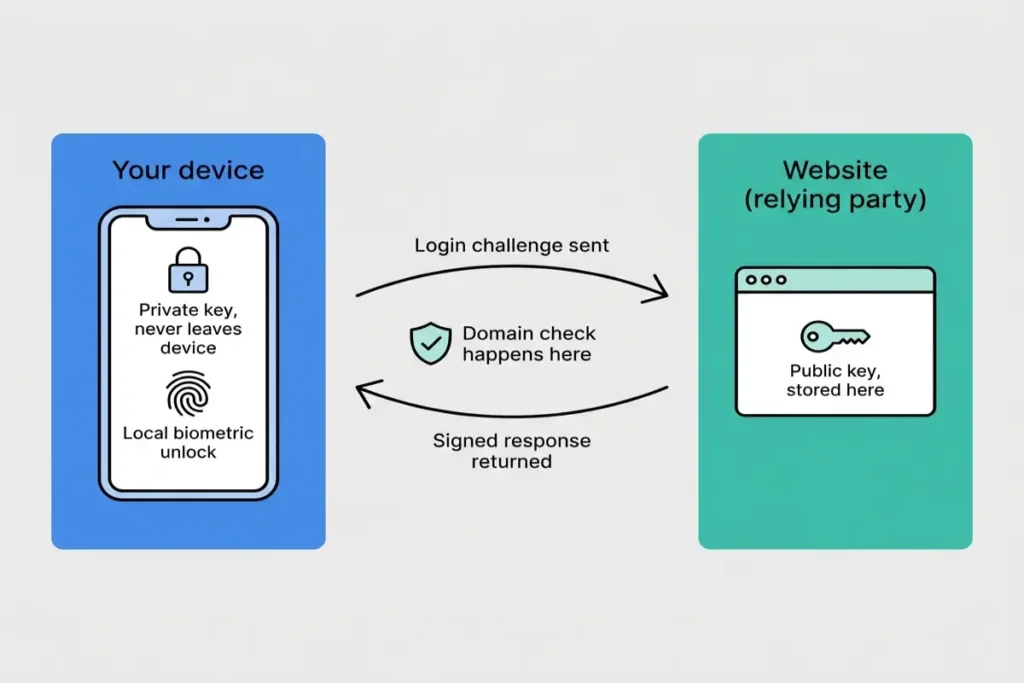
Understanding how a passkey works is the real test of passkey security, because the mechanics explain the gain instead of just asserting it. A password is a shared secret: both the user and the service hold a copy of the same string, and anyone who obtains either copy can authenticate as the user. A passkey replaces that shared secret with a key pair generated on the device the first time an account enrolls. The private half never leaves that device’s secure hardware, typically a Secure Enclave on Apple silicon, a Trusted Execution Environment on Android, or a TPM on Windows.
Security engineers call the website or app on the receiving end of that public key the relying party. The open standard governing the exchange, WebAuthn, was developed under the FIDO2 specification and is built on public-key cryptography to eliminate the risks tied to credential theft, which is why a passkey created through Apple’s ecosystem can be honored by a relying party that has only ever tested against Android or Windows. Corbado
Logging in works in reverse from a password. The service sends a one-time cryptographic challenge instead of asking for a typed secret. The device signs that challenge with the private key, after the user confirms the action with Face ID, a fingerprint, or a device PIN, and sends the signature back. The service checks the signature against the public key it stored at enrollment. No secret crosses the network at any point in that exchange, which is the specific property a typed password could never offer: there is nothing transmitted that a phishing page or a database breach could capture and reuse elsewhere.
Face ID and fingerprint data play no role in this exchange beyond unlocking the private key locally. The biometric scan never leaves the device and is never sent to the website; it only confirms, on the device, that the person signing in is the same person who enrolled the passkey. A relying party never receives a fingerprint template or a face scan, only the cryptographic signature produced after that local check passes.
This is not a vendor claim anymore; it is federal guidance. NIST finalized Special Publication 800-63-4 at the end of July 2025, formally integrating synced passkeys into the federal Digital Identity Guidelines for the first time and building phishing-resistant authentication into a risk-based framework agencies are expected to apply when deciding how strongly to verify a sign-in. nist
One additional property does the rest of the work. Each passkey is cryptographically bound to the exact domain it was created for, which is why only this kind of FIDO2-based credential reliably resists adversary-in-the-middle attacks that verify a site’s domain before anything is signed. A visually perfect copy of a login page hosted on a lookalike domain gets no usable response from the device at all, because the operating system checks the domain before the private key is ever asked to sign anything. A typed password has no equivalent check, which is exactly why a phishing-resistant login built on a passkey almost never falls for the same lookalike-domain trick a password still does. CaptainDNS
The practical effect shows up in measured numbers, not just theoretical safety. Google’s passkey rollout reached 800 million accounts and more than 2.5 billion sign-ins within two years of launch, with sign-in success rates improving by 30 percent and sign-in speed improving by 20 percent compared with passwords, and Sony observed a 24 percent reduction in sign-in time on PlayStation’s web properties after adding passkeys as an option. Passwordless authentication is not winning the passkeys vs passwords comparison purely on security grounds; it is also measurably faster to use, which is the rare security upgrade that removes friction instead of adding it. FIDO Alliance
None of this makes passkeys vs passwords a settled argument with no remaining nuance. FIDO2 authentication removes the shared secret, but most services still keep a password-based recovery path running in the background, and that fallback is exactly where a newer kind of attack has started aiming. A deeper, step-by-step walkthrough of the registration and sign-in cryptography, including how attestation works, is in how passkeys work. The next part of this guide covers the downgrade risk directly, along with the setup sequence that closes it
The new phishing problem passkeys were built to solve
Adversary-in-the-middle phishing is the specific technique that turned password-plus-MFA into an unreliable defense, and it is the attack class passkeys were built to close, sharpening the practical edge of the passkeys vs passwords comparison well beyond marketing language. Rather than guessing or stealing a password directly, an AiTM kit sits a reverse proxy between the victim and the real login page, relays the password and the MFA code through to the legitimate service, and then steals the session token the service hands back once authentication succeeds. The kit relays usernames, passwords, and MFA codes straight to the real authentication system while quietly intercepting the session token that comes back. Sekoia.io
Sekoia’s threat research team catalogued 11 distinct commercial AiTM kits in active use during the first four months of 2025, led by Tycoon 2FA, and Microsoft Defender for Office 365 blocked more than 13 million malicious emails tied to Tycoon 2FA campaigns in October 2025 alone. That volume exists because phishing-as-a-service turned a technically demanding proxy attack into a rented kit anyone can deploy, and AiTM attacks as a category surged 46 percent in 2025 as a result. Delivery has shifted alongside the technique itself: QR-code phishing, often called quishing, surged 400 percent between 2023 and 2025 specifically because it slips links past filters that scan text rather than images. The destination is still the same proxy regardless of how the victim arrives at it. Startupdefense + 3
The Canadian Centre for Cyber Security tracked the actual effect of moving to phishing-resistant authentication: full-session compromise rates in tenants that adopted it, paired with registered-device conditional access, fell from roughly 20 percent in the third quarter of 2023 to 6 to 7 percent by the second quarter of 2025. That is not a projection from a vendor deck. It is a measured before-and-after across real tenants, and it is the strongest evidence available that a working passkeys vs passwords switch closes a gap password-plus-MFA never could. Startupdefense
IBM’s 2025 Cost of a Data Breach Report ranked phishing as the single most common initial access vector, present in 16 percent of breaches at an average cost of 4.8 million dollars each. A phishing email built around a passkey account still arrives, still looks convincing, and a person can still click it. What changes is what happens next: there is no password and no static code for the AiTM proxy to relay, so the click alone produces nothing useful for the attacker to capture. Stingrai
Where passkeys vs passwords still gets complicated
Passkeys vs passwords does not end the moment an account enrolls a passkey, because most services keep older sign-in methods active behind the scenes, and that fallback is exactly where attackers have started aiming. Security researchers at Netcraft describe the resulting technique plainly: where a passkey is the primary sign-in method but a password or SMS code can still recover the account, an attacker can socially engineer the user into that weaker path instead of attacking the passkey directly. Netcraft
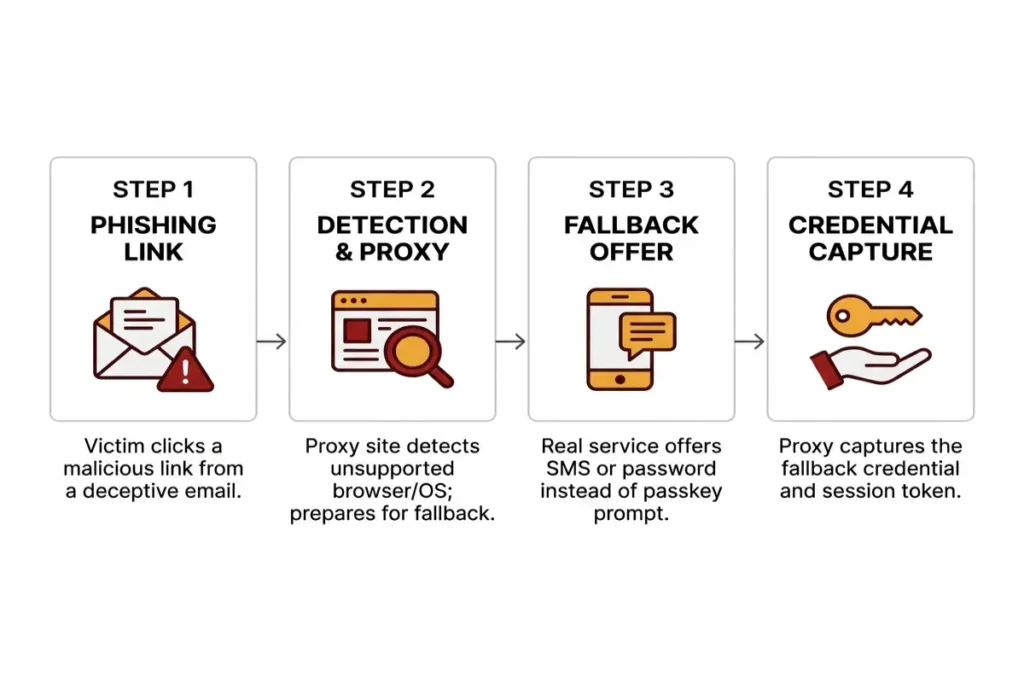
Proofpoint demonstrated exactly this against Microsoft Entra ID in August 2025. Their research showed Entra ID does not support FIDO2 authentication on every browser and operating system combination; a passkey will not work to sign into a Microsoft account from Safari on Windows or Firefox on Android, for example. A phishing proxy can detect that gap, present itself as one of those unsupported combinations, and the legitimate service then offers the user a fallback to SMS or a one-time code, which the proxy captures along with the resulting session. Cybernews
Tycoon 2FA, the same kit responsible for a large share of the AiTM volume Microsoft blocks, has shipped JavaScript built specifically to detect a passkey prompt and redirect the victim toward a weaker authentication flow before it even appears. FIDO2 authentication itself held up fine in that scenario. The fallback sitting next to it is what attackers actually exploited, which is the single most important caveat in any honest passkeys vs passwords comparison: a phishing-resistant credential only protects an account as well as the weakest method still active beside it. WorkOS
Not every proposed downgrade attack has held up under scrutiny, which is worth noting for balance. Researchers at Expel presented a separate concept in July 2025, called PoisonSeed, that used a cross-device QR-code flow to trick a target into approving a login from a rogue device, but they later found it impractical under real conditions because of the physical proximity it required. The realistic risk sits specifically in account recovery and method fallback, not in the underlying passkey exchange itself. Bleeping Computer
The fix is structural rather than something a single user configures from their own settings menu. Removing SMS and email-based recovery once a passkey is enrolled, and requiring a second registered passkey before disabling the first one, closes the exact gap Proofpoint documented. Where a service does not offer that level of control, the safest individual move is registering a passkey on every browser and device actually used for that account, so an unsupported-combination fallback never gets triggered in the first place.
[INSIDE IMAGE 2]
Type: TYPE C — Step diagram
“Horizontal left-to-right flow diagram showing 4 steps of an AiTM passkey downgrade attack. Step 1: Victim clicks a phishing link, icon of an email with a red warning triangle. Step 2: Proxy site detects an unsupported browser or OS combination, icon of a browser window with a magnifying glass. Step 3: Real service offers an SMS or password fallback instead of a passkey prompt, icon of a phone with a text bubble. Step 4: Proxy captures the fallback credential and session token, icon of a key being intercepted by a hand. Horizontal arrows connecting each step left to right. Flat design, amber and dark red accent color for each step icon, white step boxes with light grey border, bold sans-serif labels above each icon, smaller descriptive sub-label beneath. Clean horizontal layout at 1200×800px. Flat step diagram, no photographic elements, no stock photos, no watermark, no freehand illustration style, clean white background only.”
Setting up your first passkey without losing access to anything
The setup sequence that actually delivers on the passkeys vs passwords security gain starts with addition, not replacement. Adding a passkey to an existing account does not remove the password automatically on almost any service; the password stays active as a recovery path until the user deletes it deliberately. The practical first step is registering a passkey, signing out completely, and signing back in using only the passkey to confirm it actually works before touching anything else.
Registering a passkey on a second device immediately afterward is the step most setup guides skip, and it is the one that prevents the single point of failure a lost-phone scenario would otherwise create. A laptop, a tablet, or a second phone logged into the same account ecosystem gives a working fallback that does not depend on SMS, email, or a security question. The full platform-by-platform sequence for iPhone, Android, Windows, and Mac, including where each step tends to go wrong, is in how to set up passkeys.
Passkey security during this transition period depends more on which recovery methods stay active than on the passkey itself. Deleting the password only after confirming the passkey works on at least two devices, and only after checking that any remaining recovery option is something the user actually controls rather than a phone number that could be SIM-swapped, closes the practical gap covered above. What happens specifically if the device holding those passkeys is lost before a second device gets registered is covered in full in what happens if you lose the device holding your passkeys.
Moving a passkey between providers, from Apple’s iCloud Keychain into Bitwarden or 1Password, used to require deleting and re-enrolling it by hand. The FIDO Alliance’s Credential Exchange Protocol and Format, with Apple, Google, Microsoft, 1Password, Bitwarden, and Dashlane all contributing to the draft, now standardizes that transfer with end-to-end encryption built in, and Apple shipped the first major implementation of it in iOS 26 in September 2025. Passwordless authentication is becoming portable across vendors rather than locked to whichever ecosystem created the credential first. CorbadoYahoo Finance
A hardware security key is the device-bound alternative to a phone or laptop passkey, useful for the accounts where losing sync convenience is worth the trade-off, such as a primary email or a cryptocurrency exchange. The key holds its private key in its own secure chip rather than in any cloud-synced keychain, and it has no battery or network connection to compromise. It is a narrower tool than a synced passkey, not a replacement for one.
None of this setup work matters if the account is shared across a household or a team the way many streaming, banking, and work accounts are, and that shared-access reality is where the passkeys vs passwords comparison gets genuinely harder. Part 3 of this guide covers that enterprise case directly, along with the specific mistakes that quietly recreate password-era risk inside an account that already has a passkey enrolled.
The enterprise case for passkeys vs passwords
Two distinct business problems get solved by the same underlying technology, which is what makes passkeys vs passwords a budget conversation as much as a security one inside most organizations. Nearly half of consumers say they have abandoned a purchase because they forgot a password, and every resulting reset request drives up support costs for the team handling it. The FIDO Alliance’s October 2025 Passkey Index found that service providers offering passkey sign-in saw a 30 percent conversion lift over password-only sign-in, measured from production data at companies including Amazon, PayPal, and Target. DescopeIdTechWire
The second problem is internal rather than customer-facing. A separate FIDO Alliance survey of 400 IT professionals across the US and UK found two-thirds rate passkey adoption for employee sign-in as a high or critical priority, and 90 percent say user education is essential to making the rollout actually work. That figure says as much about change management as it does about cryptography. Passwordless authentication does not sell itself inside a company the way it sells itself to a consumer clicking through checkout, and that gap is exactly where most failed passkeys vs passwords rollouts inside large organizations actually break down. Biometric Update
The MGM Resorts breach covered earlier in this guide is the exact scenario most enterprise security teams are trying to prevent: a help desk employee resetting multi-factor authentication for a privileged account on the strength of a phone call alone. NIST’s SP 800-63-4 risk-based framework, finalized the same year that breach’s full cost became public, gives organizations a structured way to decide which accounts need the strongest phishing-resistant login available rather than applying one assurance level everywhere. FIDO2 authentication enrollment for the small number of accounts a help desk can least afford to get wrong, the privileged ones, captures most of the available risk reduction before a single ordinary employee account gets touched. nist

Five passkey mistakes that recreate password-era risk
Leaving SMS and email-based account recovery active after enrolling a passkey is the most common mistake, and Part 2 covered the mechanics in detail. A passkey closes the adversary-in-the-middle attack path; the fallback sitting next to it reopens a version of the same problem passwords always had, because that fallback is still phishable the old-fashioned way.
Registering a passkey on only one device recreates the single point of failure a password notebook used to be. If that one phone breaks, gets stolen, or gets wiped before a second device is enrolled, the account falls back to whatever recovery method is left, which is usually the weaker one. Registering a second device the same day a passkey is created removes this risk at no cost beyond two extra minutes of setup time.
Treating a synced passkey vault as protected on its own ignores what actually protects it. A passkey stored in iCloud Keychain or Google Password Manager is only as secure as the Apple ID or Google account holding that vault, which means a weak or reused password on the account itself, rather than on any individual site, becomes the real point of failure. Passkey security in this scenario is only as strong as the account guarding the vault, not the passkey sitting inside it. Securing that account with its own strong, unique credential and a phishing-resistant login of its own is what the rest of the setup actually depends on.
Assuming any passkey satisfies a compliance requirement written around device-bound credentials is a mistake specific to regulated industries. Financial services rules built around the strongest assurance level, AAL3, generally expect a device-bound credential such as a hardware security key rather than a synced passkey that can move between cloud-connected devices. Confirming which assurance level a given framework actually requires settles the passkeys vs passwords question for regulated accounts before an auditor settles it instead. Corbado
Removing a password fallback before confirming the passkey works on every browser and operating system combination an account actually uses recreates the exact downgrade gap Proofpoint documented against Microsoft Entra ID. FIDO2 authentication that only half-covers a person’s real device and browser mix still leaves the other half exposed to the same social-engineering fallback described in Part 2. Testing the passkey on every device before deleting anything is the one habit that closes this gap permanently.
What passkeys don’t fix yet
A passkey does not fix the human process that made the MGM Resorts breach possible. Account recovery still runs through a help desk, a support chat, or an automated identity-verification flow somewhere, and that recovery path is still vulnerable to the same social engineering that has worked against passwords for two decades. Passkeys vs passwords changes what an attacker has to do once they reach the account, not whether a sufficiently convincing phone call can reach it in the first place. Passkey security improves the moment of authentication; it has not yet improved the moment of account recovery.
Cross-ecosystem sync remains genuinely unfinished. Apple and Google do not sync passkeys between their own ecosystems, so a passkey created on an iPhone does not appear automatically inside a Google account’s password manager on an Android phone. The Credential Exchange Protocol meant to solve this is still targeting early 2026 for full standardization, which means the portability problem is real today even though the fix is already drafted and partially shipped. AuthsignalCorbado
The long tail of smaller services has not caught up either. The largest consumer platforms, Google, Apple, Microsoft, and Amazon, all support passkeys, and major financial services and e-commerce sites have largely followed, but smaller websites, enterprise applications, and regional services are still catching up. Most people will run a mixed password-and-passkey setup for years rather than completing a clean switch in one sitting. PanicVault
Passwordless authentication is the right long-term direction, and the data through this guide backs that up. It is not, in 2026, a single setting that removes every password from a person’s life in one step. The realistic outcome is fewer passwords, protected far better, on the accounts where a breach would actually hurt.
Your passkeys vs passwords action plan for 2026
The passkeys vs passwords decision does not need to happen all at once, and trying to convert every account in a single afternoon is how the mistakes in the previous section happen. Start with the accounts where a breach would do the most damage: the primary email address, the Apple ID or Google account holding a synced passkey vault, and any financial account that supports passkey sign-in. Those three accounts cover the type of exposure behind the more than a third of consumers FIDO’s research found had a password-related compromise in the past year. PRWeb
Add a passkey to each one without deleting the password yet. Sign out, sign back in using only the passkey, and confirm it works on a second device before touching any recovery setting. Once two devices confirm working access, remove SMS-based recovery first, since that is the specific fallback Proofpoint’s downgrade research targeted, and keep email recovery only as a final backstop tied to an account that itself has a passkey or a strong unique password.
Passkey security after that point is mostly maintenance: checking new accounts for passkey support before defaulting to a password, registering a passkey on any new device the same day it is set up, and raising the AAL3 question directly with a compliance team before assuming a synced passkey satisfies a regulated account’s requirements. None of this requires replacing a password manager already in use, since passwordless authentication inside that manager is usually just a toggle away.
Five billion active passkeys and a measured drop in full-session phishing compromise from roughly 20 percent to single digits are not abstractions; they are the same FIDO2 authentication this guide has walked through end to end. The phishing-resistant login a passkey provides is real, the downgrade risk sitting next to it is also real, and the difference between an account that benefits from both facts and one that does not comes down to whether someone actually finished the checklist above.