
Malware vs virus is not a terminology debate — it is a practical distinction that determines which removal approach works and which tools to deploy. Someone who calls a browser hijacker a “virus” and runs a standard virus scan may get a clean result while the hijacker remains fully operational. Someone who treats ransomware as a “virus” and tries to recover via System Restore will find that the ransomware already deleted those restore points specifically because recovery options threaten its leverage. The word you use defines the solution category you search for. The wrong word sends you to the wrong solution.
Malware is the umbrella term covering all malicious software. Virus is one specific technical subcategory within it. Every virus is malware, but the majority of threats encountered in 2026 are not viruses in the technical sense — they are trojans, adware, ransomware, spyware, or fileless threats that operate through completely different mechanisms. Calling all of them “viruses” is like calling every vehicle a car: technically the vehicle category includes cars, but the maintenance procedure for a motorcycle differs entirely from the one for a truck.
This guide covers the full malware classification taxonomy and — more importantly — explains why each category requires a different detection method and removal approach. The step-by-step removal procedures for each type are in the malware removal guide.
What the malware vs virus distinction actually means
Malware is defined by intent and effect: software written to damage, compromise, surveil, or gain unauthorized access to a computer system. The category boundary is intent-based, not mechanism-based. A script that logs keystrokes and transmits them to a remote server is malware. A macro that encrypts files and displays a payment demand is malware. A browser extension that redirects search queries for advertising revenue is malware. All three achieve their goal through fundamentally different code architectures, but all three qualify because they operate against the user’s interests without informed consent.
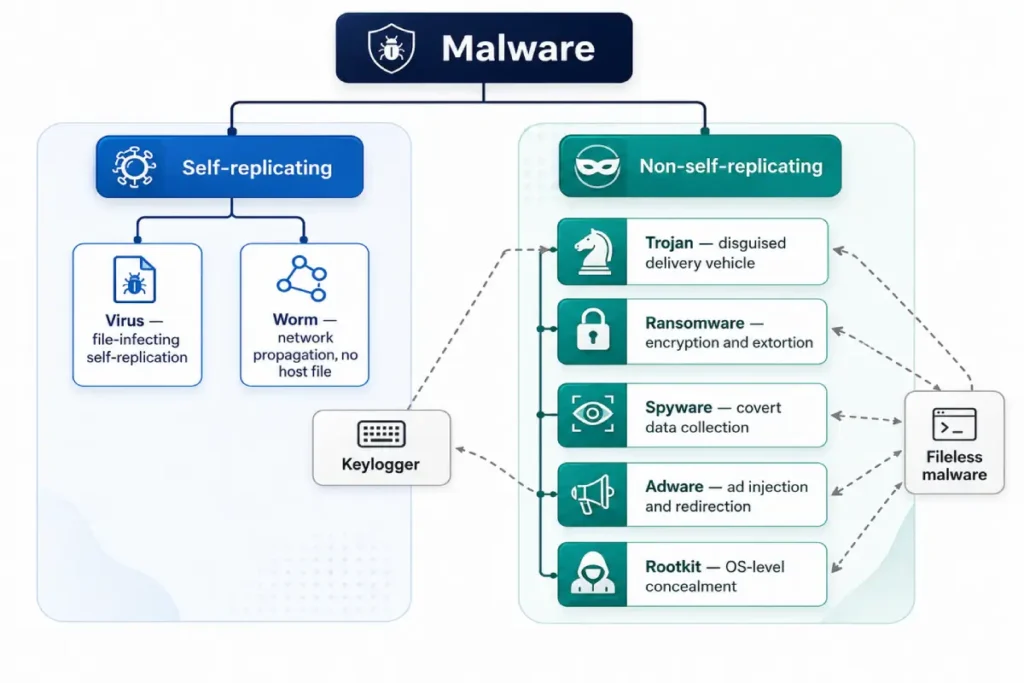
The computer virus definition is technically specific: a virus is code that replicates itself by injecting a copy of its own code into existing legitimate executable files. When an infected executable runs, the virus code executes alongside the legitimate program and injects copies of itself into additional executables accessible from the current system. Spreading requires a triggering action — an infected file must be run, an infected USB drive inserted and accessed, or an infected attachment opened. Without execution of the host file, the virus does not spread.
That self-replication-via-host-file mechanism is the specific characteristic that separates viruses from every other malware type. A trojan does not inject itself into other executables. Ransomware does not replicate its payload across the file system. Adware does not insert copies of itself into your installed programs. The self-replication boundary is the functional malware vs virus line.
The practical consequence for 2026: true file-infecting viruses represent approximately 3% of new malware samples per AV-Test’s annual classification data. The category called “antivirus software” evolved to cover the full malware taxonomy regardless of its original naming, which is why running “antivirus” today addresses trojans, adware, spyware, and ransomware that are technically not viruses at all. The product name outlasted the threat category it was named after.
Viruses and worms: the self-replicating minority
True computer viruses have declined as a threat category precisely because self-replication via host file infection is now well-understood and well-detected. Signature-based scanners built on decades of virus detection data catch file-infecting viruses reliably. Attackers have migrated to delivery mechanisms that are harder to detect and harder to attribute.
What makes a virus technically distinct from other threats in terms of removal: infection may have spread to multiple files before detection. Quarantining the “virus file” that a scanner flags removes one infected copy but leaves every other executable the virus injected itself into. A thorough virus removal requires scanning all executable files on the system and either disinfecting each infected file (surgically removing the injected virus code while preserving the original program’s functionality) or replacing infected files with clean versions from Windows installation media. Disinfection success depends on the virus variant — some attach themselves in ways that cannot be cleanly removed without corrupting the host file.
Worms share the self-replication characteristic but spread across networks rather than by infecting host files. A worm copies itself as a standalone executable over network shares, exploited network service vulnerabilities, or email systems, without needing a host program. The 2003 Slammer worm infected approximately 75,000 SQL Server installations in 10 minutes — a spread rate only possible because the worm required no host file and no user interaction, just a vulnerable open port. In 2026, worms appear most frequently in enterprise lateral movement scenarios rather than on isolated consumer machines, though consumer NAS devices and home network shares remain viable worm propagation targets.
The removal approach for both: a full-system scan rather than a targeted threat scan, because infection may exist across multiple locations. For viruses, a second scan pass after the first confirms that all injected copies were caught. For worms on a home network, every connected device requires scanning — the worm’s network propagation means the initial host machine is rarely the only infected device.
Trojans, PUPs, and the types most people call viruses
The virus vs trojan distinction is the one that changes removal procedure most significantly. A virus spreads by infecting host files and requires full-system scan coverage to catch every infected copy. A trojan requires a user to install it — disguised as a game crack, a software activation tool, a fake Flash Player update, or a bundled installer component — and does not self-replicate. It installs itself in one location and performs its function from that location.
Trojans represent the dominant non-adware malware category in 2026. They function as delivery vehicles: a trojan’s primary function is typically to establish a foothold on the system — a backdoor connection to a command-and-control server, a keylogger component, a secondary payload downloader. The trojan installer is what the user accidentally executed. What it installs and runs afterward is the actual threat.
The virus vs trojan removal difference: a trojan has one installed location (the executable the user ran) plus its persistence mechanisms — registry startup entries, scheduled tasks, injected process components. Malwarebytes Free identifies and quarantines the trojan and its persistence mechanisms in a single scan pass. No multi-file infection spread requires cleaning. Runtime: 4-8 minutes. A virus infection requires a full-system scan because the virus may have infected 50 or 500 executable files before detection. Runtime: 30-90 minutes.
PUPs occupy the borderline between unwanted software and malware. The user technically consented to the installation through a “recommended settings” checkbox during another program’s installation, but the consent mechanism is deliberately obscured. PUPs account for 71% of consumer malware detections in Malwarebytes’ 2025 data — the majority of what home users call a “virus infection” is technically a PUP. AdwCleaner removes PUPs in under 3 minutes.
Ransomware, spyware, and adware: the dominant consumer threat categories
These three types of malware account for the overwhelming majority of consumer infections in 2026 and represent the core of what most people mean when they say their computer has a “virus” — even though none of them are technically viruses.
Ransomware is a trojan subtype that uses encryption as its operational mechanism. The ransomware binary installs through the same delivery channels as standard trojans: phishing email attachments, software cracks, compromised websites, malvertising. Once executed, it proceeds through a pre-encryption phase lasting 48-72 hours — mapping the file system, disabling backup services, terminating security processes — before encrypting user files with AES-256 and displaying a payment demand. Ransomware does not replicate, does not inject into other executables, and does not spy on the user. Its entire function is to encrypt files the user values and hold them hostage. Removal of the ransomware binary is separate from file recovery — the binary is removable with Malwarebytes, but encrypted files remain encrypted until a decryptor is applied.
Spyware belongs to a distinct category because its operational goal is data collection rather than disruption. A spyware payload logs keystrokes, captures screenshots, records clipboard contents, and monitors browser sessions — transmitting all of it to a remote server. Its defining design characteristic is invisibility: CPU and RAM usage deliberately stay low, no user-facing interface exists, and no performance symptom typically appears during the early weeks of infection. Spyware distribution methods overlap with trojans — bundled installers, phishing, malicious downloads — but the payload is passive monitoring rather than active disruption.
Adware generates revenue by injecting advertising into the user’s browsing experience. Browser redirects, modified search results, pop-up overlays on sites that do not normally show ads, and altered browser settings are all adware behaviors. The delivery mechanism is almost exclusively bundled software installers. Adware occupies the lower end of the malware severity scale: it does not compromise credentials, does not encrypt files, and does not establish backdoor access. It is primarily a nuisance with privacy implications — the traffic redirection it performs is monetized through advertising networks that receive your browsing data. AdwCleaner removes adware effectively in 3 minutes, making it one of the easiest malware categories to clear.
Rootkits, keyloggers, and fileless malware: the hardest types to detect
These three categories share one characteristic: standard scanning approaches either cannot reliably detect them or cannot remove them without specialized tools.
Rootkits earn their difficulty rating from their operating position within the system. A rootkit installs itself into the Windows kernel — the core operating system layer that manages all hardware access and process management. From kernel position, the rootkit intercepts the API calls that every process, including antivirus scanners, uses to enumerate running processes and open files. It returns falsified results: the scanner asks the OS what files exist in a directory, the rootkit intercepts the query and removes its own files from the response. The scanner receives a clean-looking answer. Standard signature-based scanning cannot reliably detect a rootkit because the detection tool uses the same compromised OS layer that the rootkit controls. Removal requires a bootable scanner that loads before Windows and reads the drive from outside the infected operating system.
Keyloggers are technically not a standalone malware category — they are a component found within trojans and spyware. A keylogger records every keystroke on the keyboard, typically writing to a local log file that is periodically transmitted to the attacker. On their own, keyloggers are passive and leave minimal behavioral traces. They appear in the infection picture most often as secondary components discovered during Malwarebytes scans of a machine that had a trojan installed. The removal procedure is the same as for the parent trojan: Malwarebytes quarantine of the primary executable and its installed components.
Fileless malware operates entirely within RAM by injecting executable code into legitimate running processes — explorer.exe, powershell.exe, svchost.exe. It writes nothing to disk. There is no file to scan, no installation directory to find, no registry entry pointing to an executable. The only evidence of its presence is behavioral: the legitimate process consuming unusual resources, making unexpected network connections, or executing code sequences that behavioral monitoring identifies as anomalous. Detection requires real-time behavioral analysis running in the background — not on-demand scanning. Malwarebytes Premium’s real-time protection engine and ESET’s Advanced Memory Scanner both monitor for fileless execution patterns. Windows Defender’s offline scan catches a subset of fileless threats that are loaded early in the boot sequence, but misses those that execute only after Windows is fully loaded.
Malware vs virus: why malware classification determines removal approach
Running the wrong tool category against a specific malware type produces predictable failures that users interpret as the tool being ineffective when the actual issue is category mismatch.
A standard on-demand signature scanner against fileless malware returns clean results — not because the infection is gone, but because there is no file to scan. The tool is operating correctly within its category. The threat category requires behavioral real-time detection, which is outside the on-demand scanner’s scope.
A browser-cleaning tool like AdwCleaner against a rootkit returns clean results — not because the rootkit is gone, but because AdwCleaner scans browsers, registry run keys, and scheduled tasks. A rootkit operates at kernel level, outside AdwCleaner’s detection scope. The tool is working exactly as designed. The threat category requires a bootable scanner.
Malwarebytes Free against ransomware that has already completed encryption removes the ransomware binary but does not decrypt the files — because file decryption is not within a malware scanner’s scope. The scanner has correctly done its job. File recovery requires a decryptor tool, not a malware scanner.
Understanding malware classification before selecting a tool eliminates the frustration of tools that appear to fail. They are not failing. They are operating within their designed category. The gap is between the tool’s category scope and the threat category being treated.
The full taxonomy of tools matched to threat categories — on-demand scanners, browser-cleaning tools, bootable rescue environments, and behavioral detection engines — is covered in detail in the signs of malware infection guide, which maps each symptom to the threat type and the corresponding tool category.
How the malware vs virus confusion leads to the wrong removal tool
The practical cost of the terminology conflation appears in four specific failure patterns that are common enough to constitute predictable problems rather than edge cases.
Searching for “virus removal” when the infection is a browser hijacker. Search results for “virus removal” surface full antivirus products, paid security suites, and scanner downloads that address file-system threats. Browser hijackers are not file-system threats. They are browser-configuration modifications — registry entries, extensions, and shortcut modifications. The correct tool is AdwCleaner, which most users searching “virus removal” never encounter because AdwCleaner is not typically classified or marketed as an antivirus product.
Running a single quick scan when the infection is a rootkit. Most “virus scans” in consumer security software run a quick scan mode that checks startup programs, running processes, and common threat locations. Rootkits modify what the OS reports to those scans. A rootkit that has been on the system for three weeks has specifically interfered with the detection layer that a quick scan uses. The scan returns clean. The user concludes either the tool is ineffective or no infection exists. The rootkit continues operating.
Treating ransomware as a virus and looking for self-replication prevention. Ransomware is not self-replicating. The user cannot protect other files by removing an “infected” executable before the encryption spreads. The encryption happens once, in a controlled pass, from the ransomware binary. The protection mechanism against ransomware is real-time behavioral monitoring that intercepts the encryption activity before it completes — not file-system scanning that looks for the virus replication pattern.
Using file disinfection (virus removal technique) against a trojan. Antivirus products that offer “disinfection” — removing injected virus code from infected executables while preserving the host program — are addressing the virus-specific mechanism of host file infection. A trojan did not inject code into your Word documents. It installed itself as a separate executable in AppData. The correct removal action is quarantine of the trojan executable and its registry entries — disinfection of other files is unnecessary work that adds no value against a trojan.
Each of these failure patterns has the same root cause: applying the solution category designed for one threat type to a different threat type, because the terminology didn’t distinguish between them.
Matching the right removal approach to each malware type
The correct approach for each threat category follows directly from its technical characteristics.
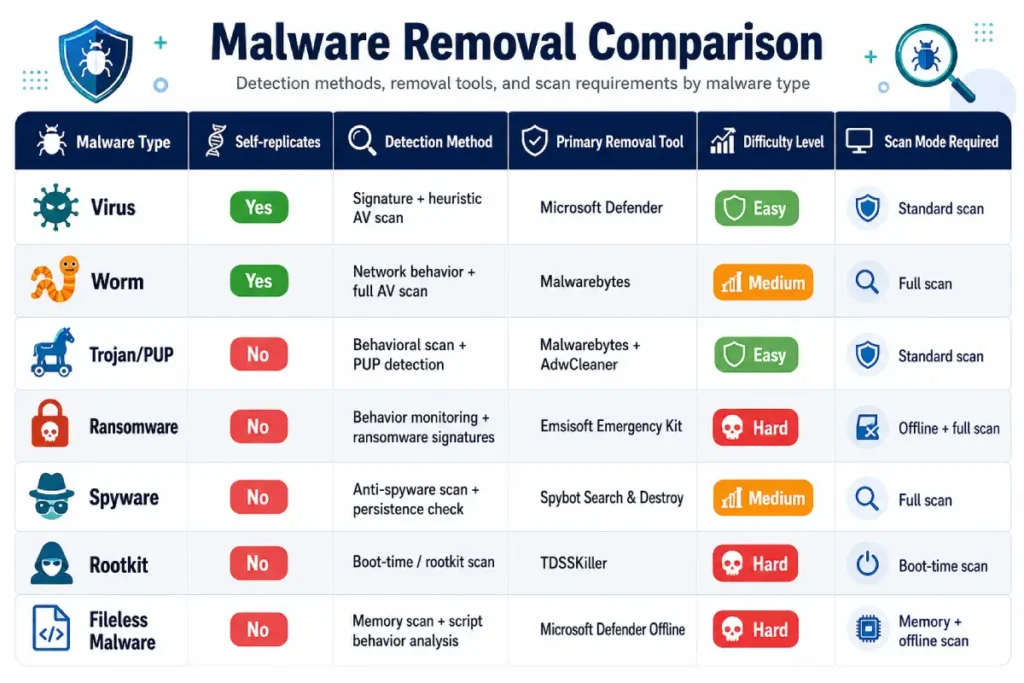
Viruses: full-system scan (not targeted scan), because infection may span multiple executables. Second-pass scan after the first pass quarantines detections. Bitdefender Total Security or ESET Internet Security for real-time protection against new file-infection events, because both use heuristic analysis that catches virus behavior patterns before signature updates confirm the specific variant.
Worms: full-system scan on the initial device, then scan every other device on the same network. A worm’s defining characteristic is network propagation — finding and removing it from one machine while leaving other infected network hosts does not resolve the incident.
Trojans and PUPs: targeted Malwarebytes Free scan (4-8 minutes), followed by AdwCleaner for any browser-layer components the trojan installed as secondary payloads. Full-system scan optional if the Malwarebytes result seems partial against active symptoms.
Ransomware: isolation and identification first, not scanning. The binary removal procedure with Malwarebytes comes after isolation and after identifying whether a decryptor exists. Scanning before isolation allows active ransomware to continue communicating with C2 infrastructure.
Spyware: Malwarebytes Free scan in Safe Mode, because spyware places persistence mechanisms in startup locations that Safe Mode blocks from loading alongside Windows. Follow with an immediate password change from a clean device — spyware’s operational goal is credential capture, and a clean scan result does not mean transmitted credentials are unexploited.
Rootkits: bootable scanner only. Bitdefender Rescue CD or Kaspersky Rescue Disk 18, loaded from a USB drive before Windows initializes. No in-Windows scan tool provides reliable rootkit removal because the scanner operates through the same OS layer the rootkit controls.
Fileless malware: real-time behavioral detection is the primary tool. Malwarebytes Premium with real-time protection enabled, running in background mode for 24-48 hours. Windows Defender offline scan as a supplemental pass. On-demand scanning alone is insufficient — there is no file to detect on demand.
For matched tool recommendations by specific threat type, the best free malware removal tools guide covers which free tools apply to which threat categories.
What complete security coverage actually looks like in 2026
A single tool does not cover all malware types equally. No product does. The differences between categories — file-based vs. fileless, user-space vs. kernel-level, passive monitoring vs. active encryption — are too architecturally different for one detection approach to address all of them with equal effectiveness.
Windows Defender provides solid baseline coverage for file-system threats: trojans, worms, PUPs, adware, and known ransomware families. Its 95.6% detection rate means it misses approximately 4.4% of the new sample set per AV-Test Q3 2025 — manageable as a baseline, inadequate as a sole defense layer on a machine used for banking or storing irreplaceable data.
Malwarebytes Premium layered alongside Defender adds a second detection engine covering the gap Defender leaves plus its behavioral monitoring for ransomware and fileless execution. The combination costs $44.99/year and runs without conflicts between the two products.
For rootkits specifically: no always-on product provides reliable rootkit detection in the consumer tier. The correct approach is periodic bootable scanner runs (quarterly is a reasonable interval for home users) when behavioral indicators suggest deep-level compromise, and immediately following any incident involving signs 8-10 from the malware warning signs checklist.
For spyware with long dwell times: the most effective detection is not technical — it is behavioral account monitoring. Login notifications enabled on every account that matters, 2FA active everywhere, and credit monitoring services ($8-$15/month from Experian, Equifax, or TransUnion) surface credential misuse faster than any scanner that runs only when launched.
No single product label — “antivirus,” “internet security suite,” “endpoint protection” — tells you which of the seven threat categories above the product covers effectively and which it handles at the edges of its capability. The taxonomy does. Understanding the categories tells you exactly what any given product covers and where its boundaries are.

The malware vs virus distinction is not a pedantic point about language. It is the difference between running a 3-minute AdwCleaner scan that resolves the problem and spending three hours running full-system antivirus scans against a browser hijacker that no antivirus product targets directly. Every threat type has a specific detection mechanism and a specific removal tool. Every tool has a specific scope. The taxonomy that connects them is not technical trivia — it is the practical map that gets you from symptom to resolution in the shortest path.