


Knowing which websites support passkeys in 2026 is the first practical step between understanding the technology and actually using it, and the list is now long enough that most people’s ten most-used accounts are on it. Nearly half of the top 100 websites globally offer passkey sign-in as of the latest FIDO Alliance reporting, more than double the share that offered it in 2022, and the major platforms driving that growth, Google, Apple, Microsoft, Amazon, and GitHub, collectively cover a meaningful share of daily authentication events worldwide. Descope
This article is organized around use rather than theory. Part 1 covers the largest and most widely used passkey compatible sites and how to confirm whether a service supports passkeys before spending time looking for the option. Part 2 covers financial services, social media, and e-commerce in detail, with specific paths to enable passkey sign in on the platforms most people use daily. Part 3 covers the long tail of services that haven’t yet added support, what to do with those accounts in the meantime, and the live directories that track the full picture as it evolves.
The broader security context behind why this matters is in passkeys vs passwords. The setup steps once a supported service is identified are in how to set up passkeys.
How to tell whether a site supports passkeys before searching its settings
How to tell whether a site supports passkeys before searching its settings is a practical time-saver given that the path to passkey enrollment varies enough between services that searching through nested account menus on a site that never added support is a common frustration. Three signals confirm support before any settings dive begins.
The sign-in page itself is the fastest check. Services that support passkey sign in surface a passkey prompt automatically on browsers with a registered credential, shown either as an autofill suggestion above the keyboard on mobile or as a system dialog on desktop. Visiting a login page and seeing this prompt appear unprompted on a device that has already been used with that service confirms active support. No prompt on a known device does not definitively confirm the absence of support, because some services require manual enrollment before the prompt appears, but it is a useful starting signal.
The account security settings page is the definitive check. Searching the account settings for any of: “passkey,” “passwordless sign-in,” “two-step verification” with a passkey option, or “security keys,” finds the enrollment point on every service that has added support. The naming is not standardized across the industry, which is why all four terms are worth trying. A settings audit across ten or fifteen high-value accounts, looking for any of those labels, usually completes in under twenty minutes and establishes a clear before-and-after baseline.
Live directories maintained by the FIDO Alliance and the broader passkey community track which services support passkeys with last-verified dates rather than publication-date snapshots. The FIDO Alliance’s own passkey directory at fidoalliance.org and the community-maintained passkeys.directory both update as services add or modify their implementations and are the right references for services not covered individually in this article. Checking a specific service in one of those directories before spending time in its settings confirms whether enrollment is possible at all before the search begins.
The major platforms: Google, Apple, Microsoft, Amazon, and GitHub
The major platforms supporting passkey sign in cover a large share of daily authentication volume, and enabling a passkey on each one is the first and most impactful step in any passkey migration. Google’s passkey rollout reached 800 million accounts with more than 2.5 billion sign-ins over a two-year period, with sign-in success rates improving 30 percent and sign-in speed improving 20 percent compared with passwords. Enabling a passkey on a Google account is the single change that closes the largest authentication surface for most people, given how many other services use Sign In with Google as their own login method. FIDO Alliance
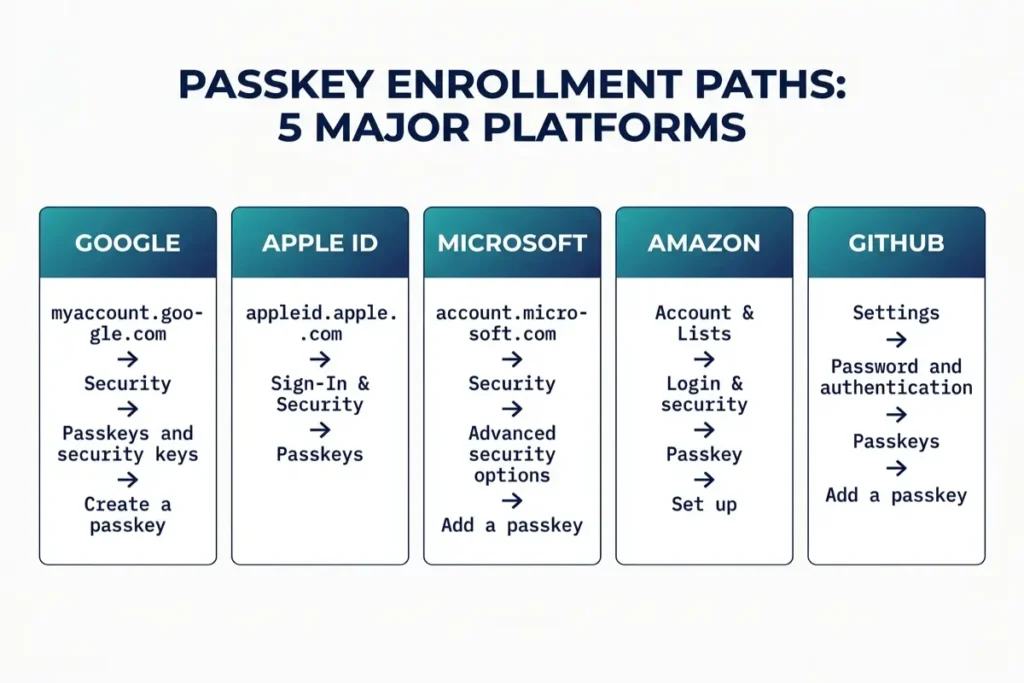
Google passkey enrollment path: myaccount.google.com → Security → Passkeys and security keys → Use passkeys → Create a passkey. The flow asks for device confirmation and completes the WebAuthn registration ceremony in under ten seconds. Existing Google sessions on other devices are not affected. Once enrolled, Google surfaces the passkey prompt automatically on subsequent sign-ins from the enrolled device, bypassing the password field entirely.
Apple ID passkey enrollment changed with the introduction of iOS 17 and macOS Sonoma: Apple accounts now use passkeys by default during device-level authentication rather than requiring a separate enrollment step. The passkey for an Apple ID is created automatically when a device is set up with Touch ID or Face ID and tied to the device’s secure hardware alongside iCloud Keychain. Reviewing which devices hold active passkeys for an Apple ID: appleid.apple.com → Sign-In & Security → Passkeys.
Microsoft account passkey enrollment path: account.microsoft.com → Security → Advanced security options → Add a new way to sign in → Passkey. Microsoft extended passkey support to consumer accounts following Windows Hello’s enterprise rollout, and the enrollment flow works identically on Edge, Chrome, and the Microsoft Authenticator app on iOS and Android. Passkey adoption has reached a tipping point, with the largest consumer platforms — Google, Apple, Microsoft, and Amazon — all supporting passkeys and major financial services, social media platforms, and e-commerce sites following. PanicVault
Amazon passkey enrollment path: amazon.com → Account & Lists → Login & security → Passkey → Set up. Amazon added passkey support across its consumer-facing properties, including the main shopping site and the Prime Video sign-in flow. The enrollment works through any browser supporting WebAuthn on both desktop and mobile.
GitHub passkey enrollment path: github.com → Settings → Password and authentication → Passkeys → Add a passkey. GitHub’s passkey implementation receives particularly strong coverage in security discussions because of the platform’s developer audience and its position as a high-value target for credential-based supply chain attacks. GitHub’s passkey rollout saw approximately 1.4 million passkeys registered quickly, outpacing other WebAuthn factors the platform had previously offered. Medium
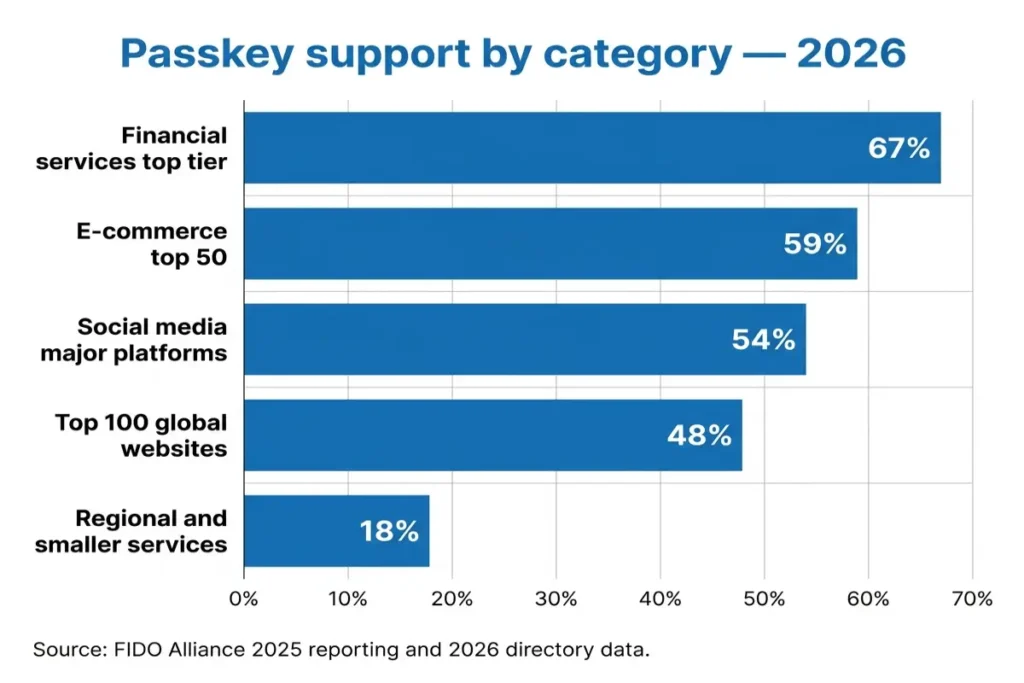
Financial services that support passkeys
Financial services that support passkeys represent the category where the security gain is most concrete, because the accounts at stake hold the most directly monetizable access an attacker could gain from a credential theft. Stolen credentials were the initial access vector in 22 percent of breaches documented in Verizon’s 2025 Data Breach Investigations Report, and financial accounts are consistently among the most targeted credential categories in that data precisely because access to them converts directly to financial loss. Enabling passkey sign in on a banking or investment account closes the phishing attack path before any stolen credential can be tested against it. Keepnet Labs
PayPal’s passkey enrollment path sits at paypal.com → Settings → Security → Passkeys → Create a passkey. PayPal added passkey support across its consumer-facing login flow and surfaces the passkey prompt automatically on subsequent sign-ins from enrolled devices. The enrollment works through both the web interface and the PayPal iOS and Android apps, with the app path found at Settings → Security → Passkeys. PayPal is listed among the FIDO Alliance member organizations contributing deployment data to the October 2025 Passkey Index, which means its passkey implementation has been running in production long enough for adoption and performance data to be meaningful. FIDO Alliance
Retail banking passkey support varies considerably between institutions in 2026, with the largest consumer banks in the US generally ahead of regional and credit union equivalents. The specific enrollment path within any given bank’s app is almost always found under Security, Account Settings, or Sign-In Options in the main navigation, and the passkey option, when it exists, is typically labeled either “Passkey” directly or “Biometric sign-in” depending on how the implementation team chose to surface it. Searching the bank’s own support documentation for “passkey” before navigating the app saves significant time because the naming inconsistency is wide enough that finding a non-existent option is otherwise indistinguishable from finding an option that is simply buried.
eBay’s passkey enrollment path: ebay.com → Account Settings → Sign in and security → Passkeys → Add a passkey. eBay’s implementation covers both the desktop web experience and the iOS and Android apps, with the passkey prompt surfacing automatically on return visits from an enrolled device. For users with a PayPal account linked to their eBay login, enrolling passkeys on both independently rather than assuming the PayPal passkey extends to eBay covers both authentication surfaces separately, since the two services authenticate independently despite their historical connection.
Social media and communication platforms
Social media and communication platforms represent the second-highest priority category for passkey enrollment after financial services, because account compromise on these platforms typically enables both social engineering of the victim’s contacts and reputational damage at a speed that password-reset recovery rarely catches before harm occurs. Adversary-in-the-middle phishing kits documented throughout this cluster target social platform credentials specifically because the session tokens they steal enable immediate impersonation.
WhatsApp’s passkey enrollment path, on Android specifically where the feature launched first: WhatsApp → Settings → Account → Passkeys → Create a passkey. WhatsApp’s passkey implementation ties to the Android device’s biometric authentication rather than a separate account credential, meaning the passkey is device-bound on Android rather than synced through Google Password Manager by default. iPhone users accessing WhatsApp should check the same path within the iOS app, where the feature availability depends on the specific WhatsApp version installed. Updating to the current App Store version before checking resolves most absence-of-option issues on iOS.
LinkedIn’s passkey enrollment path: linkedin.com → Settings & Privacy → Sign in & security → Passkeys → Add a passkey. LinkedIn added consumer passkey support following Microsoft’s broader passkey rollout, given the ownership relationship between the platforms, and the enrollment experience on LinkedIn’s desktop web interface is among the more polished in this category. The passkey prompt surfaces on subsequent sign-ins through the same browser on the same device without requiring any additional setting change after enrollment.
X (formerly Twitter) passkey support had not reached general availability for consumer accounts as of mid-2026. Users with high-value X accounts should use a hardware security key through the existing security key option in Settings → Security and account access → Security → Two-factor authentication → Security key as the strongest available option until passkey support is confirmed available. Checking passkeys.directory for current status before spending time searching X’s settings is the right starting point for this specific service.
E-commerce and shopping platforms
E-commerce and shopping platforms sit lower in the passkey enrollment priority order than financial and social accounts for most people, but the combination of stored payment methods and shipping addresses on these platforms makes them meaningfully higher-value targets than a standalone content account. A compromised e-commerce account with a stored credit card and address represents a faster path to financial fraud than the account itself suggests.
Shopify-powered stores present the most fragmented passkey compatibility situation of any category in this article, because Shopify operates as infrastructure for thousands of individual merchants rather than as a single consumer-facing service. Some Shopify stores have enabled passkey sign-in at the merchant level; others have not. Checking the specific store’s account settings rather than assuming compatibility based on the underlying platform is the only reliable approach for Shopify-based retail accounts.
Target’s passkey enrollment path: target.com → Account → Account security → Passkeys → Add a passkey. Target is listed among the nine FIDO Alliance member organizations contributing passkey deployment data to the October 2025 Passkey Index, meaning its implementation is established enough to have measurable performance data rather than being newly launched. The Target Circle loyalty program integration with the main account means a passkey enrolled on the primary account covers both the shopping login and the loyalty features in a single enrollment. FIDO Alliance
TikTok’s passkey enrollment path: Profile → Settings and privacy → Security and login → Passkey → Add a passkey. TikTok is also among the nine FIDO Alliance member organizations in the October 2025 Passkey Index, with passkey deployment data covering its global consumer base. The enrollment path works consistently across the iOS and Android app versions, with the biometric confirmation step matching whichever local authentication method the device has configured. FIDO Alliance
Password manager integration with passkey-compatible sites
Password manager integration with passkey-compatible sites is where the experience of finding and enabling passkeys across many accounts becomes manageable rather than requiring a manual audit of every service independently. Every major third-party manager, 1Password, Bitwarden, Dashlane, and Proton Pass, surfaces a passkey icon or indicator alongside saved credentials for accounts where a passkey has been enrolled, making it straightforward to identify which saved accounts still use only a password and have a passkey available to add.
1Password’s Watchtower feature specifically flags accounts where passkey sign in is available but not yet enabled, generating an actionable list of passkey compatible sites that can replace a manual directory search. The feature checks the 1Password directory of supported services against the user’s existing saved accounts and surfaces the ones with a gap between what the service offers and what the account currently uses. Bitwarden’s equivalent sits under Reports in the web vault, flagging accounts associated with services in its own passkey-support database.
Using a password manager’s built-in passkey support directory as the starting point for a migration session, rather than working through accounts manually, is the most efficient way to identify which websites support passkeys among the specific services someone actually uses. A generic directory of passkey compatible sites lists thousands of services; a manager’s own report narrows that to the specific accounts already in the vault, which is the only list that matters operationally.
Services that don’t support passkeys yet and what to do about them
Services that don’t support passkeys yet represent the realistic majority of accounts for most people in 2026, and handling them correctly matters as much as the passkey enrollments on the services that do. The long tail of smaller websites, enterprise applications, and regional services is still catching up even as the largest consumer platforms reach passkey maturity, which means most people will run a mixed credential environment for years rather than completing a clean migration to passwordless authentication in any single session. PanicVault
The practical answer for accounts still on passwords is the same as it was before passkeys existed: a unique, generated password stored in a password manager, with a non-SMS second factor wherever the service offers one. A TOTP authenticator code provides meaningful protection against the credential-stuffing attacks covered in the pillar guide, even though it remains vulnerable to the adversary-in-the-middle session-token theft that passkeys close entirely. A service without passkey support today is not defenseless; it is simply defended by a weaker method that warrants a revisit when passkey support eventually arrives.
Checking passkey support for a specific service has a faster path than searching the service’s own settings when the answer is uncertain. The FIDO Alliance’s official passkey directory at fidoalliance.org, the community-maintained passkeys.directory, and 1Password’s Watchtower each index supported services with last-verified dates rather than relying on static publication-date lists. Searching a specific service name in any of those directories returns either a confirmed support entry with the enrollment path, or a confirmed absence that removes any doubt before spending time searching settings. For services where the directory hasn’t been updated recently, checking the service’s own changelog or security blog for “passkey” is the most reliable secondary check.
One category worth tracking specifically for upcoming support is enterprise software. Two-thirds of IT professionals surveyed by the FIDO Alliance in 2025 rate passkey adoption for employee sign-in as a high or critical priority, and the enterprise software vendors responding to that demand, including major identity providers and SaaS platforms, are adding support at a pace that makes a service checked six months ago worth rechecking now. Okta, Microsoft Entra ID, and Ping Identity all added or significantly expanded passkey support between 2024 and 2026, meaning many enterprise accounts that required a password a year ago have a passkey option available today. Biometric Update
Live directories and how to use them
Live directories are the practical answer to the passkey directory problem that any article-length list cannot solve: the list of websites that support passkeys changes weekly as services add, expand, or occasionally remove passkey options, making any static compilation outdated almost immediately. Three directories are worth knowing by name because they approach the tracking problem differently and complement each other rather than duplicating the same coverage.
The FIDO Alliance’s official directory at fidoalliance.org/passkeys is the most authoritative source for confirmed implementations, built from member organization submissions and verified by the Alliance’s own team. It covers breadth across categories but skews toward the largest and most notable implementations rather than providing exhaustive coverage of every service that has quietly added support.
Passkeys.directory is a community-maintained index that includes last-verified dates for every entry alongside the specific enrollment path within each service’s settings. The community model means it often picks up smaller services and recent additions faster than a centrally maintained directory would, and the enrollment path detail is particularly useful for services where the option is buried several menu levels deep. For any service not covered in the major platform sections of this article, passkeys.directory is the first place to check.
The state-of-passkeys.io Passkey Benchmark 2026 is the most data-rich of the three, measuring not just which services offer passkeys but also enrollment success rates, authentication success rates, and time-to-completion metrics from actual production deployments. For users evaluating which services to prioritize, the benchmark’s quality data is more useful than a binary supported-or-not classification: a service with passkey support but a 60 percent enrollment success rate is worth less operational investment than one with a 95 percent success rate, because the lower-success service will generate recovery situations more frequently.
Your passkey migration checklist for 2026
Your passkey migration checklist for 2026 treats the process as a staged migration rather than a single session, because the combination of identifying supported services, enrolling carefully on each one, and verifying two-device access before changing any recovery settings is genuinely too much to rush through without the setup mistakes covered in how to set up passkeys becoming likely.
Start with five accounts regardless of which specific services they are on: the primary email address, the financial account most frequently used for transactions, the account holding the credential vault itself, one social platform used daily, and one shopping account with a stored payment method. These five account types cover the five most consequential breach scenarios the passkeys vs passwords data identifies. Enabling passkey sign in on these five, in that priority order, closes more of the realistic risk surface than enrolling passkeys on fifteen lower-priority accounts first.
After the first five, use the password manager’s built-in passkey support report, or a passkeys.directory search of each remaining saved account, to identify the next tier of passkey compatible sites already in the vault. Work through them in batches of five rather than attempting a full migration at once, running the three-point verification check from the setup guide after each batch: confirmed sign-in from the enrolled device, confirmed passkey on a second device, and confirmed removal of SMS-based recovery from any account where two-device access is established.
For services without passkey support, set a calendar reminder to check passkeys.directory for that service quarterly rather than assuming the current absence is permanent. The share of top 100 global websites offering passkeys more than doubled between 2022 and the latest FIDO Alliance reporting, a rate that suggests most holdout services in that tier will add support within the next one to two years. A quarterly check costs under a minute per service and catches newly added support before the next annual audit would. Descope

What a complete passkey migration actually looks like
A complete passkey migration does not look like a finished state where every account uses a passkey and no passwords remain. It looks like a priority-ordered setup where the highest-value accounts are passkey-protected, the medium-value accounts are on the list to migrate as time allows, the lowest-value accounts still use unique generated passwords in a manager, and the whole picture is reviewed once per quarter against the latest passkeys.directory data.
By the end of 2025, nearly 70 percent of users had at least one passkey enrolled, reflecting a shift where regulatory mandates, technology maturity, and real-world adoption all converged in a single year. That figure describes a transition already well underway rather than one beginning. The accounts not yet on a passkey among those 70 percent of users are increasingly the medium and lower-priority ones, not the high-value accounts that were the obvious starting point. Authsignal
The final step in any passkey migration is not a setting; it is a habit. Every time a new account is created on any service, checking passkeys.directory or the service’s own security settings for passkey support before defaulting to a password takes under 30 seconds. A passkey enrolled at account creation, before a password is ever set, removes the transition step entirely and keeps the migration from accumulating a new backlog as fast as the existing one is cleared. Starting with the passkeys vs passwords pillar guide’s five-account action plan and building that habit into new account creation is the complete answer to which websites support passkeys in a form that remains accurate regardless of when this guide is read.