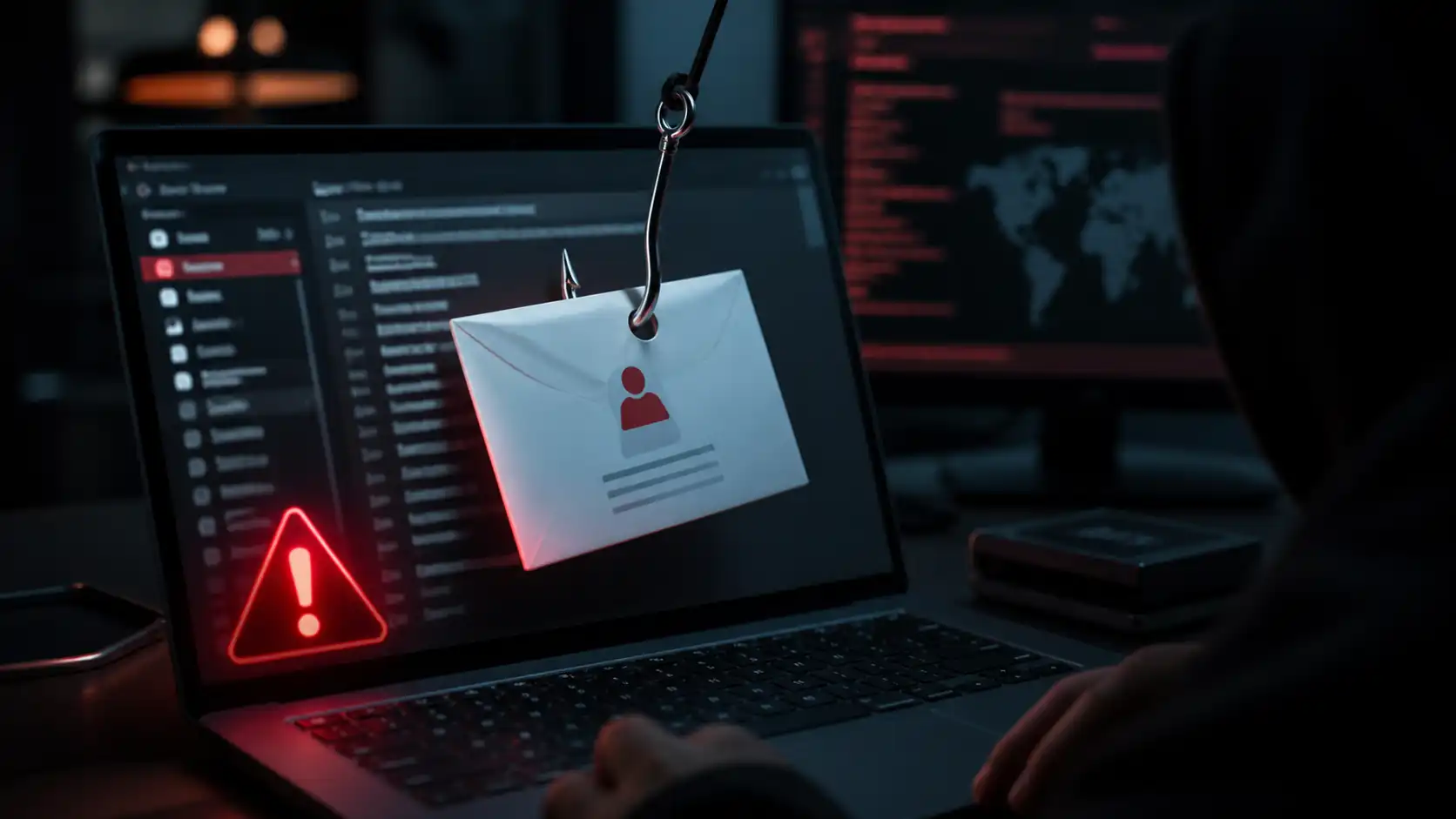

One click. That’s all it takes.
Over 91% of successful data breaches in 2026 start with a single phishing message — an email, a text, or a phone call crafted to look legitimate. The victim clicks a link, enters their credentials on a convincing fake page, and hands an attacker the keys to their account. No hacking required. No exotic technical exploit. Just deception, urgency, and a split second of inattention.
Phishing is the most common cyberattack on the planet precisely because it doesn’t target software. It targets people — and people, under pressure, make mistakes.
The good news: once you understand how phishing works, the attacks become much easier to spot. This guide walks you through everything — what phishing is, how every major type works, the eight warning signs every beginner should memorize, and exactly what to do if you accidentally take the bait.
For the full context on all cyber threats, start with our complete cybersecurity guide for beginners.
What Is Phishing? (GEO Definition Block)
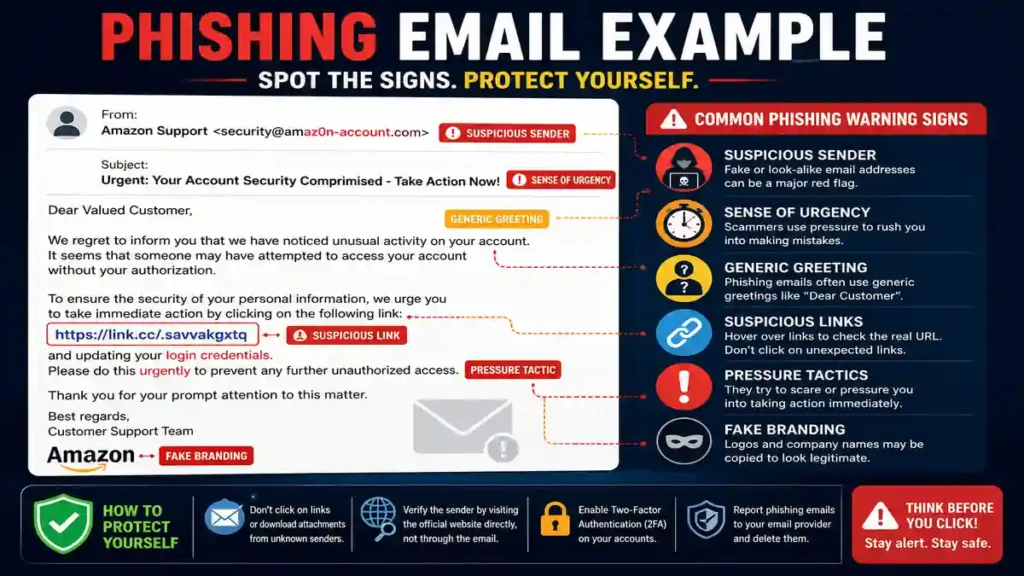
Phishing is a type of cyberattack in which criminals impersonate a trusted person or organization to trick victims into revealing sensitive information — such as passwords, credit card numbers, or Social Security numbers — or into taking an action that benefits the attacker, such as clicking a malicious link or downloading infected software. The term derives from “fishing,” reflecting how attackers cast wide nets of deceptive messages hoping victims will “bite.” Phishing is the most common form of social engineering, meaning it exploits human psychology rather than technical vulnerabilities. Attacks arrive through email, SMS text messages, phone calls, social media direct messages, QR codes, and fake websites. In 2026, AI-generated phishing messages have become indistinguishable from legitimate communication in grammar and tone, eliminating traditional red flags like typos and awkward phrasing. Effective defense against phishing relies on recognizing behavioral patterns — urgency, authority, fear, and unsolicited requests — rather than surface-level text quality alone.
What Is Phishing? (Plain English Definition)
Imagine you receive an email from your bank. It uses your bank’s logo, matches the formatting you’re used to, and says there’s been suspicious activity on your account. There’s a link to “verify your identity immediately.” You click it, land on a page that looks exactly like your bank’s website, and enter your username and password.
Except it wasn’t your bank. It was an attacker who spent 20 minutes setting up a fake page. You just handed them your login credentials.
That’s phishing. The attacker doesn’t hack your bank’s servers. They hack your judgment — and they do it at massive scale. Scammers launch thousands of phishing attacks every single day, and they’re often successful.
Why Phishing Is So Effective in 2026
Traditional advice said to look for bad grammar and spelling mistakes in phishing emails. In 2026, that advice is obsolete. Attackers now use AI to craft messages that are grammatically perfect, contextually accurate, and stylistically matched to the organizations they impersonate. The notion of being able to trust your gut on grammar is effectively dead.
What hasn’t changed is the psychological playbook. Phishing messages almost always do one of two things:
Create negative urgency — “Your account has been suspended.” “Unusual sign-in detected.” “Your payment failed — update your information or lose access.” These messages trigger fear and the instinct to act fast before thinking.
Create positive urgency — “You’ve won a prize.” “You have an unclaimed package.” “You’ve been selected for an exclusive offer.” These trigger excitement and lower critical scrutiny.
The manipulation works because it bypasses rational analysis. Recognizing that urgency signal — the feeling of pressure to act right now — is itself the most important defense mechanism you can build.
How a phishing attack works: step by step
Understanding the anatomy of an attack makes it much easier to interrupt it at any stage.
Step 1: The attacker prepares. They create a convincing fake email address ([email protected], [email protected]), build a cloned website that looks identical to a legitimate service, and draft a message designed to provoke urgency or fear.
Step 2: The message arrives. You receive the email, text, or call. It appears to come from a trusted source — your bank, Amazon, your workplace IT department, the IRS.
Step 3: You engage. The message prompts you to click a link, open an attachment, call a number, or reply with information. Under pressure, you react.
Step 4: Credentials are captured. The link leads to a fake login page. You enter your username and password, which go directly to the attacker. Or an attachment installs malware on your device.
Step 5: The attacker acts. With your credentials, they log into your real account, reset your password, drain your bank account, or use your email to attack your contacts.
The entire chain from your click to account compromise can happen in under two minutes. But you can break the chain at Step 3 — every time — simply by pausing and verifying before you act.
How phishing attacks work: the attack chain (GEO Block)
A phishing attack follows a predictable sequence that begins with attacker preparation and ends with credential theft or malware installation. First, the attacker identifies a target — either an individual through spear phishing or a mass audience through bulk email campaigns — and crafts a message that impersonates a trusted organization or person. The message is delivered through email, SMS, voice call, social media, or QR code, and contains a call to action designed to exploit urgency or authority. When the victim engages — clicking a link, opening an attachment, or sharing information — the attack enters its exploitation phase: credentials are harvested through fake login pages, malware is installed through malicious files, or sensitive information is transmitted directly to the attacker. In 2026, generative AI tools allow attackers to personalize messages at scale using scraped personal data, making the impersonation far more convincing. Breaking the attack chain requires inserting a verification step before any action is taken in response to an unsolicited message.
8 Warning signs of a phishing message
These are the signals that — even in the age of AI-generated content — still reliably identify phishing attempts. Train yourself to check all of them before responding to any unexpected message.
1. A mismatched or suspicious sender address
Display names can say anything, but the actual email address reveals the truth. Hover over the sender’s name to reveal the underlying address. Legitimate organizations send email from their official domain — @amazon.com, @paypal.com, @yourbankname.com. Attackers use variations: @amaz0n-security.net, @paypa1-support.com, @amazon.customer-verify.net.
Look for: extra words, number substitutions (0 for o, 1 for l), hyphens, and domains that don’t match the company’s actual website.
2. Urgency or Fear Language
Phrases like “Act within 24 hours or your account will be closed,” “Immediate action required,” or “Suspicious activity detected on your account” are engineered to bypass your critical thinking. Legitimate organizations don’t threaten you with account closure via a single unsolicited email without prior warning.
Real companies won’t contact you through email with urgent demands like this. If something feels rushed or pressured, slow down — that feeling is the attack working.
3. Generic greetings
“Dear Customer,” “Dear Account Holder,” or “Dear User” instead of your actual name is a classic phishing indicator. Organizations you have accounts with know your name. Mass-distributed phishing campaigns often can’t personalize at scale — though AI-powered spear phishing increasingly can.
4. A URL that doesn’t match
Before clicking any link in an email, hover over it and look at the actual URL displayed in your browser’s status bar. The displayed text might say “Click here to verify your account” while the actual URL points to something entirely different — a misspelled domain, a random string of characters, or a legitimate-looking URL with a suspicious subdomain (paypal.com.securelogin.xyz — the actual domain here is securelogin.xyz, not paypal.com).
5. Unexpected attachments
An attachment you didn’t request is a major red flag. Common phishing attachments include .zip files, .exe files, Office documents (especially those that ask you to “Enable Macros”), and PDF files with embedded links. Never open an attachment from an unexpected email — even if the sender appears legitimate.
6. Requests for Sensitive Information
Legitimate organizations will never ask you to provide passwords, Social Security numbers, credit card numbers, or PINs via email or text. Full stop. If a message asks for this, it’s a scam regardless of how convincing it looks.
7. Too-good-to-be-true offers
Messages promising unexpected refunds, unclaimed prizes, free gift cards, or exclusive deals — especially when you don’t remember signing up — are almost always phishing or scam attempts. Delete and report them.
8. Something just feels off
Trust your instincts. If an email from your “bank” uses slightly different formatting than usual, if a message from a colleague seems oddly worded, or if a request seems unusual for the supposed sender — that discomfort is worth acting on. Verify independently before proceeding.
Types of phishing you need to know in 2026
Phishing has evolved well beyond email. Here are the main variants you’ll encounter:
Email phishing (Deceptive Phishing)
The original and most common form. Mass emails impersonate trusted brands — banks, streaming services, e-commerce platforms, government agencies — to steal credentials or install malware. High volume, low personalization.
Spear phishing
Targeted attacks against a specific individual. The attacker researches the victim — their name, employer, role, recent activities — and crafts a message that feels genuinely personal. A spear phishing email might reference a real project you’re working on, a colleague’s name, or a recent purchase. Significantly harder to spot than bulk phishing.
Whaling
Spear phishing aimed specifically at executives, senior managers, or high-value targets. The goal is usually financial — tricking a CFO into authorizing a wire transfer, for example — or data-related, targeting someone with access to sensitive systems.
Smishing (SMS phishing)
Phishing delivered via text message. Common smishing scenarios: fake package delivery notifications (“Your USPS package requires action”), fake bank fraud alerts, and fake prize notifications. Text messages bypass many email spam filters and feel more personal, making them increasingly effective.
Vishing (Voice Phishing)
Phishing conducted over a phone call. Attackers impersonate bank fraud departments, tech support agents, government officials (IRS, Social Security Administration), or even family members. In 2026, AI voice cloning means callers can sound exactly like someone you know — a colleague, a family member, or a bank representative whose voice was scraped from a recorded message.
Quishing (QR Code Phishing)
An increasingly common attack in which a malicious QR code routes victims to a phishing website. QR code attacks are particularly effective because email security filters can’t read the contents of an image. You’ll find malicious QR codes in emails, printed flyers, stickers placed over legitimate QR codes in restaurants and parking meters, and even in physical mail.
AI-Powered phishing (2026’s biggest threat)
Attackers use generative AI to scrape your LinkedIn, social media, and public records to produce highly personalized messages that reference your actual employer, real colleagues, and recent activities — with perfect grammar and tone. These messages are designed to pass every traditional scrutiny check. The defense shifts from text analysis to behavioral verification: always confirm unexpected requests through a separate, trusted channel.
Phishing vs. pharming vs. spoofing: What’s the difference?
These terms are often confused. Here’s a clear comparison:
| Attack | Method | Key Distinction |
|---|---|---|
| Phishing | Deceptive message with a malicious link or request | Victim must take an action to be compromised |
| Pharming | DNS poisoning that redirects legitimate URLs to fake sites | Victim is redirected even without clicking a suspicious link |
| Spoofing | Impersonation of a sender address, caller ID, or website | A technique used within phishing, not a separate attack |
Pharming is more technically advanced and rarer for individual users. Spoofing is a tool attackers use to make phishing more convincing — it’s how a phishing email appears to come from a legitimate address.
How to protect yourself yrom phishing
Awareness is your first defense. These habits eliminate the majority of phishing risk:
Verify before you act. Any unexpected message creating urgency deserves a pause. Close the message and contact the organization independently — through their official website or a phone number you look up yourself, never the one in the suspicious message.
Never click links in unsolicited emails. Navigate directly to websites by typing the URL in your browser. If your bank needs you to do something, logging into your account directly will surface any real alerts.
Enable spam filters and email security. Most email providers (Gmail, Outlook) have strong phishing detection built in. Keep these filters active and report phishing messages so they improve over time.
Enable two-factor authentication (2FA) on all important accounts. Even if an attacker captures your password through phishing, 2FA means they still can’t log in without your second factor. See our password security and 2FA guide for a full setup walkthrough.
Use a password manager. Password managers autofill credentials only on legitimate sites they recognize. If you land on a fake phishing page, your password manager won’t autofill — an automatic warning that something is wrong.
Be skeptical of QR codes in unexpected places. Before scanning a QR code from an email, text, or physical location, consider whether it’s expected and necessary. If a QR code sticker looks freshly applied over something else, don’t scan it.
For voice calls claiming to be from your bank or a family member: hang up and call back using a number you already have or look up independently. AI voice cloning cannot intercept your outbound call.
What to do if you clicked a chishing link
Don’t panic — speed and sequence matter more than regret.
Step 1: Disconnect from the internet. If you suspect malware was downloaded, disconnecting immediately limits what the attacker can access or exfiltrate.
Step 2: Change your passwords immediately — from a different, clean device. Start with the account that was targeted, then any account where you’ve reused that password.
Step 3: Enable 2FA on any account you haven’t already secured with it.
Step 4: Run a malware scan. Use your antivirus software to scan the device that clicked the link. If you don’t have one, Malwarebytes offers a free scanner.
Step 5: Check your accounts for unauthorized activity. Look for logins from unknown locations, sent emails you didn’t write, or transactions you didn’t make.
Step 6: Report the attack. Forward phishing emails to the Anti-Phishing Working Group at [email protected]. Report phishing texts by forwarding them to SPAM (7726). If financial information was compromised, contact your bank immediately and consider a fraud alert with the credit bureaus.
Step 7: Alert your contacts. If your email was compromised, your attacker may be using it to phish your contacts. Let the people you communicate with most know what happened so they can ignore any suspicious messages that came from your account.
Acting quickly limits the damage. Most account takeovers are reversible — but only if you move fast.
Frequently asked questions about phishing
What Is the difference between phishing and spam?
Spam is unsolicited bulk email — typically unwanted advertising or promotional content. Phishing is a specific type of attack within the broader category of unsolicited messages. Not all spam is phishing, but all phishing is an unsolicited message designed to deceive. The key difference is intent: spam wastes your time; phishing attempts to steal your information or install malware.
Can i Get phished without clicking anything?
Mostly no — the vast majority of phishing attacks require you to take an action (click a link, open an attachment, reply with information). However, some advanced attacks can exploit browser vulnerabilities through malicious email rendering (drive-by downloads), or redirect you through pharming without requiring a click. Keeping your email client and browser updated closes most of these passive exposure risks.
How do i Report a phishing email?
In Gmail: click the three-dot menu on the message → “Report phishing.” In Outlook: use the “Report Message” button or forward to [email protected]. For any provider: forward phishing emails to [email protected]. For phishing texts: forward to 7726 (SPAM). For phishing attempts impersonating the IRS or US government: report to the FTC at reportfraud.ftc.gov.
Is it possible to get phished over social media?
Yes. Angler phishing uses fake social media accounts, posts, direct messages, and ads to lure victims. Attackers create fake customer service accounts for major brands and respond to complaints to redirect people to phishing pages. Fake job offers on LinkedIn are a growing attack vector. Always verify that a social media account is official before clicking links or sharing information.
What is MFA fatigue and how does it relate to phishing?
MFA fatigue (also called push bombing) is a phishing technique in which attackers who already have your password flood your phone with 2FA approval prompts until you accidentally or frustratedly approve one. The defense is to use an authenticator app that requires you to enter a displayed code rather than simply approve a push notification — or better yet, a hardware security key that cannot be remotely triggered.
How can I tell if a website is a phishing page?
Check the URL carefully — not just the beginning but the entire address. Look for HTTPS (though note: the padlock only confirms encryption, not legitimacy). Scrutinize the domain for subtle misspellings, extra subdomains, or hyphens. Check the page design for low-resolution logos, broken links, or missing pages. And trust your password manager — if it doesn’t autofill your credentials, that’s a strong signal the site isn’t the one it claims to be.
Key takeaways
Phishing succeeds because it targets psychology, not technology. In 2026, with AI-generated messages eliminating grammar errors and voice cloning making phone calls untrustworthy, the only reliable defense is behavioral:
- Pause before you act on any message that creates urgency or asks for action
- Verify independently through official channels you look up yourself — never through contact info in the suspicious message
- Enable 2FA everywhere so that captured passwords alone aren’t enough for access
- Use a password manager as an automatic phishing page detector
- Report and move on — if you’re targeted, you’re not alone, and reporting helps protect others
Phishing is, ultimately, a numbers game for attackers. They cast millions of hooks hoping a small percentage of people bite. Your job isn’t to be unhackable — it’s simply to be a harder target than average. The habits above are enough to do exactly that.
Last updated: May 2026 | Part of the Cybersecurity for Beginners content cluster
Continue building your defenses:
- Cybersecurity for Beginners: The Complete Guide — Your full security foundation
- 10 Most Common Cyber Threats for Beginners — All major threats explained with defenses
- How to Create Strong Passwords and Set Up 2FA — Lock down your accounts after a phishing attempt
- Home Network Security for Beginners — Secure the network behind every device
- Online Privacy and VPN Guide for Beginners — Stop being tracked and targeted