
Screen time limits for children are among the most actively debated topics in child development research, and also among the most consistently misapplied. The American Academy of Pediatrics updated its guidelines in 2024 and no longer specifies a daily hour limit for children over 6. Instead, the framework focuses on ensuring screen time doesn’t displace sleep, physical activity, homework, or in-person social interaction. That shift in framing changes what effective screen time management actually looks like in practice.
Most household rules around screen time were built on the older framework — a fixed number of hours per day applied uniformly across all ages and all content types. The research that has accumulated since 2020 draws a more precise picture: the effects of screen time on children depend significantly on what the child is doing on the screen, when they’re doing it, and what it’s replacing rather than on total daily minutes alone.
This guide covers what the current AAP screen time guidelines actually specify, what the research shows about the effects of different types of screen use on sleep, development, and attention, and the specific tools — Apple Screen Time, Google Family Link, Qustodio, and Circle Home Plus — that translate those research findings into household enforcement without constant conflict. It also addresses the significant distinction between how screen time management should work for a seven-year-old versus a fifteen-year-old.
What the AAP screen time guidelines actually say in 2026
The American Academy of Pediatrics’ 2024 updated guidance replaced its earlier strict hour-based recommendations with a framework organized around four principles, each applying to a different age group.
For children under 18 months, the AAP screen time guidelines recommend avoiding all digital media except video chatting. The neurological rationale is specific: children under 18 months are still developing the cognitive ability to transfer learning from a screen to the real world, which means passive screen viewing at this age produces minimal developmental benefit and displaces time that would otherwise involve more developmentally valuable interaction.
For children aged 18 to 24 months, the guidelines permit high-quality educational content when a caregiver watches alongside the child and actively engages with what appears on screen. Passive solo viewing is still discouraged at this stage.
For children aged 2 to 5, the AAP recommends limiting screen time limits for children to one hour per day of high-quality programming with co-viewing as the default. The co-viewing element is not a suggestion — the research supporting improved learning outcomes at this age is specific to supervised, interactive screen use rather than unsupervised passive consumption.
For children 6 and older, the 2024 AAP framework does not specify a daily hour ceiling. Instead, it recommends ensuring that screen time doesn’t displace the six behaviors that research consistently links to healthy development: adequate sleep, regular physical activity, in-person social interaction, academic engagement, creative play, and family time. Screen time limits for children in this age group are contextual rather than categorical — they’re calibrated to what else is happening in the child’s day, not to a fixed number.
The practical implication of this framework: parents who apply a blanket two-hour limit to a twelve-year-old’s device use are applying a rule not supported by the current guidelines. The more effective question is whether screen time, in its current form, is displacing the six healthy behaviors the AAP identifies.
For context on how screen time management fits within a broader family internet protection system that also covers content filtering, monitoring, and platform safety, our complete family internet protection guide covers all layers in sequence.
What research shows about screen time effects on children: the findings that matter
The research on screen time effects on children draws a consistent distinction that most household rules don’t yet reflect: passive consumption and active or interactive use produce different outcomes, and the timing of screen use matters as much as the total duration.
Sleep disruption represents the most robustly evidenced negative effect of specific screen use patterns. The American Academy of Sleep Medicine’s 2024 report found a statistically significant correlation between devices used in the hour before bed and reduced total sleep duration in children aged 6 to 12. The mechanism is direct: the blue-spectrum light emitted by device screens suppresses melatonin production, delaying the onset of sleep. A child who uses a device until 9:30pm and has a 10pm bedtime loses an average of 28 minutes of sleep per night compared to a child whose last screen use ends at 8:30pm. Over a school week, that compounds to over two hours of lost sleep. The most evidence-supported screen time rule for this age group isn’t a daily hour limit — it’s no devices in the 60 minutes before the intended sleep time.
Attention effects show more nuance than media coverage typically reflects. A 2025 Common Sense Media analysis of 3,400 children found that high daily screen time exceeding four hours was associated with self-reported attention difficulty, but the association was specific to passive entertainment consumption — videos, social media, and streaming. Interactive screen use including educational apps, creative tools, and video communication showed no significant attention correlation at comparable usage levels. Screen time limits for children that distinguish between passive and interactive use address the actual risk profile rather than treating all screen time as equivalent.
Physical displacement is the effect with the most direct policy implication. The World Health Organization’s 2024 physical activity guidelines for children under 18 identify prolonged sedentary screen time as the leading contributor to insufficient daily movement in children aged 5 to 17. The causal pathway is straightforward: every hour in front of a screen is an hour not spent in physical activity. The AAP screen time guidelines’ emphasis on ensuring screen time doesn’t displace physical activity reflects this research directly. Setting a hard stop on device use in the early evening and requiring physical activity before afternoon screen time are the two household rules most directly supported by this body of evidence.
Content type produces the sharpest differential outcomes in the research. Passive consumption of algorithmically served short-form video — TikTok’s For You Page, YouTube Shorts autoplay — produces different neural engagement patterns than reading, structured educational content, or video communication with known peers. A 2024 University of California at San Diego study measured reduced working memory performance in children with high exposure to algorithmic short-form video compared to matched controls. The implication for screen time management: the category of content matters as much as the total minutes.
How to enforce screen time limits for children without constant conflict
Technology-enforced screen time limits for children produce significantly less daily conflict than parent-enforced limits for one specific reason: when the device itself locks at the end of the allotted time, the cutoff is structural rather than personal. The parent didn’t take the device away — the device reached its configured limit. This distinction matters enough in practice that the AAP screen time guidelines’ emphasis on “consistent limits” reflects it directly: consistency is most achievable when the enforcement doesn’t depend on parental availability or mood.
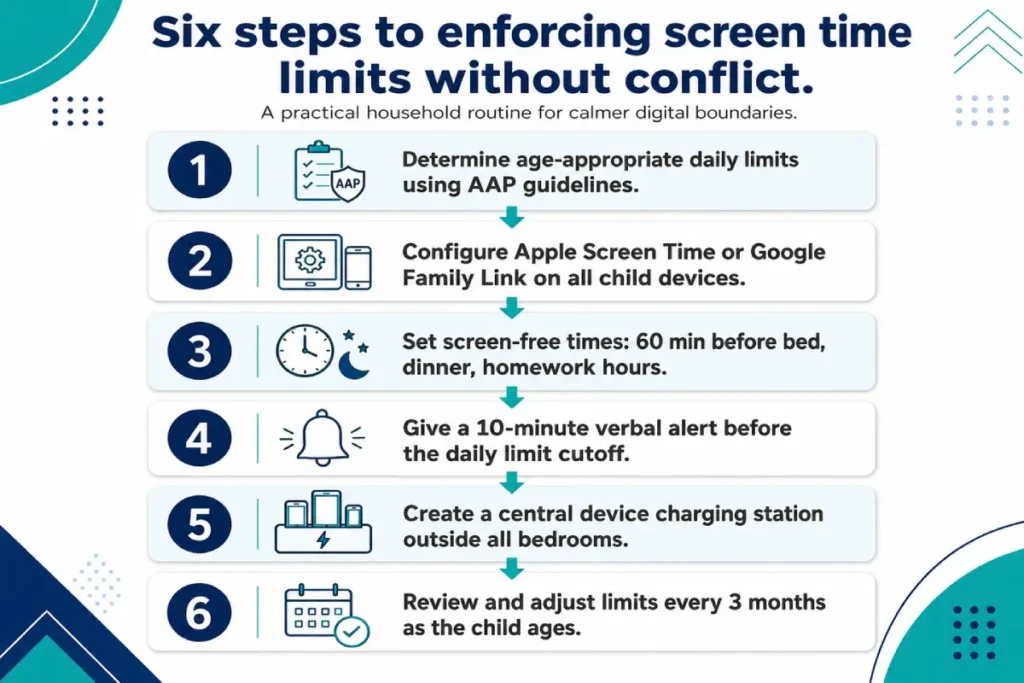
The conflict most parents experience around screen time stems from two specific failure patterns. The first is abrupt termination. Calling out a cutoff with no advance notice triggers the same frustration as interrupting any engaged activity without warning. A reliable 10-minute verbal alert before the device lock — or before the parent asks the child to put it down — significantly reduces the emotional abruptness of the transition. Screen time limits for children enforced consistently and predictably become routine within two to three weeks; limits enforced sporadically or following argument remain a source of daily friction indefinitely.
The second failure pattern is inconsistency across situations. A household rule that applies on school nights but is negotiated away on weekends, or that applies when one parent is present but not the other, signals to the child that the rule is contingent rather than structural. Device-based enforcement through Apple Screen Time or Google Family Link eliminates this inconsistency by applying the limit automatically regardless of circumstance.
Age-specific enforcement varies in approach rather than just in the limit itself. For children aged 6 to 9, hard device limits with no child-side override capability are the appropriate default — there’s no developmental reason at this age for the child to have negotiating input into their daily limit. For children aged 10 to 13, building in a single structured extension mechanism reduces resistance: one 30-minute daily extension available upon direct request from the child produces better outcomes than a hard lock that drives workarounds. For teenagers 14 and older, conversation and monitoring replace enforcement as the primary approach.
Two screen-free environmental rules are supported by the research on screen time effects on children more consistently than any specific daily hour limit. No devices in the bedroom after a set time: the American Academy of Sleep Medicine cites bedroom screen access as the leading environmental factor in sleep disruption for school-age children, and the correlation holds even when the child isn’t actively using the device. No devices at the dinner table: family mealtime remains one of the few daily contexts for unstructured conversation, and its consistent displacement by individual device use has documented effects on family communication patterns. A central device charging station outside all bedrooms — where every household device docks overnight — addresses both rules simultaneously without requiring repeated parental enforcement.
Configuring screen time limits for children by age group through Apple Screen Time or Google Family Link takes approximately 20 minutes and removes the daily negotiation entirely. The device configuration that enforces this framework is covered in the next section. For the monitoring layer that works alongside screen time enforcement — covering what children access within their allotted time on messaging platforms — see our guide to protecting children from online predators.
Apple Screen Time setup: daily limits, downtime, and content restrictions
Apple Screen Time is the built-in tool for implementing screen time limits for children on iOS and macOS devices, available on every iPhone and iPad running iOS 12 or later and every Mac running macOS Catalina or later. No third-party installation is required. For households already in the Apple ecosystem, it’s the starting point for any enforcement framework before paid parental controls software is considered.
The Apple Screen Time setup process for a parent managing a child’s device through Family Sharing follows eight steps. Working through all eight from scratch takes approximately 25 minutes.
- On the parent’s iPhone, open Settings and tap the Apple ID name at the top. Select Family Sharing and confirm the child’s Apple ID appears in the family group. If the child doesn’t have an Apple ID, create one at this step — Apple ID creation for children under 13 requires the parent’s Apple ID for verification.
- Still on the parent’s iPhone, go to Settings > Screen Time. Select the child’s name from the family list to access all Screen Time controls for their device remotely.
- Tap Turn On Screen Time for the child’s device. When prompted, select the option indicating this is a child’s device.
- Set a Screen Time Passcode — a four or six-digit code separate from the device passcode that the child doesn’t know. This single step prevents the child from adjusting limits, requesting unlimited extensions, or disabling Screen Time from their own device. Without this passcode, every other Screen Time configuration can be reversed by the child in under 30 seconds.
- Configure App Limits. Tap App Limits > Add Limit. Select by category — Entertainment, Social Networking, Games, Creativity — or by individual app. Set the daily time budget for each. As a starting point aligned with AAP screen time guidelines: Entertainment at 60 to 90 minutes for children aged 6 to 9, Social Networking at 30 minutes for children aged 10 to 13, Games at 60 minutes for both age groups.
- Configure Downtime. Set the schedule during which only approved apps can be used — typically 8:30pm to 7am for school-age children. Downtime runs independently of App Limit budgets: even if a child hasn’t used their daily Entertainment allotment, Downtime locks entertainment apps at the scheduled time. This is the most powerful single feature in the Apple Screen Time setup for addressing the sleep disruption research.
- Configure Always Allowed apps. These apps remain accessible during Downtime and after App Limits expire. Keep this list short: Phone, Messages if required for safety, and specific educational apps needed for homework. Adding streaming or gaming apps to this list effectively nullifies the Downtime configuration.
- Configure Content and Privacy Restrictions. Under this panel: set the app age rating limit appropriate to the child’s age, disable in-app purchases, restrict explicit web content in Safari, and disable the ability to install apps or change the device passcode without the Screen Time Passcode.
One frequently overlooked setting: Communication Limits. Under Screen Time > Communication Limits, parents configure who the child can call, text, and FaceTime both during active Screen Time and during Downtime. Setting Downtime communication to contacts only — rather than everyone — prevents late-night messaging with unknown numbers while preserving the ability to reach emergency contacts at any hour.
Google Family Link: screen time controls for Android and Chromebook households
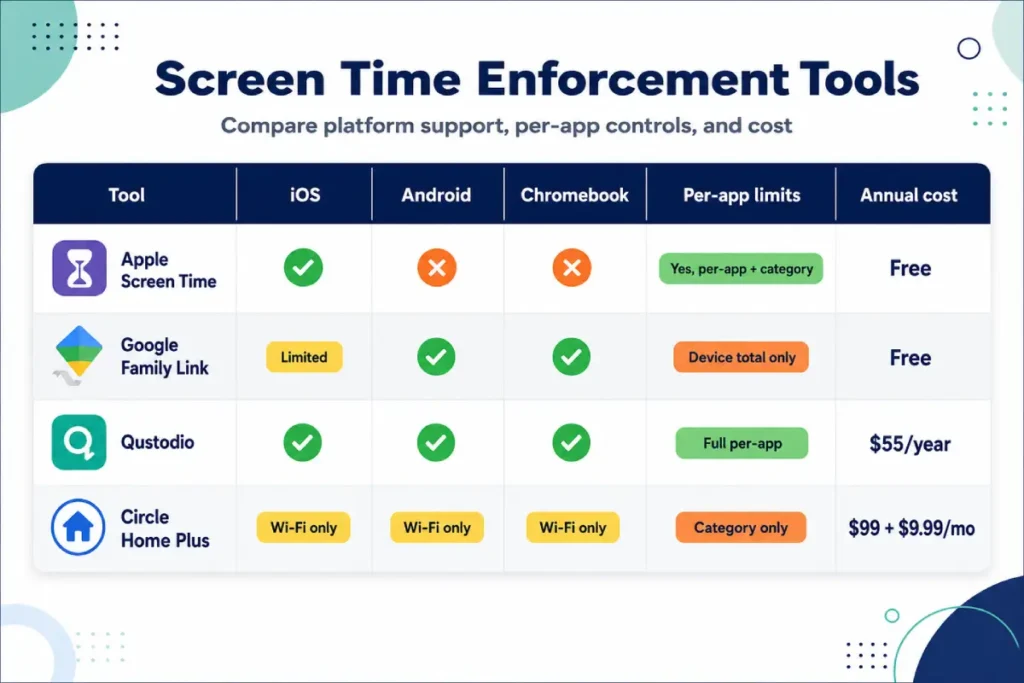
Google Family Link is the primary free tool for enforcing screen time limits for children on Android devices and Chromebooks, available as a parent app on any Android 6.0 or later smartphone. When set up with a child’s supervised Google account, it gives the parent remote control over the child’s Android device and Chromebook from a single dashboard.
Setup takes approximately 15 minutes. The parent downloads the Family Link app from Google Play, creates or links the child’s Google account as supervised, and follows the in-app pairing steps to connect the child’s device. Once paired, the parent’s Family Link app displays real-time app activity, total daily screen time, the child’s device location, and the current battery level.
Key controls in Google Family Link: a total daily screen time budget after which the device locks, app approval requiring parent sign-off on every Google Play download, SafeSearch enforcement in Chrome, content filters in Google Play, and remote device lock accessible from the parent’s phone at any time. The daily budget lock can also be scheduled as a bedtime block — the equivalent of Apple Screen Time’s Downtime but activated manually rather than on an automatic schedule.
Family Link’s main limitation compared to Apple Screen Time setup is granularity. It sets a total device daily budget rather than per-app or per-category limits. A child who spends their full daily budget on educational apps has the same remaining allotment as one who spent it on passive video consumption. Qustodio for Android fills this gap with per-app daily time limits that run alongside Family Link. Using both — Family Link for app approval and location, Qustodio for per-app time control — provides the most complete Android enforcement available.
Family Link’s Chromebook integration extends the same supervised account controls to any Chromebook the child logs into with their supervised Google account, including school-issued devices where the child’s personal account is one of multiple profiles.
Screen time limits for children after 13: why the approach changes
Screen time limits for children shift fundamentally in approach after age 13, and the shift reflects research rather than a concession to teenage resistance. The current AAP screen time guidelines for children over 13 intentionally specify no daily hour limit because the developmental goal changes at this stage: the target moves from establishing structure to building self-regulation. Enforcement-heavy approaches applied to a fifteen-year-old produce workarounds — VPNs, friends’ devices, school computers — rather than genuine behavioral change.
The evidence on screen time effects on children aged 13 to 17 is specific about which behaviors drive risk. Sleep displacement remains the most consistently documented harm: a 2024 Common Sense Media study found 72% of teenagers reported device use in the 30 minutes before sleep, correlating with an average 45-minute reduction in nightly sleep duration. The bedtime device rule — all devices charged in a central location outside bedrooms after an agreed time — is the single highest-impact screen time intervention for teenagers. It requires no app, no subscription, and no ongoing enforcement beyond the initial household agreement.
Screen time management at the teenager stage is the final piece of a comprehensive family internet protection system for most households. The practical transition from enforcement to shared responsibility involves three changes. Hard content blocks are removed except for the VPN and proxy bypass category. Bark monitoring covers messaging platforms for behavioral signals. And the teenager participates in setting their own reasonable parameters — a 2024 Common Sense Media survey found teenagers who had input into their screen time rules were three times more likely to stick to them than those who had limits imposed without input.
For the digital literacy habits and conversation frameworks that support self-regulated screen use across all age groups, see our safe internet habits for kids guide.
Common mistakes that undermine screen time limits for children
Five consistent mistakes undermine screen time limits for children regardless of which enforcement tool the household uses.
Applying identical limits to all children in the household regardless of age. A seven-year-old and a fourteen-year-old have genuinely different developmental needs and appropriate limits. Apple Screen Time and Google Family Link both support different per-child configurations — using this capability is precisely the purpose of age-differentiated setup.
Using device confiscation as punishment for non-screen-related behavior — poor grades, incomplete chores, sibling conflict. This conflates the device with punishment, making every subsequent screen time interaction adversarial. Device-related consequences should connect directly to device behavior; separating them from unrelated infractions maintains cleaner enforcement dynamics.
Failing to configure limits on secondary devices. The primary smartphone receives careful screen time configuration while the household tablet on the kitchen counter, a gaming device in a sibling’s room, and a grandparent’s tablet during visits remain entirely unmanaged. Every device a child can access independently requires its own configuration or physical placement in a supervised location.
Treating all screen time as equivalent. Screen time effects on children depend significantly on content type — educational apps and video calls with known family members produce different outcomes than algorithmic passive video consumption. Building content-type distinctions into the household’s rules and device configuration reflects the research more accurately than a flat total-minutes cap.
Failing to review limits as children age. A family internet protection configuration that works well for a nine-year-old is typically wrong for that same child at twelve. A quarterly calendar reminder to revisit screen time settings takes three minutes to schedule and prevents the drift that produces outdated rules applied to a child who has significantly changed.
Frequently asked questions
How much screen time is too much for a 10-year-old?
The current AAP screen time guidelines for children 6 and older don’t specify a daily hour ceiling — the 2024 framework focuses on whether screen time displaces sleep, physical activity, homework, or in-person interaction. For a 10-year-old, a practical research-aligned starting point: 90 minutes of entertainment screen time on school days and 2 to 2.5 hours on weekends, with no devices in the 60 minutes before bed. Screen time effects on children at this age are most pronounced when device use extends into sleep preparation time, not when it falls within a reasonable daytime window.
Should screen time limits be different on school days versus weekends?
Yes, and the distinction is worth building directly into the device configuration. Weekday entertainment limits for children aged 6 to 12 can reasonably sit at 60 to 90 minutes, while weekend limits can extend to 2 to 2.5 hours without conflicting with the research on healthy development. The rule that holds constant across both: no devices in the 60 minutes before sleep. Apple Screen Time and Google Family Link both support separate daily limit configurations for weekdays and weekends within a single setup.
Does educational screen time count toward the daily limit?
The research distinguishes clearly between passive entertainment consumption and educational or interactive screen use — the two produce measurably different outcomes. Most household screen time rules benefit from either treating educational screen use as a separate uncapped category or applying a generous standalone limit. Qustodio and Apple Screen Time both support per-category time limits that allow educational apps to run without consuming the entertainment allotment.
My child says all their friends have no screen time limits. How do I respond?
The response that holds: the household’s rules are based on what the research shows about sleep and attention, not on what other households do, and other families’ choices don’t change what the evidence says. Sharing the specific sleep finding — that devices used in the hour before bed cost children an average of 28 minutes of sleep per night — gives the rule a factual foundation. If the child can offer a specific evidence-based argument for why the rule should change, that conversation is worth having. If the argument is only about fairness relative to other households, the rule stays.
At what age should I remove screen time limits entirely?
There’s no single age at which screen time limits for children should be removed entirely. The more accurate framing: hard device enforcement transitions to monitoring-based awareness somewhere between 14 and 16, as a teenager builds the self-regulation the AAP guidelines are designed to develop. The practical transition: at 14 or 15, discuss the screen time data directly with the teenager, co-create reasonable parameters with their input, and shift from device locks to Bark monitoring and conversation. Family internet protection at the teenager stage is primarily a communication structure, not a technical enforcement system.