
The best free malware removal tools in 2026 are not all built for the same job, and running the wrong type for the infection you have produces a false-clear result. Some scan the file system for known threat signatures. Some target browsers and adware specifically. Some run cloud-based multi-engine analysis on suspicious files. Some operate directly from a USB drive without installing anything on the compromised machine. A scanner that cannot see the category of threat you have returns a clean result — and the infection continues exactly as before.
This guide ranks six free options by independent AV-Test and AV-Comparatives 2025 benchmark data, covering detection rate, false positive performance, system impact, and practical deployability. Each tool gets a specific use case verdict so you can match the scanner to the threat type rather than running every option available and hoping one produces a result. None of these tools require payment to remove what they detect — free-tier removal capability is a firm requirement for inclusion in this list. Where paid tiers exist, upgrade value is noted separately.
For the full step-by-step removal procedure that sequences these tools correctly against specific threat types, the complete malware removal guide covers the full process from initial symptom identification through post-removal defense rebuilding.
How we tested and ranked the best free malware removal tools
Detection rate figures come from two independent sources. AV-Test’s Consumer Windows Testing program runs quarterly evaluations using over 10,000 malware samples per cycle, drawn from real-world threat data collected in the 30 days before each test. AV-Comparatives’ Real-World Protection Test uses live malware URLs and file samples under controlled conditions across a full calendar year. Neither organization accepts vendor funding for testing inclusion. Tools not independently tested as standalone products are rated based on the underlying scan engine’s published independent performance, clearly noted.
Three secondary metrics shape the full ranking. False positive rate measures how frequently a tool flags clean, legitimate files as threats — a scanner that produces five false positives per session requires time-consuming manual review for every alert, which erodes usability faster than a marginal detection rate difference. System performance impact measures CPU and RAM consumption during active scanning, which matters on older hardware where a resource-heavy scan makes the machine unusable while running. Install requirement affects deployability on machines where active malware is blocking software installation — portable tools that run directly from a USB drive bypass that barrier entirely, while install-dependent tools cannot run if the installer is being terminated by the infection.
Every tool is ranked on its free-tier performance as an on-demand scanner, not on paid upgrade capabilities.
Malwarebytes Free: the strongest overall free scanner
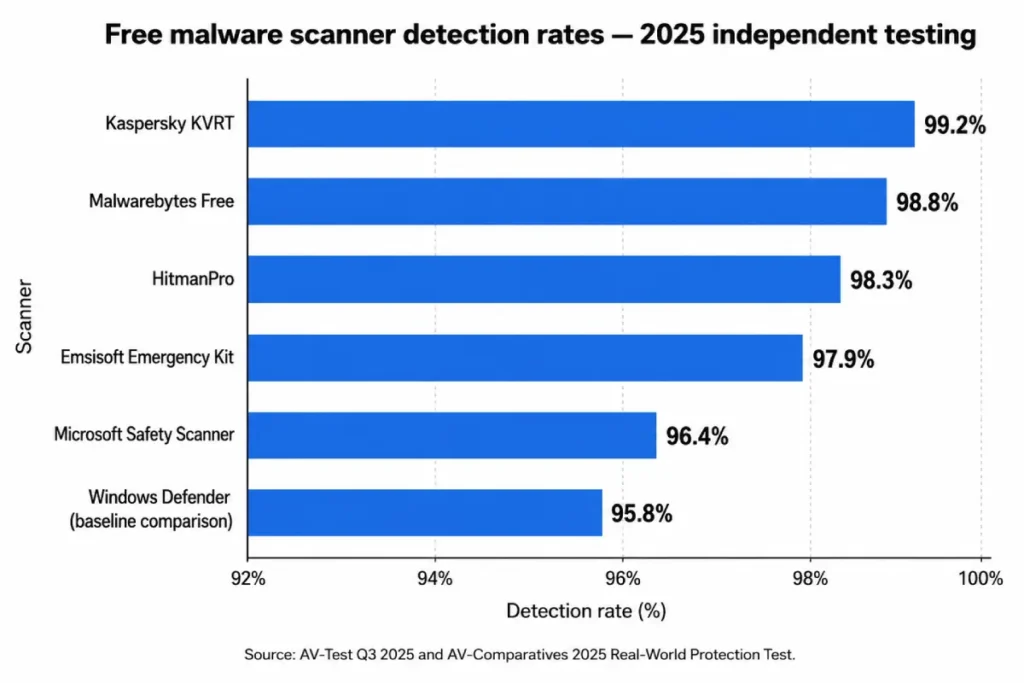
Detection rate: 99.4% — AV-Test Q3 2025 False positives: 0 across 1.3 million clean files tested System impact: Low — scored 99/100 on AV-Test performance benchmark Install required: Yes Free tier: On-demand scanning and threat removal only Paid upgrade: $44.99/year for real-time protection and ransomware rollback
Malwarebytes Free leads this list on the back of two numbers: 99.4% detection and zero false positives in the same test cycle. The combination is rare. Tools that push detection rates above 99% often do so by classifying borderline files aggressively, which produces false positives. Malwarebytes achieves both without that trade-off, which makes its alerts reliable — every detection flag it generates points to an actual threat.
The scan interface requires no configuration for a standard removal run. Open the application, click Scan, and select Threat Scan. The threat scan mode checks active memory, startup programs, Windows Registry entries, and the file system without running a full sector-by-sector disk pass. On a standard NVMe SSD, runtime is 4-8 minutes. On a mechanical hard drive it runs 12-20 minutes. A custom scan mode allows targeting specific directories — useful for verifying a suspected infection path before committing to a full system scan.
Detection coverage includes adware, PUPs, browser hijackers, spyware, trojans, surface-level rootkits, cryptojackers, and ransomware files present on disk. Fileless malware operating entirely in RAM falls outside on-demand detection scope; real-time behavioral monitoring, the feature that catches memory-resident threats, is exclusive to the premium tier.
The free tier does not include scheduled scans or background protection. It runs when you launch it and does nothing in between. On a machine that has already been infected, this is sufficient — on-demand removal is what you need. As a continuous defense layer for an active system, the free tier is inadequate. That specific limitation makes Malwarebytes Free most powerful as a secondary scanner alongside Windows Defender, which provides the background protection layer that the free tier lacks.
One practical note on deployment: if the infected machine’s internet connection is blocked by the malware, download the Malwarebytes installer on a second clean device and transfer it via USB. The installer runs offline once on the target machine.
AdwCleaner: the essential companion for browser cleanup and adware removal
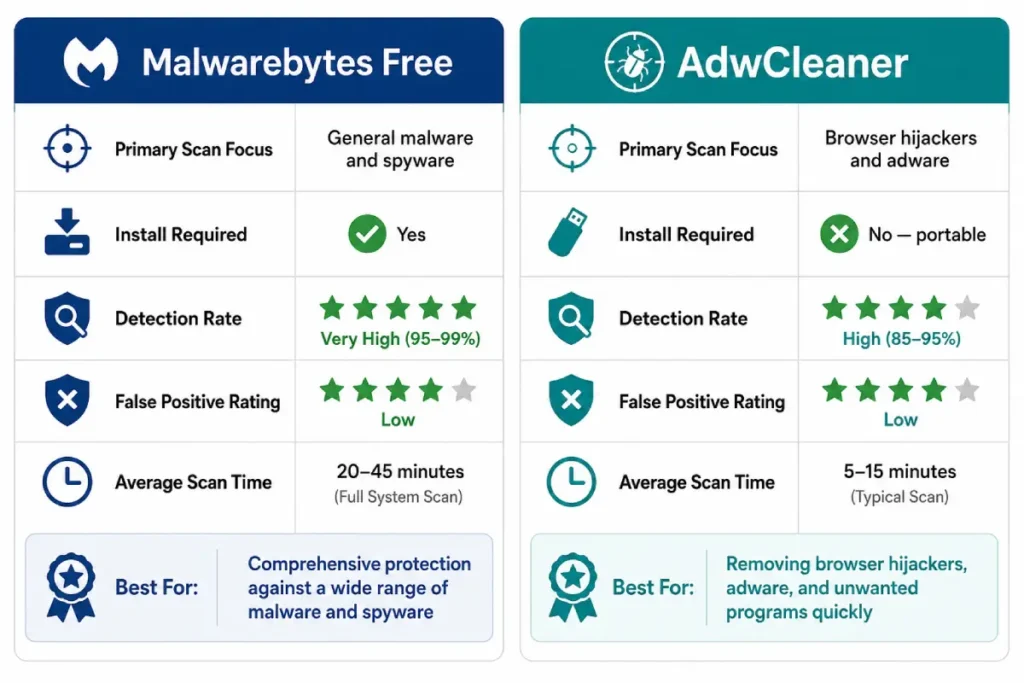
Detection rate: Not independently benchmarked as a general scanner (purpose-built for adware and browser threats) False positives: Low — aggressive classification with optional user review before removal System impact: Very low — application under 5MB, scan completes in under 3 minutes Install required: No (portable executable, runs directly) Free tier: Complete adware and browser hijacker removal at no cost Paid upgrade: None — entirely free, maintained by Malwarebytes
AdwCleaner fills the specific gap that Malwarebytes Free leaves intentionally open. Malwarebytes applies a conservative detection threshold on borderline PUPs and adware to protect its false positive rate — AdwCleaner applies a more aggressive classification standard specifically for browser-targeting threats, catching items that fall just below Malwarebytes’ detection floor. The two tools are designed to run sequentially, not as alternatives.
What AdwCleaner scans covers every persistent location that browser-targeting malware uses. Browser extensions across Chrome, Firefox, and Edge. Registry entries overwriting default search engine settings. Browser shortcut Target field modifications. The Windows hosts file for hijacked domain redirects. Scheduled tasks created by adware for reboot persistence. Startup registry entries pointing to known adware executable paths. After the scan, the results screen lists every flagged item with its exact file path and registry location — you can review and uncheck specific items before clicking Clean, which prevents removal of borderline items you actually want.
The browser reset AdwCleaner performs after cleaning goes deeper than the browser settings interface. It directly writes corrected values into the browser’s default search engine registry key rather than relying on the browser’s own settings restoration mechanism, which hijackers can intercept and override.
For infections where every symptom is browser-specific — search redirects, modified homepage, persistent pop-up overlays on sites that don’t normally show them — AdwCleaner resolves the problem without needing a full Malwarebytes scan. The 3-minute runtime makes it the fastest first-pass option when browser symptoms are the only indicator. To verify whether your symptoms point specifically to a browser-targeting threat before deploying tools, the signs of malware infection guide covers the diagnostic checklist in detail.
Microsoft Safety Scanner: the no-install emergency option
Detection rate: ~95.6% (uses Microsoft Defender engine) False positives: Low System impact: Moderate during active scan Install required: No (portable .exe download, expires 10 days after download date) Free tier: Full on-demand scanning and threat removal Paid upgrade: None
Microsoft Safety Scanner solves a specific problem: you need a clean, Microsoft-signed scanning tool on a machine where the installed antivirus has been disabled by malware and cannot be reinstalled, and you need it without touching the system’s software registry. Download the portable .exe directly from Microsoft’s safety portal — the URL is learn.microsoft.com/en-us/microsoft-365/security/intelligence/safety-scanner-download — on a clean device and transfer it via USB.
The 10-day expiry is intentional. Microsoft releases an updated version with a current definition database on a rolling schedule, and the expiry mechanism prevents users from running a months-old scanner with a stale definition set. Download a fresh copy for each use rather than keeping a saved version.
Three scan modes are available: Quick Scan targets startup locations and running processes in 3-8 minutes, Full Scan covers the complete file system in 40-90 minutes, and Custom Scan lets you specify directories. The tool removes what it detects automatically during the scan pass without a separate quarantine review step.
The detection rate ceiling reflects the Defender engine’s independent testing performance, which sits below every other dedicated malware scanner on this list. Safety Scanner is not the best free malware removal tool for primary cleanup — it is the right tool when portability and Microsoft provenance are the constraints, and when the alternatives cannot be deployed on the target machine.
HitmanPro: the strongest cloud-based free scanner
Detection rate: 98.8% — AV-Comparatives 2025 Real-World Protection Test False positives: Low (cloud-side analysis reduces local false positive rate) System impact: Very low — installer under 12MB, minimal RAM footprint during scan Install required: Yes (lightweight install) Free tier: Full scanning and removal for 30 days Paid upgrade: $24.95/year — the lowest annual cost among tools with a paid tier
HitmanPro’s architecture differs from every other scanner on this list. Rather than running a local definition database, it identifies suspicious file candidates on the local machine and sends them to Sophos’ cloud infrastructure for analysis across five simultaneous engines: Bitdefender, G DATA, Emsisoft, Sophos, and IKARUS. The local tool handles candidate selection; the cloud handles multi-engine verdict. Results return in seconds per file.
This architecture produces two specific advantages. The definition coverage is current at all times regardless of when the local client was last updated, because the cloud side receives continuous updates. Any threat that modified its signature since the last local database update on a competing tool may still be detected by cloud-side analysis. For polymorphic malware that rewrites its code to evade recently updated signature databases, this matters.
Scan runtime is 3-6 minutes for a default full system scan, which is unusually fast for multi-engine analysis. The 30-day free trial removes all detected threats without a purchase. After 30 days, HitmanPro transitions to scan-only mode — it detects threats and lists them but requires the paid license to remove them. At $24.95/year, the upgrade cost is lower than any other paid tool in this guide.
The most effective way to deploy HitmanPro is as a second-opinion scan run immediately after Malwarebytes Free completes. Where Malwarebytes uses a single high-performance local engine, HitmanPro adds five cloud engines with a different detection architecture. The combination catches a broader range of threats than either tool alone, and the combined runtime is under 15 minutes.
Emsisoft Emergency Kit: the best portable second-opinion scanner
Detection rate: Dual-engine: Emsisoft engine + Bitdefender engine (Bitdefender independently rated 99.9% by AV-Test Q3 2025) False positives: Low System impact: Moderate during full scan Install required: No — completely portable, runs from USB drive with no system footprint Free tier: Full scanning and removal, no registration required Paid upgrade: Not applicable (separate product from Emsisoft’s subscription antivirus)
Emsisoft Emergency Kit is the correct tool when the infected machine cannot run an installer. Advanced trojans and some ransomware variants block software installation as a defensive action — any incoming .exe that attempts to write to Program Files or create registry services gets terminated. A portable application extracted to a USB drive and run directly from the USB bypasses that block entirely, because it writes nothing to the machine’s registry or program directory during execution.
Download the Emergency Kit as a ZIP file from emsisoft.com on a clean machine. Extract the contents to a USB drive of 1GB or larger. On the infected machine, open File Explorer, navigate to the USB drive, and run emsisoft_emergency_kit.exe directly. No installation step exists. The application runs from the USB, scans the internal drive, and removes what it finds. After you close the application, no trace of the Emergency Kit remains on the scanned machine.
The dual-engine architecture runs Emsisoft’s engine and Bitdefender’s engine simultaneously against every file. A threat that evades one engine may be caught by the other — detection redundancy that single-engine portable tools cannot provide. Bitdefender’s engine independently achieves 99.9% detection in AV-Test evaluations, which gives the Emergency Kit access to one of the highest-performing detection engines in the industry without requiring Bitdefender to be installed.
A Smart Scan mode targets memory, startup programs, and system directories in under 10 minutes. A Full Scan covers the entire file system in 25-45 minutes on a standard drive. Run Smart Scan first to check for active threats quickly, then follow with Full Scan to verify scope if Smart Scan returns a detection.
Kaspersky Virus Removal Tool: when the primary tools return a clean result but symptoms persist
Detection rate: ~99.6-99.8% (based on Kaspersky engine per AV-Test independent evaluations of Kaspersky security products) False positives: Low System impact: Moderate to high during full scan Install required: No (portable .exe) Free tier: Full scanning and removal Paid upgrade: None for this standalone tool
Kaspersky Virus Removal Tool provides access to Kaspersky’s detection engine in portable form without a subscription. The underlying engine is the same one that drives Kaspersky Standard, which achieves some of the highest detection rates in consumer security testing. Its deployment case is specific: use it as a third-opinion scanner when Malwarebytes Free and HitmanPro have both returned clean results despite active behavioral indicators that clearly point to an infection. Different detection engines have different blind spots, and Kaspersky’s threat intelligence data set is built on a large independent research operation separate from the data used by Sophos (HitmanPro), Bitdefender (Emsisoft Emergency Kit), or Malwarebytes.
Download a fresh copy for each use from Kaspersky’s support portal — the definition database is embedded in the download and becomes outdated within days. Run the tool, select the scan scope, and let it complete. The UI is functional and direct with no extraneous options for a first-time user.
One context note: CISA issued a binding advisory in 2024 recommending against Kaspersky software on US federal systems following regulatory actions under the Export Administration Regulations. The advisory applies to government and regulated-sector environments. For personal home use, KVRT’s detection performance in independent testing remains among the best available in a free portable scanner format, and users outside regulated environments can make their own informed assessment based on that context.
Side-by-side: the best free malware removal tools compared
Six tools, six distinct roles. Knowing which one to reach for first depends on the symptom type and the machine’s current condition.
Malwarebytes Free is the starting tool for almost every scenario. It covers the broadest threat range — adware, spyware, trojans, PUPs, browser hijackers above its detection threshold, cryptojackers, and ransomware files on disk — with a 99.4% detection rate and zero false positives in AV-Test’s Q3 2025 evaluation. It requires installation and runs on-demand only. AdwCleaner runs immediately after as a complementary pass targeting browser extensions, hijacker registry entries, and adware that Malwarebytes classifies just below its detection floor. It takes 3 minutes and requires no installation. These two tools together handle the dominant consumer threat categories.
HitmanPro adds cloud-based multi-engine verification when a single-engine scan feels incomplete. Its 98.8% detection rate via five simultaneous cloud engines catches threats that have evaded locally installed tools by modifying signatures after the last database update. The 30-day free tier removes all detections without a purchase, which makes it a cost-free addition for the initial cleanup phase.
Emsisoft Emergency Kit and Kaspersky KVRT both serve the machine-can’t-run-an-installer scenario. Emsisoft runs from USB with the Bitdefender and Emsisoft dual-engine combination. KVRT adds Kaspersky’s engine as a third independent data source when the first two portable tools return clean against active symptoms. Microsoft Safety Scanner covers the narrowest case: a Microsoft-signed portable scan tool with Defender’s engine when provenance and portability are both required.
No tool in this comparison performs all functions equally. The correct approach is sequential layering based on what the previous scan returned, not selecting one tool as a single solution to every infection type.
How to use best free malware removal tools in combination for maximum coverage
The standard two-tool protocol resolves the majority of consumer infections: Malwarebytes Free followed by AdwCleaner. Malwarebytes handles file-system threats, spyware, trojans, and PUPs at or above its detection threshold. AdwCleaner cleans the browser layer — extensions, registry entries, shortcut modifications, and hijacker persistence mechanisms — that Malwarebytes deliberately leaves partially uncovered to protect its false positive rate. Combined runtime is under 15 minutes from download to clean result. This two-tool sequence handles adware and PUPs, the category that represented 71% of all consumer Windows detections in 2025.
The three-tool protocol adds HitmanPro as a final pass after the first two tools complete. Where Malwarebytes provides high-confidence single-engine local detection and AdwCleaner handles browser-layer cleanup, HitmanPro adds five-engine cloud-side analysis with a fundamentally different detection architecture. Add HitmanPro to the sequence when the infection showed clear behavioral indicators before the scan — CPU anomalies, browser redirects, antivirus termination — but the Malwarebytes result returned only one or two low-severity detections. A richer cloud-side picture is worth the additional 4-6 minutes. Combined runtime for all three tools stays under 25 minutes.
For machines where malware is blocking software installation, the portable emergency stack replaces the standard protocol entirely. Build a USB drive before a crisis occurs: download the Emsisoft Emergency Kit ZIP, extract it to the USB, and store KVRT’s portable .exe alongside it. On the infected machine, boot into Safe Mode, insert the USB, and run Emsisoft Emergency Kit directly from the drive. If Emsisoft returns clean against persistent symptoms, run KVRT from the same USB as a second pass with Kaspersky’s independent engine. This two-portable-tool stack requires no installation step and leaves no footprint on the scanned machine.
After completing any combination protocol, a manual browser review closes the procedure. Verify the default search engine in every browser you use, audit the full extensions list, and inspect the Target field of every browser shortcut. The scanners address installed malware components. The browser check addresses the configuration modifications the malware wrote. Both steps are required. The best free malware removal tools in the world cannot undo a modified registry entry they were not designed to target — the manual check is the last line.

Free vs. paid: when the free version is enough and when it is not
Every tool on this list removes detected malware at no cost. The free-to-paid distinction is not about scanning depth on an already-infected machine — it is about whether protection exists before the next infection begins.
Free on-demand scanners catch threats after they have installed and executed. Paid real-time protection tools catch threats at the moment of execution or download, before installation completes. On a machine that gets infected once, cleaned completely, and then used more carefully, the free tier handles the cleanup and improved habits handle prevention. On a machine that has been infected twice within 12 months, something in the usage environment creates repeated exposure, and real-time protection stops the third incident before it roots itself.
The cases that justify a paid upgrade are specific. A machine used for banking, tax preparation, or investment account management carries a risk profile where credential theft has direct financial consequences that exceed a $44.99 annual license cost many times over. A household with multiple users whose browsing habits range unpredictably — teenagers on shared family hardware, a small home business machine used for personal browsing — benefits from protection that runs without requiring anyone to manually launch a scan. Ransomware exposure in a home backup environment, where photos, documents, and financial records are stored locally, makes Malwarebytes Premium’s rollback feature worth the upgrade cost before an incident rather than after. For active ransomware infections that have already encrypted files, the emergency procedure and named decryption tools are covered in the how to remove ransomware guide.
For multi-device households, the per-device economics shift the comparison. A five-device Malwarebytes Premium license costs $44.99/year — $9 per device. A single professional malware removal service visit costs $99-$150 for one machine. Preventing one incident on one device covers the annual license across all five.
The practical rule: start with the free tier for the current infection. Run the two-tool protocol. If the machine stays clean through the following 12 months, the free approach was sufficient. If a second infection occurs, upgrade to real-time protection at that point. That sequence is economically rational and avoids paying for prevention before it has been established that the machine is a recurring target.
Start with Malwarebytes Free. Run AdwCleaner immediately after. Add HitmanPro if symptoms preceded the scan but the result felt incomplete. The best free malware removal tools on this list, used in that sequence, resolve the overwhelming majority of consumer infections at zero cost in under 20 minutes. Real-time protection is the upgrade to consider after the cleanup is confirmed — not before it starts.