
Safe internet habits for kids don’t develop automatically from content filters and parental controls software. They develop from specific, repeated conversations and practiced behaviors that children carry with them onto any device, any network, and any platform — including ones their parents haven’t heard of yet. A child who knows exactly what to do when an online contact sends an unexpected gift is safer than a child whose device has the most restrictive filter available but who has never been told what that situation means.
This distinction matters because technical controls protect the home network. They don’t accompany the child to a friend’s house, a school library, or a public Wi-Fi connection. The behavioral layer is the only protection layer that travels.
This guide builds that behavioral layer age by age. It covers the specific rules appropriate for children 5 to 9, the shifted approach required for 10 to 13, and the digital judgment framework for teenagers. It also addresses the two practical skills — password hygiene and privacy settings — that most families cover in conversation but rarely walk through step by step with the child actually doing the configuration.
Why digital literacy matters more than content blocking in 2026
The foundation of effective safe internet habits for kids is behavioral rather than technical. Content blocking answers the question “what can this child access?” Digital literacy for kids answers the more durable question: “what will this child do when they encounter something problematic, regardless of the device, the network, or the platform they’re on?”
The gap between those two questions is exactly where most household protection setups have an unaddressed vulnerability. A child whose family has a carefully configured router, Bark monitoring active, and platform privacy settings correctly set is still unprotected the moment they use a friend’s phone on a cellular network with no restrictions at all. No technical control layer closes that gap. The behavioral layer does.
Digital literacy for kids in 2026 encompasses six specific, teachable competencies rather than a single abstract concept of “awareness.” The first is recognition — the ability to identify when an online interaction or piece of content is potentially harmful. The second is response — knowing the specific steps to take when something feels wrong. The third is privacy management — understanding which personal information should never be shared online and why. The fourth is source evaluation — the ability to assess whether online content is trustworthy, which matters significantly in an environment where AI-generated content is increasingly difficult to distinguish from factual information. The fifth is account security — password hygiene, two-factor authentication, and recognizing phishing attempts. The sixth is the report habit — the reflex to tell a trusted adult when any of the previous five competencies flags a problem.
These six competencies are what safe internet habits for kids look like when broken into teachable components. Technical controls support and reinforce them, but they can’t substitute for any of them.
Safe internet habits for kids form the behavioral layer of any complete family internet protection approach — the layer that makes every router filter, every monitoring app, and every platform privacy setting more effective by ensuring that children know what to do when the technical tools miss something. For the full technical protection architecture that this behavioral layer works alongside, see our complete family internet protection guide.
The research supports this layered approach. A 2025 Common Sense Media study found that children who had received explicit instruction in at least three of the six digital literacy competencies above were 2.4 times more likely to report concerning online contact to a trusted adult than children who had no explicit instruction but whose devices had active content filtering.
Safe internet habits for kids aged 5 to 9: the foundational rules
Safe internet habits for kids aged 5 to 9 are non-negotiable structural rules rather than guidelines or suggestions. At this developmental stage, children don’t have the abstract reasoning capacity to evaluate exceptions — what they need is a small set of clear, concrete, consistently enforced rules that they can recite and apply automatically.
Six foundational internet safety rules for kids in this age group form the core of the behavioral framework.
First: personal information stays private. Full name, school name, home address, phone number, and daily routine are never shared with anyone online — not with a gaming contact, not in a profile field, not in response to a question from someone who claims to be a friend. This rule has no exceptions. Children aged 5 to 9 are concrete thinkers, and framing this as a list of specific, named items that are never shared is more effective than abstract guidance about privacy.
Second: never click a link from someone who isn’t a known, in-person person. This applies to links in messages, links in game chat, and links in emails. At this age, the rule is binary — if the link came from an online-only contact, it doesn’t get clicked. The reasoning doesn’t need to be explained in detail. The rule simply applies.
Third: never download an app or create an account without a parent present. This is the friction that prevents the installation of anonymous messaging apps, secondary social media accounts, and gaming platforms outside the parent’s knowledge base. At ages 5 to 9, this rule is enforced through Apple Screen Time’s app installation restriction and Google Family Link’s app approval requirement — the device itself enforces what the rule states.
Fourth: never agree to meet in person with someone known only online. This covers the grooming pattern’s Stage 5 transition to real-world contact. At this age, the rule is stated as an absolute: a person you only know online is never someone you meet in person without your parent meeting them first. The language is concrete and specific.
Fifth: if something online feels wrong or uncomfortable, tell a parent immediately — with the explicit household commitment that doing so will never result in device removal. The online privacy for children that matters most at this age is their ability to bring a problem to a trusted adult without fear of losing access. This rule requires the accompanying parental commitment to hold.
Sixth: passwords are private from everyone except parents. No sharing passwords with friends, even close ones. At ages 5 to 9, this is taught as a simple privacy rule equivalent to not sharing a house key — not because the friend is untrustworthy, but because that’s how passwords work.
Safe internet habits for kids aged 10 to 13: when social exposure begins
Safe internet habits for kids aged 10 to 13 require a different foundation than the binary rules that work for younger children. At this developmental stage, children begin using messaging platforms, encounter social media for the first time, and game regularly with strangers. The rules from the 5 to 9 framework don’t disappear — no in-person meetings with online-only contacts, no personal information sharing, tell a parent when something feels wrong — but they need supplementing with habits that address the specific risk environment of this age group.
Building effective safe internet habits for kids aged 10 to 13 means introducing the teachable concept that online contacts aren’t necessarily who they claim to be. This isn’t an abstract warning — it’s a concrete habit. Any online contact who exhibits the behavioral patterns of trust-building through unusual generosity, special attention, or requests for secrecy warrants disclosure to a parent regardless of the contact’s claimed age or identity.
Six specific internet safety rules for kids in this age range supplement the foundational rules from the earlier stage.
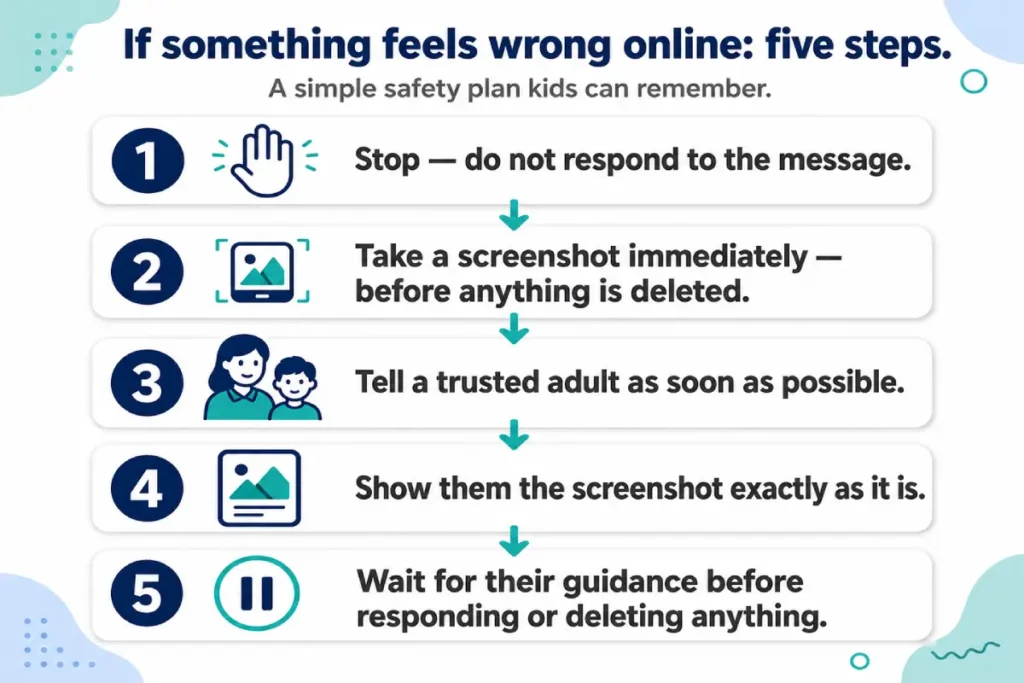
The screenshot test: before sending any message or posting any content, ask “would I be comfortable if a parent could see this?” This single habit reduces the probability of sending content that escalates a conflict, provides location information, or documents behavior the child would later regret.
The platform migration alert: any online contact who asks to move the conversation to a more private or less monitored application — from Roblox chat to Discord, from Discord to WhatsApp — is a contact to show to a parent before responding. This covers the grooming pattern’s contact-escalation stage in practical, actionable terms.
Photo discipline: no photos shared online that include school uniforms, house exteriors, bedroom windows, or any neighborhood landmark that helps identify a location. Most children in this age group share photos casually and have never been told which environmental details can identify a location to someone determined to find it.
The fake identity awareness: accounts online can present any claimed identity, age, or backstory. This isn’t cause for paranoia — it’s the factual context for why the other habits in this list exist. Introducing this concept at 10 to 13 provides the reasoning behind the rules, which makes the rules more durable.
Direct message discipline: accept DMs only from contacts already in the approved friend list, not from unknown accounts that send unsolicited requests. Most major platforms allow restricting incoming DMs to approved contacts — activating this setting on every platform the child uses is part of the parent’s platform configuration session and reinforces the habit simultaneously.
Platform-specific context to introduce at this age: Discord server owners can see all activity in their servers. Instagram screenshots preserve any “disappearing” message. The TikTok Following feed is significantly lower-risk than the algorithmic For You feed. Gift offers from Roblox contacts outside the friend list follow a recognizable pattern worth recognizing.
These behavioral habits work most effectively when paired with the router-level and device-level protection covered in our home router parental controls setup guide.
Safe internet habits for teenagers aged 14 to 17: from rules to judgment
The transition in safe internet habits for kids from the 10 to 13 framework to the 14 to 17 stage shifts the goal from rule enforcement to judgment development. This shift is backed by research rather than being a concession to teenage resistance: a fourteen-year-old with an internet-connected device can access virtually any content they want to find, and restriction-based enforcement produces workarounds rather than genuine behavioral change. The goal moves to ensuring teenagers understand why digital safety behaviors matter — not because a parent requires them, but because the teenager has internalized the reasoning.
Eight practical habits form the digital literacy for kids foundation at this stage.
Privacy settings audit as an ongoing practice: knowing how to find, review, and update privacy settings on every platform the teenager uses — who can see posts, who can send direct messages, what the account looks like to non-followers. This is a skill the teenager practices themselves at each new platform introduction, not a configuration a parent sets once and never revisits.
Context collapse awareness: content shared in one context — a close friends story, a private message thread — can travel beyond that context through screenshots, resharing, or access by someone other than the intended recipient. The practical principle: if a piece of content would cause harm if it reached the wrong person, it doesn’t get posted or sent.
Digital permanence: what’s published online persists longer than most teenagers intuitively understand. University admissions offices, future employers, and future relationships can access years of online activity. The habit is not fear-based avoidance but deliberate consideration of what to publish under one’s name and what to keep private.
Two-factor authentication: enabling 2FA on every account with meaningful personal information — email, social media, any financial account, school accounts. Teenagers can be taught the specific steps for enabling 2FA across different platforms and why account takeover is a realistic risk, not an abstract one.
Phishing recognition: identifying the structural patterns of phishing messages — artificial urgency, credential requests, links that don’t match the claimed sender’s domain, unusual requests from known contacts. Digital literacy for kids at this stage includes identifying these patterns in real examples rather than in abstract description.
Critical content evaluation: understanding that source, motivation, and production quality don’t establish factual accuracy — particularly relevant in 2026 when AI-generated documentary-style content appears throughout search results and social feeds. The habit is pausing before sharing to ask who produced the content, what platform it appeared on, and what the producer wanted the reader to believe.
Relationship pattern recognition: online contacts who escalate quickly from first contact to intense emotional connection, who request secrecy, or who offer unusual attention warrant skepticism regardless of their claimed identity or age. At 14 to 17, framing this as pattern recognition rather than a prohibition is more effective and more honest.
The goal at this stage shifts from enforcing safe internet habits for kids to building the digital judgment that makes those habits self-sustaining into adulthood. Online privacy for children transitions at this age into something the teenager values for their own protection — not something managed by parents, but a set of practices maintained on their own behalf.
The one habit that doesn’t change at any age: the reflex to tell a trusted adult when something feels significantly wrong online. Even at seventeen, encountering genuine predatory behavior, explicit solicitation, or harassment that escalates beyond normal peer conflict is a situation that benefits from adult involvement. The no-punishment-for-telling commitment established in the earlier years is what keeps that channel open.
Safe internet habits for kids: password hygiene and account security
Strong password hygiene is one of the six safe internet habits for kids that applies across all age groups, with increasing complexity introduced as children mature. Account takeovers targeting children are not rare — a hijacked social media account can have harmful content posted under the child’s name within minutes of access, and recovering the account requires a process most children are unprepared for.
Four password rules form the core of this internet safety framework for kids. First: every account uses a unique password, never reused across platforms. A password used on Roblox should not be the same one used for email or Instagram — if one platform is breached, the others remain protected. Second: password length matters more than complexity. A passphrase like “sunflower-bike-river-7” is significantly more secure against automated attacks than a short complex string like “P@ss1” and far easier to remember. Third: passwords are never shared with friends, regardless of how trusted. Fourth: if a friend was ever given access to an account, the password is changed immediately.
At age 12 and above, introducing a password manager removes the memory burden from unique-password discipline. Bitwarden is free and cross-platform. Apple’s built-in Keychain handles iOS and macOS devices automatically. Either removes the primary reason children reuse passwords — the difficulty of remembering many different ones.
The phishing variant that specifically targets children: messages that claim “your account has been hacked, click here to verify your identity.” No major platform sends unsolicited login verification links. Any such message is phishing. The internet safety rules for kids response is always the same: close the message, log in directly through the official app, show the message to a parent. The platform’s actual login page has never changed — the link in the message is not the login page.
Two-factor authentication supplements strong passwords at every age where the child manages their own accounts. At 10 to 13, a parent enables it during the initial account setup. At 14 and above, the teenager enables it independently as part of the privacy settings audit practice described in the previous section.
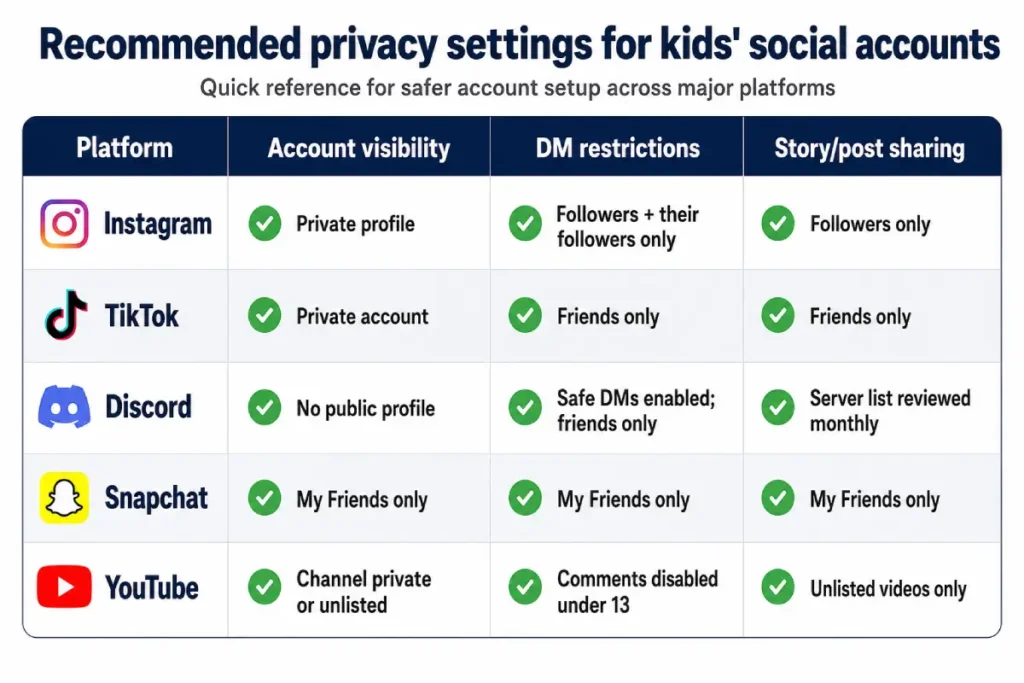
Online privacy for children: privacy settings every parent should walk through together
Teaching online privacy for children by configuring settings for the child produces a child who can’t maintain those settings when a platform updates its interface or when they start a new account. Teaching the settings by walking through them together, with the child doing the actual navigation, produces a child who knows how to find and update privacy settings independently on any platform.
Digital literacy for kids includes understanding not just which setting to change but what information each setting exposes when left at the default. “Public” profile on Instagram means anyone in the world — including people the child has never met and would never willingly share information with — can see every post, story, and the profile’s location tags. Most children who create accounts on default settings don’t understand this, because the platform’s default state feels normal and safe.
Four platforms account for the majority of children’s social platform activity in 2026. On Instagram: set the profile to private, change “Who can send you message requests” to “Accounts you follow and their followers,” and disable story resharing to non-followers. On TikTok: set the account to private, restrict DMs to friends only, and disable Duet and Stitch for non-friends. On Discord: enable Safe Direct Messaging in Privacy & Safety settings, restrict friend requests to “Friends of Friends,” and review the full server list together monthly. On Snapchat: set “Who can contact me” to “My Friends” and “Who can view my story” to “My Friends.”
Online privacy for children also means understanding what they don’t need to fill in: most platforms request a date of birth, a phone number, a location, and a profile bio. None of these are required to use the platform. Teaching children to provide the minimum required information — and to understand that “optional” fields are genuinely optional — is one of the most transferable online privacy for children habits across platforms and years.
The privacy audit habit at 14 and older: every three to four months, the teenager opens each platform they use and reviews the privacy settings panel, because platform updates occasionally reset or change defaults without notification. This takes under ten minutes per platform and closes the drift that produces accounts that started private and gradually became public as settings changed.
The “report it” habit: building a culture where children bring problems to parents
The report it habit is the most durable protective behavior across all the internet safety rules for kids covered in this guide. Every other habit in this article — the screenshot test, the platform migration alert, the privacy audit — functions as preparation for a moment when the child needs to bring something to a trusted adult. That moment only produces the right outcome if the reporting channel is already established and trusted.
Building this culture requires two things from parents. The first is the explicit, repeated no-punishment-for-telling commitment: coming to a parent about an online problem will never result in device removal as punishment. This commitment needs to be stated proactively, not only in response to incidents, and it needs to be visibly honored the first few times a child uses it.
The second is low-stakes practice. Encouraging children to mention minor online annoyances — an ad that seemed strange, a comment that felt rude, a message from an unknown account — builds the reporting reflex for high-stakes situations. A child who has never mentioned anything online to a parent won’t start with the most serious incident they’ve encountered. The family internet protection conversation that maintains this channel: “Is there anything online that’s been bothering you lately?” asked as a routine question during normal conversation, not only in response to perceived warning signs.
For the specific warning signs and response protocol that apply when predatory contact is involved, see our guide to protecting children from online predators.
Frequently asked questions
What is the most important safe internet habit to teach first?
The no-punishment-for-telling commitment from the parent is the prerequisite for every other habit. A child who knows they can report an online problem without losing their device is significantly more likely to use every other protective behavior in this guide. Once this commitment is established and visibly honored, the specific internet safety rules for kids — personal information discipline, the platform migration alert, screenshot preservation — function as intended rather than as rules the child navigates around privately.
How do I explain online privacy to a child in a way they’ll actually understand?
The comparison that works across age groups: just as you wouldn’t give your house key or home address to a stranger on the street, certain information stays private online because it could help a stranger find you or understand your routine. Online privacy for children is clearest when framed as choosing who gets access to information about you — not as hiding, but as deciding. For younger children, focus on the specific list of never-share items. For older children, extend this to understanding that a “public” profile means literally anyone in the world can see everything on it.
My child created a social media account without permission. What should I do?
Begin with curiosity rather than immediate punishment: why did they create it, which platform, and who have they connected with? A punitive first response closes the information channel. Understanding the situation comes first. Then, together, review the account’s privacy settings, who they’ve shared it with, and what content has been posted. If the account violates the household’s age-appropriate rules, the conversation about removing or restricting it is more productive after the parent understands what led the child to create it. The digital literacy for kids goal is to use the incident as a teaching moment rather than only a discipline moment.
At what age should a child have their own email address?
A parent-supervised email address from around age 9 to 10 is appropriate — primarily for school platforms and safe educational tools rather than open social communication. At this age, the address should avoid full name identification, and the parent maintains access to the inbox. An independent private email becomes appropriate at around 13 to 14. Making the setup process include creating a strong unique password, enabling two-factor authentication, and setting the recovery phone number together is the most practical way to introduce account security as a concrete skill rather than an abstract concept.
How do I help my child recognize a fake profile or scam account?
Three patterns identify most fake accounts. The profile has no real history — few posts, a recent creation date, and no evidence of an actual ongoing life in the content. The account contacts the child with unusual speed and intensity — being very attentive, very generous, or very invested in the child’s situation without a natural reason for that investment. And the account’s expressed identity shifts or remains vague under any direct question about it. Family internet protection against this specific threat is primarily a pattern recognition habit. Practicing the identification of these three signals with children using hypothetical examples is more effective than abstract warning because it builds a recognizable template rather than a general sense of caution.