


Choosing the best antivirus for spyware removal is not simply a matter of selecting the most advertised product or the one with the most features listed on the box. Spyware-specific detection capability varies dramatically across security suites, and a product that earns top marks against viruses and ransomware may have significantly weaker performance against the behavioral characteristics of modern spyware. This guide cuts through the marketing noise with a vendor-agnostic evaluation framework, detailed capability breakdowns, and specific recommendations based on independent laboratory test results, real-world detection rates, and the technical characteristics that determine effectiveness against the specific threat class that spyware represents.
What makes an antivirus effective specifically against spyware
The technical architecture of antivirus software matters enormously when the target is spyware rather than traditional file-based malware. Most antivirus suites are optimized for the threats that generate the most volume and press coverage — ransomware, trojans, and worms — which means spyware-specific detection is sometimes treated as a secondary capability rather than a primary design goal.
Behavioral detection versus signature detection
Signature-based detection identifies malware by comparing files against a database of known malicious patterns. It is highly reliable against known threats, fast, and resource-efficient. Against spyware, however, it has a fundamental limitation: spyware operators routinely generate polymorphic variants with slightly modified code specifically to evade signature databases. A new variant released today may share a behavioral profile with a known spyware family while having a completely unique file hash that no signature matches.
Behavioral detection — also called heuristic analysis or HIPS (Host Intrusion Prevention System) — monitors the actions processes perform rather than their code structure. A process that hooks keyboard input, captures screenshots at regular intervals, and maintains persistent connections to remote IP addresses is behaving like a keylogger regardless of its file signature. Behavioral engines can flag and block such processes even when no signature exists for the specific variant. The quality of behavioral detection is the single most important technical differentiator between antivirus products when the specific threat is spyware.
Anti-rootkit capability
As discussed throughout this cluster, rootkit-equipped spyware represents a distinct and more severe threat than standard file-based spyware. Removing it effectively requires antivirus software with dedicated rootkit scanning capability — the ability to scan the filesystem and running processes from a perspective that bypasses the potentially compromised OS. This requires either an offline scanning mode that boots from its own environment or a kernel-level driver that operates below the OS layer that rootkits attempt to manipulate.
Not every antivirus product includes meaningful rootkit detection, and the products that do vary significantly in the sophistication and reliability of their rootkit-hunting capabilities. Independent tests specifically targeting rootkit detection are available from AV-Comparatives and are worth examining if rootkit-equipped spyware is a specific concern in your threat model.
Browser protection and PUA detection
Many spyware infections originate through the browser — through malicious extensions, drive-by downloads from compromised websites, or phishing pages designed to trick users into installing something. Antivirus products with robust browser protection intercept threats at this vector before they can reach the filesystem, blocking malicious URLs, scanning downloaded files before execution, and flagging or blocking browser extensions with known-bad reputations.
PUA (Potentially Unwanted Application) detection is specifically relevant to the category of bundled software that often behaves as spyware while claiming to be a legitimate utility. Products with aggressive PUA detection are more likely to flag the borderline tools — the “system optimizers,” “registry cleaners,” and “performance boosters” that are commonly bundled with free software — that collect user data without meaningful disclosure.
The top antivirus products for spyware removal
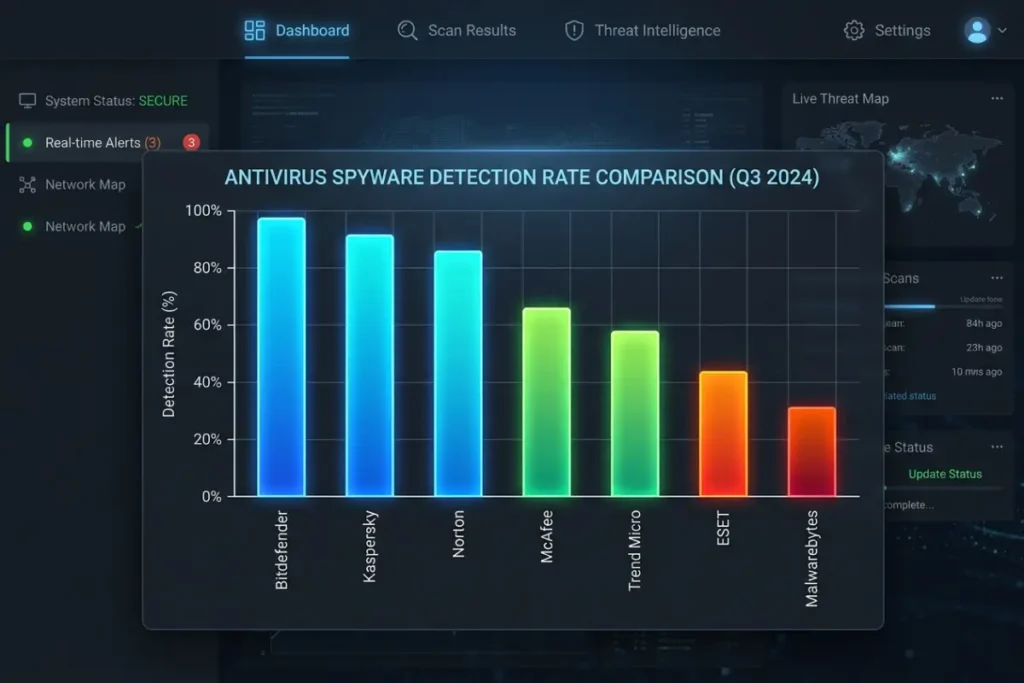
The following evaluation covers the leading security products based on their specific performance characteristics against spyware, drawing on AV-Test and AV-Comparatives results alongside technical capability analysis.
Malwarebytes Premium
Malwarebytes occupies a unique position in the market because it was built specifically around malware and spyware removal from its inception, rather than growing out of a traditional antivirus product. Its detection technology is particularly strong against adware, PUAs, and browser hijackers — the categories of unwanted software that sit at the intersection of spyware and nuisanceware. Its real-time protection layer uses behavioral heuristics as a primary mechanism, making it effective against polymorphic spyware variants that evade signature databases.
Malwarebytes’ browser extension, Browser Guard, adds a layer of protection specifically at the browser level, blocking malicious URLs and known-bad extensions before they can interact with your system. The combination of system-level protection and browser-level protection creates a defense posture that addresses the two most common spyware infection vectors simultaneously. For users dealing with an active infection, the free on-demand scanner is a well-regarded starting point before committing to the premium subscription.
Bitdefender Total Security
Bitdefender consistently earns top marks from both AV-Test and AV-Comparatives across the full spectrum of malware categories, including spyware-specific PUA detection. Its behavioral analysis engine, which Bitdefender calls Advanced Threat Defense, monitors process behavior in real time and blocks suspicious activity before a signature determination is made — the approach best suited to novel spyware variants. Bitdefender’s full suite also includes a hardened browser environment called Safepay for financial transactions, VPN capability, and anti-tracker technology that prevents the data collection techniques used by advertising networks that border on spyware behavior.
The product’s performance overhead is low compared to its detection capability, making it one of the better options for older hardware where a resource-heavy security suite creates a perceptible performance penalty. Bitdefender also offers a regularly updated rescue environment for offline rootkit scanning, available as a free download from their website, which complements their online protection with the capability to address rootkit-equipped infections that resist online remediation.
Norton 360 with LifeLock
Norton has rebuilt significant credibility in the security space over the past several years, having addressed the performance criticisms that damaged its reputation in the early 2010s. The current Norton 360 suite is genuinely competitive with the best products in the category, with strong detection rates across malware types including spyware. Its SONAR behavioral detection engine monitors process behavior in real time, and the suite includes a dedicated anti-spyware component in addition to its general malware protection.
The LifeLock integration in the higher-tier plans adds identity theft monitoring — monitoring dark web markets and breach databases for your personal information — which is particularly relevant to spyware victimization scenarios, since stolen credentials frequently appear for sale within days of their theft. This identity monitoring capability positions Norton 360 with LifeLock as a response tool as well as a prevention tool, providing visibility into whether data stolen by spyware has already been used or sold.
Kaspersky Standard
Kaspersky consistently achieves some of the highest raw detection rates of any antivirus vendor in independent laboratory testing. Their behavioral analysis technology, System Watcher, is specifically designed to detect and roll back the damage caused by malware including spyware, capturing a rollback snapshot of system state before suspicious processes run so that, if a threat is confirmed, the changes it made can be reversed. This remediation capability goes beyond detection to actually undo spyware installation damage.
It is necessary to acknowledge that Kaspersky’s software has been subject to government restrictions in certain jurisdictions — the U.S. CISA issued guidance in 2022 regarding the use of Kaspersky products in critical infrastructure environments, and the company was subsequently added to the FCC’s Covered List in 2023. Individual users must weigh this geopolitical context against the product’s technical capabilities when making their selection decision.
ESET NOD32 and ESET Internet Security
ESET has built a loyal following among technically sophisticated users for its low system footprint, its advanced heuristic detection engine, and its highly configurable alert system. ESET’s approach to detection prioritizes precision over aggression — it generates fewer false positives than many competitors while maintaining strong detection rates against genuine threats. Its LiveGrid cloud-based threat intelligence system provides rapid updates when new threats are identified in the wild, narrowing the window between a new spyware variant’s release and ESET’s ability to detect it.
For users who want deeper visibility into their system’s security state, ESET’s interface exposes more technical detail than most consumer products — log access, network connection monitoring, and process analysis tools are all available within the suite rather than requiring separate Sysinternals tools. This makes it a particularly good fit for users who want to apply the detection methodology described in comprehensive guide to manual spyware detection techniques → How to detect spyware on your PC before it’s too late using tools integrated into their security suite rather than assembling a separate toolkit.
How to evaluate antivirus spyware detection independently
Marketing materials are an unreliable guide to actual detection capability. The most reliable data comes from independent testing organizations that subject antivirus products to controlled evaluations using real malware samples under standardized conditions. AV-Test (av-test.org) and AV-Comparatives (av-comparatives.org) are the two most rigorous and widely respected organizations in this space, and both publish detailed results including subcategory data that allows you to isolate spyware-specific detection rates from overall scores.
When reviewing test results, look specifically at:
The real-world protection test results from AV-Comparatives, which use fresh malware samples collected from the web within hours of the test, reflecting current threats rather than established samples. Detection rates against PUAs (Potentially Unwanted Applications) in AV-Test results, since this category overlaps heavily with spyware and adware. False positive rates, because an antivirus that flags every other legitimate application as suspicious creates friction that causes users to disable real-time protection, eliminating the protection benefit entirely. Performance impact scores, reflecting the suite’s effect on system responsiveness during normal use.
Paid versus free antivirus for spyware removal
Free antivirus products have a legitimate role in the security ecosystem, and several provide meaningful protection for users who cannot or will not pay for a subscription. However, free products consistently trade off certain capabilities against cost, and the capabilities they most commonly sacrifice are precisely those most important for spyware detection: real-time behavioral monitoring, browser protection, and scheduled automatic scanning.
Windows Defender, built into Windows 10 and 11, provides a reasonable baseline of protection and has improved substantially in independent test scores over the past five years. For standard spyware distributed through common vectors — malicious downloads, phishing emails — Windows Defender combined with a dedicated free on-demand scanner provides adequate protection for most low-risk users. For users in higher-risk categories — those who frequently use public Wi-Fi, download software from diverse sources, or handle sensitive professional data — a paid suite with stronger behavioral detection and browser protection is a meaningful risk reduction investment.
The detailed examination of the best no-cost tools for spyware detection and elimination → Best free spyware removal tools that actually work covers the free option landscape comprehensively, with honest assessments of where free tools are sufficient and where paid solutions are genuinely necessary.
Feature checklist for selecting your antivirus
When comparing products for spyware-specific protection, prioritize the following capabilities in the order listed:
Real-time behavioral monitoring that detects process behavior rather than relying solely on signatures. Web protection that blocks malicious URLs and scans downloads before execution. Browser extension management that flags or blocks extensions with suspicious permission profiles. Anti-rootkit capability including offline scanning support. PUA detection configured at an aggressive threshold (usually configurable in settings). Automatic signature updates with an update frequency of at least several times daily. Low false positive rate as confirmed by independent testing. Reasonable performance impact that does not create friction sufficient to cause users to disable protection.
Configuring your antivirus correctly for maximum spyware protection
Purchasing and installing an antivirus suite provides only partial protection if the configuration is left at default settings. Default settings are calibrated for the broadest audience, which means they balance protection against false positive rates in a way that may leave the most aggressive detection capabilities disabled.
Enable PUA detection at maximum sensitivity
PUA detection is almost always configurable, and the default setting is frequently “moderate” rather than “aggressive.” In the product’s settings or preferences, find the PUA or potentially unwanted application detection setting and raise it to its highest level. This will increase the number of false positives slightly — some borderline legitimate tools may be flagged — but it provides dramatically better coverage of the adware, stalkerware, and bundled software categories that represent a substantial portion of real-world spyware infections.
Configure scheduled scans to complement real-time protection
Real-time protection catches threats as they arrive, but scheduled full-system scans catch threats that may have arrived before real-time protection was active, threats that exploited brief gaps in coverage during updates, and threats that bypassed behavioral detection because they delayed their malicious activity until after installation. Configure weekly full-system scans during periods of low computer usage — overnight, or during lunch — and ensure the schedule is set to run even if you typically miss the scheduled time.
Enable advanced features that ship disabled
Many security suites include features that ship in a disabled or opt-in state because they involve either performance trade-offs or user workflow changes that the vendor does not want to impose without consent. These commonly include: aggressive network traffic scanning that examines HTTPS connections (requires installing a trusted root certificate, which some users object to); application sandboxing that runs unfamiliar programs in an isolated environment before allowing them to access the real system; and deep behavioral analysis modes that consume more CPU in exchange for higher detection sensitivity. For users dealing with elevated threat environments, enabling these features provides measurably better protection.
Understanding false positives and how to handle them
Any antivirus that detects real threats will also occasionally flag legitimate software incorrectly. This is inherent to the detection model — a behavioral engine that flags processes maintaining persistent network connections and capturing keyboard input will sometimes flag legitimate remote access tools, network monitoring utilities, and accessibility software that use the same technical mechanisms as spyware. Knowing how to evaluate a false positive without disabling protection entirely is an important operational skill.
When your antivirus flags a file or process you believe is legitimate, research the flagged item’s name and hash through VirusTotal before taking any action. If only one or two engines out of seventy flag the item, the finding is likely a false positive. If a majority of engines flag it, the item is likely genuinely malicious regardless of your belief about its source. If the finding is confirmed as a false positive, most antivirus products allow you to add specific files or processes to an exclusion list, preserving protection for everything else while allowing the legitimate tool to operate.
Do not add broad directory exclusions — never add your entire Downloads folder or Program Files directory to the exclusion list — as this creates a potential bypass for genuinely malicious files placed in excluded locations by attackers who understand your configuration.
When your antivirus stops working — recognizing targeted disabling
One of the most alarming and definitive signs of an active spyware infection is the discovery that your antivirus software has been disabled and cannot be re-enabled. Many spyware variants specifically target the security software running on infected systems as a first priority, using techniques that range from terminating the antivirus process, to corrupting its installation, to modifying Windows service configuration to prevent it from starting, to blocking its update servers at the network level.
If your antivirus shows as disabled in the Windows Security Center and you cannot re-enable it; if the application fails to open or crashes immediately on launch; if update attempts fail with network errors when your other internet connectivity is normal — these are not technical glitches. They are evidence of an active infection that has specifically targeted your defenses. In this scenario, proceed immediately to an offline remediation approach using a bootable rescue disk, since online remediation is likely to be actively resisted by the infection.