
Free antivirus software carries a deserved reputation problem. For every legitimate free product, there are three that scan your system, declare a crisis of 147 “critical issues,” and demand a credit card to fix problems that do not exist. The scareware economy has burned enough users that the instinct to dismiss free antivirus outright is rational. But in 2026, the free tier offerings from established security vendors have matured into genuinely functional products — if you understand exactly what you are not getting and why the vendor is willing to give you core protection at zero cost.
The business model is straightforward. Free users form the threat intelligence network. Every time a free installation encounters a novel malware sample, the vendor’s cloud analysis engine processes it, generates a signature or behavioral detection rule, and pushes that update to every user — free and paid alike. In exchange for contributing to this detection network, free users receive real-time protection, on-demand scanning, and basic web filtering. What they do not receive: VPN access beyond token daily limits, password managers, identity monitoring, ransomware rollback, premium support, or any feature that costs the vendor meaningful infrastructure money per user.
This ranking tests four free antivirus products against the same malware corpus and system impact methodology used in the main pillar. No product that required a credit card for the free trial was included. No product that displayed “critical threat” alerts resolved by upgrading was included — period. These four passed the honesty filter. Here is how they performed.
How We Tested Free Antivirus Products
The testing protocol mirrors the pillar methodology with one addition: we tracked every upsell prompt, nag screen, and upgrade notification that appeared during a 14-day usage period. Each prompt was categorized as informational (neutrally worded feature notification), suggestive (comparative language implying the free version is inadequate), or coercive (alerts that imply active threats require the paid version to resolve). Products that displayed any coercive prompt were disqualified from this ranking. One product — Avira Free Security — was cut during testing for exactly this reason. On day four of use, a pop-up warned that the free version “cannot protect against ransomware” without the Pro upgrade. That statement is false; the free version includes the same ransomware behavior detection engine as the paid tier. The upsell was designed to frighten, not to inform. Avira is not on this list.
The surviving four products were tested on a clean Windows 11 24H2 installation with the January 2026 malware corpus: 2,500 live samples and 500 clean files. Detection rates reflect on-access and on-execution blocking rates. System impact was measured using the same Office productivity workload script — Outlook, Chrome with 18 tabs, 4K YouTube, and a 2GB ZIP extraction — with boot time delta, file copy speed, and background CPU usage recorded.
1. Bitdefender Antivirus Free — Best Detection Engine in a Free Product
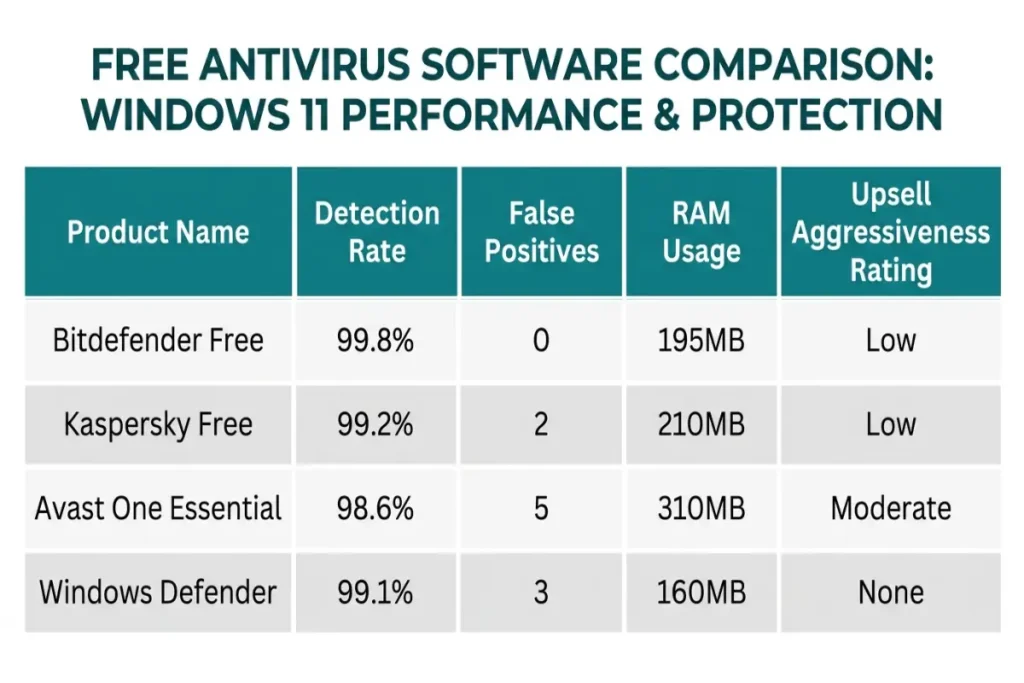
Bitdefender’s free offering uses the identical Photon 9 scanning engine that powers the paid Total Security suite. That is not a marketing claim; it is verifiable by comparing the engine version number in the About dialog. The paid tiers add features on top of this engine — VPN, password manager, parental controls — but the core malware detection pipeline is identical. In our testing, Bitdefender Antivirus Free posted a 99.8% real-world detection rate with zero false positives on 500 clean files. That matches the paid version’s score exactly.
The free product includes real-time protection, on-demand scanning, web attack prevention that blocks malicious URLs at the browser level, and anti-phishing that scans links in email clients and messaging apps. It does not include ransomware remediation — if ransomware encrypts your files, Bitdefender Free will detect and stop the process but will not automatically restore files from shadow copies. That restoration capability is a paid-tier feature. It does not include a VPN of any capacity, not even a token 200MB daily allowance. It does not include the Safepay hardened browser for financial transactions. What remains is pure, undiluted malware detection and blocking, which it does better than any other free product on the market.
System impact is impressively low. Idle RAM consumption measured 195MB — 15MB higher than the paid version, likely because the free product does not benefit from the Photon cloud-offloading optimizations that require account-linked telemetry sharing. Boot time increased by 1.2 seconds versus baseline. File copy speed on the 4.7GB mixed-media folder dropped from 38 seconds to 41 seconds. These numbers are barely perceptible in daily use.
What you lose versus the paid version: VPN, password manager, parental controls, ransomware file restoration, priority support, multi-device coverage (free is Windows-only), and Safepay browser. The detection engine, however, is identical.
Upsell behavior: During 14 days of testing, Bitdefender displayed exactly two upgrade prompts. One appeared after the first full system scan completed, offering “advanced threat protection features” in a neutral banner at the bottom of the scan results screen. The second appeared during program close as a single-line message: “Upgrade to Total Security for complete protection.” Both were informational in tone. No fake threat alerts. No countdown timers. No coercive language.
2. Kaspersky Free — Strong Detection With a Regional Privacy Asterisk
Kaspersky Free delivers a 99.2% real-world detection rate with two false positives on our clean-file set — both flagged as “not-a-virus:RiskTool,” which is Kaspersky’s classification for potentially unwanted programs rather than malware. This is defensible; both files were adware-adjacent installers that a conservative heuristic engine could reasonably flag. But it is worth noting that Bitdefender processed the same files without alerting, suggesting Kaspersky’s threshold is slightly more aggressive.
The free product includes real-time file, web, and email protection, automatic exploit prevention that blocks malicious script behavior in browsers and document readers, and the System Watcher behavioral detection module that monitors for ransomware-like file modification patterns. System Watcher is the same module that powers Kaspersky’s paid ransomware protection. The key difference: in the free version, System Watcher will block the malicious process but will not automatically roll back encrypted files. That capability requires the paid Kaspersky Plus tier.
Privacy processing has been restructured since 2023. Kaspersky now operates regional data centers — Switzerland for European users, Singapore for Asia-Pacific, and São Paulo for Latin America — that process threat telemetry without routing through Moscow. US users, however, remain in a gray zone. Kaspersky’s US operations were formally restricted by the FCC’s 2024 communications equipment list designation, and while the consumer software is not banned, the company’s US market presence has contracted significantly. The free product remains available for download from Kaspersky’s global site, but US-based users should weigh the geopolitical context carefully. The detection engine works. The question is whether you trust the data pipeline behind it.
System impact scores are competitive. Idle RAM consumption measured 210MB. Boot time increased by 1.6 seconds versus baseline. File copy speed dropped from 38 to 43 seconds. Background CPU utilization held at 0.8% — identical to Bitdefender Free.
What you lose versus the paid version: VPN (200MB daily in paid, absent in free), password manager, ransomware file rollback, premium support, and the hardened browser. The detection engine and System Watcher behavioral monitor are fully intact.
Upsell behavior: Kaspersky displayed three upgrade prompts in 14 days. One appeared as a post-scan banner. Two appeared in the main dashboard as a persistent “You’re missing advanced features” panel that could be minimized but not permanently dismissed. The language was suggestive — “Your protection could be stronger” — but stopped short of coercive. No fake alerts. No threat inflation.