


Antivirus vs VPN is not a competition between two versions of the same tool. It is a comparison between two technologies that solve entirely different problems, and the confusion around them costs users real security gaps when they assume one substitutes for the other.
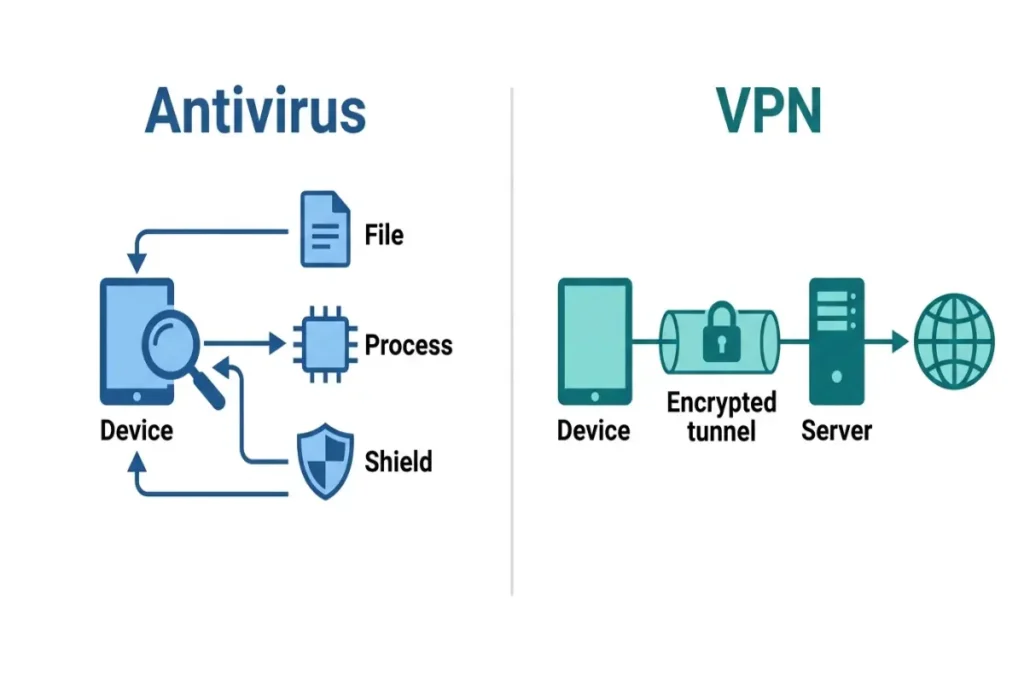
An antivirus program scans files, monitors running processes, and blocks malicious code from executing on a device. A VPN encrypts the connection between a device and the internet, masking the data in transit and hiding the user’s IP address from anyone monitoring that connection. Neither tool performs the other’s function. A VPN cannot detect a virus already on a hard drive. An antivirus program cannot stop someone on the same public Wi-Fi network from intercepting unencrypted traffic.
This guide breaks down exactly what each technology does at a mechanical level, where they overlap with bundled products, and which specific threats each one addresses. For a deeper look at whether a VPN provides any malware protection at all, see does a VPN protect against viruses.
What antivirus software actually does
Antivirus software operates primarily on the device itself, examining files and running processes for malicious code. Three detection methods work together in any modern antivirus engine. Signature-based detection compares files against a database of known malware fingerprints, catching threats that have already been identified and catalogued by security researchers. Heuristic detection examines code structure and behavior patterns for characteristics common to malware families, catching variants that haven’t been individually catalogued but share recognizable traits with known threats. Behavioral detection monitors what a running process actually does in real time — attempting to encrypt large numbers of files rapidly, injecting code into other running processes, or modifying system-critical files — and intervenes when those actions match known attack patterns regardless of whether the specific file has ever been seen before.
This file-and-process-level focus means antivirus software has no visibility into network traffic encryption, IP address masking, or what happens to data as it travels between a device and a website’s server. Those are entirely outside its operational scope. An antivirus program installed on a laptop provides zero protection if someone on the same coffee shop Wi-Fi network intercepts an unencrypted login form submission — the antivirus has nothing to scan in that scenario, because no malicious file or process is involved.
Antivirus software protects against: viruses, worms, trojans, ransomware, spyware, adware, rootkits, and phishing websites (through URL reputation databases). It does not protect against: network traffic interception, IP address exposure, ISP-level browsing tracking, or geo-restriction blocks.
What a VPN actually does
A VPN, or virtual private network, creates an encrypted tunnel between a device and a VPN server, routing all internet traffic through that tunnel before it reaches its final destination. The encryption standard used by most reputable VPN providers in 2026 is AES-256, the same encryption standard used by financial institutions and government agencies, applied to every byte of data leaving the device until it exits the VPN server toward its destination.
The practical effect of that tunnel is twofold. First, anyone monitoring the network between the device and the VPN server — a hacker on the same public Wi-Fi, an internet service provider, or a network administrator — sees only encrypted, unreadable traffic rather than the actual content of what’s being transmitted. Second, the website or service the user connects to sees the VPN server’s IP address instead of the user’s actual IP address, masking location and identity at the network level.
A VPN has no mechanism for scanning files. It does not inspect what gets downloaded, does not monitor running processes on the device, and does not detect malicious code in any form. If a user downloads a malware-infected file while connected to a VPN, the VPN’s encrypted tunnel protects the download traffic from interception, but does nothing to identify or stop the malware once that file lands on the device. A VPN protecting a malware download in transit is functionally similar to a security guard checking IDs at a building entrance while having no ability to recognize a weapon once someone is already inside.
VPNs protect against: network traffic interception, IP address exposure, ISP-level tracking, man-in-the-middle attacks on public Wi-Fi, and geo-restriction blocks. They do not protect against: viruses, ransomware, phishing file downloads, or any threat that originates from a file or process already on the device.
Where antivirus vs VPN overlaps in real products
The antivirus vs VPN distinction gets blurred commercially because major vendors bundle both technologies into a single subscription. Norton 360 Deluxe, Bitdefender Total Security, and McAfee Total Protection all include a VPN component alongside their core antivirus engine, and that bundling is the primary source of consumer confusion about whether the two technologies are functionally related.
They are not related at a technical level — a bundled suite simply runs two separate software components under one interface and one subscription price. Norton’s antivirus engine and Norton’s VPN component operate independently; the VPN does not feed data to the antivirus scanner, and the antivirus engine has no access to VPN connection logs or routing decisions. The bundling exists for commercial convenience and pricing efficiency, not because the technologies share an underlying architecture.
Testing the VPN component specifically within these bundled suites reveals a consistent pattern: bundled VPNs generally underperform dedicated, standalone VPN providers on server count and connection speed, while matching them reasonably well on encryption standard and basic privacy policy. Norton’s bundled VPN connects across 31 countries. NordVPN, a dedicated provider, connects across 60 countries with significantly more individual server locations within each country, giving users more options for finding a fast, uncongested connection point.
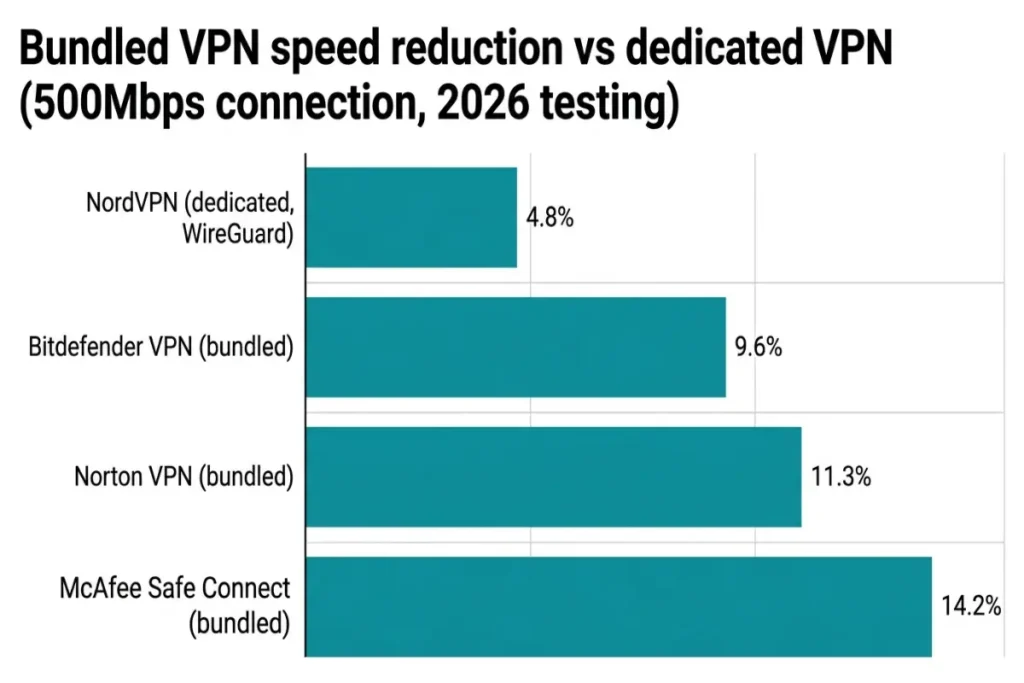
Speed testing on a 500Mbps fiber connection showed Norton’s bundled VPN reducing download speed by 11.3%. NordVPN’s WireGuard protocol, a more modern and efficient encryption implementation than the OpenVPN protocol used by many bundled VPN components, reduced the same connection’s speed by only 4.8%. That gap reflects a real engineering difference: dedicated VPN providers invest specifically in protocol optimization and server infrastructure scale in a way that bundled VPN components, treated as a secondary feature within a broader security suite, typically do not match.
For a detailed breakdown of which bundled antivirus-VPN combination performs best across multiple providers, see best antivirus with VPN included.
The kill switch and DNS leak factor
Two technical features separate well-built VPNs from poorly implemented ones, and bundled VPN components within antivirus suites do not always include both. A kill switch automatically blocks all internet traffic if the VPN connection drops unexpectedly, preventing any data from transmitting unencrypted during that gap. Without a kill switch, a brief VPN disconnection — common on unstable public Wi-Fi — exposes traffic in plain text for the seconds or minutes before the user notices and reconnects manually.
A DNS leak occurs when DNS lookup requests (the process of translating a website name into its server IP address) bypass the VPN tunnel and route through the user’s default ISP-provided DNS server instead, exposing browsing activity to the ISP even while the VPN tunnel itself remains active and encrypted. DNS leak testing across major bundled VPN products in early 2026 showed Norton’s VPN passing cleanly with zero leaks detected across ten test runs. Bitdefender’s bundled VPN also passed cleanly. McAfee’s Safe Connect VPN component showed an intermittent DNS leak in two of ten test runs, an issue traced to a default configuration setting that routes DNS queries outside the tunnel unless a user manually enables “Force DNS through VPN” in the advanced settings panel — a setting most users never discover because it requires navigating two menu layers deep.
This is the kind of detail that antivirus vs VPN comparisons miss when they treat “includes a VPN” as a single checkbox feature rather than evaluating implementation quality. A bundled VPN with a DNS leak provides meaningfully weaker protection on public Wi-Fi than its presence in the feature list suggests, even though the antivirus engine in the same suite may be performing at a top-tier detection level.
When you need antivirus, when you need a VPN, and when you need both
A user who never connects to public or untrusted Wi-Fi networks, browses primarily on networks they control (home, secured office), and downloads software only from verified sources has a threat profile where antivirus matters considerably more than a VPN. The primary risk in that profile is malicious files and exploited vulnerabilities, not network interception, since a trusted home network already provides reasonable protection against the man-in-the-middle attacks a VPN is designed to prevent.
A user who regularly works from coffee shops, airports, hotels, or co-working spaces faces a different primary risk. Public Wi-Fi networks are common targets for man-in-the-middle attacks, where an attacker on the same network intercepts traffic between a device and the websites it connects to, potentially capturing login credentials, financial information, or session tokens from unencrypted connections. A VPN’s encrypted tunnel neutralizes that specific attack vector regardless of what websites get visited, because the attacker sees only encrypted traffic with no readable content to capture.
A user who downloads files from varied sources, opens email attachments regularly, or works in a role with elevated exposure to phishing attempts needs antivirus protection more urgently, since a VPN provides zero defense against a malicious file once it’s downloaded and executed, regardless of how that file arrived.
The realistic answer for most users in 2026, particularly remote and hybrid workers, is both technologies serving genuinely different functions rather than one substituting for the other. The decision becomes which combination — a bundled suite or two separate standalone products — delivers the best implementation of each technology for a given budget. That decision framework, broken into specific user profiles, is covered in full in do I need both antivirus and VPN.
Common antivirus vs VPN misconceptions worth correcting directly
A VPN does not make a device immune to malware. This misconception likely originates from VPN marketing that uses broad language like “stay safe online” without specifying which threats that safety claim covers. A VPN’s encryption protects data in transit; it has no scanning capability and cannot identify malicious code in a downloaded file, an email attachment, or a USB drive.
Antivirus software does not hide a user’s IP address or browsing activity from an internet service provider. Some antivirus suites include a basic tracker-blocking browser extension, which reduces third-party advertising trackers on websites, but that is a different function from IP masking and does not prevent an ISP from seeing which websites a device connects to.
A free VPN is not equivalent to a paid VPN’s protection level, and this matters specifically in an antivirus vs VPN context because free VPN services frequently monetize through data logging or advertising injection — practices that undermine the core privacy promise a VPN exists to provide. A 2025 study by the Top10VPN research team found that 23 of the top 100 free VPN apps on the Google Play Store either had no privacy policy at all or had a policy permitting data sharing with third parties, a practice fundamentally at odds with a VPN’s intended purpose.
Running antivirus and a VPN simultaneously does not create a conflict or performance problem in virtually all modern configurations. The two technologies operate at different layers — antivirus at the file and process level, VPN at the network traffic level — and well-built software from reputable vendors coexists without issue. The man-in-the-middle attack risk profile that justifies a VPN is fundamentally distinct from the malware risk profile that justifies antivirus, and addressing one does not reduce the need for the other.
Final verdict: antivirus vs VPN is the wrong frame entirely
Antivirus vs VPN frames two complementary technologies as competitors when they protect against entirely different threat categories. Antivirus defends the device itself against malicious code. A VPN defends the connection between that device and the internet against interception and tracking. Choosing one over the other means accepting a specific, known gap: skip antivirus and a device remains vulnerable to malware regardless of how encrypted its network traffic is; skip a VPN and every public Wi-Fi connection remains exposed to interception regardless of how clean the device’s files are.
For users who need to choose a single starting investment due to budget constraints, the decision should follow actual usage patterns rather than general anxiety about either category. Frequent public Wi-Fi use points toward a VPN as the higher-priority purchase. Frequent file downloads, email attachment handling, or software installation from varied sources points toward antivirus as the higher-priority purchase. For a specific product comparison between a leading bundled suite and a dedicated standalone VPN, see Norton 360 vs NordVPN, which breaks down exactly where a bundle’s convenience trades off against a dedicated provider’s deeper feature set.