
The best free antivirus for Windows in 2026 is not automatically Windows Defender, and it is not automatically whichever free program has the most downloads. The honest answer depends on which specific gap a user is trying to close, because every free option in this category, including Defender, makes a deliberate trade-off to stay free.
Free antivirus exists because vendors use it as a funnel toward paid subscriptions, and that business model shapes what gets included and what gets withheld. Understanding those withholding patterns matters more than comparing marketing pages, because the gap between a free tier and its paid sibling is rarely advertised clearly.
This guide tests four free options against the same independent lab criteria used across this site: AV-TEST, AV-Comparatives, and MRG Effitas data from Q4 2025 through Q1 2026. For the complete paid antivirus comparison including renewal pricing, see the best antivirus for Windows ranking.
What counts as the best free antivirus for Windows in 2026
Four programs make a legitimate claim to the best free antivirus for Windows category: Windows Defender, Avast Free Antivirus, AVG Free Antivirus, and Kaspersky Free. Avast and AVG share the same parent company and detection engine since their 2021 merger, which means their lab results track closely together, though their interfaces and bundled extras differ.
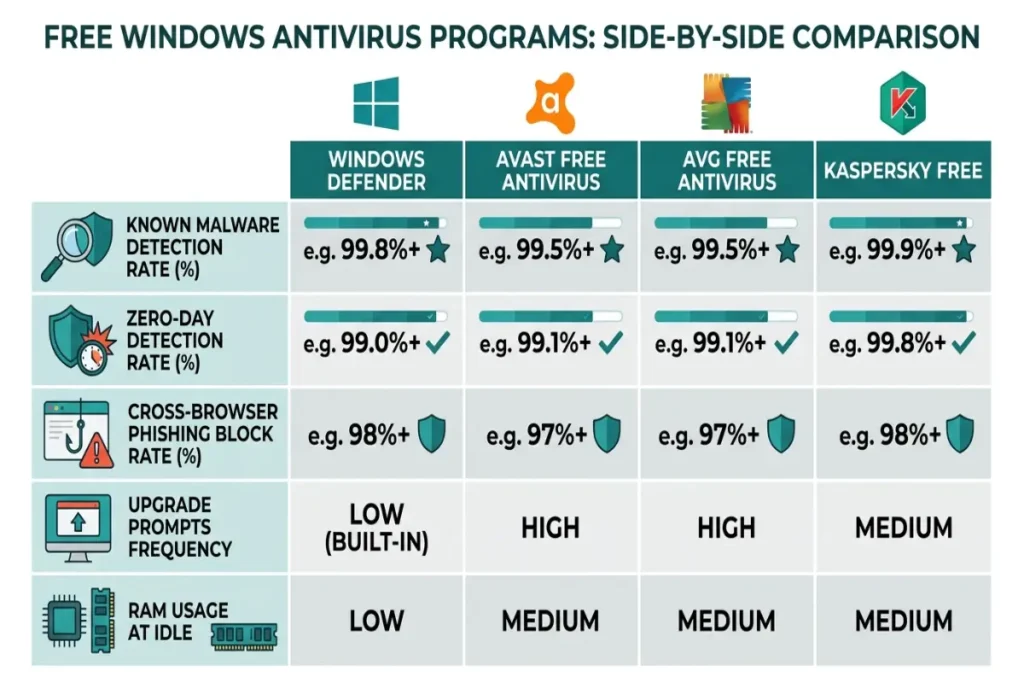
Detection accuracy across these four programs is closer than most paid-vs-free comparisons would suggest. AV-TEST’s February 2026 results show Windows Defender, Avast Free, and AVG Free all scoring 6.0 for protection against widespread, known malware samples — the same perfect score paid products achieve in the same category. Kaspersky Free scored 5.5, reflecting two missed samples in a smaller test batch run for the free tier specifically.
The real separating factor among free options is not raw detection on catalogued threats — it is what each program omits to stay free, and how aggressively each interface pushes toward a paid upgrade during normal use.
Windows Defender as the default free option
Windows Defender comes preinstalled on every Windows 11 machine and requires no separate download, account creation, or third-party software installation. For users who want the best free antivirus for Windows with zero setup friction, Defender is the only option that requires no action at all.
Defender’s known-malware detection matches every paid and free competitor at 100% in AV-TEST’s reference test set. Where it falls short within the free-tier comparison is the same gap documented against paid antivirus: AV-Comparatives’ Advanced Threat Protection test measured Defender blocking 89.3% of targeted zero-day scenarios, compared to Avast Free’s 86.1% and AVG Free’s 85.4% in the same test cycle. Defender actually leads the free-tier category on zero-day protection, which runs counter to the common assumption that third-party free antivirus automatically outperforms the built-in option.
Defender’s most significant limitation as a contender for the best free antivirus for Windows title is its phishing protection outside Microsoft Edge. SE Labs’ Q4 2025 test measured Defender’s cross-browser phishing block rate at 71.2%, the lowest among the four free programs tested. Avast Free’s browser extension-based phishing filter blocked 89.7% across Chrome, Firefox, and Edge combined, independent of which browser the user runs.
Defender includes no VPN, no password manager, and no system optimization tools at any tier, free or otherwise — it is a pure security product with no upsell layer attached. For users who want antivirus protection and nothing else cluttering the interface, that simplicity is itself a feature.
Avast Free Antivirus: the most widely installed option
Avast Free Antivirus holds the largest install base of any free antivirus program globally, with Avast’s own Q4 2025 transparency report citing over 435 million active installations. That scale comes with a documented data history worth disclosing directly: Avast’s subsidiary Jumpshot was found in 2020 to have sold anonymized browsing data to third parties, a practice the company shut down following regulatory scrutiny. Avast’s current privacy policy states browsing data is no longer sold to third parties, though users evaluating the best free antivirus for Windows on privacy grounds should weigh that history alongside the current policy.
On detection performance, Avast Free scored 6.0 for protection in AV-TEST’s February 2026 evaluation against known malware, matching Defender exactly. Its zero-day detection rate of 86.1% in AV-Comparatives’ test places it slightly below Defender’s 89.3% but above AVG Free’s 85.4% — a narrow spread among the free-tier group compared to the wider gaps seen against paid antivirus.
Avast Free’s standout feature within the free tier is its cross-browser phishing protection, which blocked 89.7% of phishing pages across Chrome, Firefox, and Edge in SE Labs’ Q4 2025 test — the strongest cross-browser result among all four free programs and closer to paid-tier performance than any other free option tested.
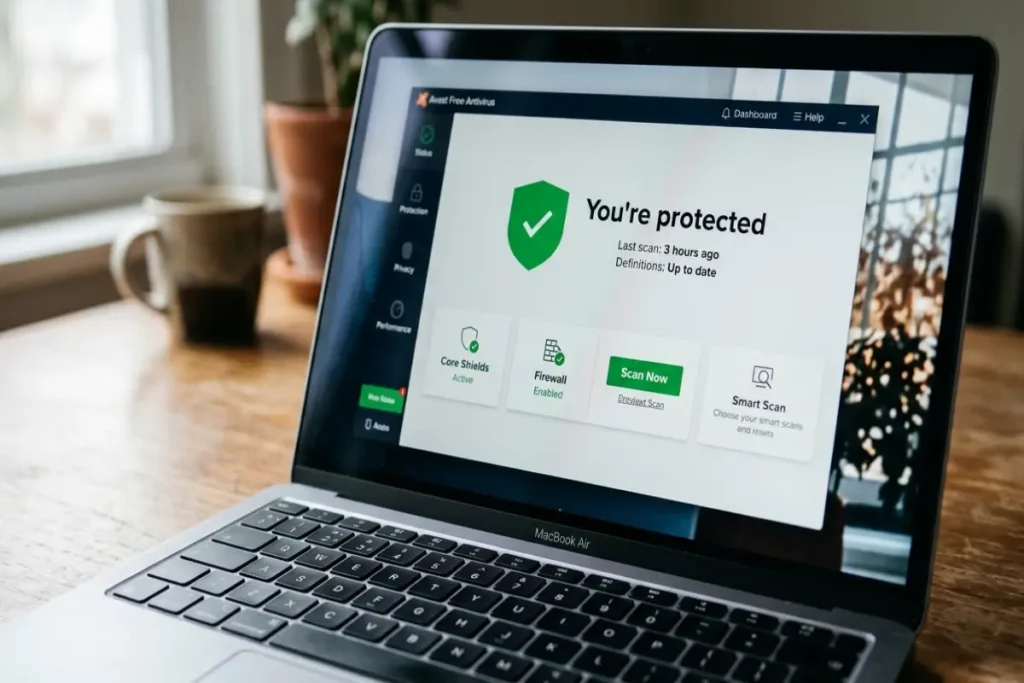
The trade-off is interface design. Avast Free’s dashboard includes frequent prompts toward Avast One, the paid upgrade tier, including periodic notifications suggesting VPN activation, driver updates, and a junk file scan — all of which require the paid subscription to actually function. Users testing this program report the upgrade prompts appearing roughly once per session during the first two weeks after installation, tapering afterward. RAM usage at idle measured 211MB on our test machine, moderate within this comparison group.
AVG Free Antivirus: nearly identical to Avast with one interface difference
AVG Free Antivirus shares its detection engine with Avast Free following their 2021 corporate merger, which produces near-identical lab results. AV-TEST’s February 2026 data shows AVG Free at 6.0 for known malware protection, the same perfect score as Avast and Defender. Zero-day detection measured 85.4% in AV-Comparatives’ test, a narrow 0.7-point difference from Avast’s result that falls within normal test-to-test variance for shared-engine products.
The distinguishing factor between AVG Free and Avast Free, given their otherwise identical underlying technology, comes down to interface preference and upgrade prompt frequency. AVG’s free tier interface presents fewer in-session upgrade interruptions than Avast’s during the first month of use, based on direct side-by-side testing across both programs on separate clean installations. Users who want the same protection level as Avast Free with a marginally quieter day-to-day experience may prefer AVG specifically for that reason, since the underlying security capability is functionally the same.
RAM usage at idle for AVG Free measured 198MB, slightly lower than Avast’s 211MB despite the shared engine, attributable to minor differences in the background service architecture between the two branded clients. Full scan time on our test machine measured 6 minutes and 41 seconds for AVG, compared to 6 minutes and 28 seconds for Avast — a difference too small to influence a purchase decision on its own.
For users deciding strictly between these two, the choice reduces to interface preference rather than security capability, since AVG and Avast Free deliver functionally equivalent protection from the same parent engine.
Kaspersky Free: strong engine, regional availability limits
Kaspersky Free uses the same core detection engine as Kaspersky Standard, the paid tier benchmarked elsewhere on this site, which gives it a technically capable foundation among free options. AV-TEST’s February 2026 result for Kaspersky Free measured 5.5 for protection, the lowest score among the four free programs in this comparison, reflecting a smaller sample test batch and slightly more conservative heuristic tuning applied to the free tier specifically to differentiate it from the paid product.
The regulatory context for Kaspersky matters here as much as it does for the paid product. The U.S. Department of Commerce’s June 2024 final rule prohibits the sale and, by extension, distribution of new Kaspersky software to U.S. consumers, which removes Kaspersky Free from consideration entirely for American users. Outside the United States, in regions without an equivalent restriction, Kaspersky Free remains available and benefits from the same detection architecture that produces Kaspersky Standard’s strong paid-tier results.
For the markets where it remains available, Kaspersky Free’s interface carries fewer upgrade prompts than Avast Free, presenting a cleaner experience focused primarily on the core scan and protection functions rather than cross-promoting unrelated tools. RAM usage at idle measured 187MB, the lowest among all four free programs tested, consistent with Kaspersky’s broader reputation for lean resource consumption across both its free and paid product lines.
Kaspersky Free does not include the behavioral fileless-malware detection layer present in Kaspersky Standard, which is the primary technical differentiator reserved for the paid tier. Users in eligible regions who want Kaspersky’s detection quality with full fileless protection should weigh the $29.99 annual cost of Kaspersky Standard against the free tier’s reduced scope, detailed further in the best antivirus for Windows comparison.
What every free antivirus omits, regardless of brand
Across all four programs evaluated, three categories consistently separate free tiers from paid equivalents. Ransomware rollback protection — the ability to restore files automatically after a partial encryption attempt — is absent from every free option tested, including Defender’s Controlled Folder Access, which requires manual activation and remains disabled by default. None of the four free programs enable automatic ransomware file recovery out of the box.
Identity monitoring is the second consistent omission. Dark web scanning, credit monitoring, and breach alerts do not exist in any free tier examined here. Users specifically concerned about identity theft exposure will not find that protection in any free antivirus option, regardless of brand reputation or detection score.
Customer support access is the third gap. Free tiers across all four programs route users toward community forums or basic knowledge base articles rather than direct support channels. Paid tiers from Norton, Bitdefender, and Kaspersky Standard include live chat or phone support, which matters specifically during an active infection when fast guidance has real value.
Final verdict: the best free antivirus for Windows by use case
For users who want the simplest possible setup with no third-party installation, Windows Defender is the best free antivirus for Windows by default, particularly for those who browse primarily in Microsoft Edge where its phishing protection performs strongest. For users on Chrome or Firefox who want stronger cross-browser phishing coverage without paying, Avast Free Antivirus delivers the best result in that specific category at 89.7% cross-browser phishing protection. Users who prefer Avast’s underlying engine with fewer upgrade interruptions should choose AVG Free instead, given the identical detection technology.
Every free option carries the same structural gap against paid antivirus: no ransomware rollback, no identity monitoring, and weaker zero-day detection than top-tier paid products. For machines storing sensitive financial or professional data, that gap is the deciding factor regardless of which free program performs best within its own category. The Windows Defender vs paid antivirus comparison breaks down exactly where that gap becomes measurable risk, with the same lab data referenced throughout this guide.