


Not every effective security tool carries a subscription price tag. The free spyware removal tools available in 2026 include several that have earned genuine credibility through years of independent testing, active development, and transparent operation — tools that can meaningfully compete with paid solutions for specific use cases and threat categories. The challenge for users navigating this space is distinguishing the tools that genuinely deliver from the vast field of fake “free antivirus” applications that are themselves adware or spyware, exploiting users’ desire for cost-free security to install the very threats those users are trying to avoid. This guide provides honest, technically grounded assessments of the free tools worth your time, with clear explanations of where they excel and where their limitations require a paid complement.
Why free spyware removal tools have a legitimate role
The argument for paid security software is straightforward: ongoing threat detection requires ongoing development, threat intelligence, and infrastructure, all of which cost money that ultimately comes from subscriptions. A free tool that does not receive regular updates becomes progressively less effective as new spyware variants emerge with signatures and behaviors not reflected in its detection database.
The best free tools resolve this tension through specific business models that enable continued development without requiring user payment: freemium models where a free tier is used to demonstrate value and convert users to paid subscriptions (Malwarebytes), open-source community development (ClamAV), institutional funding (many academic and government-backed tools), or vendor-supported free versions that serve as marketing for commercial products (Kaspersky Security Scan, Bitdefender Free). Understanding the business model behind a free tool helps predict its update cadence and long-term reliability.
The tools that earned their place on this list
Malwarebytes Free
Malwarebytes Free is the most widely recommended free spyware removal tool among security professionals, and that recommendation is well-earned. In on-demand scan mode (the free version does not include real-time protection), Malwarebytes detects an exceptionally broad range of spyware, adware, PUAs, and browser hijackers. Its detection database is updated multiple times daily, its false positive rate is low, and its removal capability is thorough — it does not simply quarantine the primary executable but also identifies and removes associated persistence mechanisms, browser modifications, and registry changes.
For users dealing with an active infection on a system where no paid antivirus is present, Malwarebytes Free as the first-response scanning tool is the starting recommendation of virtually every security professional. The scan takes between twenty minutes and two hours depending on disk size and the volume of files, and it should be run after disconnecting from the network and, where possible, after booting into Safe Mode as described in the main step-by-step spyware removal methodology for Windows and Mac → Spyware removal guide.
The significant limitation of Malwarebytes Free is the absence of real-time protection. The free version only catches threats when you run a manual scan — it does not monitor for and block new infections as they arrive. This makes it appropriate as a removal tool and a supplementary scanner rather than a standalone protection solution. Users who need always-on protection should either pair it with Windows Defender’s real-time protection or upgrade to Malwarebytes Premium.
Microsoft Safety Scanner
Microsoft Safety Scanner (MSERT) is a free, on-demand scanning tool published directly by Microsoft. It is portable — it does not require installation — and it uses the same detection engine as Windows Defender, which means its signatures are current and its detection capability reflects Microsoft’s current threat intelligence. MSERT is updated when downloaded and valid for ten days before it must be re-downloaded with a fresh signature set.
Because it is a Microsoft product running Microsoft’s own detection technology, it has no additional software to install, no account to create, no bundled offers, and no commercial motive to generate false positives to frighten users into purchasing upgrades. For users who want the simplest possible scanning option from a completely trusted source, MSERT is the appropriate choice. Its limitation compared to Malwarebytes is that its PUA detection is less aggressive by default, meaning borderline adware and stalkerware applications may not be flagged.
AdwCleaner
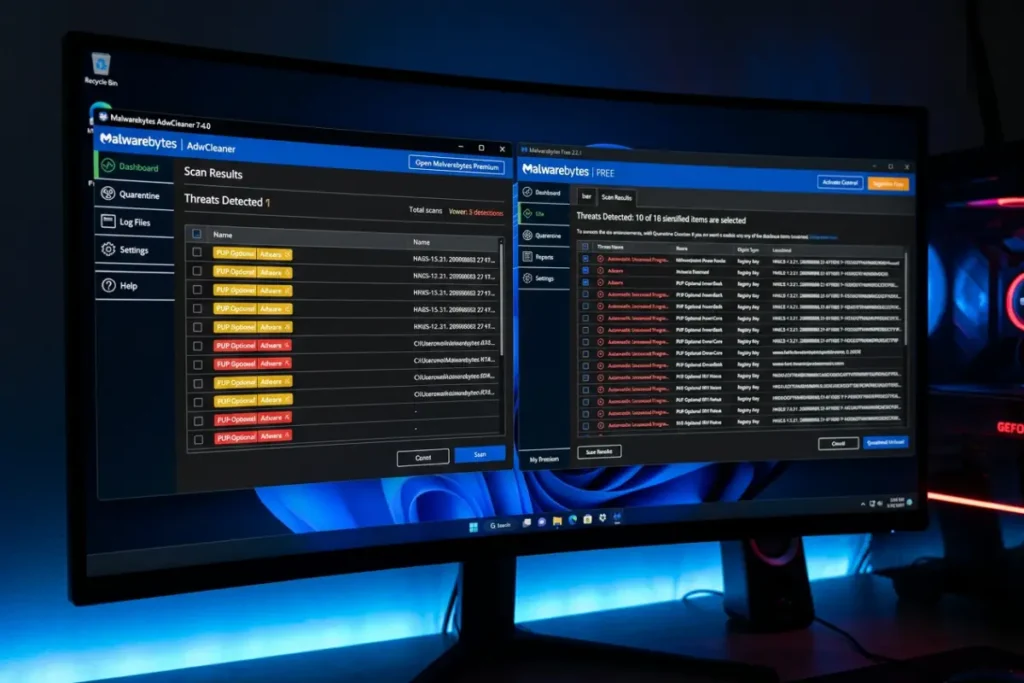
AdwCleaner, now developed and maintained by Malwarebytes, is a specialized tool focused on adware, browser hijackers, PUPs (potentially unwanted programs), and toolbar infections. It is not a general-purpose antivirus scanner — it will not catch ransomware or sophisticated trojans — but for the specific categories of unwanted software that most commonly alter browser settings, inject advertising, and collect browsing data without meaningful disclosure, it is one of the most effective free tools available.
AdwCleaner’s scan and cleaning process is extremely fast compared to full system scanners — typically completing in under five minutes — and it produces detailed logs of everything it finds and removes. It is particularly useful as a first-pass tool when browser-specific symptoms are the primary complaint, allowing rapid identification and removal of browser-level threats before committing to a longer full-system scan.
Spybot Search & Destroy Free
Spybot Search & Destroy is one of the oldest dedicated anti-spyware tools in existence, first released in 2000, and it has maintained an active development cycle that keeps its detection database current. The free version includes on-demand scanning for spyware, malware, and PUPs, along with a “Immunize” feature that blocks known malicious URLs at the system level by adding them to the Windows Hosts file and the browser’s restricted sites list — a primitive but functional network-level protection mechanism that requires no active monitoring.
Spybot’s interface is dated compared to modern security tools, and its scan speed is slower than competitors, but its detection coverage for established spyware families — particularly adware and tracking software — is strong. It is most appropriately used as a third scanning layer alongside Malwarebytes Free and Windows Defender, rather than as a primary tool, to catch anything those two may have missed.
Kaspersky Virus Removal Tool
Kaspersky’s free Virus Removal Tool is a portable, on-demand scanner that uses Kaspersky’s full commercial detection engine without requiring a subscription. Like MSERT, it does not require installation — it runs as a standalone executable downloaded directly from Kaspersky’s website. Its detection rates, which reflect Kaspersky’s consistently strong performance in independent testing, make it one of the most powerful free scanning options available in terms of raw detection capability.
The geopolitical considerations surrounding Kaspersky software, noted in the antivirus comparison satellite, apply equally to this free tool. Users in jurisdictions where Kaspersky products have been restricted or where concerns about data routing to Russian servers are relevant to their threat model should factor this into their tool selection.
Bitdefender Free Antivirus
Bitdefender’s free antivirus tier provides real-time protection using the same detection engine as their paid commercial products — a genuine differentiator from most free tools, which offer only on-demand scanning. The free version includes real-time scanning of files and applications as they are accessed, web protection that blocks malicious URLs, and anti-phishing protection. It does not include the advanced features of the paid suite — no VPN, no password manager, no ransomware remediation, no behavioral analysis at the same depth as Total Security — but as a free real-time protection solution, it represents genuinely competitive capability.
The trade-off is configuration control: the free version offers significantly less customization than the paid suite, and certain features like PUA detection sensitivity cannot be adjusted. For users who want better-than-Defender protection without paying a subscription, Bitdefender Free is one of the strongest options. For users who specifically need aggressive PUA detection for spyware-adjacent applications, the limited configurability may be a meaningful constraint.
How to use multiple free tools effectively without conflicts
Running multiple security tools simultaneously creates the risk of conflicts — particularly between real-time protection engines, which can interfere with each other’s file system hooks and cause significant performance problems or false positives when each engine scans the same file access events. The approach that avoids conflicts while maximizing coverage is:
Use one product with real-time protection active at all times — either Windows Defender (already built in), Bitdefender Free, or a paid suite. Use Malwarebytes Free, AdwCleaner, Kaspersky Virus Removal Tool, and Spybot as on-demand supplementary scanners only — run them manually when you have specific reasons to suspect infection or as part of a regular security audit, without enabling any background or real-time features they may offer. This layered approach captures the complementary detection benefits of multiple tools without the performance and stability problems caused by competing real-time engines.
Fake “free antivirus” tools to avoid
The market for fake security software is enormous. Applications that present themselves as free antivirus or anti-spyware tools but are themselves spyware, adware, or scareware represent a persistent and well-resourced threat. These fake tools typically follow a consistent pattern: they claim to detect large numbers of threats on a clean system, create extreme urgency around the “infections” they claim to have found, and demand payment to remove the threats their scan “discovered.” The threats they report are fabricated — the real threat is the application itself.
Warning signs of fake security tools include: detection of an implausibly large number of threats immediately on first scan of a clean system; extreme urgency and alarmist language about detected threats; requests for payment before displaying any specific threat information; no presence in independent security reviews or testing organization results; developers with no verifiable identity or history in the security industry; download links appearing in pop-up advertisements claiming your system is infected. Trusted security software from established vendors does not advertise through pop-up ads, does not claim to detect hundreds of threats on clean systems, and is always reviewable through independent testing organization results at av-test.org or av-comparatives.org.
Combining free tools with prevention for comprehensive coverage
The best free spyware removal tools address infections after they occur. Addressing them before they occur requires preventive measures that go beyond scanning capability. For users who want to maximize their protection without a paid antivirus subscription, the combination of Windows Defender for real-time protection, Malwarebytes Free for periodic supplementary scanning, a browser with built-in security features (Firefox with uBlock Origin, for example), and careful application download hygiene creates a meaningful defense posture at zero cost.
The detailed preventive framework in practical guide to preventing spyware from reaching your system → How to prevent spyware infections: a complete protection guide provides the behavioral and technical controls that complete this zero-cost security approach.
Free tools for mobile spyware removal
The free tool landscape for mobile devices — both Android and iOS — is more limited than the Windows ecosystem, reflecting the more restricted environments these platforms present to security tools. Mobile security applications cannot perform the deep system-level analysis that desktop tools can, because both Android and iOS intentionally prevent applications from having unrestricted access to system processes and other applications’ data.
Android free security tools
Malwarebytes for Android offers a free tier with on-demand scanning and a limited real-time protection trial. Its Android detection capability covers malicious applications, adware, and PUPs with meaningful detection rates, though it is constrained by Android’s sandboxing to examining application packages rather than system processes. Bitdefender Mobile Security offers a 14-day free trial of its full capability, which is worth using for a thorough initial scan even if you do not intend to subscribe. Avast Mobile Security offers a perpetually free tier with basic scanning, though the free version includes advertising within the application itself — an irony that some users find uncomfortable in a security application.
For the complete Android removal process that these tools support but do not replace, working through the step-by-step procedure in the dedicated Android guide provides the manual remediation steps that go beyond what automated tools can accomplish within Android’s security sandbox.
iOS considerations
iOS security applications cannot perform antivirus scanning in the traditional sense — Apple’s security model prevents any application from reading the files and processes of other applications. What iOS security applications can do is check whether your device is jailbroken (which significantly widens its attack surface), scan for unsafe network connections, provide VPN functionality for network-level protection, and monitor whether your stored account credentials appear in known breach databases. These functions are genuinely useful, but they should not be described as “antivirus scanning” in the traditional sense, and any iOS security application that claims to scan your device for viruses or malware in the way a Windows scanner does is misrepresenting its capabilities.
The free tools ecosystem: what the future looks like
The free security tools available today are generally more capable than their equivalents from five years ago, reflecting both competitive pressure from the paid market and improvements in detection technology that reduce the incremental development cost of maintaining capability. The most significant development trend affecting free tools is cloud-based detection: by performing the heavy lifting of behavioral analysis in the cloud rather than on the local device, free tools can deliver detection capability that would previously have required commercial-grade on-device resources.
The primary limitation that is unlikely to change — the economic constraint of maintaining a free product — means that the gap between free and paid solutions in real-time behavioral monitoring and automatic remediation will likely persist. For users who are comfortable with a more active role in their own security — running manual scans regularly, staying current on emerging threats, applying the detection methodology in the companion detection guide — free tools provide excellent value. For users who prefer a fully automated, always-on protection posture with minimal required engagement, the investment in a paid suite from a reputable vendor is genuinely justified.