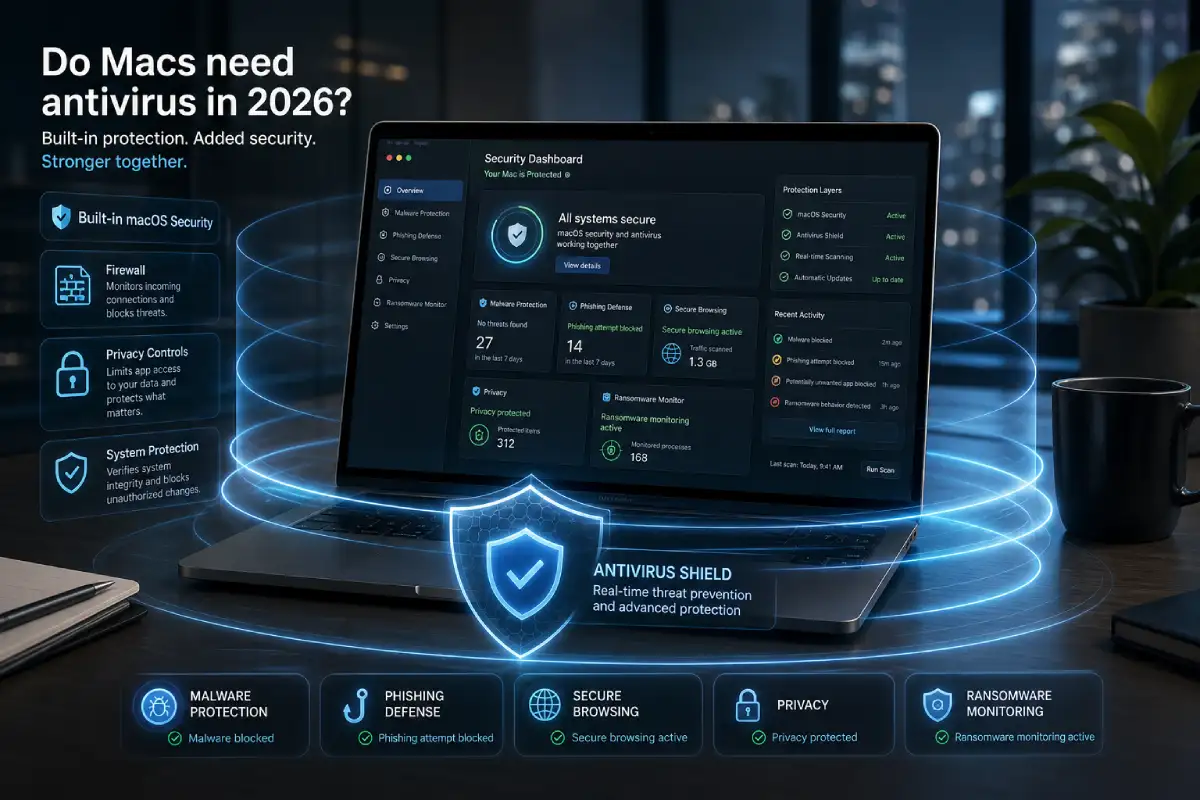

Do Macs need antivirus in 2026? For many Mac users, the honest answer is: not always, but often yes depending on how you use your device. macOS already includes strong built-in security features, so a Mac is not an unprotected computer. Apple includes several layers designed to stop unsafe software, verify apps, block known malware, and protect sensitive parts of the system. But modern online threats are not limited to traditional viruses, and that is where antivirus software can still be useful.
A Mac can be exposed to phishing websites, fake software updates, malicious browser extensions, unsafe downloads, adware, scam pop-ups, infected documents, password theft attempts, and privacy risks. These threats often target the user more than the operating system. That means even a secure Mac can still be affected if the person using it is tricked into entering a password, installing a suspicious tool, or trusting a fake warning.
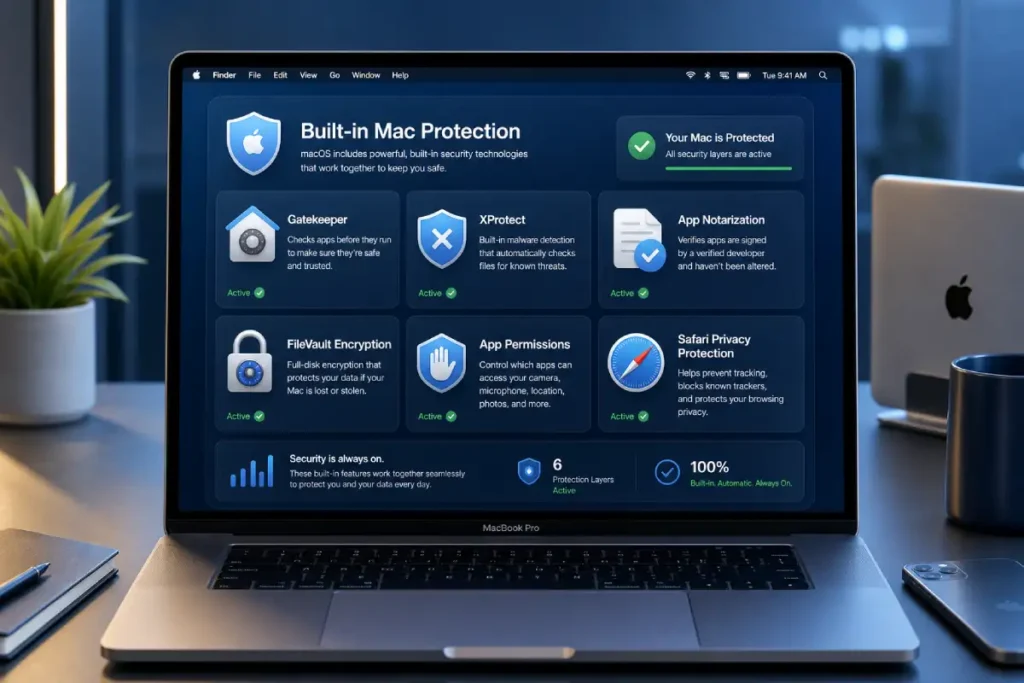
Apple explains that macOS malware defenses are structured in layers, including the App Store, Gatekeeper, notarization, and XProtect. These protections help prevent malware from launching, block malware from running, and remediate malware that has executed. That is a strong security foundation, especially compared with older systems or poorly maintained devices.
However, built-in security does not remove every risk. Antivirus software adds another layer. CISA explains that antivirus software looks for patterns connected to known malware, usually through signatures or definitions. Modern antivirus tools can also include phishing protection, real-time scanning, ransomware behavior monitoring, VPN privacy, password managers, and identity alerts.
The best way to answer the question is not with a simple yes or no. A better answer is this: if you use your Mac only for basic browsing, streaming, documents, and trusted apps, Apple’s built-in protections plus safe habits may be enough. But if you download files often, install apps from outside the App Store, use public Wi-Fi, manage business accounts, shop online, or store important documents, antivirus software can be worth it.
This article explains what macOS already protects, where the risks remain, who should consider antivirus, and how to decide whether a paid Mac antivirus is useful for your situation.
Why people think Macs do not need antivirus
Many people still believe Macs do not need antivirus because Apple has a strong reputation for security. That reputation is not fake. macOS is designed with important protection layers, and Apple controls much of its hardware and software ecosystem. This gives Apple more control over security updates, app verification, permissions, and system integrity.
Another reason people believe Macs are safer is historical. For many years, Windows had a much larger desktop market share, so attackers often focused more on Windows users. Mac users saw fewer threats, and the idea that “Macs do not get viruses” became popular.
But lower risk is not the same as no risk. Cybercriminals follow users, money, and data. As more people use Macs for work, school, online banking, e-commerce, content creation, development, and business management, Mac users become more attractive targets.
The myth is outdated
The old phrase “Macs do not get viruses” is too simple. A Mac may be harder to attack in some ways, but it can still face malware, adware, phishing, browser-based scams, and social engineering.
In 2026, attackers do not always need to break the operating system. Sometimes they only need to trick the user. A fake Apple ID page, fake delivery message, fake software update, or fake security alert can cause serious problems without needing advanced malware.
This is why antivirus discussions should focus on real-world behavior. The question is not only whether macOS is secure. The question is whether your daily online habits create risk.
Apple security is strong but not magic
Apple’s built-in security is a major advantage. Gatekeeper helps verify apps downloaded from outside the App Store. Apple says Gatekeeper checks whether software is from an identified developer, notarized by Apple, and not altered. This helps reduce dangerous software installations.
But no security system is perfect. Users can still approve risky permissions, download unsafe apps, click malicious links, install questionable browser extensions, or enter passwords on phishing websites. Antivirus can help by adding clearer warnings and extra detection layers.
What macOS already protects by default
Before deciding whether you need antivirus, it is important to understand what your Mac already does well. macOS includes several built-in protections that help keep users safer.
Gatekeeper
Gatekeeper helps control which apps can run on your Mac. When you download an app outside the App Store, Gatekeeper checks whether it comes from an identified developer and whether Apple has notarized it. This helps prevent many unsafe or unknown apps from launching easily.
For everyday users, Gatekeeper is one of the most important built-in protections. It gives you a warning before opening software that may not be trusted.
XProtect
XProtect is Apple’s built-in malware detection system. It helps identify and block known malware. Apple updates its security protections over time, which means macOS can respond to known threats without the user manually installing a traditional antivirus tool.
XProtect is useful because it works quietly in the background. Many users may never see it, but it is still part of macOS security.
Notarization
Notarization is Apple’s process for checking apps before they run more easily on macOS. It does not guarantee that every app is safe forever, but it helps reduce risk by requiring developers to submit software for automated security checks.
Notarization is especially important for apps distributed outside the App Store. It gives users another layer of trust before installing software.
App permissions
macOS asks for permissions when apps want access to sensitive parts of the device. This can include camera, microphone, location, contacts, files, photos, screen recording, and accessibility controls.
These permission prompts are important because many threats need access to private data. If a suspicious app asks for unnecessary permissions, that can be a warning sign.
FileVault
FileVault encrypts your Mac’s storage. This helps protect your data if your MacBook is lost or stolen. Encryption does not stop phishing or malware, but it protects files from someone who physically has the device.
For students, travelers, remote workers, and business users, FileVault is a very useful built-in feature.
Safari security and privacy features
Safari includes protections against suspicious websites, tracking, and unsafe browsing behavior. Browser security matters because many attacks happen online rather than through traditional downloaded viruses.
However, many users install other browsers or extensions. That can change the risk level. If you use Chrome, Firefox, Edge, or many extensions, you should pay extra attention to browser security.
Where built-in Mac security may not be enough
macOS has strong protection, but some risks remain. These risks often come from the browser, email, downloads, permissions, and user behavior.
Phishing websites
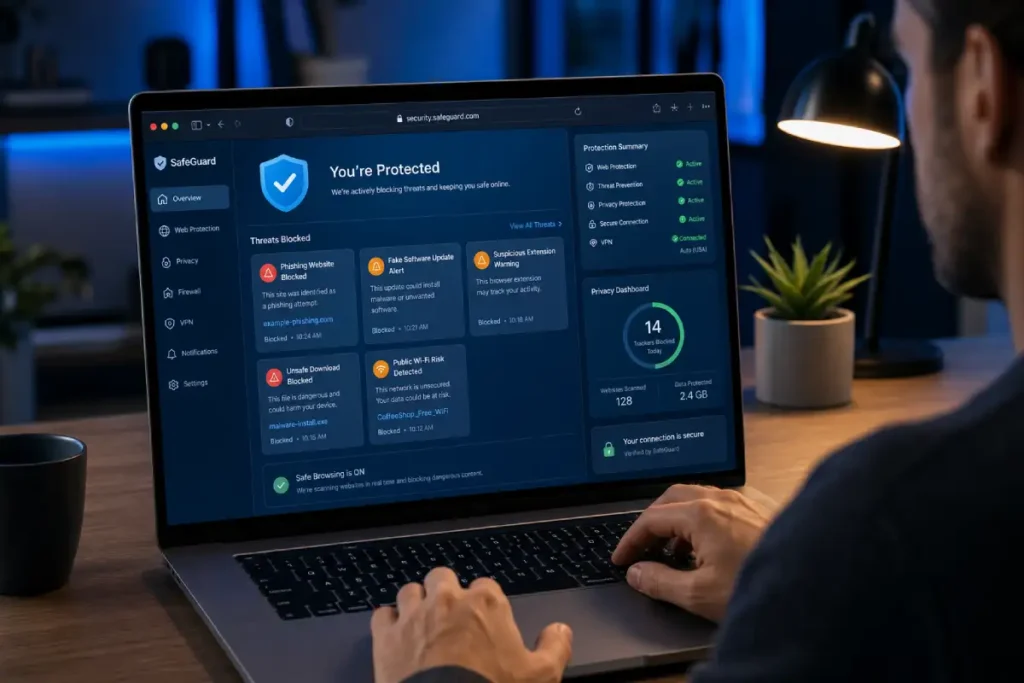
Phishing is one of the biggest online risks for Mac users. The FTC explains that phishing scams often pretend to come from trusted sources and try to make people give personal information.
A phishing page can look like a real login page. It may copy the design of Apple, Google, Microsoft, PayPal, banks, delivery companies, cloud storage services, or social media platforms. If you enter your login details, attackers can access the account even if your Mac itself is not infected.
Antivirus with web protection can help by warning you before you visit known scam pages or enter information on suspicious sites.
Fake software updates
Fake software updates are common. A website may show a warning that says your browser, video player, VPN, cleaner app, or security tool is outdated. The goal is to make you download something unsafe.
Mac users should be careful with pop-ups that create urgency. Real updates should come from the App Store, System Settings, or the official developer website.
Malicious browser extensions
Browser extensions can be useful, but they can also be risky. Some extensions request permission to read and change data on websites. That can become dangerous if the extension is malicious, compromised, or overly aggressive with data collection.
Antivirus software with browser protection may help identify risky extensions or unsafe browsing behavior.
Adware and unwanted apps
Adware is one of the most common problems on Macs. It may change browser settings, show unwanted ads, redirect searches, install toolbars, or create pop-ups.
Adware may not always behave like traditional malware, but it can still damage the browsing experience and expose users to more scams. Antivirus tools often include detection for potentially unwanted applications.
Unsafe downloads
Mac users often download PDFs, templates, apps, plugins, scripts, design files, documents, and installers. If you work online, these downloads may come from clients, marketplaces, cloud links, or unknown sources.
Every download increases risk. Antivirus can scan files and warn you when something looks suspicious.
Public Wi-Fi risks
Public Wi-Fi is common in cafés, airports, hotels, schools, libraries, and coworking spaces. Not every public network is dangerous, but you do not control the environment.
A VPN can help protect your connection on shared networks. Some antivirus plans include VPN access, which can be useful for remote workers and travelers.
Who needs antivirus on a Mac?
Not every Mac user has the same level of risk. The right answer depends on how you use your device.
You may not need paid antivirus if your use is basic
You may not need paid antivirus if you only use your Mac for trusted activities. For example, basic browsing, streaming, writing documents, using the App Store, and avoiding suspicious downloads.
In this case, macOS built-in protection, regular updates, strong passwords, two-factor authentication, and careful browsing may be enough for many users.
But this does not mean you should ignore security. You should still keep macOS updated, avoid suspicious links, and download apps only from trusted sources.
You should consider antivirus if you download files often
If you regularly download files from different websites, cloud links, marketplaces, clients, classmates, or online communities, antivirus becomes more useful.
This is common for designers, editors, developers, marketers, students, writers, and freelancers. Files may look harmless, but unsafe downloads can still create problems.
You should consider antivirus if you work online
Remote workers and freelancers often manage important accounts. This can include email, client platforms, cloud storage, payment processors, banking, project management tools, ad accounts, website dashboards, and affiliate dashboards.
For these users, a security problem can affect income, reputation, and client trust. Antivirus with phishing protection, password tools, VPN, and identity alerts can be worth it.
You should consider antivirus if you use public Wi-Fi
If you often connect your MacBook to public Wi-Fi, a security suite with VPN may be useful. Public networks are not always dangerous, but they are less controlled than your home network.
A VPN is especially useful when working from cafés, hotels, airports, coworking spaces, or schools.
You should consider antivirus if you share your Mac
Shared devices have more risk because different people may click different links, install different apps, or ignore warnings. If family members, classmates, or coworkers use the same Mac, antivirus can add an extra safety layer.
You should consider antivirus if you want simpler protection
Some people are comfortable managing security manually. Others prefer a dashboard that shows whether the device is protected. Antivirus can make security easier to understand.
A good antivirus provides clear warnings, scan results, and simple recommendations. This can help beginners avoid mistakes.
Free antivirus vs paid antivirus for Mac
Free antivirus can be useful, but it usually has limits. Paid antivirus is not always necessary, but it often provides broader protection.
What free antivirus usually offers
Free antivirus tools may include basic scanning, simple malware detection, and limited protection. They can be useful for users who want occasional checks or a basic second opinion.
Free plans are also helpful for testing a product before paying. You can see whether the interface is easy, scans are fast, and alerts are understandable.
What paid antivirus usually adds
Paid antivirus usually adds real-time protection, advanced web protection, anti-phishing, ransomware monitoring, VPN, password manager, identity monitoring, dark web alerts, customer support, and multi-device coverage.
These features matter if you work online, handle sensitive information, or want stronger protection against more than classic malware.
Which one is better?
Free antivirus can be enough for basic users. Paid antivirus is usually better for users with higher risk or more valuable data.
The best choice depends on your situation. A student with simple needs may choose free protection. A freelancer managing client accounts may benefit from paid protection. A family may prefer a multi-device plan.
Signs your Mac may need a security scan
A Mac can behave strangely for many reasons. Not every issue means malware. But some signs are worth checking.
Browser redirects
If your browser keeps redirecting you to strange websites, showing unexpected search results, or opening pages you did not choose, you may have adware or a suspicious extension.
Too many pop-ups
Unexpected pop-ups, fake warnings, or aggressive ads can be signs of adware or unsafe websites. Be careful with pop-ups that say your Mac is infected and push you to download a tool immediately.
Unknown apps or extensions
If you see apps or browser extensions you do not remember installing, review them carefully. Remove anything you do not recognize or trust.
Slower performance after installing something
A slow Mac does not always mean malware. It can also come from low storage, heavy apps, too many startup items, or old hardware. But if the slowdown started after installing a new app or extension, it is worth scanning.
Changed browser settings
If your homepage, default search engine, or new tab page changed without your permission, check for unwanted extensions or adware.
Strange security warnings
Fake security warnings often appear in browsers. They may use urgent language like “Your Mac is infected” or “Your device is at risk.” Do not download software from random pop-ups. Use trusted tools and official sources.
How to stay safe on Mac without relying only on antivirus
Antivirus can help, but safe habits are still important. The strongest protection comes from combining macOS security, smart behavior, and trusted tools.
Keep macOS updated
Updates fix security weaknesses and improve protection. Turn on automatic updates or check regularly in System Settings.
Download apps from trusted sources
Use the App Store or official developer websites whenever possible. Avoid cracked software, unknown installers, and random download pages.
Be careful with permissions
If an app asks for access to your microphone, camera, files, screen recording, or accessibility settings, ask yourself whether it truly needs that access.
Use strong unique passwords
Password reuse is risky. If one account is compromised, attackers may try the same password elsewhere. Use unique passwords and a password manager when possible.
Enable two-factor authentication
Two-factor authentication adds a second step to logins. Even if someone gets your password, they may still need a verification code or device approval.
Avoid suspicious links
Be careful with urgent messages, delivery alerts, fake invoices, account warnings, and prize offers. Scammers often use pressure to make people click quickly.
Back up your files
Use Time Machine, cloud backup, or another trusted backup system. Backups protect you from accidental deletion, device failure, theft, and some malware problems.
What to look for in Mac antivirus software
If you decide to use antivirus, choose carefully. Not every product is a good fit for Mac users.
Real-time protection
Real-time protection checks files and activity while you use the device. This is better than only scanning manually once in a while.
Anti-phishing protection
Anti-phishing protection is essential because many attacks happen through fake websites. This feature can warn you before you enter passwords or personal information on suspicious pages.
Low system impact
A good Mac antivirus should not make your Mac feel slow. Look for tools known for lightweight performance and clean background protection.
Ransomware monitoring
Ransomware monitoring helps protect important files from suspicious changes. This is useful for people who store work, school files, photos, business documents, or client projects.
VPN
A VPN can be useful if you often use public Wi-Fi. It is not required for every user, but it can add privacy and network protection.
Password manager
A password manager helps you use stronger, unique passwords. Some antivirus suites include this feature.
Multi-device coverage
If you use several devices, check whether the plan covers Mac, Windows, iOS, and Android. Multi-device plans can be better value.
Clear interface
The antivirus should be easy to understand. You should be able to see protection status, start scans, review alerts, and fix issues without confusion.
So, do Macs need antivirus?
Macs do not always need paid antivirus, but many Mac users can benefit from it. macOS already includes strong built-in security, and Apple’s tools such as Gatekeeper, notarization, and XProtect provide an important foundation. But modern threats include more than traditional viruses. Phishing, fake updates, adware, unsafe downloads, malicious extensions, and privacy risks can still affect Mac users.
If your Mac use is simple and careful, built-in protection may be enough. If you work online, download files often, use public Wi-Fi, manage important accounts, or want easier protection, antivirus is worth considering.
The best answer is based on your risk level. A Mac is secure, but it is not untouchable. Antivirus is not about fear. It is about adding another layer of protection for the way people actually use their devices today.