

Why Trojans have become the dominant malware category in 2026
The cybercriminal ecosystem did not arrive at Trojans by accident. Out of every category of malware — viruses, worms, spyware, adware, ransomware — the Trojan achieved primacy because it exploits the single vulnerability that no technical patch has ever fixed: human trust. A traditional virus forces its way into a system through exploitation. A Trojan walks through the front door because you held it open. This fundamental reliance on deception rather than technical force is what makes Trojans simultaneously the most prevalent and the most difficult malware category to defend against at the behavioral level.
In 2026, the Trojan landscape has evolved in ways that make the threats documented even three years ago look primitive by comparison. AI-assisted malware development tools, available on underground forums for prices that have collapsed to the point of irrelevance as a barrier, allow non-technical operators to generate custom Trojan binaries tailored to evade specific antivirus products. Polymorphic generation engines produce Trojan variants that restructure their own code at each infection, ensuring that no two deployed copies share the same hash — defeating signature-based detection before the sample is ever submitted to a vendor’s analysis pipeline.
The delivery ecosystem has matured alongside the payloads. Phishing infrastructure as a service means that a convincing, SSL-certified replica of a major bank’s login page or a corporate IT portal can be deployed by someone with no web development knowledge within minutes. SEO poisoning campaigns push malicious download pages to the top of search results for software queries — searches like “download [popular tool] free” that generate millions of daily clicks and serve as permanent Trojan distribution highways. The user who thinks they are downloading a legitimate productivity application is often executing a Trojan installer that has passed through no fewer than four layers of obfuscation designed specifically to frustrate automated scanning.
The data tells the story clearly. Trojans account for more than half of all malware incidents recorded by major threat intelligence platforms, and average infection dwell time — the period between initial compromise and discovery — sits close to six months in consumer environments. Six months of undetected Trojan activity on a machine that is used for online banking, work communications, and personal data storage represents a data theft timeline with potentially catastrophic downstream consequences.
This guide is the definitive resource for 2026. Whether you are dealing with an active infection, investigating suspicious system behavior, or building a security posture that prevents the problem from occurring, every stage of the process is documented here with technical precision.
The architecture of a Trojan: what it actually is
The term “Trojan virus” is technically a misnomer that has become so entrenched in popular usage that correcting it requires a brief explanation. A virus, in strict malware taxonomy, is defined by its ability to self-replicate — to insert copies of its own code into other files and propagate automatically. A Trojan does not replicate in this sense. It is a standalone piece of malicious software that disguises itself as something legitimate — an application, a document, an update, a utility — to trick the user into executing it voluntarily.
The “horse” in the name captures the architecture precisely: a hollow structure that appears to be one thing on the outside and contains something entirely different within. The Trojan’s outer shell is typically a functioning piece of software that does what it claims to do — the cracked application works, the game runs, the document opens — because a functional decoy dramatically increases the time before the victim becomes suspicious. The concealed payload runs silently in parallel, establishing persistence, communicating with attacker infrastructure, and executing whatever operation the attacker has programmed it to perform.
This architecture produces the defining characteristic of a Trojan infection: the lag between execution and awareness. On average, users who discover they have a Trojan do so weeks or months after initial infection, during which time the attacker has had unrestricted operational access to the machine and everything on it.
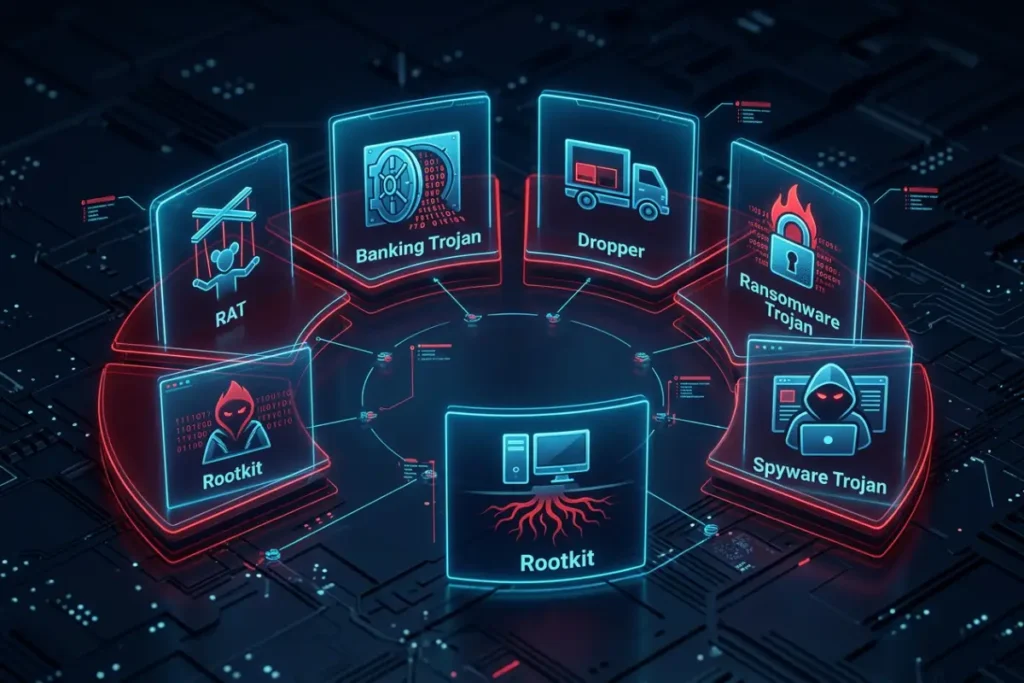
The taxonomy of Trojan malware: every type you need to know
Understanding the specific type of Trojan you are dealing with is not an academic exercise — it directly determines how you approach removal, what post-infection steps are critical, and what the realistic damage scope of the infection is. Each category has a distinct behavioral fingerprint and removal complexity.
Remote access Trojans
Remote Access Trojans — RATs — are the intelligence community’s worst nightmare and the most feared tool in an individual attacker’s arsenal because they do not merely steal data. They establish a persistent, real-time control channel between the victim’s machine and the attacker’s command-and-control infrastructure. Through that channel, the attacker operates the victim’s computer as though they are physically present: browsing the file system, reading documents, capturing screen content, recording audio through the microphone, activating the camera, logging keystrokes, and using the victim’s internet connection as a proxy to route their own traffic anonymously.
AsyncRAT, QuasarRAT, XWorm, and NanoCore are among the most actively deployed RAT families in 2026, each maintaining development communities on underground forums that provide version updates, evasion patches, and customer support with a functionality that mirrors legitimate software businesses. The operational sophistication of these platforms reflects the industrialization of cybercrime — RAT deployments in 2026 are not random opportunism; they are targeted campaigns with defined objectives and professional execution.
Banking Trojans
Banking Trojans represent the most financially motivated segment of the Trojan family. Their operational logic is precisely calibrated: lie dormant, consume minimal system resources, trigger no detectable anomalies, and wait. The wait ends the moment the victim navigates to an online banking portal, a brokerage platform, a payment processor, or a cryptocurrency exchange. At that moment, the Trojan activates its financial interception capabilities.
The primary attack technique is form-grabbing — intercepting the data submitted in browser form fields before that data is encrypted by the HTTPS connection and transmitted to the legitimate server. This means the Trojan captures credentials that never traverse the network unencrypted and that antivirus products with network monitoring are not positioned to intercept. More sophisticated banking Trojans implement web injection — dynamically modifying the banking website’s interface as it loads in the victim’s browser, adding fake form fields, removing multi-factor authentication prompts, or injecting fraudulent transaction confirmation steps. The victim interacts with what appears to be their normal banking interface while submitting their credentials directly to the attacker.
QakBot, IcedID, and Dridex remain the dominant banking Trojan families despite years of law enforcement disruption efforts. Each has demonstrated the ability to rebuild infrastructure and resume operations within weeks of takedown actions — a resilience that reflects the organized criminal ecosystem underlying their development.
Dropper and loader Trojans
Dropper Trojans exist at the beginning of the infection chain. Their singular purpose is to deliver and execute additional malware payloads on the victim’s system. A dropper may contain one or multiple payloads bundled within its own code structure, which it extracts and executes after gaining initial access. A loader performs a similar function but retrieves its payloads from remote servers on demand rather than carrying them internally, allowing the operator to dynamically select and deliver different payloads to different victims based on system profile, geographic location, or target value assessment.
The practical consequence of dropper and loader activity is that removing the initial Trojan without identifying and removing its delivered payloads leaves the system compromised by the secondary infections. A system scan that detects and removes the dropper but misses the banking Trojan and the RAT it installed is a partial remediation that creates a false sense of security.
Ransomware-delivering Trojans
The intersection of Trojan delivery and ransomware payload represents the most catastrophically damaging point in the malware ecosystem. A Trojan that functions as the delivery mechanism for a ransomware payload transforms an exploited user into the entry point for data encryption and extortion. The WannaCry and NotPetya campaigns — both of which caused billions of dollars in damage — relied on exactly this model. The initial infection was established through Trojan-like mechanisms; the ransomware was the delivered payload.
In 2026, ransomware-delivering Trojans have become increasingly targeted. Rather than deploying ransomware immediately upon infection, sophisticated operators use the Trojan’s initial access for extended reconnaissance — mapping the network, identifying backup systems, escalating privileges, and positioning for maximum impact — before triggering the ransomware payload at a strategically optimal moment.
Rootkit Trojans
Rootkit Trojans operate at a level of the operating system that most security tools cannot reach from within a normal runtime environment. By hooking into kernel functions — the foundational system calls that Windows uses to report on its own state — a rootkit Trojan can instruct the operating system to return falsified information to any monitoring tool. When your antivirus queries the file system for a list of all files in a directory, the rootkit intercepts that query and removes its own files from the returned list. When Task Manager queries the OS for a list of running processes, the rootkit removes its own processes from the response.
The practical consequence is that a machine infected with a rootkit Trojan cannot be reliably assessed or cleaned from within the running operating system. Every tool you run inside Windows is receiving a version of reality that the rootkit has curated. Effective detection and removal requires booting from external media that the rootkit has never touched — a clean environment from which the compromised drive can be examined without the rootkit’s interference.
Critical warning signs: your computer is telling you something is wrong
Trojans are designed for operational invisibility, but operational necessity creates behavioral residue that a trained observer can detect. The more of the following signs you observe concurrently, the higher the probability that your system is compromised. Each one in isolation may have an innocent explanation. Several appearing simultaneously create a pattern that demands investigation.
Unexplained resource consumption without active application use
Open Task Manager by pressing Ctrl + Shift + Esc and observe CPU and RAM consumption when no resource-intensive application is running. A machine engaged only in background Windows tasks should idle well below 30% CPU. A Trojan maintaining a persistent command-and-control connection, executing a cryptomining payload, logging and buffering keystrokes, or conducting scheduled data exfiltration generates measurable processor and memory overhead. If you observe consistent high resource usage with no identifiable cause in the process list, that absence of explanation is itself the indicator — because legitimate processes that consume resources are always traceable to installed software or Windows components.
Security software failure or unexplained deactivation
Security software failure is one of the highest-confidence indicators of a Trojan infection. Corrupting or disabling the antivirus is frequently a first-priority action for Trojans because an undetected presence is the prerequisite for everything else they do. Signs include: the antivirus icon has disappeared from the system tray; the software launches but crashes before completing initialization; real-time protection is reported as disabled and cannot be re-enabled; the software can no longer update its definitions despite an active internet connection; or scans terminate before completion without generating an error.
Anomalous outbound network activity during idle periods
Your router or a network monitoring tool like GlassWire can reveal that your machine is generating significant outbound traffic during periods when you are not actively using it. Trojans transmit captured data, maintain heartbeat connections to C2 servers, and receive instruction updates on schedules that often favor off-peak hours — early morning or late night — to avoid detection. Consistent outbound traffic to unfamiliar external IP addresses during periods when all user-facing applications are closed is a strong behavioral indicator.
Browser modifications you did not make
Changed homepage, unfamiliar default search engine, new browser extensions you did not install, persistent redirects to unfamiliar domains when clicking links, and an unusual volume of pop-up advertising in sessions where they did not previously appear — all are indicators that a Trojan has modified your browser configuration. Browser-modifying Trojans range from relatively benign adware-tier threats to sophisticated credential-intercepting banking Trojans that inject content into financial websites.
Autonomous system behavior
If you observe your mouse cursor moving independently, text appearing in applications without your input, programs opening or closing without user action, or any other interaction with the system that you did not initiate, a Remote Access Trojan with an active operator session is the most probable explanation. This is the most viscerally alarming manifestation of a Trojan infection and the one that most immediately compels users to seek help.
The preparation phase: what you must do before attempting removal
The most common failure mode in Trojan removal is insufficient preparation. Beginning a removal attempt while the Trojan is actively running, without taking steps to isolate the system and acquire tools safely, frequently produces incomplete remediation — the removal appears to succeed, symptoms diminish, and three days later the Trojan regenerates from a persistence component that was never identified. The following preparation steps are not optional formalities; they are the foundation on which successful removal is built.
Physical network disconnection — your first action
Before any other step, physically disconnect the infected machine from the internet. If you are on a wired network, unplug the Ethernet cable. If you are on wireless, toggle your router’s Wi-Fi signal off or enable the system’s airplane mode through the hardware Wi-Fi switch if one exists. Do not rely on disabling Wi-Fi through Windows — a Trojan with elevated system privileges can re-enable the adapter through system calls.
Disconnection achieves three concrete objectives: it stops any active data exfiltration that may be in progress; it prevents the Trojan from receiving updated instructions or additional payload deliveries from its C2 server in response to your remediation activity; and it severs the communication channel that a RAT operator uses to monitor and respond to your actions in real time.
Acquiring tools from a separate, verified device
Software downloaded on a machine that may be actively compromised cannot be trusted. Sophisticated Trojans modify the Windows Hosts file to redirect antivirus vendor domains to attacker-controlled servers — meaning your attempt to download a legitimate removal tool from Malwarebytes.com or Bitdefender.com may route through an attacker’s infrastructure and deliver a compromised installer that appears to run a scan while doing nothing useful or actively worsening the situation.
Use a separate, uninfected device — a smartphone, a second computer, a work machine — to download all tools you intend to use. Transfer them to the infected machine via a freshly formatted USB drive. Verify the hash of each downloaded file against the hash published on the vendor’s official website before transferring.
Selective backup of critical personal files
Before any tool touches your system, back up irreplaceable personal data to an external drive. The selection should be conservative and intentional. Copy: documents, photographs, videos, audio files, and data exports from applications you cannot replace. Do not copy: executable files (.exe, .bat, .com, .vbs, .scr), compressed archives from untrusted origins, or any file whose provenance you cannot positively verify. A Trojan may have embedded itself in files across your system, and an indiscriminate backup carries the risk of transporting the infection onto future clean systems.
Once backup is complete, physically eject and disconnect the external drive. Keep it disconnected from the infected machine until remediation is fully confirmed.
Configuring Windows for maximum system visibility
Two Windows settings dramatically expand your visibility into what is running on the system and hide Trojan components from being discovered. Navigate to File Explorer → View → Options → Change folder and search options. On the View tab, enable “Show hidden files, folders, and drives” and deselect both “Hide extensions for known file types” and “Hide protected operating system files.” Apply and confirm.
These changes expose Trojan files that rely on system-hidden attributes for concealment and reveal the true file extensions that Trojans commonly spoof — the classic example being a file named “invoice_scan.pdf.exe” which, with default Windows settings, displays only as “invoice_scan.pdf” to the user, disguising an executable as a document.
The primary removal method: antivirus-based systematic remediation
For the majority of Trojan infections encountered outside of nation-state-level targeted attacks, an antivirus-based removal approach executed in the correct sequence achieves complete remediation. The sequence matters as much as the tools selected.
Booting into Safe Mode with networking
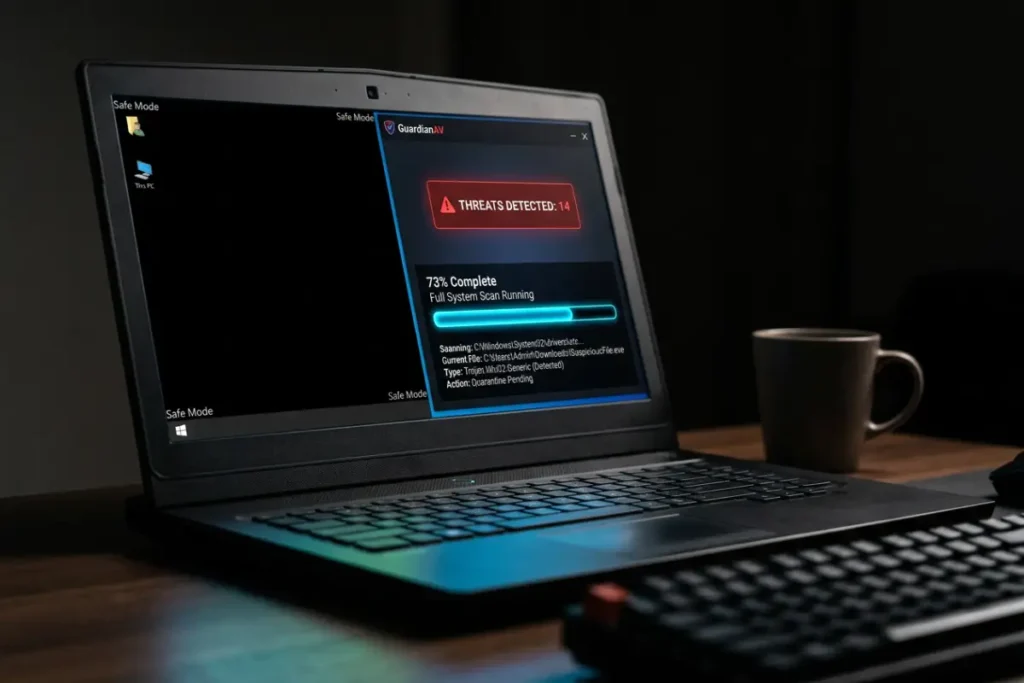
Safe Mode is the diagnostic startup configuration that loads only the minimum required drivers and system services. It is the preferred operating environment for Trojan removal because the vast majority of Trojans are not programmed to register startup entries in Safe Mode’s restricted execution environment, meaning they do not run their own processes when the system boots into Safe Mode. A Trojan that is not running cannot regenerate deleted files, cannot interfere with your scanner’s operation, and cannot receive updated instructions from its C2 server.
Access Safe Mode on Windows 10 or Windows 11 by holding the Shift key while selecting Restart from the Start menu. In the Advanced Recovery Options, navigate to Troubleshoot → Advanced Options → Startup Settings → Restart. After the system restarts and presents the startup settings menu, press F5 to select Safe Mode with Networking. Networking capability is required in this context to allow your antivirus software to update its definitions before scanning — an outdated database significantly reduces detection rates against recent Trojan variants.
Updating and running a comprehensive full system scan
After reaching Safe Mode with Networking, launch your antivirus software and navigate directly to the update function. Apply the most current definitions available. Then select the most comprehensive scan option the software offers — typically labeled Full Scan, Deep Scan, or Complete Scan. Do not run a Quick Scan. Quick scans examine only the highest-probability infection locations and are entirely unsuitable as the primary scan in a confirmed or suspected infection scenario.
A full scan will examine every file on every connected storage device: all drives, system directories, user directories, temporary file locations, browser caches, and the Windows Registry. Depending on drive size and processing speed, this will take one to several hours. Allow it to run to completion without interruption.
When the scan completes, quarantine every detected threat. Review the quarantine list before committing to permanent deletion — consult the vendor’s threat encyclopedia for any detection name you do not recognize to confirm it represents a genuine threat rather than a false positive. Then permanently delete all confirmed threats and empty the Recycle Bin.
The second-opinion scan — why it is non-negotiable
No antivirus product maintains a 100% detection rate against all Trojan variants, including recent zero-day deployments. Running a second scan with a completely independent tool after your primary scanner completes is the professional standard, not an optional extra. Malwarebytes Anti-Malware is the most widely recommended second-opinion scanner in the security community — its detection architecture differs fundamentally from traditional signature-based antivirus engines, which means it routinely surfaces threats that primary scanners miss.
For complete coverage, Emsisoft Emergency Kit and ESET Online Scanner are two additional tools that can be run without installation and provide independent verification using different detection logic. If any second-opinion scanner identifies threats that your primary tool missed, you have confirmed that the primary tool’s detection was incomplete and that additional investigation of your system’s security configuration is warranted.
Manual removal: when automated tools fall short
When antivirus tools fail to completely resolve a Trojan infection — a scenario most commonly encountered with rootkit-level threats, fileless Trojans, or infections where the Trojan has corrupted the primary antivirus before it could be fully updated — manual investigation and remediation becomes necessary. This requires technical comfort with Windows system tools that most users do not use in their daily workflow. If you reach this point and are not confident in working with the Windows Registry, process analysis tools, and system services, the clean reinstallation path discussed in the following section may be the more appropriate option.
Investigating processes with Process Explorer
Download Process Explorer from the official Microsoft Sysinternals website — it is a free, standalone executable that requires no installation. In the Safe Mode environment, run Process Explorer and examine the process tree it presents. Unlike Task Manager, Process Explorer displays the parent-child relationship between processes, reveals the digital signature verification status of every running executable, and integrates with VirusTotal for hash-based multi-engine scanning of any process directly from the interface.
Enable VirusTotal integration through Options → VirusTotal.com → Check VirusTotal.com. Process Explorer will query the VirusTotal API for the hash of every running process and display the detection ratio (number of flagging engines out of total engines scanned) in a dedicated column. Any process showing a non-zero detection ratio, or any unsigned process running from a non-standard directory, is a candidate for investigation and removal.
Auditing all startup locations with Autoruns
Autoruns — another free Microsoft Sysinternals tool — is the most comprehensive startup analysis utility available for Windows. It examines every location in the system that can cause code to execute automatically: Registry Run keys (for all user accounts), scheduled tasks, Windows services, drivers, browser extensions, Winlogon entries, AppInit DLLs, image file execution options, and dozens of additional locations that a standard Task Manager review would never reach.
Use the Options menu to filter out Microsoft-signed entries and then enable VirusTotal scanning. This leaves only third-party and unsigned entries visible, dramatically reducing the review scope to the items that require your attention. Examine every remaining entry for: executable path (is it in a legitimate system or application directory?), publisher (is it signed by a recognizable company?), and description (does it accurately describe the file it points to?). Any entry that fails these three checks warrants investigation and likely removal. Right-click confirmed malicious entries and select Delete. Removing the startup entry does not delete the underlying file — you will manually delete the file separately after removing all startup registrations.
Registry cleanup targeting persistence mechanisms
The Windows Registry must be inspected manually for Trojan persistence entries that may have survived Autoruns’ automated review. Open Registry Editor (Windows + R → regedit). Navigate to and inspect each of the following keys:
HKEY_CURRENT_USER\Software\Microsoft\Windows\CurrentVersion\Run
HKEY_LOCAL_MACHINE\SOFTWARE\Microsoft\Windows\CurrentVersion\Run
HKEY_LOCAL_MACHINE\SYSTEM\CurrentControlSet\Services
HKEY_LOCAL_MACHINE\SOFTWARE\Microsoft\Windows NT\CurrentVersion\Winlogon
In the Run keys, every value’s data field shows the executable that will launch at login. Any path pointing to a file in a temp directory, a user’s AppData folder, or any directory outside of C:\Windows\System32, C:\Windows\SysWOW64, or C:\Program Files deserves scrutiny. In the Services key, look for services whose ImagePath value points outside standard system directories. In the Winlogon key, the Userinit value should contain only userinit.exe and the Shell value should contain only explorer.exe — any additional executables appended with a comma separator represent Trojan modification.
Before deleting any Registry entry, export a backup of the parent key: right-click the key, select Export, and save the .reg file to your desktop. This precaution allows reverting a deletion if it causes unintended system behavior.
Offline boot scanning: the solution for rootkit-level infections
When a Trojan has embedded itself at the kernel level using rootkit techniques, no tool that runs inside the compromised operating system can reliably detect or remove it. The rootkit has modified the OS’s own reporting mechanisms to conceal its presence from everything running within that environment. The only reliable solution is to remove the infected hard drive from the influence of the compromised OS by booting from completely independent external media.
Creating and using a bootable rescue disc
Major antivirus vendors provide free, purpose-built bootable rescue environments specifically for this scenario. Kaspersky Rescue Disk 18, ESET SysRescue Live, Bitdefender Rescue Environment, and Avira Rescue System are all well-maintained, regularly updated tools that boot a self-contained Linux-based operating system from a USB drive. Download the ISO file of your chosen tool on a clean machine. Write it to a USB drive using Rufus or Balena Etcher. Configure your infected machine’s BIOS or UEFI to boot from the USB device first — typically accessed by pressing F2, F10, F12, or Delete during the initial startup sequence.
Once the rescue environment loads, run a full scan of all internal hard drives. Because the infected operating system is not running, the rootkit’s concealment mechanisms are inactive — the scanner is reading the drive directly without any OS-level filtering. This approach detects and removes rootkit components that are completely invisible from within Windows, making it the definitive solution for the most severe infection scenarios.
You may find it useful to explore best free Trojan removal tools in 2026 (tested and ranked) for a comprehensive assessment of which bootable rescue environments perform best in independent testing, alongside detailed comparisons of on-system scanning tools.
Post-removal critical actions: the steps most people skip
Successful Trojan removal addresses the technical infection. It does not undo the consequences of whatever the Trojan accomplished during its operational window. The following actions are not optional cleanup — they are critical response steps whose omission creates ongoing exposure from an infection that is technically gone.
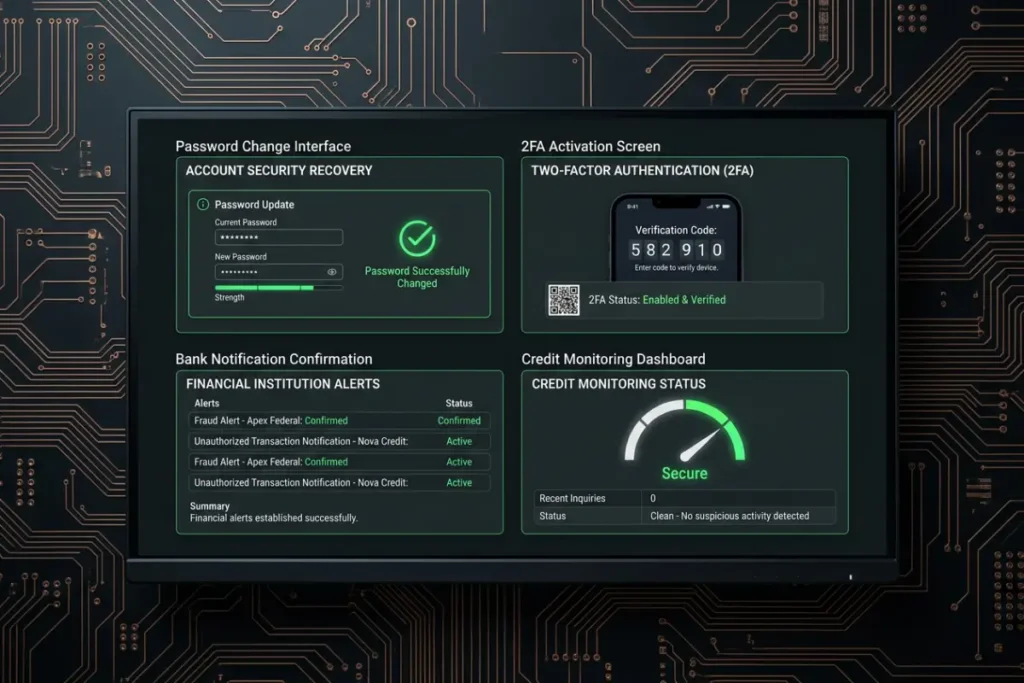
Immediate and comprehensive password rotation
Every credential typed, saved, copied, or auto-filled on the infected machine during the infection period must be treated as compromised. This includes banking and investment accounts, email providers (which function as the master key to virtually every other account through password reset flows), social media platforms, cloud storage services, work systems, VPNs, and any subscription service with stored payment methods.
All password changes must be performed from a separate, confirmed-clean device before those accounts are accessed again on the remediated machine. Generate new passwords using a reputable password manager — strong, unique credentials for every account with zero reuse across services. If you do not currently use a password manager, a Trojan infection is the most compelling possible argument for starting now.
Universal two-factor authentication deployment
Two-factor authentication is the most effective single countermeasure against credential theft originating from a Trojan infection. A stolen password combined with a required second factor that resides only on your physical device transforms the attacker’s captured credentials into a set of keys that do not fit the lock. Enable 2FA on every account that supports it, prioritizing in order: financial institutions, email providers, cloud storage, social media, and all work-related systems. Use an authenticator application — Google Authenticator, Authy, or 1Password — rather than SMS-based codes wherever the option exists, as SMS-based 2FA is vulnerable to SIM-swapping attacks.
Financial institution notification
Contact your bank, credit card issuers, and any financial institution whose credentials were accessible on the infected machine. Notify them that the device was compromised by malware. Most financial institutions have dedicated fraud response capabilities and will: place a fraud alert on the account, review recent transactions for unauthorized activity, proactively reissue card numbers, and initiate chargeback processes for confirmed fraudulent transactions. Early notification dramatically improves the probability of recovering funds from fraudulent transactions before they clear.
Credit and identity monitoring
Trojan infections that captured personal identifying information create downstream identity theft risk that may not materialize for months. Request your credit reports from all three major bureaus and review them for accounts you did not open, inquiries you did not authorize, or associated addresses you do not recognize. Consider placing a credit freeze — the strongest available protection against new account fraud in your name — which prevents any new credit from being issued without your explicit, verified authorization.
Building a Trojan-resistant security architecture
The most valuable investment you can make after surviving a Trojan infection is engineering the conditions that make a repeat infection orders of magnitude less likely. The principle is defense in depth — multiple independent security layers that each represent a checkpoint a Trojan must pass to achieve a foothold, such that the simultaneous failure of all layers becomes vanishingly improbable.
The foundational security layer: updated software at every level
Trojan infections routinely exploit known vulnerabilities in operating systems and applications — vulnerabilities with available patches that victims have simply not applied. Enable automatic updates for Windows, your browser, browser extensions, PDF readers, Java, and every other piece of software on the machine. This is the single highest-return investment in security hygiene because it closes the exploitation vectors that require zero user interaction — the Trojan-delivery mechanisms that do not even require you to click anything suspicious.
Real-time behavioral protection with a top-tier security suite
A static signature scanner is no longer sufficient as a primary defense in 2026. Select an antivirus product whose architecture includes behavioral monitoring — continuous observation of process activity for behavioral patterns consistent with malware operations regardless of whether the executing file matches any stored signature. This capability is what separates security products that catch novel Trojans from those that only catch catalogued ones. In independent testing by AV-TEST and AV-Comparatives, the behavioral protection layers of Bitdefender, Kaspersky, and Norton consistently outperform competitors in zero-day threat scenarios.
For a complete evaluation of which security suites provide the strongest Trojan protection in 2026, the detailed analysis in signs your computer has a Trojan virus right now and the tool comparison in how to protect your computer from Trojan viruses permanently both complement this guide with focused practical guidance.
Verified file origins and pre-execution scanning
The origin of every file you execute should be verified before you run it. Download software exclusively from official developer websites — never from aggregator sites, torrent sources, or third-party repositories. Before executing any downloaded file, submit it to VirusTotal.com for analysis against 70+ independent scanning engines. This 30-second verification step has the potential to catch a Trojan installer before it ever runs — making it the most efficient possible point of intervention in the infection chain.
Backup discipline as the ultimate insurance
No security architecture is theoretically impenetrable. Maintaining a current, clean, offline backup of critical data ensures that even the worst-case scenario — a ransomware-delivering Trojan that encrypts your entire drive — does not result in permanent data loss. Follow the 3-2-1 rule: three copies of important data, on two different media types, with one copy stored offline and physically disconnected from any network-connected device. Test your restore process periodically — a backup you have never tested is a backup whose reliability is entirely unknown.
The clean reinstallation option: when to use it
There are infection scenarios where even thorough, multi-tool removal and careful manual cleanup cannot produce the certainty of a clean system. Confirmed rootkit infections, extended infections of unknown duration, infections discovered only after financial activity was conducted on the machine, and scenarios where complete confidence in removal cannot be established all qualify as candidates for clean reinstallation.
A clean reinstallation — not a Reset This PC operation, which preserves files that may still be infected, but a full installation from official Microsoft media — replaces the operating system entirely with a verified clean copy. Every component of the infection is eliminated. The procedure begins with a verified-clean backup of personal files, creation of a Windows installation USB using the official Microsoft Media Creation Tool, full installation over the existing system, and selective restoration of personal data only — never executable files or application data backups that may carry infection.
It is a significant undertaking, but for the scenarios described above, it is the only approach that provides justified, rather than assumed, confidence in a clean system.
The enduring calculus of Trojan defense
The Trojan threat will not diminish. The criminal ecosystem that develops and operates Trojan malware is profitable, organized, and continuously innovating at a pace that tracks advancement in defensive technology. The AI tools that empower defenders in 2026 — behavioral analysis engines, machine learning classifiers, cloud-based threat intelligence — are equally available to attackers for generating evasion-optimized payloads and testing them before deployment.
What this calculus means for the individual user is not hopelessness — it is clarity. The goal of personal cybersecurity is not achieving theoretical perfection against every possible threat. It is elevating your attack cost above the threshold at which you become an attractive target relative to the billions of less-defended machines that exist alongside yours on the global network. Consistent patch management, behavioral monitoring tools, pre-execution file verification, disciplined download habits, and maintained backups collectively achieve that elevation without requiring technical expertise beyond the scope of this guide.
The steps in this guide represent the complete intervention framework for the Trojan threat as it exists in 2026. Execute them methodically, maintain the practices permanently, and the probability of a successful Trojan infection on your machine becomes a manageable risk rather than an inevitable outcome.