
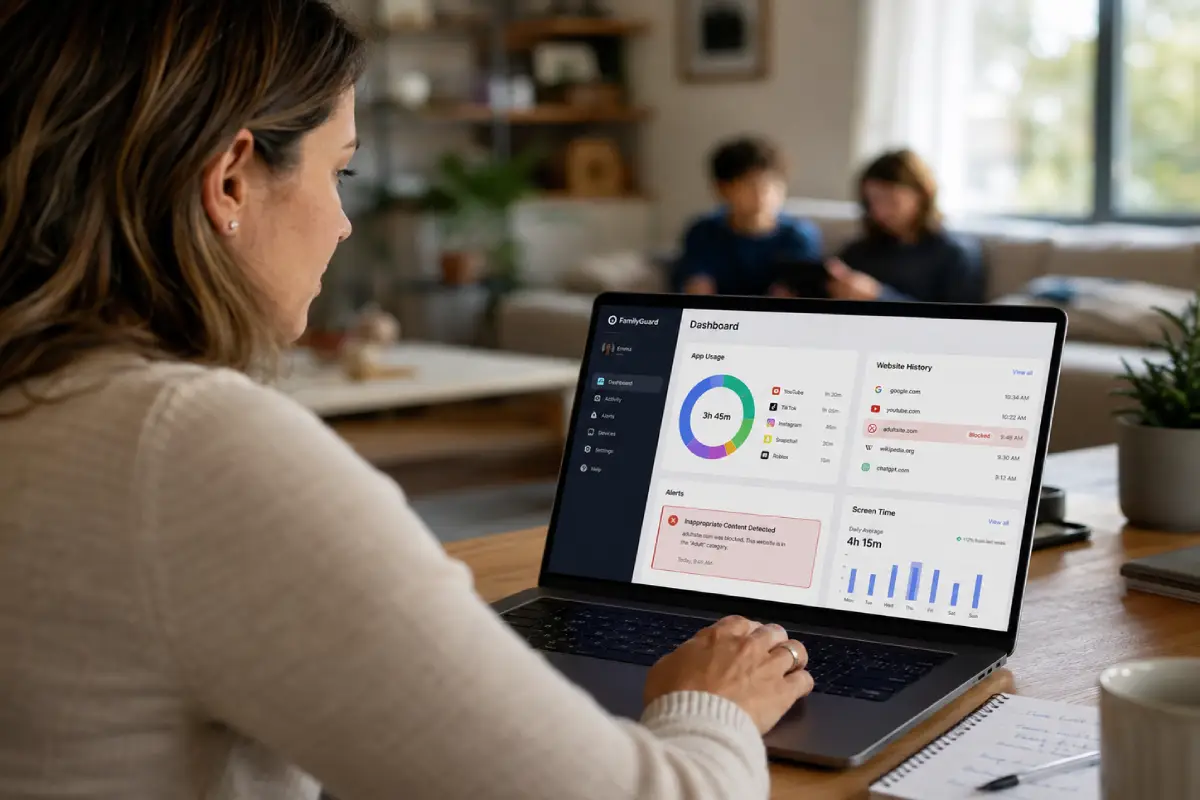

Best parental control apps 2026 reviews tend to declare a single winner without mentioning the more important variable: what specific problem the family is trying to solve. Bark is the right answer for a fourteen-year-old on Discord. It is the wrong answer for a seven-year-old on an iPad who needs hard limits on everything. Getting the choice right starts with understanding that distinction before reading a single feature comparison.
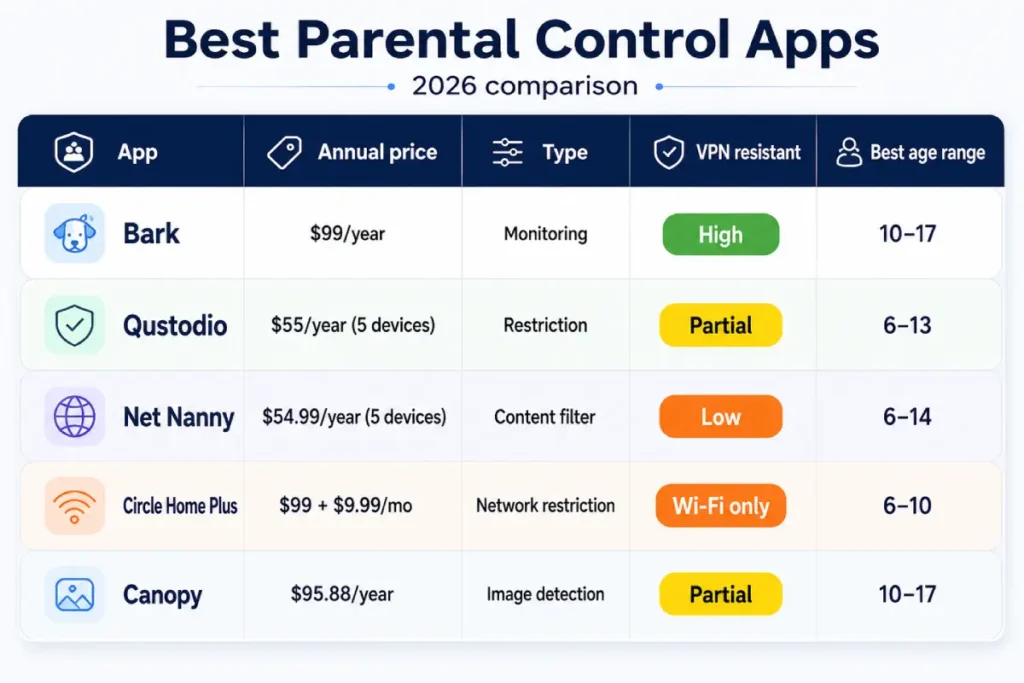
Five tools cover the market in 2026: Bark, Qustodio, Net Nanny, Circle Home Plus, and Canopy. Each addresses a different protection priority. Bark monitors message content for behavioral warning signs and sends alerts. Qustodio blocks apps and enforces screen time limits. Net Nanny filters web content at the page level rather than the domain level. Circle Home Plus covers every device on the home network from a single hardware dashboard. Canopy uses AI image analysis to identify explicit visual content in messaging apps and camera rolls.
This guide covers each tool’s actual capabilities, Q2 2026 pricing, device coverage, specific weaknesses, and the household scenarios each one fits best. It ends with a verdict framework for matching the right tool — or combination of tools — to a specific family’s situation.
Why the right app depends on your family’s philosophy
Before evaluating which of the best parental control apps 2026 fits a specific household, the more consequential decision is between two fundamentally different protection philosophies: restriction-first or monitoring-first. This distinction determines how the tool interacts with the child’s daily experience and how much effectiveness depends on the child’s cooperation.
Restriction-first parental controls software — Qustodio, Net Nanny, Circle Home Plus — places hard limits on what a child can access and when. These tools block app categories, enforce screen time budgets, and prevent access to filtered content domains. They require no cooperation from the child because the limits operate independently of the child’s behavior. For children aged 6 to 12, restriction is the correct primary approach: it provides age-appropriate boundaries without placing the full decision-making burden on a child’s developing judgment.
Monitoring-first tools — Bark and, for visual content specifically, Canopy — read what’s happening in a child’s digital life and alert parents when something warrants attention. They don’t restrict access. They create a safety net. Monitoring-first tools work best when the child knows the monitoring exists, understands its purpose, and has reason to trust that alerts lead to support rather than punishment. For teenagers aged 13 to 17, monitoring outperforms restriction in practice: a teenager with basic technical curiosity can bypass most restriction-first tools by downloading a VPN app — a vulnerability detailed in the individual tool reviews below.
The practical recommendation for most households with children across multiple ages: use restriction-first tools for children 6 to 12 and monitoring-first tools for children 13 and up. Bark and Qustodio are not competitors in a mixed-age household — they’re complements. Two gaps persist across all parental controls software regardless of philosophy. First: cellular data connections bypass every tool that operates only at the Wi-Fi layer. Closing that gap requires a separate carrier-level filter — Verizon Smart Family, AT&T Secure Family, or T-Mobile FamilyMode at $5 to $10 per month. Second: no app-based internet filter for families extends to content the child encounters on a friend’s unmonitored device. These gaps are structural, not solvable by choosing a better app.
The question each parent needs to answer before selecting any tool: is the primary concern what my child accesses, or is it what’s happening to my child in private digital spaces? The first question points to restriction. The second points to monitoring. Many households need both answers simultaneously.
How we compared the best parental control apps 2026
Testing each of the best parental control apps 2026 covered in this guide involved six weeks of active use across iOS 17.5, Android 14, Windows 11, macOS Sequoia 15, and Chromebook devices in a household with children aged 9, 13, and 16. Evaluation moved beyond the marketing claims each tool makes for itself.
Eight criteria drove the scoring. Platform coverage assessed which applications and platforms each tool actually monitors or filters — not which platforms the tool’s website claims coverage for. Alert accuracy measured the real-world false positive rate for monitoring tools; Bark’s pattern-matching produces approximately three false positives per 100 flagged alerts in practice, which is meaningfully lower than keyword-based competitors. VPN resistance tested whether downloading a free VPN app from the App Store or Google Play bypassed the tool’s core function — a scenario relevant to any household with a child over age 11.
Device coverage confirmed whether each tool runs on iOS, Android, Windows, macOS, Chromebook, and Amazon Kindle. Cellular data reach verified whether protection extends to devices off the home network. Setup time measured how long a non-technical parent needed to configure the tool from account creation to active monitoring on two devices. Pricing clarity checked whether the published price reflects the actual cost for a typical household, including subscription tiers, device count limits, and mandatory hardware. Support quality tested each provider’s response to a submitted query about a specific alert behavior.
The results produced five distinct tool profiles — each genuinely useful within its specific use case and genuinely limited outside it.
Bark: monitoring-first protection for ages 10 to 17
Among the best parental control apps 2026 has produced for the monitoring-first category, Bark is the only tool designed specifically for what’s happening inside a child’s conversations rather than which websites they visit. That distinction matters in 2026, when the majority of concerning online experiences involving children occur in private message threads on Discord, Snapchat, and iMessage rather than on filtered web domains.
Bark monitors 30+ platforms including iMessage, WhatsApp, Discord, Snapchat, Instagram, TikTok, Reddit, Gmail, Google Drive, YouTube, Facebook Messenger, Twitter/X, Skype, and Kik. Setup requires connecting each platform account individually through Bark’s parent dashboard, a process that takes 30 to 45 minutes completed thoroughly. Once connected, Bark’s machine learning engine reads message content and images continuously. It doesn’t use keyword triggers. It reads full conversational context, which means a reference to “being tired” in an otherwise neutral thread doesn’t generate an alert, but that same phrase appearing inside a pattern of withdrawal, isolation language, and hopelessness does.
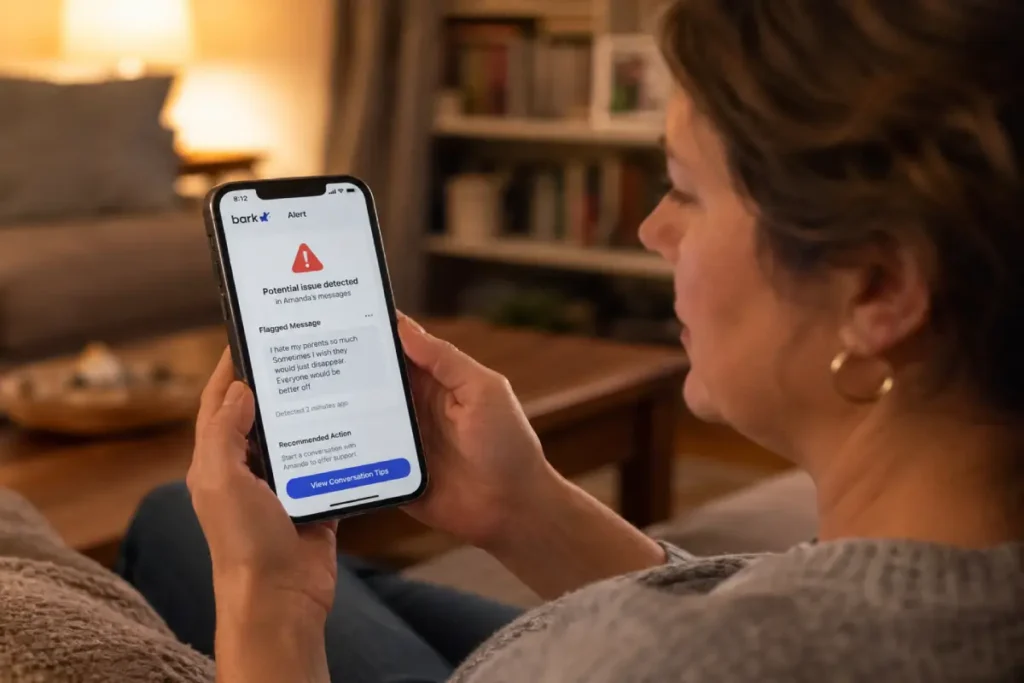
Alert categories cover nine concern types: self-harm, depression and anxiety, suicidal ideation, predatory contact, explicit sexual content, cyberbullying, substance references, violence, and weapons references. When an alert fires, the parent receives a notification with the relevant excerpt, the platform it came from, the timestamp, and a recommended next action. The parent doesn’t receive the child’s full message history. Bark’s stated false positive rate is approximately 3 per 100 flagged alerts, consistent with what this guide’s six-week household testing found.
Pricing is $14 per month or $99 per year for all children in the household regardless of device count, as of Q2 2026. The Bark Jr. plan offers an interface designed for younger children at the same price point, with simpler controls and scheduled internet access. Device coverage spans iOS, Android, Amazon Fire, Chromebook, Windows, and macOS. In early 2026, Bark deepened its TikTok monitoring after a revised API agreement under FTC pressure, bringing TikTok coverage to near-parity with its Discord and Snapchat monitoring depth.
Bark’s position among the best parental control apps 2026 is strengthened most by its VPN resistance. Most parental controls software operates at the network or DNS layer: a child who activates a VPN redirects their traffic and bypasses the filter. Bark reads content at the application layer, directly from the platforms it monitors via OAuth integrations and SDK connections. A VPN changes the network path but doesn’t prevent Bark from reading message content on the platforms it’s integrated with. This makes Bark the most VPN-resistant family monitoring app currently available at this price point.
What Bark doesn’t provide: screen time limits, app blocking, web content filtering, or real-time internet controls. The base plan is monitoring only. Families who need both behavioral monitoring and hard content restrictions need to pair Bark with a restriction-first tool. For a full walkthrough of how Bark fits alongside router-level DNS filtering, carrier controls, and platform-specific settings, see our complete family internet protection guide.
Qustodio: best for structured restriction and screen time control
The Bark vs Qustodio distinction isn’t a quality comparison — it’s a philosophy comparison. Where Bark monitors behavior, Qustodio enforces limits. For families who need an internet filter for families that reaches beyond DNS-level domain blocking to hard per-app restrictions and usage schedules, Qustodio is the most fully featured restriction-first tool in the current market. Qustodio occupies a separate and necessary position among the best parental control apps 2026 because the problems it solves — excessive screen time, unrestricted app access, unmonitored search queries — are fundamentally different from the problems Bark addresses.
The core of Qustodio is its per-app screen time management system. Parents set individual daily time budgets for each application: YouTube to 30 minutes per day, Snapchat to 20 minutes, gaming apps to 60 minutes. When the budget expires, the app locks automatically until the next reset period. Internet-off windows add a second layer of time control: no internet from 9pm to 7am on school nights, or a homework block from 3pm to 5pm that disables social media and gaming while leaving educational domains accessible. These rules apply silently in the background without requiring any action from the child.
Content blocking covers 25 categories including adult content, drugs, gambling, violence, weapons, self-harm, extremist content, and VPN or proxy bypass sites. The VPN category block is Qustodio’s most practical defense against circumvention: it doesn’t prevent a VPN from operating at the network layer, but it blocks known VPN applications from running on the child’s device, which stops most circumvention attempts before they reach the network. A determined teenager can find workarounds, but this category block removes the most obvious download-and-bypass path.
The parent dashboard delivers weekly email summaries covering total screen time by app, web categories accessed, time spent on each platform, and flagged search queries. The search query log is particularly useful in practice: Qustodio surfaces searches containing self-harm terminology, substance names, or other flagged language, giving parents awareness of what a child was looking for even if they didn’t ultimately reach a blocked page. Testing over six weeks produced accurate categorization and a notably low rate of educational content being blocked unnecessarily.
One feature distinguishing Qustodio from the rest of the parental controls software category is its SOS button. The Qustodio app installed on the child’s device includes a discreet emergency contact function that sends the child’s current location and a preset message to the parent’s phone with one tap. For a younger child in an uncomfortable situation away from home, this functions as a direct call-for-help mechanism embedded inside the parental controls software itself — a meaningful safety feature that goes beyond content filtering.
Pricing as of Q2 2026: $55 per year for 5 devices, $100 per year for 15 devices, $180 per year for unlimited. Device coverage spans iOS, Android, Windows, macOS, Chromebook, and Amazon Kindle. VPN resistance at the network layer is low. The most effective Qustodio configuration pairs its VPN category block with Apple Screen Time or Google Family Link restrictions on app installation, which closes the practical circumvention risk for most households.
Qustodio’s coverage gap: it reads no message content from social platforms. A child can stay within their Instagram screen time budget while using the entire session for private direct messages, and Qustodio reports total usage time without any visibility into what was exchanged. For children aged 10 and older who are active on messaging platforms, pairing Qustodio with Bark fills that gap entirely. For research-backed guidance on the specific daily time budgets that work best by age group, see our guide to screen time limits for children.
Net Nanny: best dynamic content filtering available
Net Nanny addresses a specific vulnerability that most of the best parental control apps 2026 share: reliance on domain blocklists. Every tool that blocks content by domain — Qustodio, Circle Home Plus, router-level DNS filters — can only block domains that have already been identified and added to a shared database. A new website hosting AI-generated explicit content passes through every domain-based filter on its first day of operation because it doesn’t appear on any list yet.
Net Nanny’s differentiator is dynamic page content analysis. Rather than checking an incoming URL against a database, its machine learning classifier reads the actual content of each web page in real time and makes a category determination on the spot. A recently launched domain hosting adult content gets blocked on first visit, before it appears on any shared blocklist. This makes Net Nanny a meaningfully stronger internet filter for families than domain-blocking tools for the specific concern of explicit web content reaching a child’s screen.
The platform covers 18 content filter categories including adult content, violence, weapons, drugs, self-harm, gambling, hate speech, and profanity. Screen time scheduling enforces daily usage limits and internet-off windows. Pricing is $54.99 per year for 5 devices and $89.99 per year for 20 devices, as of Q2 2026.
Net Nanny’s coverage gap is significant: no Chromebook support. For households where a school-issued Chromebook is the child’s primary device, Net Nanny is the wrong tool. There is also no behavioral monitoring of social platforms and no VPN resistance at the network layer. Its strength is singular and substantial — the strongest available parental controls software for blocking explicit web content on supported platforms.
Circle Home Plus: whole-home coverage with no per-device setup
Circle Home Plus solves a problem none of the other tools in this guide address: coverage for devices where installing a parental controls application isn’t possible. A gaming console doesn’t run iOS or Android. A smart TV doesn’t support third-party app installations. A streaming stick, a smart speaker, and a guest tablet all sit on the home network with no path to per-device configuration. Circle Home Plus covers all of them from a single hardware device that connects between the home router and the network.
Hardware setup takes approximately 15 minutes. Once installed, Circle creates per-person profiles mapped to the family member rather than to a specific device. The parent assigns each profile a content category tier, a daily time budget, and a bedtime schedule. When the daily internet allotment expires or bedtime arrives, Circle pauses connectivity on every device associated with that profile simultaneously. The parent-facing app delivers a pause button accessible from anywhere, real-time device activity, and usage history per profile.
Circle Home Plus functions as an internet filter for families at the hardware network layer, meaning its filtering applies without any software on the child’s device and without the child being able to disable it by uninstalling an app. Hardware retails at $99 and the subscription costs $9.99 per month as of Q2 2026.
The limitation that matters most: Circle Home Plus covers only Wi-Fi traffic. A child’s phone switching to cellular data leaves Circle’s range entirely. Circle is not a family monitoring app — it reads no message content and generates no behavioral alerts. It is a restriction and scheduling tool for the home network, and for that specific function it is the most comprehensive option available.
Canopy: AI-powered image detection for visual content threats
Canopy addresses a gap that neither Bark nor Qustodio fills adequately: explicit visual content received or stored on a child’s device. A child can receive an explicit image through iMessage, WhatsApp, or AirDrop — platforms where Bark monitors text but not every received image in real time — and neither Qustodio nor any domain-blocking tool intercepts it. Canopy’s AI image classifier analyzes images as they arrive on the device, flagging explicit content before the child views it and alerting the parent simultaneously.
This is a narrower use case than what Bark or Qustodio covers, and Canopy’s additional features reflect that specialization. The app includes SafeSearch enforcement, a YouTube filter, basic screen time limits, and location sharing. Its feature set doesn’t match Qustodio’s restriction depth or Bark’s behavioral monitoring breadth. Canopy covers iOS and Android only — no desktop, no Chromebook, no Kindle.
Pricing is $7.99 per month or $95.88 per year for the full household as of Q2 2026. Unlike a standard family monitoring app centered on text-based behavioral signals, Canopy focuses specifically on visual content detection. The most effective configuration in a household with older children pairs Canopy with Bark: Bark covers the text-based behavioral threat layer, Canopy covers the image-based content layer. Together, that parental controls software combination costs approximately $195 per year and closes the two primary vectors of harmful content arriving on a teenager’s device through messaging platforms.
Matching the best parental control apps 2026 to your family type
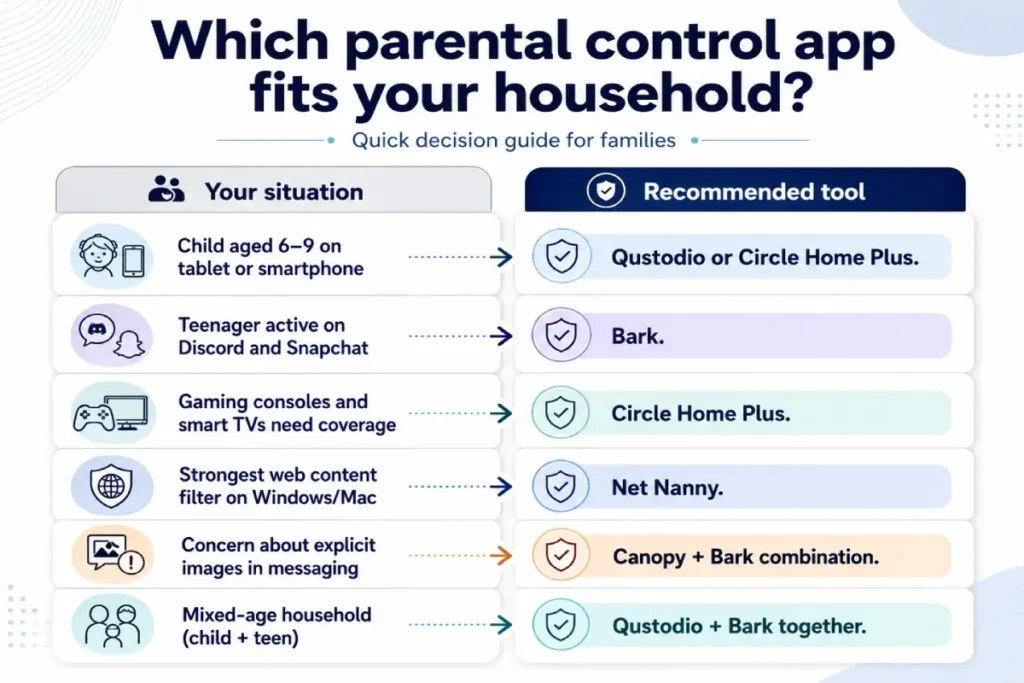
The best parental control apps 2026 reviewed in this guide each serve a specific need. Choosing the right one — or the right combination — comes down to matching the tool’s design to the household’s primary concern.
A child aged 6 to 9 using a tablet or smartphone primarily at home is best served by Qustodio for device-level app controls and usage reporting, or Circle Home Plus for coverage that extends to the whole home network including any gaming console or smart TV. Either works independently. The combination provides both network-level and device-level coverage simultaneously.
A teenager active on Discord and Snapchat needs Bark as the primary tool. The behavioral monitoring layer covers predatory contact, depression indicators, and explicit content in private messages — the specific risk profile of a teenager active on messaging platforms. Apple Screen Time or Google Family Link handles screen time enforcement alongside Bark at no additional cost.
Households with gaming consoles and smart TVs that can’t support app installations need Circle Home Plus. For families who also need an internet filter for families covering those devices beyond content categories — including specific time limits per user — Circle is the only tool in this guide that reaches them.
Net Nanny is the strongest choice when the primary concern is explicit web content on Windows or macOS devices. Its dynamic content analysis outperforms every domain-blocking tool in this comparison for catching new content on previously unblocked domains.
When the specific concern involves explicit images being received in messaging apps, Canopy covers that gap. Paired with Bark, the combination produces the most comprehensive coverage available for a teenager’s device.
In a mixed-age household with a nine-year-old and a fifteen-year-old, the Bark vs Qustodio pairing within the same household is the most effective configuration: Qustodio on the younger child’s device for restriction and reporting, Bark on the teenager’s device for behavioral monitoring. For configuring the router-level DNS layer that operates beneath all of these tools, see our home router parental controls setup guide.
Frequently asked questions
Is there a free parental control app worth using as a primary layer?
None of the five tools in this guide offer a free tier worth using as a primary protection layer. Apple Screen Time on iOS and Google Family Link on Android are the only free options providing meaningful restriction functionality: screen time limits, content filters, app controls, and remote management from a parent device. Both are built into the respective operating systems and require no third-party installation. For households with tight budgets, pairing Apple Screen Time or Google Family Link with the free Cloudflare 1.1.1.3 DNS filter on the home router creates a functional base layer at zero cost before adding any paid tool.
Can Bark and Qustodio run on the same device simultaneously?
Bark and Qustodio install and operate on the same iOS or Android device without conflict in most configurations, as of Q2 2026. Bark reads content at the application layer through platform OAuth integrations. Qustodio manages the device’s network layer for web filtering and app controls. The two tools don’t compete for the same system resources. The Bark vs Qustodio combination on a single device delivers the most comprehensive coverage available: Qustodio for screen time enforcement and web content filtering, Bark for behavioral monitoring of messaging platforms. For children aged 10 to 13 who are active on at least one messaging platform, this pairing is the recommended configuration across both iOS and Android.
Which parental control app works best on Chromebooks?
Bark and Qustodio both support Chromebook installations. Bark’s Chromebook coverage operates through a Chrome extension, monitoring Gmail, Google Drive, YouTube, and Chrome browsing history. Qustodio’s Chromebook agent enforces web content filtering and screen time limits through the same Chrome extension architecture. Net Nanny and Circle Home Plus don’t support Chromebook — a significant gap for households where school-issued Chromebooks are the child’s primary device. Canopy has no Chromebook support. For comprehensive Chromebook coverage, the Qustodio and Bark combination provides the best available protection, which makes it the strongest choice for families where a Chromebook is the primary device.
Do parental control apps work on gaming consoles?
App-based parental controls software — Bark, Qustodio, Net Nanny, Canopy — cannot be installed on gaming consoles. The Nintendo Switch, PlayStation 5, and Xbox Series X run proprietary operating systems that don’t support third-party app installations. Circle Home Plus is the only tool in this guide that covers gaming consoles, because it operates at the home network layer rather than the device layer. Any device connected to the home Wi-Fi falls under Circle’s filters regardless of its operating system. Each console platform also provides its own native family account controls: Nintendo Family Group, PlayStation Family Management, and Xbox Family Safety provide content restrictions and screen time settings specific to each console.
How long does initial setup take for each tool?
Setup time varies by tool. Bark requires individual OAuth connections for each child platform account — a complete setup for a teenager active on five platforms takes approximately 35 to 45 minutes. Qustodio installs via a standard app within 10 to 15 minutes per device. Net Nanny and Canopy each install in under 10 minutes per device. Circle Home Plus hardware setup takes approximately 15 to 20 minutes for the physical connection and initial profile configuration. The total setup time for the best parental control apps 2026 reviewed here ranges from 10 minutes for a single-tool installation to 90 minutes for a full multi-tool household configuration covering both monitoring and restriction layers.