
Browser fingerprinting is the tracking method that survives everything most users do to protect their privacy. It survives clearing cookies. It survives switching to incognito mode. It survives installing a VPN. It survives deleting your browsing history. It works because it does not store anything on your device and does not require your consent — it simply reads properties your browser already reports to every website you visit and combines them into a statistical identifier that is unique to you with surprisingly high probability.
Understanding browser fingerprinting precisely — not as a vague concept but as a set of specific mechanisms with specific countermeasures — is what separates a privacy configuration that works from one that creates false confidence. This guide covers how each fingerprinting technique operates at the API level, what the current state of research says about practical uniqueness, which countermeasures have verified effectiveness against specific techniques, and how to measure your own exposure with free public tools.
The stop browser tracking guide covers fingerprinting as one of seven tracking methods in the broader tracking landscape. This guide goes deeper on fingerprinting specifically — the full technical picture and every mitigation worth implementing.
What browser fingerprinting actually is
A browser fingerprint is a composite identifier assembled from the values your browser reports in response to a set of JavaScript API queries and HTTP headers. Each individual value is innocuous. Your screen resolution alone identifies nothing. Your browser’s language setting alone identifies nothing. But the combination of 50 or 100 such values produces a string that, in practice, matches only your specific browser running on your specific hardware.
The 2021 Gómez-Boix, Laperdrix, and Baudry study — the most rigorous large-scale fingerprinting study published to date, covering 2.07 million browser instances collected over four months — found that 70.4% of desktop browser instances produced a unique fingerprint that appeared exactly once in the dataset. Mobile browsers were less fingerprintable at the time due to more uniform hardware configurations. By 2026, as mobile hardware has diversified and new API surfaces have been added, the mobile uniqueness rate has narrowed that gap considerably.
The implication: if you visit a site today and again six months from now — from the same device, using the same browser version, without changing your configuration — a fingerprinting script can connect both visits as the same user with high statistical confidence, without any cookie, any file, or any storage on your device.
The technical mechanisms: how each API gets fingerprinted
Canvas fingerprinting
The HTML5 Canvas API allows JavaScript to render graphics directly in the browser. A fingerprinting script creates an invisible canvas element, draws a specific combination of text and shapes using various fonts, colors, and blend modes, and then reads the pixel-level output of the rendered image using canvas.toDataURL() or getImageData().
The output differs between browsers and devices because different GPUs, GPU drivers, and operating systems apply slightly different anti-aliasing algorithms, sub-pixel rendering techniques, and color profile transformations to the same drawing instructions. A user running Chrome 124 on a MacBook Pro M3 produces a different canvas hash than a user running the same Chrome version on a Windows PC with an NVIDIA GPU, even with identical browser settings.
The differences are invisible to human perception — the image looks identical to both users. But the hash of the pixel data differs in the low-order bits, creating a stable device-level identifier that persists across sessions.
Fingerprint entropy contributed: High. Canvas fingerprinting alone can provide sufficient entropy to uniquely identify a browser in many practical deployments.
WebGL fingerprinting
WebGL is a JavaScript API for rendering 3D graphics using the device’s GPU. A fingerprinting script renders a specific 3D scene and reads the output. More commonly, it simply queries the WebGL renderer and vendor strings — gl.getParameter(gl.RENDERER) and gl.getParameter(gl.VENDOR) — which return the GPU model name and driver vendor string directly.
A typical WebGL vendor string looks like: ANGLE (NVIDIA, NVIDIA GeForce RTX 3080 Direct3D11 vs_5_0 ps_5_0, D3D11). This string identifies not only the GPU model but the driver version and rendering API in use. Combined with the operating system, it narrows the fingerprint significantly.
Fingerprint entropy contributed: High for the renderer string (which is often specific to a GPU model and driver version combination). Moderate for the rendered scene output, which adds additional entropy on top of the renderer identification.
Audio fingerprinting
The Web Audio API processes audio signals through a simulated audio graph. A fingerprinting script creates an oscillator node, routes it through a compressor node, and reads the processed output values. The specific numerical values produced differ between devices based on subtle differences in floating-point arithmetic implementations, audio hardware drivers, and DSP processing pipelines.
Unlike canvas fingerprinting, audio fingerprinting does not play any audible sound — it operates entirely within the browser’s audio processing pipeline at the computational level. It is invisible and inaudible to the user.
Fingerprint entropy contributed: Moderate on its own, but highly complementary to canvas and WebGL fingerprinting because it adds an independent entropy source from a different hardware component (audio hardware versus graphics hardware).
Font enumeration
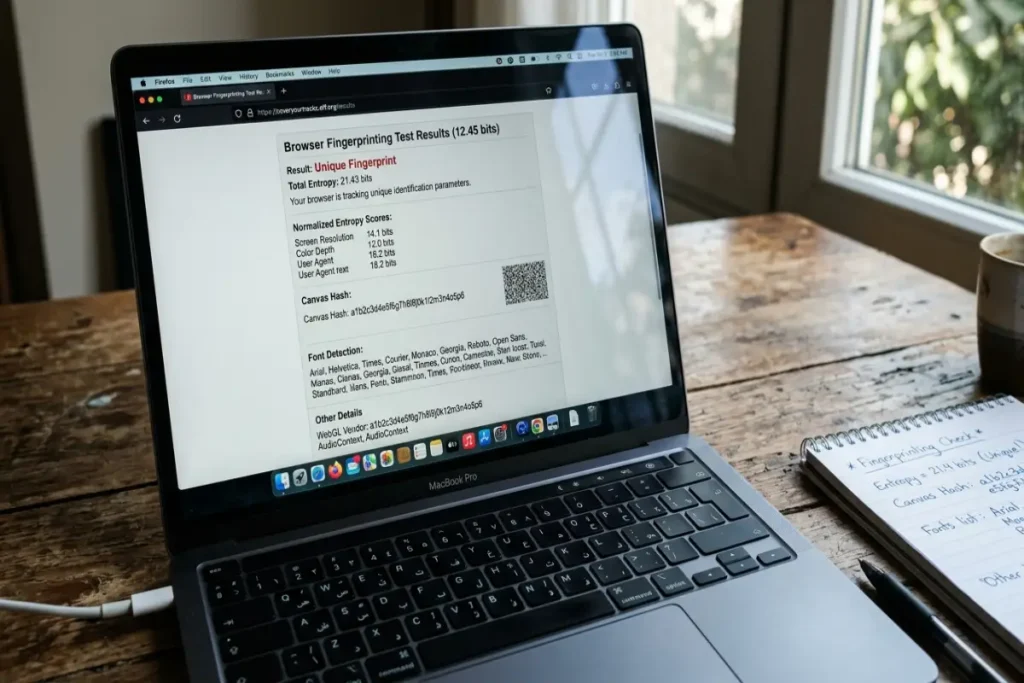
JavaScript cannot directly query a list of installed fonts, but fingerprinting scripts infer font presence through CSS measurement. The script renders a test string in a reference font (typically monospace, sans-serif, or serif) and measures its rendered pixel dimensions using document.createElement and getBoundingClientRect(). It then renders the same string in hundreds of specific font names, measuring each. Wherever the dimensions differ from the reference font, the specific font is present on the device.
The number of detectable fonts typically ranges from 10 to over 200 depending on the operating system and installed software. macOS ships with a specific set of system fonts. Windows ships with a different set. A user who has installed Adobe Creative Cloud has a dramatically larger font library than a base system installation. The combination of which fonts are present and which are absent produces a highly discriminating identifier.
Fingerprint entropy contributed: High, particularly when the font list is large and includes non-standard installed fonts from design or publishing software.
Navigator object and HTTP headers
The browser’s navigator object exposes a collection of properties that fingerprinting scripts read with a single API call: userAgent (browser name, version, and operating system), platform (operating system architecture), language and languages (interface language and preferred language list), hardwareConcurrency (number of logical CPU cores), deviceMemory (approximate RAM in gigabytes, reported in buckets of 0.25, 0.5, 1, 2, 4, 8), maxTouchPoints (number of touch points supported by the display), and plugins (list of registered browser plugins, now limited in modern browsers but historically a major fingerprinting source).
HTTP request headers — particularly Accept-Language, Accept-Encoding, and User-Agent — are sent with every request your browser makes, before any JavaScript runs. A server-side fingerprinting script can begin building a partial fingerprint from headers alone, before any JavaScript fingerprinting executes.
Fingerprint entropy contributed: Moderate individually, but the navigator object is almost always included in fingerprinting scripts because it requires no rendering and produces values that are stable between sessions.
Screen properties and window dimensions
window.screen exposes screen width, height, color depth, and pixel ratio. window.innerWidth and window.innerHeight expose the browser window dimensions. The combination of screen resolution, device pixel ratio (relevant on high-DPI displays), and current window size — particularly if the user does not browse maximized — adds identifiable specificity.
On mobile devices, screen properties are less discriminating because a specific device model produces identical screen values across all units. On desktop, where window sizes are user-defined and more variable, window dimensions add meaningful entropy.
Timezone and locale
Intl.DateTimeFormat().resolvedOptions().timeZone returns the IANA timezone identifier for the system timezone — not just a UTC offset but the specific timezone name, such as America/New_York or Europe/Paris. Combined with language settings and the detected locale, this contributes to geographic attribution even when IP address is masked.
Battery API (now largely deprecated but historically significant)
The Battery Status API, removed from most browsers by 2018 following research by Lukasz Olejnik demonstrating its fingerprinting utility, exposed battery charge level and charging state. The charge level changed continuously and could be used to track users across sessions even without other fingerprinting methods. Its removal is cited as one of the clearest examples of browser vendors responding directly to documented fingerprinting research by eliminating an API surface.
What uniqueness actually means in practice
The 70.4% unique fingerprint rate from the 2021 study means that 70.4% of browsers in a dataset of 2.07 million produced a fingerprint seen exactly once. The remaining 29.6% shared a fingerprint with at least one other browser.
For a fingerprinting tracker operating at scale — processing tens of millions of browser visits per day — a 70% unique identification rate is highly useful. The 30% of browsers that share fingerprints with others are not untraceable — they can still be tracked with lower confidence through probabilistic methods, or tracked within sessions using IP address correlation.
Fingerprint stability over time is the other critical dimension. A unique fingerprint that changes every time the browser updates is less useful for long-term tracking than a stable fingerprint. The 2021 study found that 89% of fingerprints remained stable across browser updates, primarily because the hardware-derived components (canvas, WebGL, audio) do not change when the browser version increments. Only significant hardware changes — GPU replacement, operating system reinstallation — substantially alter these components.
The three countermeasure approaches and their honest trade-offs
Every currently available approach to fingerprint resistance operates through one of three mechanisms: randomization, standardization, or blocking. Each has distinct properties, limitations, and compatibility implications. No single approach eliminates fingerprinting — the question is which approach reduces your fingerprint entropy most effectively within the usability constraints you can accept.
Approach 1: Randomization
Randomization injects controlled noise into the values returned by fingerprinted APIs. Each time a site requests your canvas fingerprint, your audio fingerprint, or your WebGL output, the browser returns a slightly modified version of the true value. The modification is small enough that the rendered output appears correct to human perception, but the pixel-level hash differs from the previous session’s hash, breaking the persistent identifier.
Brave’s Strict fingerprinting protection uses randomization as its primary defense. When Shields are set to Strict, Brave randomizes canvas rendering output, audio processing output, and WebGL renderer values. The randomization is seeded per origin — meaning a given site always receives the same randomized value during a single session, so site functionality that depends on canvas rendering works correctly, but the value changes between sessions.
Verified performance: At the EFF’s coveryourtracks.eff.org, Brave with Shields on Strict consistently reports a “randomized fingerprint” result, meaning the test detects that randomization is occurring. The practical tracking implication is that cross-session fingerprint tracking fails — the same Brave browser in two different sessions reports different fingerprints to the same tracking script.
Limitation: Intra-session tracking using fingerprinting — tracking your behavior within a single browsing session — still works with Brave, because the randomization is stable within a session. For most users, cross-session tracking is the primary concern, making this limitation minor.
Approach 2: Standardization
Standardization reports identical values for fingerprinted APIs as a large population of other browsers, making individual identification statistically improbable by maximizing the number of users who share your fingerprint.
Firefox with privacy.resistFingerprinting enabled uses standardization. It reports fixed, identical values for:
- Canvas rendering output (a pre-defined standard hash regardless of actual hardware)
- Screen resolution (reported as a standardized value regardless of actual display)
- Timezone (reported as UTC regardless of system timezone)
navigator.hardwareConcurrency(reported as 2 regardless of actual CPU core count)navigator.deviceMemory(reported as 8 regardless of actual RAM)- Audio processing output (standardized values)
- Date and time precision (reduced to prevent timing attacks)
Verified performance: Firefox with privacy.resistFingerprinting set to true achieves a “strong protection” result at coveryourtracks.eff.org because the reported fingerprint matches a large population of other Firefox users running the same protection. The entropy score drops substantially.
Limitation: Standardization is detectable. A site that knows Firefox’s standardized values can identify that privacy.resistFingerprinting is enabled, which itself becomes a fingerprinting signal — though a less granular one than the full hardware fingerprint it replaces. Some sites behave differently when they detect this setting. The hardwareConcurrency value of 2 is particularly noticeable to applications that use it for thread pool sizing.
Approach 3: Blocking
Blocking prevents fingerprinting scripts from executing at all by intercepting their network requests before they reach the browser. This is uBlock Origin’s approach — its EasyPrivacy filter list includes domains known to operate fingerprinting services, and network requests to those domains are blocked before any JavaScript executes.
Verified performance: Highly effective against known fingerprinting-as-a-service providers that operate from identifiable third-party domains. Ineffective against fingerprinting code embedded directly in a site’s own JavaScript (first-party fingerprinting), which is increasingly how sophisticated trackers operate in 2026 to survive blocking-based defenses.
Limitation: The most significant of the three approaches. As first-party proxying has become the dominant tracking architecture, script-domain blocking catches a decreasing proportion of total fingerprinting activity.
The optimal configuration by browser
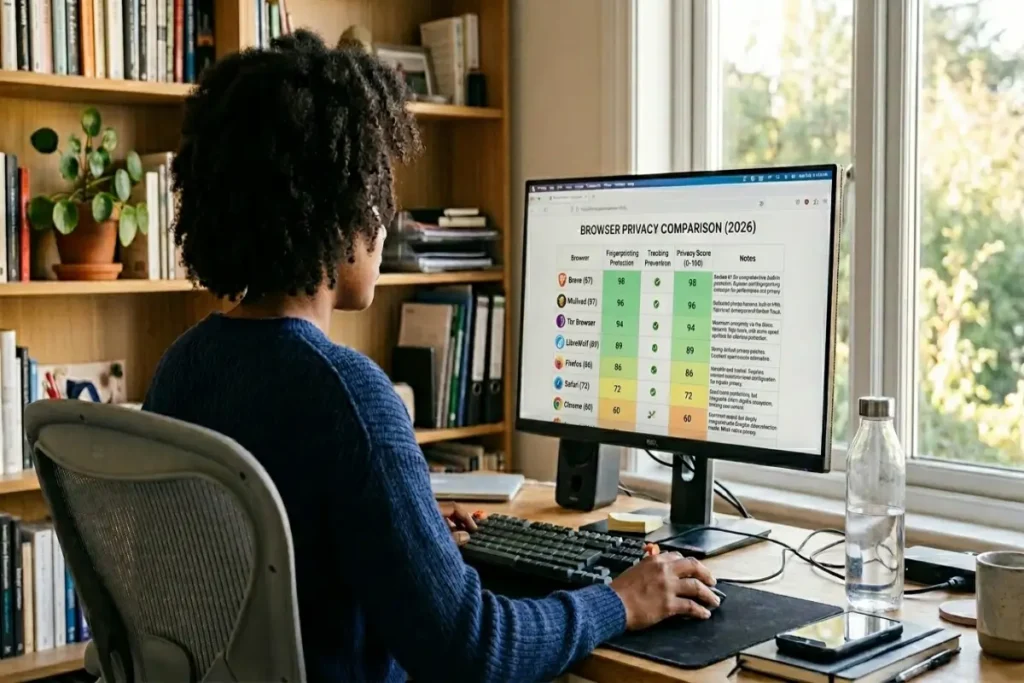
The honest assessment of which browser + configuration combination provides the strongest fingerprinting resistance, ranked by verified effectiveness:
Brave with Shields on Strict: Randomization applied to canvas, audio, and WebGL APIs, combined with native tracker blocking and URL parameter stripping. The randomization model is the most practical for daily use — it does not break site functionality during a session and does not produce the detectable standardized-value signatures that privacy.resistFingerprinting generates. The strongest option for users who want maximum fingerprint protection with minimum compatibility disruption.
Firefox with privacy.resistFingerprinting true and uBlock Origin: Standardization across the major fingerprinted APIs plus blocking of known fingerprinting domains. Stronger against intra-session fingerprinting than Brave’s randomization model, but detectable and occasionally disruptive to sites that rely on the standardized values for functionality.
Tor Browser: The Tor Browser bundles Firefox with privacy.resistFingerprinting enabled, letterboxed window sizing (resizing the content area to standard dimensions to defeat window-size fingerprinting), JavaScript disabled on the Strict security level, and routing through the Tor network. It is the strongest available fingerprinting protection by a significant margin — at the Safest security level, canvas, WebGL, and audio APIs are entirely disabled. The trade-offs are severe: JavaScript-disabled browsing breaks most modern sites, page load times are substantially slower due to Tor routing, and the Tor Browser is not practical as a daily driver for most users. It is appropriate for high-sensitivity research tasks where anonymity takes precedence over convenience.
Chrome with uBlock Origin Lite: The weakest configuration among major browsers for fingerprinting specifically. Chrome does not implement native fingerprinting randomization or standardization. uBlock Origin Lite blocks some fingerprinting script domains but cannot intercept first-party fingerprinting. If fingerprinting resistance is a priority, Chrome is the wrong starting point.
Testing your configuration: a verified methodology
Run the following tests in order after completing any configuration change. Record the results before and after each change to verify what actually improved versus what you assumed improved.
Test 1: coveryourtracks.eff.org The EFF’s tool tests for canvas fingerprinting, font detection, navigator properties, and several other vectors. The result reports whether your browser has a “unique fingerprint,” “randomized fingerprint,” or “strong protection.” Run it in a standard window and then in a private window — the results should be identical if your protection is browser-level rather than session-level.
Test 2: browserleaks.com/canvas The Canvas Fingerprint test at BrowserLeaks renders a specific canvas image and displays the resulting hash alongside your browser’s reported canvas capabilities. In Brave with Strict fingerprinting enabled, this hash should differ between page reloads, confirming randomization is active. In Firefox with privacy.resistFingerprinting, the hash should be identical across sessions but match the standardized Firefox value rather than your hardware’s true output.
Test 3: browserleaks.com/webgl The WebGL test displays your reported WebGL renderer string. In Brave with Strict shields, the renderer string is modified. In Firefox with privacy.resistFingerprinting, the renderer string is spoofed to a generic value. In Chrome or Firefox without fingerprint protection enabled, the exact GPU model and driver string is visible.
Test 4: amiunique.org AmIUnique, a research tool from the Inria research institute, compares your fingerprint against a database of collected fingerprints and reports how unique your combination of values is. Unlike the EFF tool, it provides a percentage — what fraction of browsers in its database share your fingerprint. A result below 0.1% unique (meaning less than 1 in 1,000 browsers shares your fingerprint) indicates a highly identifiable configuration. A result above 5% unique (more than 1 in 20 shares your fingerprint) indicates effective standardization or randomization.
Run all four tests. Rerun them after each browser version update that might affect privacy API behavior. Save the results to track changes over time.
What fingerprinting cannot do alone
Browser fingerprinting is a powerful tracking mechanism, but it operates within constraints that matter for understanding your actual exposure.
A fingerprint identifies a specific browser on a specific device — it does not identify a person unless combined with additional information. If three different people share the same computer, they produce the same fingerprint. If you use three different browsers on the same device, you produce three different fingerprints. The fingerprint tracks the browser instance, not the individual.
Fingerprinting accuracy degrades over time. Hardware changes, operating system updates, and browser updates shift the fingerprint values that derive from hardware-adjacent APIs. The 89% stability rate cited earlier means roughly 11% of fingerprints change significantly within a year — not through any privacy action, but through normal system evolution.
Fingerprinting alone cannot reveal your identity to a tracker who has never seen you before. It becomes powerful when combined with behavioral data — the sequence of sites you visit, the time patterns of your sessions, the content you interact with — that allows probabilistic re-identification even when the fingerprint changes.
Understanding these constraints helps calibrate your response. Fingerprinting is a serious tracking mechanism that deserves the countermeasures described in this guide. It is not omniscient surveillance. The configuration in this guide — Brave with Strict shields or Firefox with privacy.resistFingerprinting — reduces your fingerprint entropy enough that most commercial tracking operations will not maintain a persistent cross-session identifier for your browser. That is the realistic goal.
For users who want to go deeper into the full browser security posture that this guide fits within, the browser security guide provides the complete framework — settings, extensions, maintenance habits, and the threat model each addresses.

Frequently asked questions about browser fingerprinting
Does incognito mode give me a different fingerprint?
No. Browser fingerprinting reads real-time hardware and software properties — your GPU, your installed fonts, your screen resolution, your audio hardware. None of these properties change when you open a private window. A fingerprinting script run in an incognito window on Chrome produces the identical fingerprint as the same script in a regular window. The only exceptions are browsers that apply fingerprint randomization or standardization specifically in private windows — which Firefox does not do by default, but which Brave applies in all windows when Shields are enabled.
Does using a VPN change my fingerprint?
A VPN changes your visible IP address, which is one input into some composite tracking systems that combine IP with fingerprint data. It does not affect any of the browser API values that constitute the fingerprint itself — canvas output, WebGL renderer, font list, audio processing, navigator properties. Your fingerprint is identical with and without a VPN active.
How do I know if a site is fingerprinting me?
You cannot determine this through normal browsing behavior — fingerprinting scripts are JavaScript that runs without any visible indicator. The presence of canvas, WebGL, or audio API calls in a page’s source code suggests fingerprinting activity, but reading source code is not practical for routine use. Indirect evidence comes from blocking reports: uBlock Origin’s network request log shows all blocked requests including known fingerprinting service domains. BrowserLeaks provides a passive detection tool showing which APIs your browser exposed during the page load. For a proactive answer, check the domain against disconnect.me’s tracker database, which maintains a categorized list of known tracking and fingerprinting service operators.
Is browser fingerprinting legal?
In most jurisdictions, fingerprinting for advertising purposes operates in a legal gray area that varies by interpretation of consent requirements. The EU’s GDPR requires explicit consent for processing personal data — and fingerprints that uniquely identify a user arguably constitute personal data under Article 4(1). The ePrivacy Directive’s “cookie consent” requirements have been interpreted by several EU data protection authorities (including France’s CNIL and Germany’s DSK) as applying to fingerprinting. In practice, enforcement against fingerprinting has been limited compared to cookie-based tracking, and the technical complexity of proving fingerprinting-based processing makes legal challenges difficult. Legal status is not a reliable indicator of whether fingerprinting is occurring or affecting you.
Which browser has the best fingerprinting protection?
For daily use, Brave with Shields on Strict provides the strongest fingerprinting protection with the least compatibility disruption. Its randomization model breaks cross-session tracking without producing the detectable standardized values that privacy.resistFingerprinting generates. For users who need the absolute strongest protection and accept significant usability trade-offs, the Tor Browser at its Safest security level completely disables the canvas, WebGL, and audio APIs that provide the highest-entropy fingerprinting surfaces.
Can I be fingerprinted on a mobile device?
Yes, but mobile fingerprinting produces less entropy than desktop fingerprinting because mobile hardware is more uniform. All iPhone 15 Pro units running the same iOS version produce very similar canvas and WebGL outputs. Android device diversity is higher, but still lower than the desktop browser landscape. Fingerprinting on mobile is typically combined with device advertising identifiers and app-level tracking for cross-context identification, rather than relying on browser fingerprinting alone. Safari’s Intelligent Tracking Prevention on iOS limits some cross-site fingerprinting signal collection, and Brave on Android applies its Shields fingerprint protection to mobile browsing sessions.