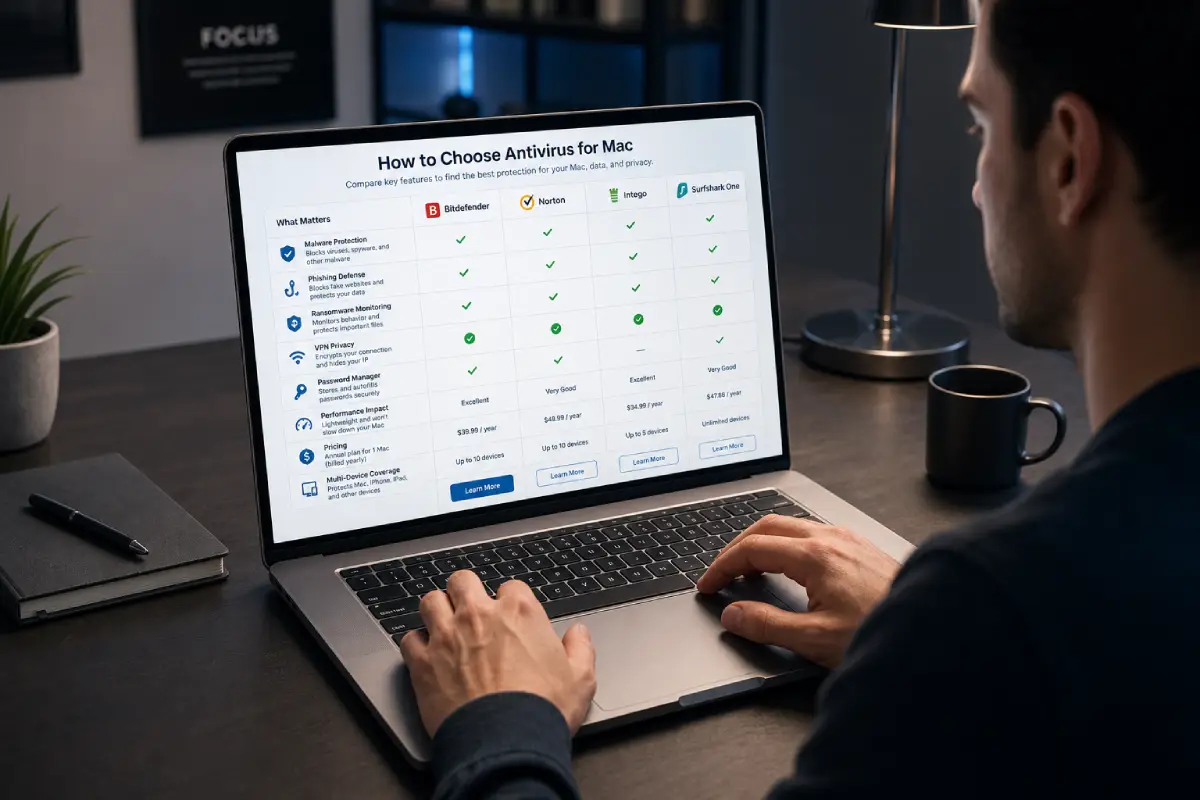

How to choose antivirus for Mac is an important question because not every Mac user needs the same level of protection. Some people use their Mac only for browsing, streaming, writing documents, and trusted apps. Others use it for remote work, online business, client files, banking, design projects, development tools, school work, or travel. The best antivirus for one user may be too expensive, too limited, or too heavy for another.
macOS already includes strong built-in security features. Apple uses protections such as Gatekeeper, notarization, XProtect, app permissions, and FileVault to help protect users from unsafe software and unauthorized access. That means a Mac is not an unprotected device. But Mac users can still face phishing websites, fake software updates, malicious browser extensions, unsafe downloads, adware, public Wi-Fi risks, ransomware behavior, password theft attempts, and privacy threats.
The right antivirus should add protection without creating problems. It should not slow your Mac, drain your battery, interrupt your workflow, or confuse you with constant alerts. It should make your digital life safer and easier to manage.
Choosing antivirus for Mac is not only about malware detection. It is also about browser protection, privacy, account security, ransomware monitoring, VPN, password safety, device coverage, customer support, and long-term pricing. A good choice balances protection, performance, usability, and value.
This guide explains exactly what to look for before choosing antivirus for Mac, how to compare free and paid plans, which features matter most, and how to avoid paying for tools you do not need.
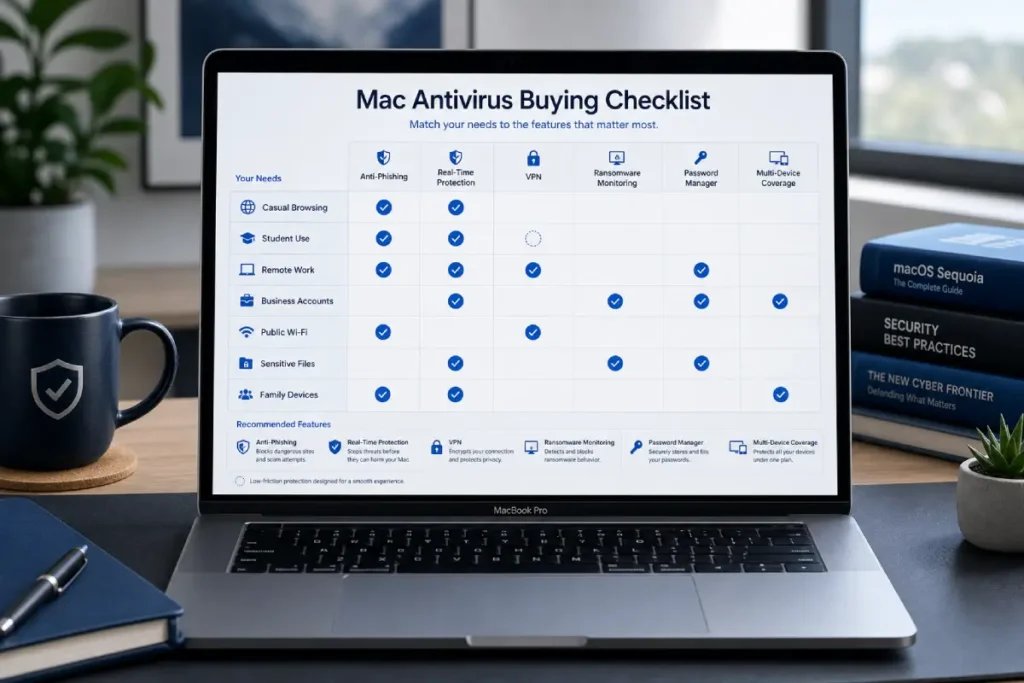
Start with your Mac usage
Before comparing antivirus brands, start with your own risk level. This is the most important step.
Casual Mac users
If you mainly use your Mac for browsing trusted websites, watching videos, writing documents, using email, and downloading apps from the App Store, your risk level may be lower. For this type of user, macOS built-in protections plus careful habits may be enough, or a simple free antivirus may work as an extra layer.
Casual users should still care about phishing, weak passwords, fake pop-ups, and suspicious links. Even a careful user can be tricked by a fake login page. But they may not need the most expensive antivirus plan.
Students
Students often use school portals, shared Wi-Fi, cloud storage, PDFs, email attachments, online research, and collaboration tools. They may also download files from classmates, teachers, or learning platforms.
For students, a good antivirus should be affordable, lightweight, and easy to use. Anti-phishing protection and safe browsing are especially useful. VPN can be helpful if the student often uses campus Wi-Fi or public networks.
Remote workers
Remote workers usually need stronger protection. They may manage business email, client files, cloud documents, video calls, project management tools, payment platforms, and company dashboards.
For remote workers, antivirus should include real-time malware protection, anti-phishing, ransomware monitoring, VPN, and password safety. If your Mac is part of your income, better protection is easier to justify.
Freelancers and creators
Freelancers and creators often download many files. This can include client attachments, images, videos, fonts, plugins, templates, scripts, documents, and compressed folders.
For this group, safe downloads and ransomware protection are important. Anti-phishing is also critical because freelancers often receive invoices, payment links, collaboration invites, and client messages.
Business owners
Business owners may use a Mac to manage websites, online stores, ad accounts, payment processors, customer communication, supplier messages, banking, documents, and analytics dashboards.
For business owners, the best antivirus for Mac should include strong web protection, anti-phishing, secure browsing, ransomware monitoring, identity alerts, VPN, and password protection. Account compromise can be more damaging than a simple malware infection.
Families
Families often need simple protection across multiple devices. One person may use a MacBook, another may use a Windows laptop, and others may use phones or tablets.
A multi-device antivirus plan can be useful for families because it is easier to manage one subscription than several separate tools. The best family option should be simple, clear, and reliable.
Compare core antivirus protection
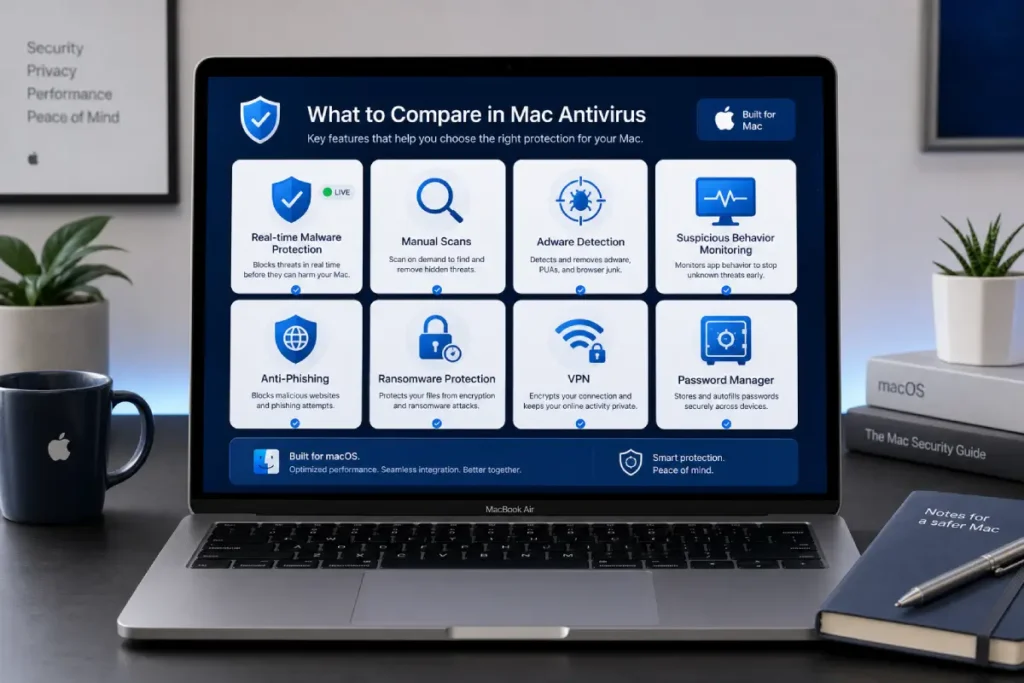
After understanding your risk level, compare the core protection features. These are the features that matter most.
Real-time malware protection
Real-time malware protection checks files, downloads, apps, and suspicious activity while you use your Mac. This is more useful than only scanning manually because it can warn you before a threat runs.
For Mac users who download files often, install apps outside the App Store, or work with client attachments, real-time protection is one of the most important features.
A good antivirus should detect known malware, adware, spyware-like behavior, risky installers, and potentially unwanted applications.
Manual and scheduled scans
Manual scans let you check your Mac whenever you want. Scheduled scans let you scan automatically at chosen times.
Scheduled scans are useful because they reduce interruptions. You can set scans for times when you are not working, studying, editing, or joining calls.
For MacBook users, scheduled scans should be battery-friendly and performance-aware.
Adware and unwanted app detection
Adware is a common Mac problem. It can change browser settings, redirect searches, show pop-ups, add toolbars, or push users toward suspicious websites.
A good antivirus should detect adware and potentially unwanted apps clearly. It should also help remove them without confusing the user.
Suspicious behavior monitoring
Modern antivirus should not only look for known malware. It should also notice suspicious behavior. This can include unusual file changes, risky app behavior, or strange browser activity.
Behavior monitoring helps catch threats that may not be recognized by traditional signatures.
Prioritize phishing and web protection
Phishing protection is one of the most important features when choosing antivirus for Mac. Many serious security problems start in the browser, not in the operating system.
Why phishing protection matters
A phishing website can look like a real login page. It may copy Apple, Google, Microsoft, PayPal, banks, cloud storage services, delivery companies, social media platforms, or business tools.
If you enter your password, the attacker may access your account even if your Mac is not infected. This is why web protection matters so much.
A good antivirus should warn you before you enter personal information on suspicious websites. It should also block known malicious pages and scam domains.
Safe browsing alerts
Safe browsing alerts help users avoid risky websites. These alerts should be clear and easy to understand.
A good alert should explain why the site is risky and what action you should take. It should not use confusing technical language.
Browser extension safety
Many users install browser extensions for productivity, shopping, SEO, writing, screenshots, coupons, privacy, password management, or development. Some extensions request broad permissions.
A security tool that helps detect risky browser behavior can be valuable, especially for users who install many extensions.
Email and link protection
Some antivirus tools scan links in emails or browser sessions. This can help reduce the chance of clicking a fake login page or malicious download.
This feature is useful for remote workers, students, business owners, and anyone who receives many messages.
Look for ransomware and file protection
Ransomware protection is not only for large businesses. It can also matter for individuals who store important files on their Mac.
What ransomware monitoring does
Ransomware monitoring watches for suspicious file behavior. This may include attempts to encrypt, lock, rename, or rapidly modify many files.
If a threat tries to change your documents or projects, ransomware protection may help detect and block the behavior.
Who needs ransomware protection most?
Ransomware protection is especially useful for:
Creators with project files
Students with school work
Freelancers with client folders
Business owners with documents
Photographers with image libraries
Developers with source code
Writers with drafts and research
If losing your files would create stress, delays, or financial damage, ransomware protection is worth considering.
Backups still matter
Antivirus is not a replacement for backups. Use Time Machine, cloud backup, or another trusted backup method.
The best protection is layered: updated macOS, safe habits, antivirus, and reliable backups.
Check performance and battery impact
A Mac antivirus should protect without slowing your device. Performance is especially important for MacBook Air and MacBook Pro users.
Why performance matters
If antivirus software makes your Mac slow, you may disable it. That defeats the purpose.
The best antivirus should run quietly in the background. It should not slow startup, app launches, browsing, video calls, editing, or coding.
MacBook Air users
MacBook Air users should look for lightweight antivirus with low battery impact. The software should not run heavy scans during active work unless you start them.
Battery-friendly protection is important for students, travelers, writers, and remote workers.
MacBook Pro users
MacBook Pro users may run heavier workflows such as video editing, design, coding, music production, rendering, or virtual machines. Antivirus should not interfere with these tasks.
Professional users should choose a tool with strong protection and low false positives.
How to test performance yourself
After installing antivirus, check whether your Mac feels slower. Open Activity Monitor and look at CPU, memory, and energy usage.
Some high usage during a full scan is normal. Constant heavy background usage is not ideal.
Decide whether you need VPN
Many antivirus plans include VPN, but not everyone needs it.
What a VPN does
A VPN encrypts your internet connection between your device and the VPN server. This can help protect browsing activity on networks you do not fully trust.
VPN is useful on public Wi-Fi in cafés, airports, hotels, schools, coworking spaces, and shared networks.
What a VPN does not do
A VPN does not replace antivirus. It does not automatically block malware, phishing pages, unsafe downloads, or suspicious files.
VPN protects the connection. Antivirus protects against malicious software and risky behavior. They solve different problems.
Who should choose antivirus with VPN?
Antivirus with VPN is useful for travelers, students, remote workers, freelancers, and people who often connect to public Wi-Fi.
If you only use trusted home Wi-Fi, VPN may be less important.
Check VPN limits
Some antivirus plans include unlimited VPN. Others limit data or require a premium plan. Check this before buying.
Check password and identity features
Password and identity tools can add value, but they are not equally important for everyone.
Password manager
A password manager helps create and store strong unique passwords. This is important because password reuse is risky.
If one website is breached and you use the same password elsewhere, attackers may try that password on other accounts. A password manager reduces this risk.
Some antivirus suites include a password manager. Others do not. Dedicated password managers may offer more advanced features, but an included tool can still be useful.
Breach alerts
Breach alerts notify you if your email address or personal information appears in known breach data.
This can be helpful if you use the same email across many services or manage business accounts.
Identity monitoring
Identity monitoring can be useful for users who want alerts about personal data exposure. It may not be necessary for everyone, but it can add peace of mind.
Business owners, professionals, and users with many online accounts may find it more valuable.
Compare free vs paid plans
Free and paid antivirus can both make sense depending on your needs.
When free antivirus is enough
Free antivirus may be enough if you use your Mac casually and want basic scanning. It can help detect malware, adware, and unwanted apps.
It may also be useful for testing a product before upgrading.
When paid antivirus is better
Paid antivirus is better if you want real-time protection, anti-phishing, ransomware monitoring, VPN, password tools, identity alerts, support, and multi-device coverage.
Paid plans are especially useful for remote workers, freelancers, business owners, travelers, and families.
Do not choose only by price
The cheapest plan is not always the best. Compare features, device count, renewal price, support, and performance.
Also avoid buying the most expensive plan if you will not use the extra tools.
Check device coverage
Device coverage affects value.
One Mac only
If you only need to protect one Mac, a single-device plan may be enough.
Multiple Apple devices
If you use a MacBook, iPhone, and iPad, check whether the antivirus suite supports all of them and what features are available on each device.
Some features may be different on macOS and iOS.
Family devices
If your family uses Mac, Windows, Android, and iOS devices, a multi-device plan may be better value.
Work devices
If your Mac is used for work, check whether the plan is suitable for personal use or business use. Business security may require different tools or licenses.
Review pricing and renewal cost
Antivirus pricing can be confusing because many brands offer large first-year discounts.
First-year price
The first-year price may be attractive. This is useful if you want to test a product.
Renewal price
The renewal price may be higher. Always check what you will pay after the first year.
Refund policy
Look for a clear refund policy or trial period. This lets you test performance and usability before committing long term.
Feature tiers
Some brands lock important features behind higher plans. Check whether VPN, password manager, identity alerts, or ransomware protection are included in the plan you want.
Check usability and support
Security software should be easy to use.
Simple dashboard
A good antivirus should show protection status clearly. You should quickly understand whether your Mac is protected.
Clear alerts
Alerts should explain the problem and recommended action. Avoid tools that create constant vague warnings.
Easy setup
Installation should be simple. The app should guide you through required macOS permissions.
Customer support
Good support matters if your Mac is important for work. Paid plans usually offer better support than free plans.
Mistakes to avoid when choosing antivirus for Mac
Choosing only the cheapest plan
A cheap plan may miss important protection. Look at value, not only price.
Buying features you do not need
Do not pay extra for advanced features if you will not use them.
Ignoring phishing protection
Phishing is one of the biggest risks. Do not choose antivirus based only on malware scanning.
Ignoring performance
A heavy antivirus can make your Mac frustrating to use. Choose lightweight protection.
Installing multiple antivirus apps
Multiple antivirus apps can conflict and slow your system. Use one trusted solution.
Skipping macOS updates
Antivirus does not replace macOS updates. Keep your system and browsers updated.
Final checklist before choosing
Before buying antivirus for Mac, ask yourself:
Do I download files often?
Do I use public Wi-Fi?
Do I manage important accounts?
Do I store sensitive files?
Do I need VPN?
Do I need password protection?
Do I need family device coverage?
Do I care about battery life?
Is the renewal price reasonable?
Does the software feel easy to use?
If you answer yes to several of these questions, a paid antivirus plan may be worth it. If your use is basic, a free antivirus or built-in macOS security plus safe habits may be enough.
Final verdict: how to choose antivirus for Mac
The best way to choose antivirus for Mac is to match protection to your real usage. Do not buy based only on brand name, discount, or fear. Look for real-time malware protection, anti-phishing defense, ransomware monitoring, low performance impact, VPN if needed, password tools, multi-device coverage, clear pricing, and simple usability.
Casual users may only need basic protection. Students should look for lightweight and affordable security. Remote workers need phishing protection, VPN, and ransomware monitoring. Business owners need stronger account and file protection. Families may need multi-device coverage.
A good antivirus should make your Mac safer without making it harder to use.
[INTERNAL LINK: Best Antivirus for Mac → Best Antivirus for Mac in 2026: Top Picks]