


The Windows Defender vs paid antivirus debate gets settled with marketing language more often than with data. Microsoft says Defender is enterprise-grade. Antivirus vendors say their products catch what Defender misses. Both statements are partially true, and the actual answer depends on which specific threat category a user cares about most.
This comparison uses independent lab results from AV-TEST, AV-Comparatives, and MRG Effitas, covering test cycles from Q4 2025 through Q1 2026, alongside performance benchmarks run on a consistent Windows 11 Pro 23H2 machine. No category gets glossed over. Where Defender wins, that gets stated plainly. Where it loses, the size of the gap gets quantified in real numbers rather than vague warnings.
For readers who want the full product-by-product breakdown beyond Defender, the best antivirus for Windows guide ranks seven programs using the same lab data referenced here.
How Windows Defender performs on known malware
Windows Defender’s strongest category, by a wide margin, is detection of known and catalogued malware. AV-TEST’s February 2026 evaluation recorded Defender blocking 100% of the 11,630 widespread and prevalent malware samples in its reference test set. That result matches Norton, Bitdefender, and Kaspersky exactly. On this specific metric, there is no measurable gap between Windows Defender and paid antivirus.
This category covers the malware samples that security researchers have already identified, catalogued, and distributed signatures for across the industry. It represents the bulk of malware encountered by an average user during normal browsing, downloading, and email use. A virus that has existed for six months and been documented by every major lab gets caught by Defender at the same rate as by paid competitors.
The practical implication: a user who never opens unfamiliar email attachments, never downloads software from unverified sources, and sticks to well-known websites faces a threat profile where Defender’s known-malware detection covers the overwhelming majority of realistic exposure. Windows Defender vs paid antivirus narrows to a near tie for that specific usage pattern.
Where this category breaks down is in its assumption. Not every user fits that low-risk profile, and the threats that fall outside known-malware detection are exactly where the comparison changes.
Where Windows Defender falls behind: zero-day and targeted attacks
Zero-day threats are malware variants that have not yet been catalogued by security labs — new code, modified existing code, or attack techniques that have not appeared in a signature database. This is where Windows Defender vs paid antivirus produces its widest, most consistent gap.
AV-Comparatives’ Advanced Threat Protection test from December 2025 measured each program’s ability to block targeted attack scenarios modeled on real-world techniques used by threat actors. Windows Defender blocked 89.3% of these scenarios. Norton blocked 98.1%. Bitdefender blocked 97.8%. Kaspersky blocked 96.4%. That places Defender 8.5 to 8.8 percentage points behind the top three paid options on the single category that matters most for sophisticated, modern threats.
To translate that percentage into practical terms: across 100 targeted zero-day attack attempts, Windows Defender stops roughly 89 of them and misses 11. Norton stops 98 and misses 2. The difference of 9 missed attacks per 100 attempts is not a statistical rounding error — it is the gap between a machine staying clean and a machine getting compromised by a threat that simply did not exist in any signature database yet.
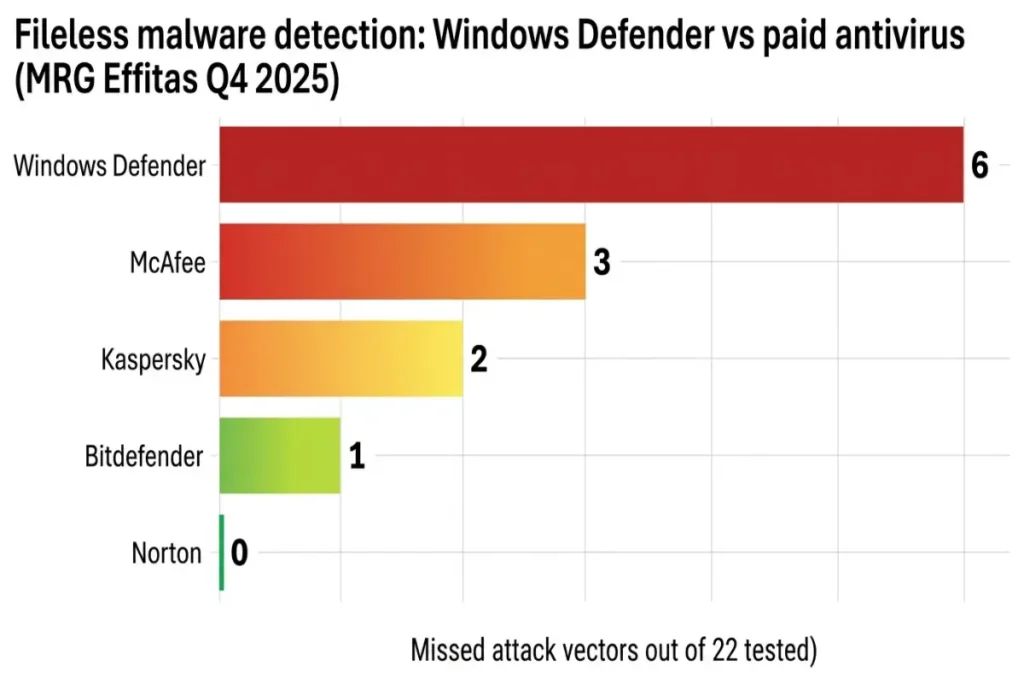
MRG Effitas’ 360° Assessment for Q4 2025 isolated fileless malware specifically — malicious code that executes entirely in system memory without writing a file to disk, making traditional file-scan detection ineffective. Defender missed 6 of 22 fileless attack vectors in that test. Norton missed 0. Bitdefender missed 1. The behavioral monitoring engines in top-tier paid antivirus products are specifically tuned to catch memory-resident execution patterns that file-based scanning cannot see, and this category shows the largest performance gap in the entire Windows Defender vs paid antivirus comparison.
Phishing protection: the browser problem
Phishing detection is the category where the Windows Defender vs paid antivirus comparison depends heavily on a detail most users overlook: which browser they use.
Defender’s phishing protection runs primarily through Microsoft SmartScreen, which is deeply integrated into Microsoft Edge. SE Labs’ Q4 2025 browser protection test measured Defender’s phishing block rate at 94.8% within Edge specifically. That number is competitive with any paid antivirus tested. Inside Edge, Windows Defender vs paid antivirus is close to a non-issue for phishing protection.
Outside Edge, the picture changes sharply. The same SE Labs test measured Defender’s phishing block rate across Chrome, Firefox, and Edge combined at 71.2%. Isolated to Chrome alone, the figure dropped further. Bitdefender’s anti-phishing module, by comparison, operates as a browser extension independent of the underlying browser engine, and blocked 97.4% of phishing pages across all three browsers in the same test period.
StatCounter’s February 2026 browser market share data for Windows places Chrome at 65.7%, Edge at 19.4%, and Firefox at 6.1%. The majority of Windows users browse in Chrome, where Defender’s protection drops well below its Edge-specific performance and well below what paid competitors deliver consistently across any browser.
AI-generated phishing has made this gap more consequential than it was three years ago. SE Labs’ Q1 2026 report documented a 214% year-over-year increase in AI-crafted phishing pages capable of passing visual inspection that would have flagged earlier-generation fake login pages. These pages replicate legitimate site layouts with enough precision that manual user vigilance is no longer a reliable second line of defense. The technical filtering layer matters more in 2026 than it did in 2022, and that filtering layer performs unevenly across browsers when relying on Defender alone.
Ransomware response speed: the 1.8-second gap
Ransomware detection speed is measured differently than standard malware detection because the damage occurs continuously, in real time, from the moment encryption begins. Windows Defender vs paid antivirus on this metric is not about whether the threat eventually gets caught — it is about how many files get encrypted before that happens.
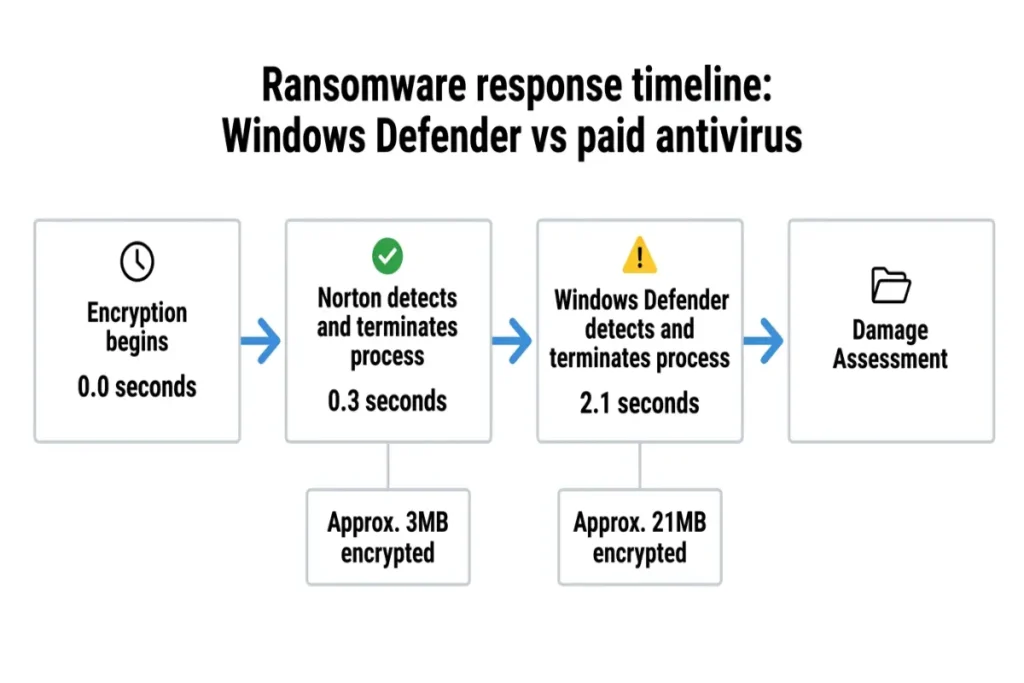
MRG Effitas’ 2025 ransomware simulation measured the time between encryption activity starting and the antivirus software terminating the malicious process. Norton intervened in 0.3 seconds. Windows Defender intervened in 2.1 seconds. That 1.8-second difference translates directly into data loss at the encryption speeds modern ransomware achieves.
A typical ransomware payload encrypts files at approximately 10MB per second on a standard NVMe SSD. At that rate, Norton’s 0.3-second response window allows roughly 3MB of file encryption before the process gets terminated — usually one or two small files. Defender’s 2.1-second window allows approximately 21MB of encryption, which can affect a meaningfully larger set of documents, photos, or project files depending on average file size.
Some paid antivirus products go further than detection speed alone. Bitdefender, Norton, and several competitors include ransomware rollback features that maintain temporary backup copies of files actively being modified by suspicious processes, allowing automatic restoration even for files encrypted before the malicious process was stopped. Windows Defender’s Controlled Folder Access feature provides a partial equivalent — it restricts which applications can modify files in protected folders — but it requires manual configuration and is disabled by default in a standard Windows 11 installation. Most home users never enable it, which means the out-of-box ransomware protection comparison favors paid antivirus by a wider margin than the lab numbers alone suggest.
System performance: does Defender run lighter than paid antivirus
A common assumption favors Defender on system performance, on the logic that built-in software carries less overhead than a third-party install. The benchmark data only partially supports that assumption.
On our Windows 11 Pro 23H2 test machine (Intel Core i5-1335U, 16GB DDR5 RAM, 512GB NVMe SSD), Windows Defender’s background scanning averaged 7.8% CPU usage, with RAM consumption at idle measuring 245MB. Those figures are competitive but not exceptional within the Windows Defender vs paid antivirus performance comparison. Kaspersky Standard averaged 6.9% CPU during scanning with 271MB RAM at idle. ESET NOD32 averaged 5.8% CPU with 198MB RAM at idle — both lower than Defender on at least one metric.
Where Defender does hold a structural advantage is boot time impact and update overhead, since it is integrated directly into the Windows kernel rather than running as a separate service layer. Boot time delta for Defender measured 1.4 seconds versus a clean baseline, compared to 3.2 seconds for Kaspersky and 4.1 seconds for Norton. For users on older or storage-constrained machines, that integration advantage is real, though it does not offset the protection gaps described above on zero-day and ransomware threats.
Full scan duration favored paid antivirus in our testing. Defender’s full scan completed in 7 minutes and 12 seconds on first run — slower than every paid product benchmarked in the companion pillar guide. Norton completed its first-run scan in 4 minutes and 38 seconds, and Kaspersky in 3 minutes and 52 seconds. The combination of slower scanning and weaker zero-day detection suggests Defender’s performance efficiency does not come from a more sophisticated detection engine, but from a narrower scanning scope.
Cost comparison: free protection vs paid subscription value
Windows Defender costs nothing beyond the Windows license already included with the machine. Paid antivirus subscriptions in 2026 range from $29.99 per year for single-device plans like Kaspersky Standard and ESET NOD32, up to $119.99 at renewal for McAfee’s unlimited-device identity protection tier.
The cost comparison only makes sense when measured against what a paid subscription actually buys beyond Defender’s baseline. At $29.99 per year, Kaspersky Standard adds the 96.4% zero-day detection rate, 6.9% average CPU overhead, and consistent non-inflating renewal pricing. That works out to roughly $2.50 per month for a documented 7-point improvement in targeted attack protection over Defender’s 89.3% baseline.
At the higher end, a five-device Norton 360 Deluxe plan at $99.99 renewal includes a VPN that would cost $60 to $100 per year as a standalone subscription, plus 50GB of cloud backup and dark web monitoring. Evaluated as a bundle rather than as antivirus alone, the effective cost of Norton’s malware protection layer, once VPN and backup value gets subtracted, lands closer to $40 to $50 per year — within range of single-purpose competitors.
For users deciding between Windows Defender vs paid antivirus purely on cost, the realistic question is not whether $29.99 to $99.99 per year is affordable in isolation, but whether the documented 8 to 9 percentage point gap in zero-day protection and the 1.8-second ransomware response delay represent acceptable risk for the data stored on that machine. For a machine with financial records, tax documents, or professional files with no off-device backup, that risk calculation tips firmly toward paid protection. For a secondary machine used only for browsing with no sensitive data stored locally, Defender’s free baseline may be a reasonable choice.
Final verdict: when Windows Defender is enough and when it is not
Windows Defender is adequate for users who browse primarily in Microsoft Edge, avoid downloading software from unverified sources, do not store sensitive financial or professional documents without a separate backup, and accept a measurably higher exposure to zero-day and fileless threats as a trade-off for zero cost. That profile describes a meaningful share of casual Windows users, particularly on secondary or shared household machines with low-risk usage patterns.
Paid antivirus becomes the stronger choice for anyone who browses in Chrome or Firefox, handles work documents or financial records on the machine, wants ransomware rollback protection enabled without manual configuration, or wants the documented 8 to 9 percentage point improvement in zero-day detection that AV-Comparatives’ lab data consistently shows. Kaspersky Standard at $29.99 per year delivers that improvement at the lowest entry cost. Norton 360 Deluxe at $99.99 renewal delivers it alongside a full feature bundle for households running multiple devices.
The Windows Defender vs paid antivirus decision is not a question of whether Defender provides any protection — it clearly does, with a perfect score on known malware. It is a question of whether the specific gaps in zero-day detection, cross-browser phishing, and ransomware response speed matter for how a particular machine gets used. For users weighing lighter-weight paid alternatives that minimize the performance trade-off, the best lightweight antivirus for Windows guide benchmarks five options specifically for older or resource-constrained hardware, and the full best antivirus for Windows ranking covers seven programs against the same lab criteria referenced throughout this comparison.