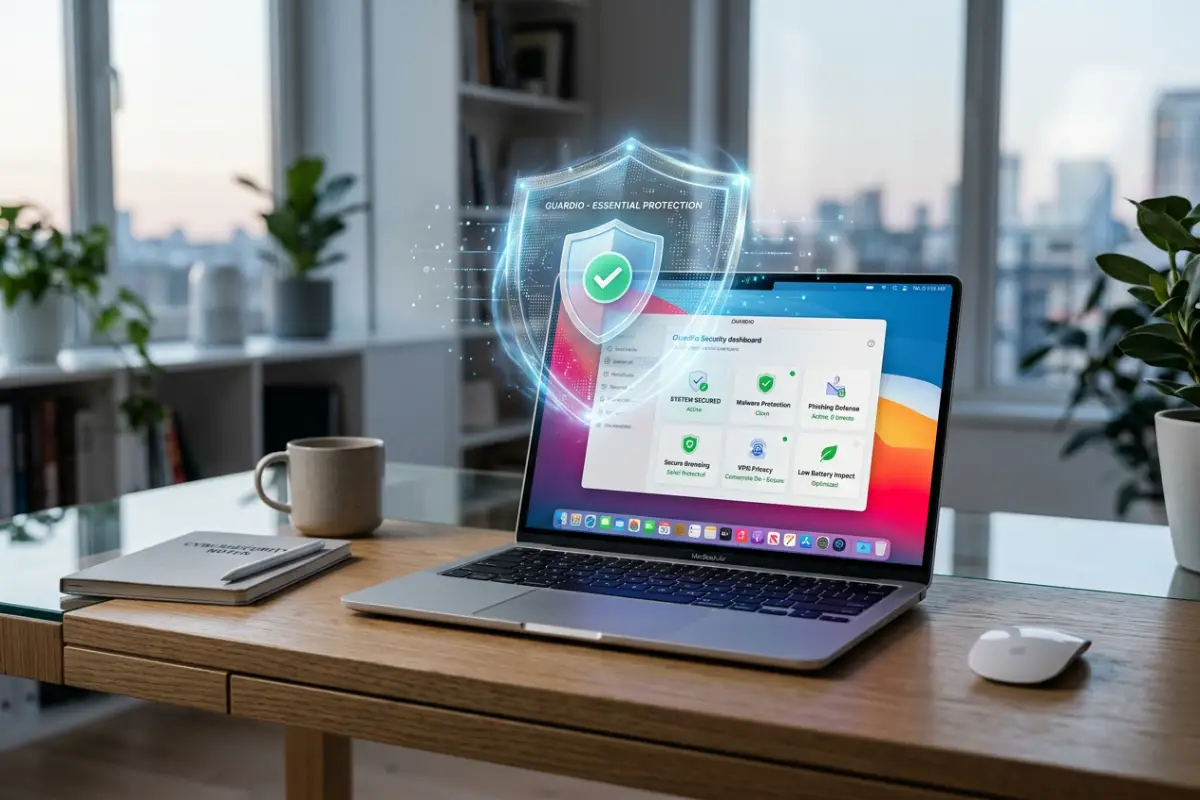

Best antivirus for MacBook Air should protect your laptop without making it feel slow, heavy, or annoying to use. The MacBook Air is popular because it is thin, quiet, portable, and battery-friendly. People buy it for school, remote work, travel, writing, browsing, business, and everyday productivity. That means the right antivirus needs to match the MacBook Air experience: lightweight, simple, clean, and efficient.
MacBook Air users do not usually want complicated security software. They want something that runs quietly, scans quickly, protects against unsafe websites, and does not drain the battery. This is why choosing antivirus for MacBook Air is slightly different from choosing antivirus for a desktop Mac or a high-performance MacBook Pro.
Apple already gives macOS strong built-in security layers. Apple explains that macOS malware defenses include the App Store or Gatekeeper combined with notarization, Gatekeeper, notarization, and XProtect to help prevent, block, and remediate malware. Gatekeeper and runtime protection also help ensure that only trusted software runs on a Mac.
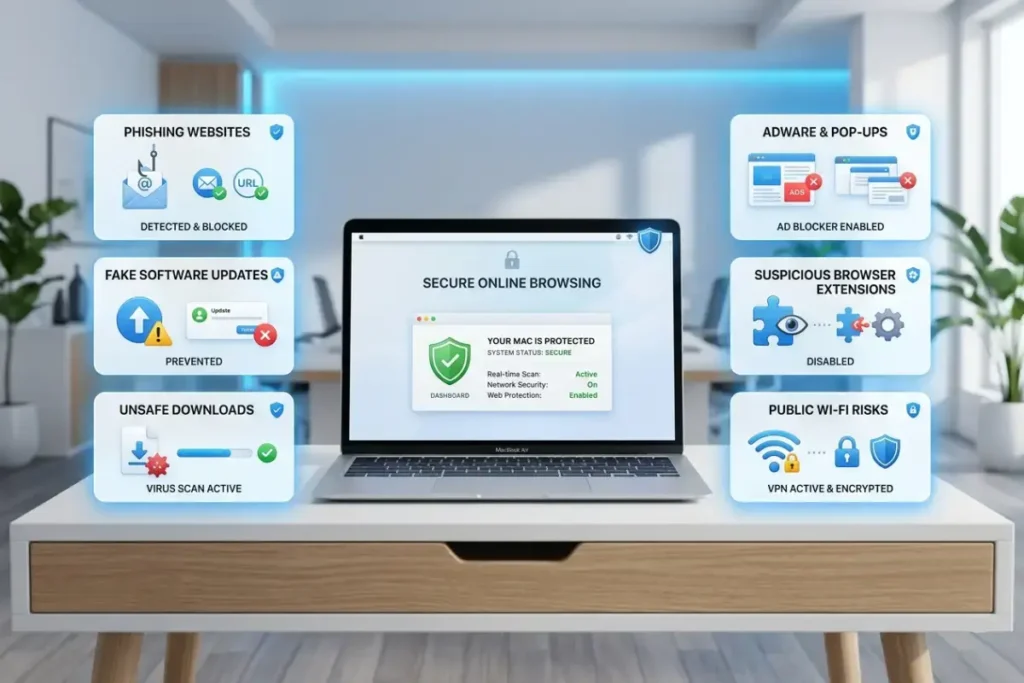
That is a strong start. But built-in macOS security does not protect against every modern online risk. MacBook Air users can still face phishing websites, fake software updates, suspicious browser extensions, adware, unsafe downloads, scam pop-ups, public Wi-Fi risks, and privacy threats. These risks are especially common because the MacBook Air is often used on the go.
A student may connect to campus Wi-Fi. A freelancer may work from cafés. A traveler may use airport or hotel networks. A business owner may manage payment accounts, cloud storage, email, ads dashboards, or client files from the same laptop. In those situations, a good antivirus can add useful protection beyond the default macOS security layer.
The best antivirus for MacBook Air should focus on five things: real-time malware protection, phishing defense, low system impact, privacy tools, and simple usability. If an antivirus is powerful but slows the laptop or creates constant pop-ups, it is not the right fit for most MacBook Air users.
Why MacBook Air users need lightweight security
The MacBook Air is designed for portability. It is not usually bought as a heavy workstation. Many users choose it because it feels fast, silent, and easy to carry. Security software should not destroy that experience.
Battery life matters
One of the biggest reasons people choose a MacBook Air is battery life. Heavy antivirus software can reduce battery performance if it runs aggressive background tasks, constant scans, unnecessary notifications, or resource-heavy monitoring.
A good antivirus should protect in the background without making the fanless MacBook Air feel slower or warmer. It should also let the user schedule scans at convenient times instead of interrupting active work.
For example, a student taking notes during class does not want a full system scan starting in the middle of a lecture. A remote worker on a video call does not want security software using too many resources. A traveler working from a café does not want battery drain during a long session.
Performance should stay smooth
MacBook Air users often multitask. They may keep Safari or Chrome open with many tabs, use Google Docs, Canva, Notion, Slack, Zoom, email, cloud storage, and productivity apps. Even if each app is not heavy by itself, the total workload can become noticeable.
The best antivirus for MacBook Air should have low system impact. AV-TEST evaluates macOS security products using protection, performance, and usability categories, which is useful because Mac users should care about both detection and speed.
A tool that detects threats well but slows down the device may not be ideal for MacBook Air. The goal is balanced protection.
Simple alerts are better than noisy alerts
Some antivirus products create too many alerts. That can train users to ignore warnings. For MacBook Air users, the best software should provide clear and useful alerts only when action is needed.
A good alert should explain the risk in plain language. It should tell the user what happened, why it matters, and what to do next. The user should not need technical knowledge to understand the warning.
Cloud-based protection can help
Many modern antivirus tools use cloud-based reputation checks to identify suspicious files and websites more quickly. This can help reduce local system load, although it still depends on the product.
For MacBook Air users, cloud-assisted protection can be useful because it helps keep the app lighter while still improving detection speed.
What threats affect MacBook Air users?
MacBook Air users are not usually targeted because of the laptop model itself. They are targeted because of how they use the device. The threats are often connected to browsing, downloading, accounts, and networks.
Phishing websites
Phishing is one of the most important risks. A phishing website can look like a real login page for Apple ID, Gmail, Microsoft, PayPal, bank accounts, delivery services, cloud storage, social media, or business tools.
If the user enters a password, the account can be compromised even if the MacBook Air itself is not infected. This is why anti-phishing protection is one of the most important antivirus features.
For students and remote workers, phishing can arrive through email, messaging apps, shared documents, fake school portals, fake invoices, or fake account alerts. For business owners, phishing can target ad accounts, payment tools, or store dashboards.
Fake software updates
Fake software update pop-ups are common. They may tell the user to update a browser, video player, VPN, cleaner app, PDF reader, or security tool. The goal is to push the user to download unsafe software.
MacBook Air users who browse many websites or download productivity tools may see these pop-ups. A good antivirus can help identify unsafe websites or suspicious installers.
Adware and unwanted apps
Adware is one of the most common issues on Macs. It can change search settings, display unwanted ads, redirect pages, add toolbars, or install browser extensions.
Adware may not always be as destructive as serious malware, but it can make browsing frustrating and expose users to more unsafe pages. Antivirus software often includes detection for potentially unwanted applications.
Risky browser extensions
Browser extensions can request powerful permissions. Some can read and change website data. If an extension is malicious, compromised, or overly aggressive with tracking, it can affect privacy and browsing safety.
MacBook Air users who rely on productivity extensions, shopping extensions, coupon tools, VPN extensions, PDF tools, or AI browser helpers should be careful. A good antivirus with browser protection can help reduce this risk.
Unsafe downloads
MacBook Air users often download PDFs, class materials, invoices, templates, plugins, design assets, documents, and apps. Not every file is dangerous, but unsafe downloads remain a common attack path.
CISA explains that antivirus software scans files or memory for patterns that may indicate malware. Modern antivirus tools may also use behavior monitoring and cloud checks to evaluate suspicious files.
Public Wi-Fi risks
Because the MacBook Air is portable, many users connect to public Wi-Fi. Public networks in cafés, airports, schools, hotels, and coworking spaces are convenient, but users do not control them.
A VPN can help protect browsing activity on shared networks. Antivirus with an included VPN may be valuable for MacBook Air users who travel or work outside the home often.
Key features to look for in MacBook Air antivirus
Choosing the best antivirus for MacBook Air is not about buying the most expensive plan. It is about matching protection to your device and your daily habits.
Real-time malware protection
Real-time protection checks files, apps, downloads, and suspicious activity while you use the MacBook Air. This is better than only scanning manually after something seems wrong.
For MacBook Air users, real-time protection should be efficient. It should not constantly slow browsing or app launches. The best tools run quietly and only interrupt when needed.
Anti-phishing and safe browsing
Anti-phishing protection is essential. Many Mac users will never face a classic virus, but they may still receive fake login links or scam pages. A strong antivirus should warn users before they enter passwords or payment details on unsafe websites.
This is especially important for people who manage online accounts from a MacBook Air. Email, cloud storage, banking, e-commerce dashboards, school portals, and work tools are all attractive targets.
Low system impact
Low system impact is one of the most important MacBook Air antivirus features. The software should not slow down startup, app launches, browser performance, video calls, or document work.
Independent test labs can help evaluate performance. AV-Comparatives published a 2025 Mac Security Test and Review using macOS Sequoia with current security patches and tested Mac security products for protection and usability. This type of testing is useful because marketing pages do not always show real performance impact.
Ransomware monitoring
Ransomware monitoring watches for suspicious file changes. It may detect attempts to encrypt, rename, lock, or rapidly modify personal files.
This feature is useful for users who store school work, business files, creative projects, client documents, or personal photos on their MacBook Air. Even if ransomware is not the most common everyday Mac threat, protecting important files is still valuable.
VPN privacy
A VPN can be useful for MacBook Air users who connect to public Wi-Fi. It encrypts internet traffic between the device and the VPN server, which helps protect activity on networks you do not fully trust.
Not every antivirus VPN is the same. Some plans include unlimited VPN data, while others have limits. Some are fast enough for daily use, while others are basic add-ons. Before buying, check whether the VPN is included in the plan or requires an upgrade.
Password manager
A password manager helps users create and store strong unique passwords. This matters because password reuse can expose multiple accounts if one website is breached.
A password manager is especially useful for students, freelancers, creators, and online workers who manage many accounts. Some antivirus suites include one, but dedicated password managers may sometimes offer more advanced features.
Identity and breach alerts
Some paid antivirus plans include identity monitoring or dark web alerts. These tools can notify users if an email address or personal information appears in known breach data.
This feature is not required for every MacBook Air user, but it can be useful for people who manage important accounts or use the same email across many services.
Free vs paid antivirus for MacBook Air
Free antivirus can be useful for MacBook Air, but it usually comes with limits. The right choice depends on risk level.
When free antivirus is enough
Free antivirus may be enough if you use your MacBook Air for simple browsing, school work, streaming, and trusted apps. It can also be useful for occasional scanning.
A free antivirus can help detect basic malware or unwanted apps, but it may not include advanced features such as real-time protection, VPN, ransomware monitoring, password manager, or identity alerts.
When paid antivirus is better
Paid antivirus is better if your MacBook Air is important for work, money, business, or sensitive accounts. If you use public Wi-Fi, download files often, manage clients, shop online, or use cloud storage heavily, paid protection may be a smarter choice.
Paid plans usually offer stronger real-time protection, better web security, anti-phishing tools, ransomware monitoring, VPN access, and customer support.
The best value approach
The best value is not always the cheapest plan. For MacBook Air users, value means strong protection with low system impact. A slightly more expensive antivirus may be better if it protects well without slowing the laptop.
Also check renewal prices. Some antivirus plans have low first-year discounts but higher renewal costs. Before buying, compare both the first-year price and renewal price.
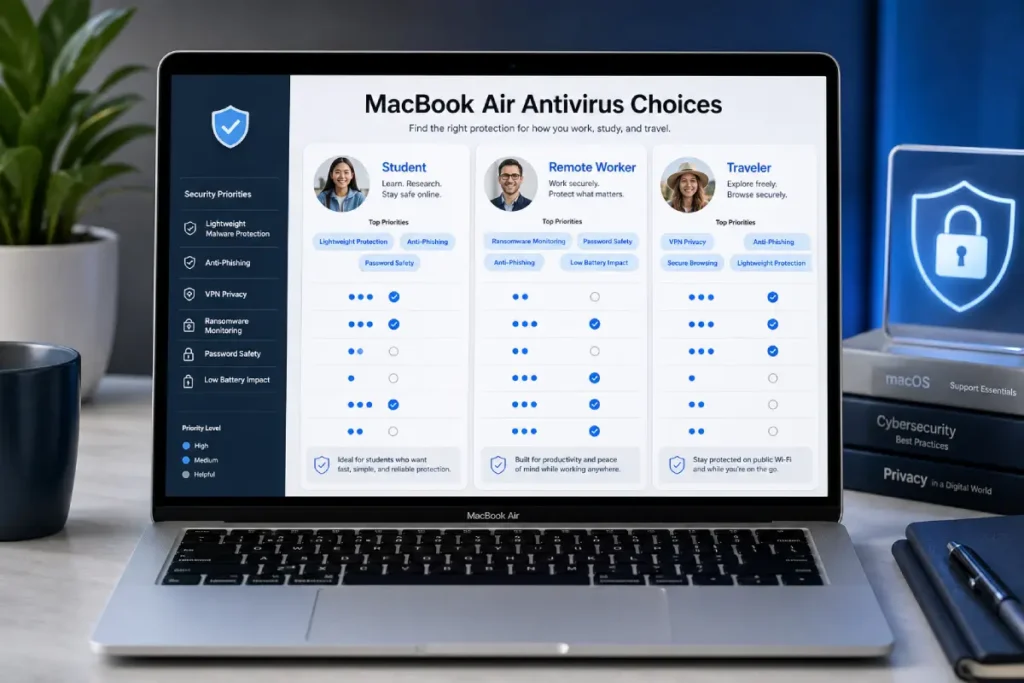
Best antivirus for MacBook Air by user type
The best antivirus for MacBook Air depends on who is using the laptop.
Best for students
Students need affordable, lightweight protection. The best student antivirus should include malware scanning, real-time protection, safe browsing, and simple alerts.
A VPN can also be useful for students using campus Wi-Fi or public networks. However, students may not need the most expensive identity protection plan unless they manage sensitive accounts.
Best for remote workers
Remote workers should prioritize anti-phishing, VPN, ransomware monitoring, and password protection. This is because remote workers often use email, cloud storage, work dashboards, video calls, and client files.
A remote worker’s MacBook Air may contain business documents, login sessions, invoices, contracts, and private communication. Extra protection is worth considering.
Best for travelers
Travelers should look for antivirus with VPN, phishing protection, and lightweight performance. Public Wi-Fi is common in hotels, airports, cafés, and coworking spaces, so network privacy matters.
A traveler also needs software that does not drain battery or interrupt work during limited charging opportunities.
Best for families
Families should look for multi-device plans. A family may have a MacBook Air, iPhones, tablets, Windows laptops, or Android phones. A plan that protects several devices can be more practical.
Family antivirus should be easy to install, easy to manage, and simple enough for non-technical users.
Best for beginners
Beginners need simple protection. The best antivirus for beginners should explain alerts clearly and avoid complicated settings.
A clean dashboard, one-click scan, automatic protection, and helpful recommendations are more important than advanced controls that most beginners will never use.
How to choose antivirus without slowing your MacBook Air
Choosing antivirus for a MacBook Air should include a performance checklist.
Check independent test results
Look for antivirus products that perform well in independent testing. AV-TEST and AV-Comparatives are useful because they evaluate products using structured test methods, including protection and performance factors.
Independent testing does not tell the whole story, but it is better than relying only on brand claims.
Check macOS compatibility
Make sure the antivirus supports your current macOS version. Security apps need permission and system access to work properly, so compatibility matters.
A good product should be updated regularly for the latest macOS releases.
Avoid installing multiple antivirus apps
Do not install several antivirus apps at the same time. Multiple security tools can conflict, slow down the MacBook Air, and create confusing alerts.
Choose one trusted antivirus and keep it updated.
Use scheduled scans
Scheduled scans help reduce interruptions. You can set scans for times when you are not working, studying, or using video calls.
This is useful for MacBook Air because it helps preserve performance during active use.
Review background activity
If your MacBook Air feels slower after installing antivirus, check Activity Monitor. Look for high CPU or memory usage. Some temporary activity during scans is normal, but constant heavy usage may be a problem.
Keep macOS updated
Antivirus is not a replacement for macOS updates. Apple security updates fix vulnerabilities and improve system protection. The best setup is updated macOS plus a trusted antivirus, not one or the other.
MacBook Air antivirus and battery life
Battery life is a major concern for MacBook Air users. Antivirus software can affect battery life if it is poorly optimized.
What causes battery drain?
Battery drain can happen when antivirus software performs frequent scans, monitors too aggressively, syncs constantly with cloud services, or runs many extra tools in the background.
VPN features can also increase battery use because they encrypt traffic and maintain a secure connection. This is normal, but the impact should not be excessive.
How to reduce battery impact
Use scheduled scans, avoid unnecessary extra features, disable tools you do not use, and keep the antivirus updated. Newer versions often improve performance.
Also check whether your antivirus has battery-friendly settings. Some tools reduce background activity when the laptop is on battery power.
Choose features you actually need
Do not buy the biggest plan just because it has more features. Extra tools can be useful, but only if you use them.
For example, a MacBook Air student may not need advanced identity monitoring. A remote worker may need VPN and phishing protection. A family may need multi-device coverage. A business owner may need ransomware monitoring and breach alerts.
Common mistakes MacBook Air users should avoid
Many MacBook Air users make security mistakes because they trust the device too much.
Ignoring phishing risks
A secure device cannot protect you if you voluntarily enter your password on a fake page. Always check links before logging in.
Downloading from random websites
Avoid downloading apps from unknown sources. Use the App Store or official developer websites whenever possible.
Clicking fake virus warnings
Fake warnings often appear in browser pop-ups. They may say your Mac is infected and push you to download a tool immediately. Do not trust random pop-ups.
Using weak or repeated passwords
Even with antivirus, weak passwords can expose accounts. Use unique passwords and enable two-factor authentication where possible.
Skipping backups
Backups protect against accidental deletion, device loss, hardware problems, and some malware situations. Use Time Machine or another trusted backup method.
Forgetting renewal pricing
Many antivirus plans are cheaper in the first year. Always check renewal pricing before buying.
Final verdict: what is the best antivirus for MacBook Air?
The best antivirus for MacBook Air is lightweight, simple, and strong enough to protect everyday online activity. It should include real-time malware protection, anti-phishing defense, safe browsing, low system impact, and clear alerts. For users who travel or work from public Wi-Fi, VPN protection can also be valuable.
MacBook Air users should not choose antivirus only by brand name or discount price. The right choice depends on how you use your laptop. Students may need affordable protection. Remote workers may need stronger phishing defense and VPN. Travelers may need privacy tools. Families may need multi-device coverage.
macOS already provides a strong security foundation, but antivirus can add useful protection against phishing, unsafe downloads, adware, suspicious browser behavior, and privacy risks. The best setup is simple: keep macOS updated, use safe browsing habits, avoid risky downloads, use strong passwords, and choose a trusted antivirus that does not slow down your MacBook Air.
[INTERNAL LINK: Best Antivirus for Mac → Best Antivirus for Mac in 2026: Top Picks]