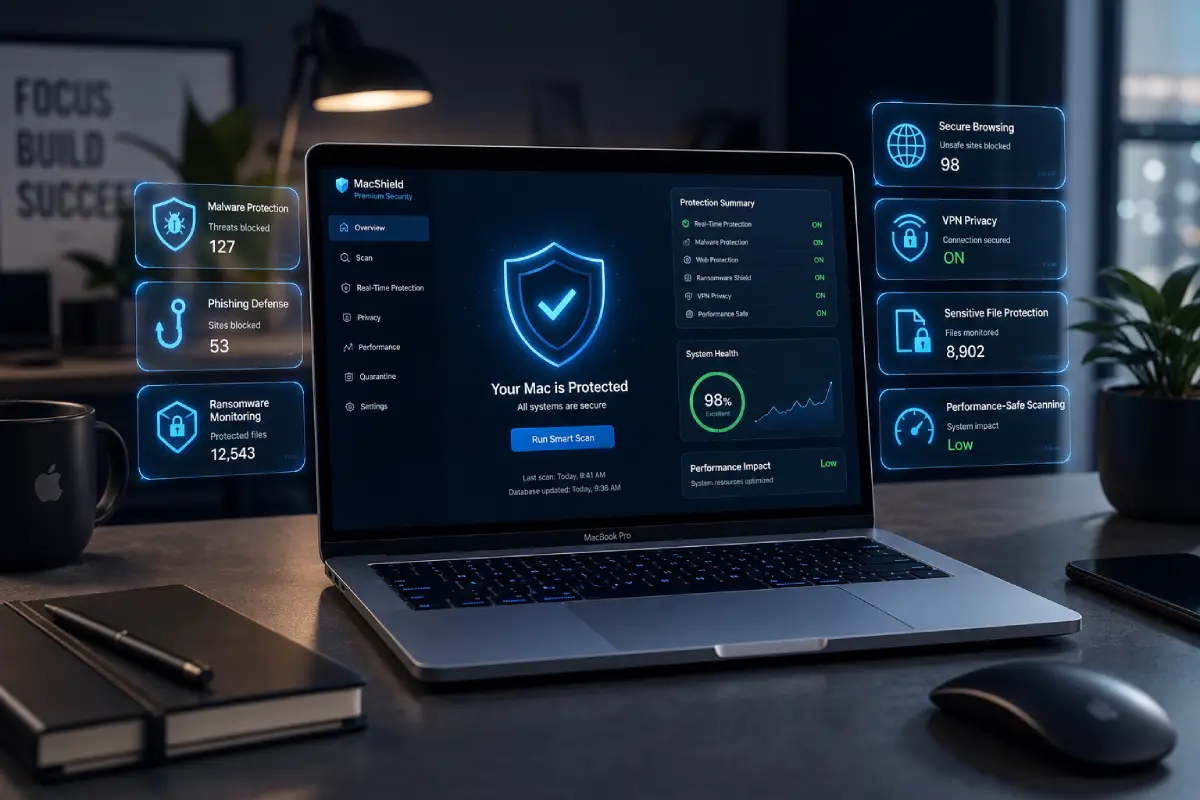

Best antivirus for MacBook Pro should protect professional work without slowing down serious workflows. The MacBook Pro is not usually a casual laptop only. Many people use it for video editing, design, software development, business management, music production, marketing, writing, finance, client work, and remote work. That means the right antivirus needs to protect more than a device. It needs to protect valuable projects, accounts, private files, and productivity.
MacBook Pro users often keep important data on their machines. This can include client documents, design files, source code, invoices, contracts, creative assets, business dashboards, cloud storage, and sensitive communication. For these users, losing access to a device or account can create real professional damage.
Apple already gives macOS strong built-in protection. Apple explains that macOS malware defenses use layers such as the App Store or Gatekeeper combined with notarization, Gatekeeper, notarization, and XProtect to help prevent malware from launching, block malware from running, and remediate malware that has executed. Apple also explains that Gatekeeper helps ensure downloaded software is signed by the App Store or a registered developer and notarized by Apple before it is opened.
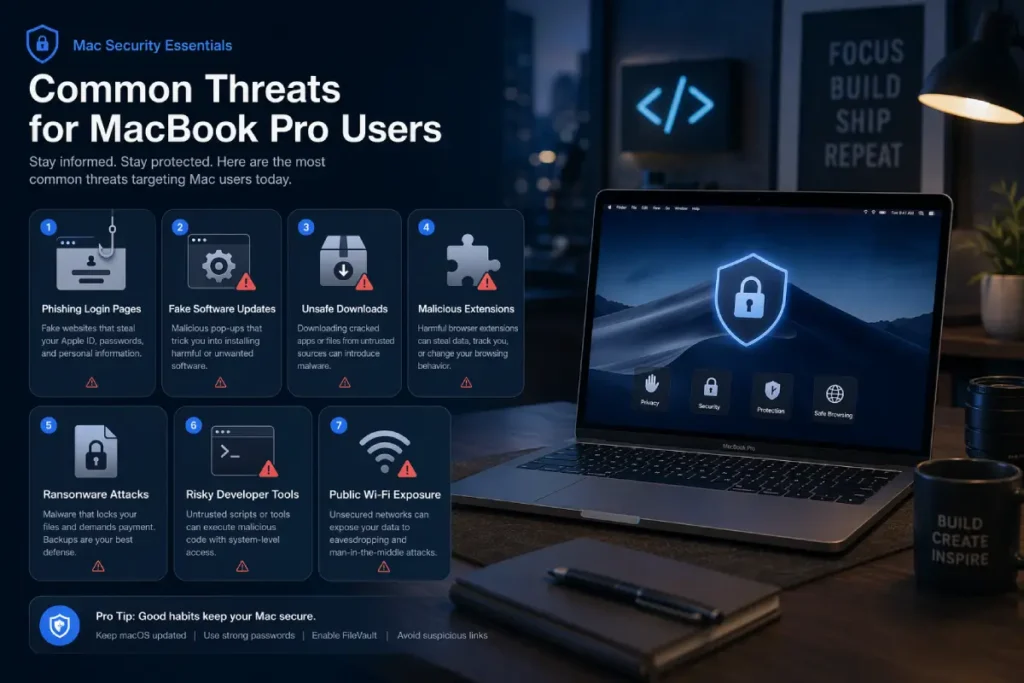
That built-in security is important, but it does not remove every risk. MacBook Pro users can still face phishing websites, fake software updates, unsafe downloads, malicious browser extensions, suspicious developer tools, infected documents, public Wi-Fi risks, adware, password theft attempts, and privacy threats.
The best antivirus for MacBook Pro should add protection where professional users need it most: real-time malware scanning, anti-phishing protection, ransomware monitoring, low performance impact, privacy tools, safe browsing, and clear security alerts. It should not interrupt heavy work, break developer tools, slow creative apps, or create constant pop-ups.
A good MacBook Pro antivirus should feel like a quiet security assistant. It should monitor the background, warn when needed, and stay out of the way when the user is editing, coding, designing, presenting, or meeting clients.
Why MacBook Pro users need stronger protection
MacBook Pro users often have a higher-value digital life than casual users. The device may hold work files, login sessions, professional tools, and private business data. This makes security more important.
Professional files are valuable
A student may lose a document and feel frustrated. A professional may lose a project and lose money, time, or client trust. That difference matters.
Designers may store brand assets, PSD files, Figma exports, raw photos, and client folders. Video editors may store footage, timelines, audio files, and project libraries. Developers may store source code, API keys, staging credentials, or Git repositories. Business owners may store invoices, customer data, ad account access, supplier information, and reports.
For these users, malware protection is not only about avoiding viruses. It is about reducing the chance of workflow disruption.
Account security matters more
Many MacBook Pro users manage important online accounts. This can include email, Google Workspace, iCloud, Dropbox, Notion, GitHub, Shopify, Stripe, PayPal, Meta Business Manager, Google Ads, WordPress, hosting dashboards, banking, and affiliate platforms.
A phishing attack can be more damaging than a traditional malware infection. If someone steals access to a business email, ad account, payment processor, or cloud drive, the impact can be serious.
That is why anti-phishing protection is one of the most important features for MacBook Pro users. The FTC describes phishing as messages that pretend to come from trusted organizations and try to trick people into sharing sensitive information.
Downloads are part of daily work
Professional users download more files than casual users. They may download plugins, templates, client attachments, documents, fonts, code packages, design resources, spreadsheets, software tools, and compressed files.
Every download is not dangerous. But frequent downloads increase exposure. CISA explains that antivirus software scans files or memory for patterns that may indicate malware. Modern security tools may also use behavior monitoring and cloud reputation systems to identify suspicious files more quickly.
Public and shared networks add risk
MacBook Pro users often work from cafés, coworking spaces, hotels, airports, schools, studios, and client offices. These networks are convenient, but they are not always controlled by the user.
A VPN can help protect internet traffic on shared networks. Antivirus with VPN included may be useful for professionals who travel or work remotely.
What threats affect MacBook Pro users?
MacBook Pro users face many of the same threats as other Mac users, but the consequences can be higher because the device is often connected to professional accounts and valuable data.
Phishing and credential theft
Phishing is one of the biggest risks. A fake login page can steal credentials for email, Apple ID, cloud storage, ad platforms, payment tools, developer accounts, or business dashboards.
A phishing attack does not need to infect the Mac. It only needs the user to trust a fake page. This makes browser protection and safe browsing features very important.
Fake software updates
Fake software updates often appear as pop-ups claiming that a browser, video player, PDF viewer, security tool, VPN, or productivity app is outdated. These pop-ups may push users to download unsafe installers.
MacBook Pro users who download software frequently should be careful. Real updates should come from System Settings, the App Store, or the official developer website.
Malicious browser extensions
Professional users often install browser extensions for productivity, SEO, analytics, password management, screenshots, development, writing, automation, shopping, or ads management.
Some extensions request broad permissions, such as reading and changing data on websites. If an extension is malicious or compromised, it can create privacy and security risks.
A good antivirus or browser protection tool can help warn about risky sites or suspicious browser behavior.
Ransomware behavior
Ransomware attempts to lock or encrypt files. While ransomware is not the only threat to Mac users, professional files are valuable enough that ransomware monitoring is useful.
The best antivirus for MacBook Pro should watch for suspicious file behavior, such as rapid encryption, mass renaming, or unusual file modification patterns.
Adware and potentially unwanted apps
Adware may not always be as severe as advanced malware, but it can damage productivity. It can change browser settings, show unwanted ads, redirect searches, install toolbars, or push scam pages.
Professional users need a clean browsing environment. Unwanted browser changes can waste time and increase exposure to further risks.
Suspicious developer tools and scripts
Developers and technical users may install packages, command-line tools, scripts, libraries, and open-source projects. Most are safe, but some can be risky if downloaded from untrusted sources.
Antivirus should not interrupt legitimate development work, but it should still detect known malicious files and suspicious behavior.
Key features to look for in MacBook Pro antivirus
Choosing antivirus for MacBook Pro should be based on professional needs. The best software should protect without disrupting serious work.
Real-time malware protection
Real-time protection checks files, apps, downloads, and system activity as they happen. This is important for users who frequently download files or install software.
A strong antivirus should detect known malware, suspicious installers, adware, potentially unwanted apps, and risky behavior. It should also update frequently.
Low performance impact
Performance is critical for MacBook Pro users. Many people use this device for resource-heavy work such as editing video, rendering graphics, compiling code, running virtual machines, recording audio, or managing large files.
The antivirus should not slow down professional apps or create performance spikes during active work. AV-TEST evaluates Mac security products using protection, performance, and usability categories, and its December 2025 macOS Sequoia test focused on malware detection, false positives, and performance.
Anti-phishing and web protection
Anti-phishing protection is essential for professional users. A fake login page can compromise email, cloud storage, business platforms, client tools, payment accounts, or developer accounts.
The best antivirus for MacBook Pro should warn users before they enter passwords or payment details on suspicious websites.
Ransomware monitoring
Ransomware monitoring is useful for protecting client files, creative projects, source code, business documents, and personal archives.
A strong antivirus should monitor suspicious file behavior and help block attempts to lock or mass-modify files.
VPN and secure browsing
A VPN is useful for professionals who work outside the home. It can help protect browsing activity on public or shared networks.
However, VPN quality matters. Some antivirus suites include unlimited VPN, while others have limited data or fewer privacy features. Check what is included before buying.
Password manager
A password manager helps users create strong unique passwords for important accounts. This is especially valuable for professionals who manage multiple dashboards, client tools, cloud accounts, and admin panels.
Some antivirus suites include password managers, but dedicated tools may sometimes offer more advanced features. The main point is to avoid password reuse.
Identity and breach alerts
Identity and breach monitoring can alert users if their email address or credentials appear in known breach data. This can be useful for professionals because business accounts are valuable targets.
This feature is not required for every user, but it can add peace of mind for people managing sensitive accounts.
Firewall and network monitoring
Some security suites include firewall controls or network monitoring tools. These can help users understand which apps are connecting to the internet and whether a network looks suspicious.
For advanced users, this can be useful. For beginners, the interface should remain simple.
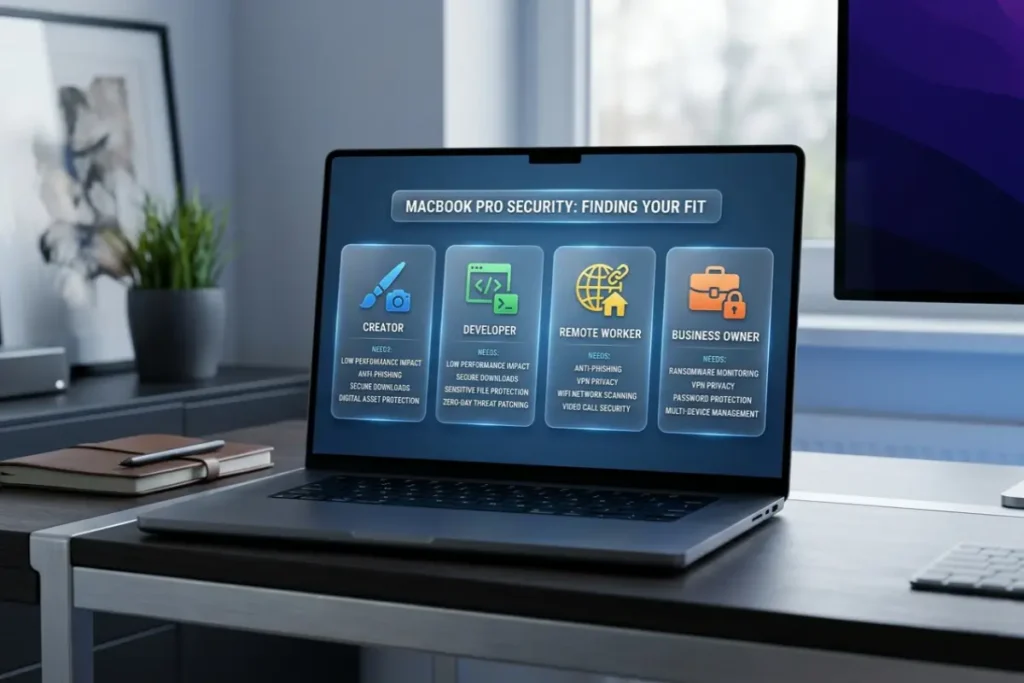
Best antivirus for MacBook Pro by user type
The best antivirus depends on what kind of work the MacBook Pro supports.
Best for creators
Creators need protection that does not interrupt editing, designing, exporting, or rendering. The antivirus should be lightweight, stable, and quiet.
Important features include real-time scanning, ransomware monitoring, safe browsing, and protection against suspicious downloads.
Best for developers
Developers need security software that does not constantly flag legitimate tools. The best antivirus for developers should be accurate, low on false positives, and compatible with development workflows.
It should protect against malicious downloads, suspicious scripts, and unsafe websites without blocking normal coding tools.
Best for remote workers
Remote workers should prioritize phishing protection, VPN, ransomware monitoring, and password safety. They often work with cloud tools, emails, shared documents, and client accounts.
A paid security suite can be worth it if the MacBook Pro is used for income-generating work.
Best for business owners
Business owners may use a MacBook Pro to manage websites, payment systems, ads accounts, online stores, suppliers, customer data, and financial documents.
For this group, stronger protection is smart. Look for anti-phishing, safe browsing, VPN, identity alerts, password tools, and ransomware monitoring.
Best for students using MacBook Pro
Some students use MacBook Pro for design, coding, engineering, video editing, or media work. They may not need the most expensive plan, but they should consider lightweight antivirus with malware scanning, anti-phishing, and safe browsing.
Free vs paid antivirus for MacBook Pro
Free antivirus can help with basic scanning, but MacBook Pro users often benefit more from paid protection because their use case is more professional.
When free antivirus may be enough
Free antivirus may be enough if you use your MacBook Pro casually and only want occasional malware scans. It can also be useful as a basic second opinion.
However, free plans often lack advanced real-time protection, ransomware monitoring, VPN, password manager, and identity alerts.
When paid antivirus makes more sense
Paid antivirus makes more sense when your MacBook Pro is used for work, income, client files, business tools, or sensitive accounts. The cost of a security subscription may be small compared with the potential cost of account compromise or lost productivity.
Paid tools usually provide broader protection and better convenience.
Check renewal pricing
Many antivirus companies offer a discounted first year and a higher renewal price. Always check both prices before choosing.
A good deal is not only about the first payment. It is about long-term value.
Performance: how to protect your MacBook Pro without slowing it down
MacBook Pro users should choose security software carefully because performance matters.
Use scheduled scans
Schedule full scans when you are not editing, rendering, presenting, or compiling code. This reduces interruptions and keeps active workflows smoother.
Avoid unnecessary extras
Some antivirus suites include cleanup tools, browser add-ons, VPNs, password managers, and monitoring features. Use the features that matter, but avoid turning on tools you do not need.
Monitor CPU and memory use
If your MacBook Pro feels slower after installing antivirus, check Activity Monitor. Temporary high usage during scans can be normal, but constant heavy background usage may not be ideal.
Keep the antivirus updated
Updates can improve detection, performance, and compatibility. An outdated security app may create problems or miss newer threats.
Keep macOS updated
Antivirus is not a replacement for macOS updates. Apple security updates help fix vulnerabilities and improve system protection. AV-Comparatives tested Mac security products on macOS Sequoia with the latest security patches in its 2025 Mac Security Test and Review.
How to choose the best antivirus for MacBook Pro
Use a practical checklist before buying.
Start with your workflow
Think about what you actually do on your MacBook Pro. A video editor, developer, business owner, and remote worker may need different features.
If you download many files, prioritize malware protection and safe downloads. If you manage online accounts, prioritize anti-phishing and password safety. If you work from public Wi-Fi, prioritize VPN. If you store valuable projects, prioritize ransomware monitoring and backups.
Compare protection and performance
Do not choose only based on brand name. Look for independent testing, performance results, false positive rates, and usability. AV-TEST and AV-Comparatives are useful sources for comparing Mac security products.
Check macOS compatibility
Make sure the antivirus supports your current macOS version. Mac security tools need proper permissions and system compatibility to work well.
Check device coverage
If you only need one MacBook Pro, a single-device plan may be enough. If you also have iPhone, iPad, Windows, or Android devices, a multi-device plan may offer better value.
Check VPN limits
Some antivirus plans include VPN, but not all VPN features are equal. Check data limits, server options, speed, and whether VPN is included in your plan.
Check customer support
Professional users may need fast support if something goes wrong. Look for brands with reliable customer service, clear documentation, and easy account management.
Read renewal terms
Always review renewal pricing and cancellation terms. A low first-year price can become expensive later.
Common mistakes MacBook Pro users should avoid
Trusting every download
Do not assume a file is safe because it came from a professional-looking website. Download from official sources whenever possible.
Ignoring phishing emails
A fake email can compromise a professional account quickly. Be careful with urgent messages about invoices, payments, account suspensions, password resets, or cloud documents.
Installing too many browser extensions
Browser extensions can create privacy and security risks. Remove extensions you do not use and review permissions carefully.
Using cracked software
Cracked software is risky and often used to distribute malware or unwanted apps. It can also create legal and professional problems. Use official software sources.
Reusing passwords
Password reuse is one of the fastest ways to lose multiple accounts after one breach. Use unique passwords and enable two-factor authentication.
Skipping backups
A good backup system protects against accidental deletion, hardware failure, theft, and some malware incidents. Use Time Machine or a trusted backup service.
Final verdict: what is the best antivirus for MacBook Pro?
The best antivirus for MacBook Pro is one that gives strong protection without disrupting professional work. It should include real-time malware protection, anti-phishing, safe browsing, ransomware monitoring, low performance impact, and clear alerts. For remote workers, travelers, and business owners, VPN and identity protection can also be valuable.
MacBook Pro users should choose antivirus based on their workflow. Creators need performance-safe protection. Developers need accurate detection and low false positives. Remote workers need phishing protection and VPN. Business owners need account security, safe browsing, and ransomware monitoring.
macOS already provides strong built-in security, but a dedicated antivirus can add important protection for professional users who download files, manage accounts, use public Wi-Fi, and store valuable projects.
[INTERNAL LINK: Best Antivirus for Mac → Best Antivirus for Mac in 2026: Top Picks]